





Unterabschnitte von Ihnen erhalten E-Mail-Kontrolle
sicheres E-Mail-Gateway
Probleme mit der E-Mail-Zustellung?
Wir helfen Ihnen gerne!
E-Mails |
Ignoriert |
Gelesen |
|---|---|---|
 |
 |
 |
Zugelassene IP-Adressen
E-Mails ohne lästige Authentifizierung versenden
digital signierte Nachrichten
Digital signierte E-Mail-Nachrichten: SPF, DKIM und sichere E-Mail-Authentifizierung
dedizierte IP-Adresse
IP-Adressen sind wichtig für den Versand von E-Mail-Nachrichten
Sicherheitseinstellungen
Sicherer Wechsel von Ihrem aktuellen Mailserver zu RealSender
Unterabschnitte des sicheren E-Mail-Gateways
Zugelassene IP-Adressen

Versenden Sie E-Mails ohne lästige Benutzerauthentifizierung.
Wir stellen Ihnen einen offenen Port zur Verfügung, der durchgeleitet wird und
lediglich die IP-Adressen Ihrer Verbindung überprüft.
Geben Sie einfach die IP-Adressen an, von denen aus Sie die Verbindung herstellen
, und schon können Sie Ihre E-Mails versenden.
digital signierte Nachrichten
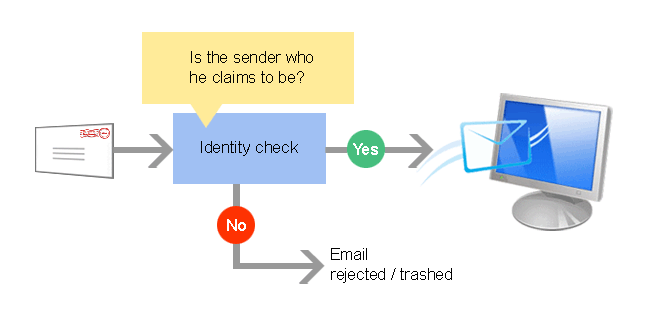
Zum Schutz vor E-Mail-Missbrauch überprüfen immer mehr E-Mail-Server
die Identität des Absenders, bevor sie die Nachricht zustellen.
Wenn Sie E-Mails ohne RealSender versenden , können Ihre Empfänger nicht sicher sein
, dass die erhaltene Nachricht von Ihnen stammt.
Wenn Sie E-Mails mit RealSender versenden , werden alle Ihre Nachrichten
digital signiert, sodass die Empfänger ihnen vertrauen können .
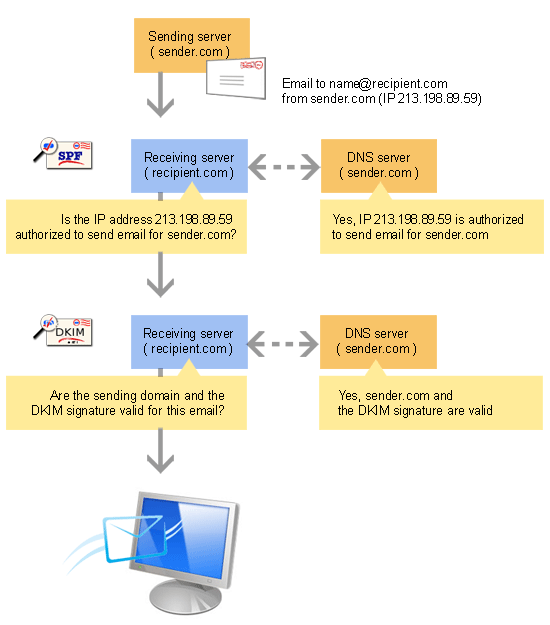
Es gibt zwei Standards zur Überprüfung der Absenderidentität: SPF und DKIM.
RealSender bietet beide an:
- SPF legt fest, welche SMTP-Server für eine bestimmte Domain autorisiert sind
- DKIM signiert digital jede Nachricht, die von einer bestimmten Domain und dem zugehörigen SMTP-Server gesendet wird.
Alle Informationen, die zur Überprüfung der DKIM-signierten Nachrichten verwendet werden,
werden in den DNS-Einstellungen der Domain gespeichert und geschützt.
dedizierte IP-Adresse

Die „Internetprotokolladresse“ oder „IP-Adresse“
ist vergleichbar mit einer Telefonnummer auf Ihrem Festnetztelefon oder Mobilgerät.
Es handelt sich um personenbezogene Daten, die automatisch
von einem anderen Computer erfasst werden, sobald eine Kommunikationsverbindung über das Internet hergestellt wird.
Kein anderes Gerät im Internet hat dieselbe IP-Adresse.
Diese ist für die Kommunikation zwischen Geräten erforderlich.
„Dedizierte“ IP-Adressen sind für den Versand von E-Mails wichtig,
da ihre Reputation einen starken Einfluss darauf hat, ob die E-Mail akzeptiert wird oder nicht.
Die Nutzung gemeinsam genutzter IP-Adressen für die Geschäftskommunikation
ist vergleichbar damit, jedem Kunden jedes Mal einen anderen Vertriebsmitarbeiter zu schicken. Da
der Empfänger ihn nicht kennt, wird er ihm misstrauen.
Im Extremfall, wenn derselbe Verkäufer täglich unterschiedliche Produkte anbietet,
ist es sehr wahrscheinlich, dass er beim nächsten Besuch nicht mehr bedient wird.
Die meisten SMTP-Dienste im Internet stellen ihren Kunden gemeinsam genutzte IP-Adressen zur Verfügung.
Bei jedem E-Mail-Versand wird eine andere IP-Adresse zugewiesen.
Ähnliches gilt für Cloud-Hosting-Anbieter, die ihre Dienste minutengenau abrechnen.
In diesem Fall erhalten Sie eine oder mehrere temporär zugewiesene IP-Adressen.
Seit seiner Gründung im Jahr 2009 bietet RealSender ausschließlich SMTP-Server mit dedizierten IP-Adressen an.
Jeder Kunde erhält somit eine IP-Adresse, die sich nicht ändert.
Die Verknüpfung mit der Unternehmensdomain per E-Mail-Authentifizierung erhöht die Autorität beider.
Wenn Ihre Kommunikation regelmäßig und erwartungsgemäß erfolgt,
wird sie nach und nach von den Empfängern wahrgenommen und höher bewertet.
Dieses Vertrauen kann so groß werden, dass alle übermittelten Mitteilungen
automatisch akzeptiert und als wichtig oder prioritär eingestuft werden.
Sicherheitseinstellungen

Wechseln Sie von Ihrem aktuellen Mailserver zur sicheren RealSender-Umgebung.
Sie können dieselben Anmeldeinformationen
sowie denselben SMTP-Hostnamen verwenden, wenn dieser unter Ihrem Domänennamen geführt wird.
Sie können E-Mail-Nachrichten sicher versenden, auch ohne Authentifizierung.
Themen in diesem Bereich:
autorisierte Absender
Nur die deklarierten Absender dürfen passieren
geschützt durch fail2ban
Unbefugte Zugriffe werden nach drei fehlgeschlagenen Versuchen erkannt, blockiert und gesperrt
zusätzliche Sicherheitseinstellungen
optionale zusätzliche Sicherheitskonfigurationen
Unterabschnitte der Sicherheitseinstellungen
autorisierte Absender

Jedem Kunden wird ein eigener RealSender-SMTP-Server zugewiesen.
Nur so lässt sich die Reputation des Servers kontrollieren
und die Domain-Reputation der Absender täglich überprüfen.
Dieser Ansatz erfordert, dass nur die deklarierten Absender die Freigabe erhalten.
Das System prüft jede Nachricht und akzeptiert oder lehnt sie anhand der Liste der zulässigen Absender ab.
Die „autorisierten Absender“ für jedes RealSender-Konto
müssen sich auf einen oder mehrere Domainnamen beziehen, die von demselben Unternehmen registriert wurden.
RealSender-Partner und große Organisationen können die Liste der autorisierten Absender
selbstständig aktualisieren
geschützt durch fail2ban

RealSender nutzt die Serveranwendung Fail2ban, um Ihren dedizierten SMTP-Server zu sichern.
Dies schützt vor unberechtigtem Zugriff und DOS-Angriffen (Denial-of-Service).
Nach drei fehlgeschlagenen Versuchen wurde die Quell-IP gesperrt und verbannt.
Die Gründe für die Aufnahme auf die schwarze Liste könnten sein:
-
Authentifizierungsversuch mit falschen Anmeldedaten
(falscher Benutzername oder falsches Passwort) -
Authentifizierungsversuch über unsichere Kanäle
(das System erfordert TLS/SSL-Authentifizierung) -
Die E-Mail-Adresse des Absenders ist nicht zum Versenden von E-Mails berechtigt
(siehe Einschränkungen für autorisierte Absender bei RealSender). -
Die SMTP-Verbindung wurde während des Authentifizierungsprozesses unterbrochen
(mehrere Verbindungsabbrüche führen dazu, dass der SMTP-Dienst für berechtigte Benutzer nicht verfügbar ist).
Die Blockierung führt dazu, dass der SMTP-Server nicht mehr auf Verbindungsversuche reagiert.
Der anfragende Computer erhält folgende Meldung:
Verbindung zu Adresse 93.184.216.34 fehlgeschlagen: Verbindung abgelehntWie man mit versehentlich gesperrten IP-Adressen umgeht:
- Manchmal werden legitime IPs aufgrund neuer Konfigurationen oder aus anderen Gründen gesperrt.
RealSender bietet direkten Zugriff auf die Fail2ban-Protokolle, um die Sperrungen zu überprüfen, wie beispielsweise diese:
2024-08-26 01:38:01,199 fail2ban.filter [19671]: INFO [smtp] Gefunden: 93.184.216.34 - 2024-08-26 01:38:00 2024-08-26 01:38:01,201 fail2ban.filter [19671]: INFO [smtp] Gefunden: 93.184.216.34 - 2024-08-26 01:38:01 2024-08-26 01:38:01,404 fail2ban.filter [19671]: INFO [smtp] Gefunden: 93.184.216.34 - 2024-08-26 01:38:01 2024-08-26 01:38:01,972 fail2ban.actions [19671]: HINWEIS [smtp] Sperrung von 93.184.216.34- Sobald Sie festgestellt haben, dass Ihre IP-Adresse gesperrt wurde,
kontaktieren Sie den RealSender-Support und beantragen Sie die Aufnahme in die Whitelist.
Neue Verbindungen von der auf der Whitelist stehenden IP-Adresse werden ignoriert und wie folgt protokolliert:
2024-08-23 07:00:12,501 fail2ban.filter [30057]: INFO [smtp] Ignoriere 93.184.216.34 von IP 2024-08-23 07:00:12,501 fail2ban.filter [30057]: INFO [smtp] Ignoriere 93.184.216.34 von IP 2024-08-23 07:00:13,115 fail2ban.filter [30057]: INFO [smtp] Ignoriere 93.184.216.34 von IPzusätzliche Sicherheitseinstellungen

Themen in diesem Bereich:
Schlechte Anhänge stoppen
Sicherheitsoption zum Blockieren aller E-Mails mit potenziell schädlichen Anhängen
Anzahl der Nachrichten begrenzen
Sicherheitsoption zur Begrenzung der Anzahl der vom Absender gesendeten Nachrichten
Nachrichtengewicht begrenzen
Sicherheitsoption zum Blockieren aller E-Mails, die das Gewichtslimit überschreiten
große Anbauteile umwandeln
Sicherheitsoption zum Konvertieren großer Dateianhänge in Links
BCC an alle gesendeten E-Mails
Alle gesendeten E-Mails transparent in BCC setzen
Unterabschnitte der zusätzlichen Sicherheitseinstellungen
Schlechte Anhänge stoppen

Die Option „Schädliche Anhänge stoppen“ blockiert alle potenziell schädlichen Anhänge
mit Ausnahme einiger sicherer Dateierweiterungen, die Sie definieren können, wie z. B.: pdf, txt, gif, jpg und png.
Das Versenden mit nicht autorisierten Anhängen wurde gestoppt.
Die Nachricht wird vom SMTP-Server nicht weitergeleitet,
die E-Mail wird mit folgender Warnung an den Absender zurückgesendet:
Der Anhang „example.zip“ verstößt gegen die E-Mail-Sicherheitsrichtlinien Ihres Unternehmens. Die Zustellung wurde blockiert. Für weitere Informationen wenden Sie sich bitte an Ihren IT-Administrator.Anzahl der Nachrichten begrenzen

Inspiriert durch einen Kommentar von Phil Pennock auf der SAGE-Mailingliste:
Ich wünschte wirklich, ich könnte die Anzahl der E-Mails pro Tag pro Kunde begrenzen, und zwar so, dass diese Begrenzung erhöht werden kann, wenn ein Kunde berechtigte Gründe für den Versand von E-Mails hat ...Hohe E-Mail-Aufkommen werden häufig durch kompromittierte Konten verursacht.
Sie können den Ruf Ihres Unternehmens und Ihres Mailservers schädigen.
Mit der Option „Nachrichtenanzahl begrenzen“ können Sie eine maximale Anzahl von E-Mails pro Absender und Tag festlegen,
sodass überschüssige Mengen blockiert werden, bevor sie ins Internet gelangen.
Der Versand von Mitteilungen mit „zu hoher Menge“ wird gestoppt.
Die E-Mails werden umgehend mit einer Warnung wie der folgenden an den Absender zurückgesendet:
Beim Senden der E-Mail ist ein Fehler aufgetreten. Der Mailserver antwortete: 450 4.7.1 <>... sender@example.com hat die maximale Anzahl an Nachrichten pro Tag überschritten.Als Maßnahme gegen Spam haben die meisten SMTP-Server eine Option eingeführt, um die Anzahl der Empfänger
pro E-Mail zu begrenzen. In Sendmail heißt diese Option „MaxRecipientsPerMessage“.
RealSender fördert die Begrenzung der Anzahl der Empfänger pro Nachricht,
um Missbrauch zu reduzieren und das Risiko zu vermeiden, dass cc/bcc an viele Adressen gesendet wird.
Wir stellen eine Liste mit 300 @bogusemail.net-Adressen zum Testen zur Verfügung:
bogusemail-test.txt
Die Nachrichten landen auf einem „Black Hole“-Mailserver.
Sie können diese Funktion nach Belieben nutzen,
um zu überprüfen, wie viele Empfänger pro Nachricht
Ihr SMTP-Server zulässt.
Nachrichtengewicht begrenzen

Wenn Sie jemandem einen großen Anhang senden,
kann es sein, dass dieser nicht zugestellt wird, da die Größe der eingehenden Anhänge des Empfängers möglicherweise kleiner ist.
Mit der Option „Nachrichtengewicht begrenzen“ können Sie ein maximales Nachrichtengewicht festlegen,
sodass Nachrichten bereits vor dem Hochladen blockiert werden.
Der Versand von zu großen Anhängen wird gestoppt,
mit einer Warnung wie dieser
an den Absender zurückgesendet :
Die Nachricht, die Sie senden möchten, überschreitet die globale Größenbeschränkung des Servers von (xxxx Bytes). Verkleinern Sie die Nachricht und versuchen Sie, sie erneut zu senden.Alternativ können große Anhänge auch online in Ihrem Webspace
veröffentlicht und über einen einfachen, leichten Link geteilt werden
Die E-Mail mit dem Link zum Benutzerbereich enthält folgende Anweisungen:
Ihr Webspace-Zugangslink: (Temporäre Inhalte werden nach 7 Tagen gelöscht) https://username:secretcode@rsXXX.realsender.com/view/ (Kopieren/Einfügen in: https://webspace.realsender.com) Beispiel: https://rsXXX.realsender.com/view/example.mp4 (101 MB)große Anbauteile umwandeln

Die RealSender-App „filelink“ wandelt automatisch
alle Anhänge, die größer als die von Ihnen festgelegte Größe sind
, in einen Link um, etwa so:
[Beispieldatei example.pdf] (43,96 MB) verschoben nach: http://rsXXX-realsender.com/files/e1eb3665a1a0766ea65616b6210cfd538c4950f8.pdf Die Datei wird nach zwölf Monaten gelöscht.Der Empfänger erhält eine kurze Nachricht.
Er kann den Anhang bei Bedarf herunterladen.
Bei der Domain im Link kann es sich um eine beliebige dedizierte Domain oder Subdomain Ihrer Wahl handeln.
BCC an alle gesendeten E-Mails

E-Mails sind der wichtigste Kommunikationskanal in der modernen Geschäftswelt.
Ihr versehentlicher Verlust würde dem Wissensbestand des Unternehmens großen Schaden zufügen.
Darüber hinaus sollte Geschäftskorrespondenz in der Regel bis zu zehn Jahre lang aufbewahrt werden.
!! Falls Ihr Unternehmen private E-Mail-Adressen wie vorname.nachname@firmenname.com verwendet, müssen Sie die Absender vor der Aktivierung dieser Funktion informiert habenMithilfe der BCC-Funktion (Blindkopie)
überträgt RealSender alle gesendeten E-Mails transparent.
-
Sie können Ihre E-Mails in einem speziellen POP3-Postfach speichern, das
für den Empfang großer E-Mail-Mengen in kurzer Zeit konfiguriert ist und
über externe Dienste automatisch heruntergeladen werden kann
. Gespeicherte E-Mails werden nach 7 Tagen automatisch gelöscht. Dies
beispielsweise über die Funktion „ E-Mails von anderen Konten abrufen
in Gmail möglich, sowohl in der kostenlosen Einzelversion als auch in der G Suite App.
-
an eine andere E-Mail-Adresse,
die korrekt konfiguriert ist, sodass die Nachrichten nicht als Spam eingestuft werden.
Die Gmail G Suite App bietet die Option „Eingehende Mail-Gateways einrichten“.
für E-Mail-Administratoren

Themen in diesem Bereich:
E-Mail-Client-Einstellungen
Konfigurationsbeispiele für E-Mail-Clients: Outlook – Outlook 2007 – Outlook 2013/2016 – Mac OS/X Mail – Thunderbird – Zimbra Desktop
E-Mail-Server-Einstellungen
Konfigurationsbeispiele für E-Mail-Server: Microsoft Exchange Server – Microsoft Office 365 – Zimbra Collaboration
Xbox-App
Ein sofort einsatzbereiter E-Mail-Server, der jede an die autorisierte Domain gesendete Nachricht empfängt
SpamStop-App
ein Spamfilter basierend auf E-Mail-Authentifizierung und autorisierten Absendern
Unterabschnitte für E-Mail-Administratoren
E-Mail-Client-Einstellungen
So starten Sie die Nutzung von RealSender:
- Fordern Sie ein kostenloses Testkonto
- Ändern Sie die Einstellungen für ausgehende E-Mails (SMTP) in Ihrem E-Mail-Programm:
Outlook – Outlook 2007 – Outlook 2013/2016 – Mac OS/X Mail – Thunderbird – Zimbra Desktop.
Ist Ihr Programm nicht aufgeführt? Kontaktieren Sie uns !
Wenn Sie ein zentrales E-Mail-System verwenden, besuchen Sie den Bereich „ E-Mail-Server
Planen Sie den Versand von Massenmails ? Dann schauen Sie in unserem Bereich „ Newsletter-Software “ vorbei
- Ändern Sie die Einstellungen Ihrer Domain, um die gesendeten Nachrichten mit SPF zu authentifizieren
(dies erfolgt in der Regel nach der Testphase).
- Warum? Wenn Sie E-Mails Ihrer Domain über einen Drittanbieterdienst versenden möchten,
müssen Sie Ihren SPF-Eintrag so konfigurieren, dass die Zustellung von den IP-Adressen des Dienstanbieters erlaubt ist.
Andernfalls riskieren Sie, dass E-Mail-Empfänger alle von Ihrer Domain gesendeten E-Mails ablehnen. - Das Einrichten des RealSender SPF-Eintrags ist einfach:
Sie müssen lediglich include:spf.realsender.com zu Ihrem SPF-Eintrag hinzufügen, und schon sind Sie fertig.
Wir signieren E-Mails automatisch mit DKIM, sodass Sie nichts weiter tun müssen.
Haben Sie Fragen? Kontaktieren Sie uns!
Unterabschnitte der E-Mail-Client-Einstellungen
Ausblick


Extras > Optionen > Konten
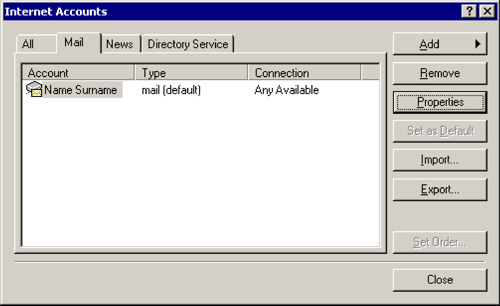
Mail > [Eigenschaften]
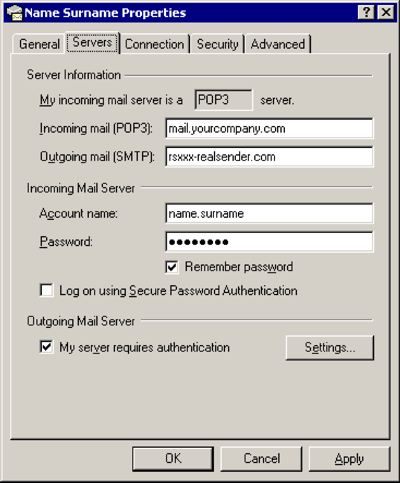
Server
Ausgehende E-Mails (SMTP): rsxxx.realsender.com
Ausgehender Mailserver
[x] Mein Server erfordert Authentifizierung
[Einstellungen…]
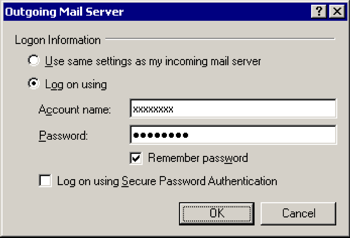
Ausgehender Mailserver
[x] Anmelden mit
Benutzername: (der von uns gesendete)
Passwort: (das von uns gesendete)[x] Passwort speichern
[OK]
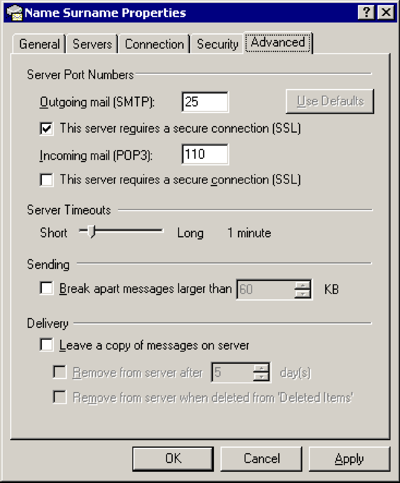
Fortschrittlich
Ausgehende E-Mails (SMTP): 25
[x] Dieser Server erfordert eine sichere Verbindung (SSL).
[OK]
Ausblick 2007

Extras > Optionen…
E-Mail-Einrichtung > [E-Mail-Konten…]
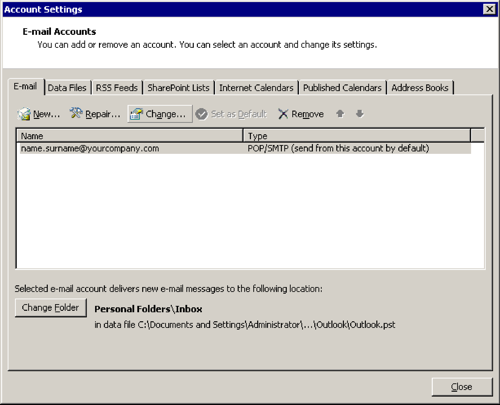
[Ändern…]
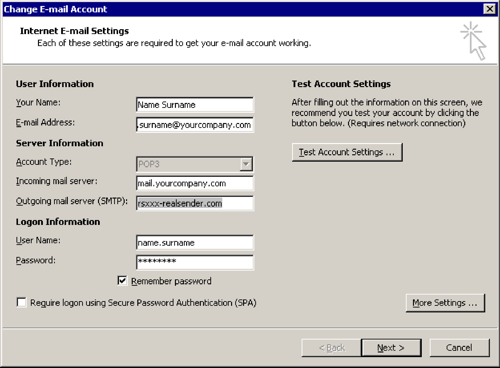
E-Mail-Konto ändern
Ausgehender Mailserver (SMTP): rsxxx.realsender.com
[Weitere Einstellungen…]
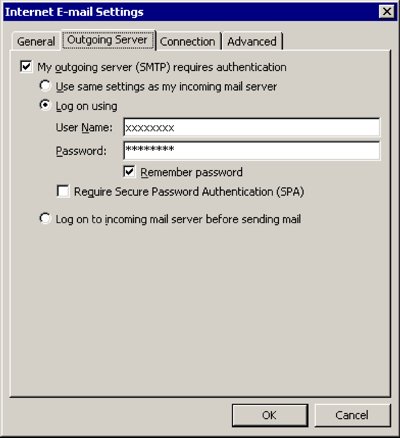
Ausgehender Server
[x] Mein Postausgangsserver (SMTP) erfordert Authentifizierung
[x] Anmelden mit
Benutzername: (der von uns gesendete)
Passwort: (das von uns gesendete)[x] Passwort speichern
[OK]
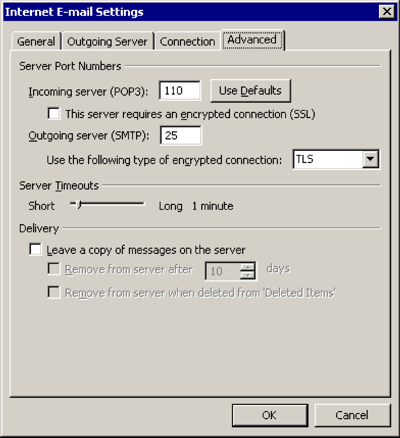
Fortschrittlich
Verwenden Sie die folgende Art der verschlüsselten Verbindung: TLS
[OK]
Outlook 2013 2016

Datei > [Info]

[Konto- und Social-Media-Einstellungen]
[Kontoeinstellungen…]
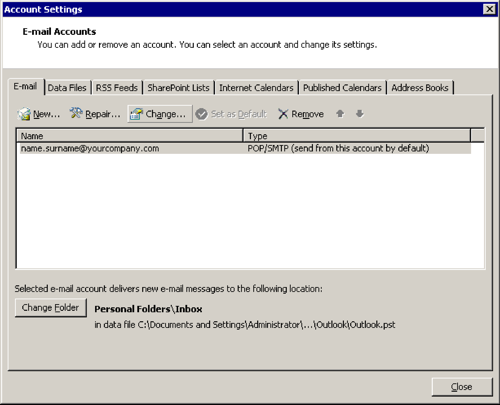
[Ändern…]
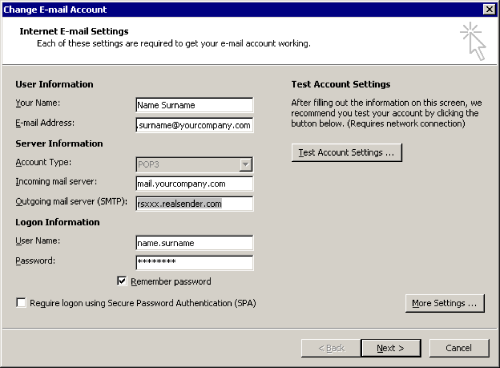
E-Mail-Konto ändern
Ausgehender Mailserver (SMTP): rsxxx.realsender.com
[Weitere Einstellungen…]
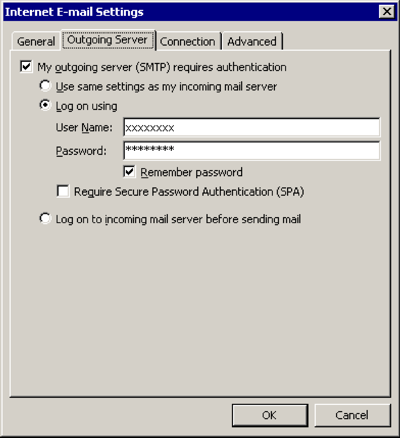
Ausgehender Server
[x] Mein Postausgangsserver (SMTP) erfordert Authentifizierung
[x] Anmelden mit
Benutzername: (der von uns gesendete)
Passwort: (das von uns gesendete)[x] Passwort speichern
[OK]
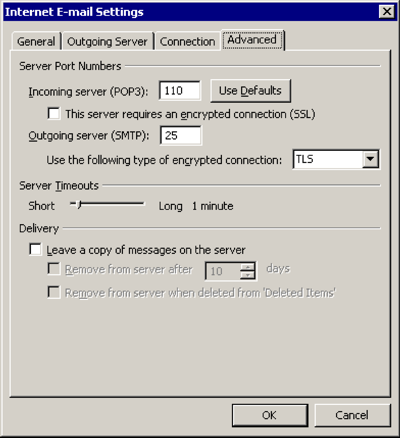
Fortschrittlich
Verwenden Sie die folgende Art der verschlüsselten Verbindung: TLS
[OK]
Mac OS/X Mail
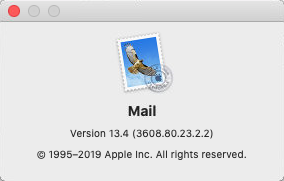
E-Mail > Einstellungen… > Servereinstellungen
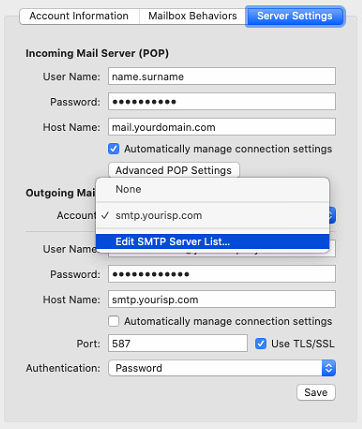
Ausgehender Mailserver (SMTP) > SMTP-Serverliste bearbeiten …
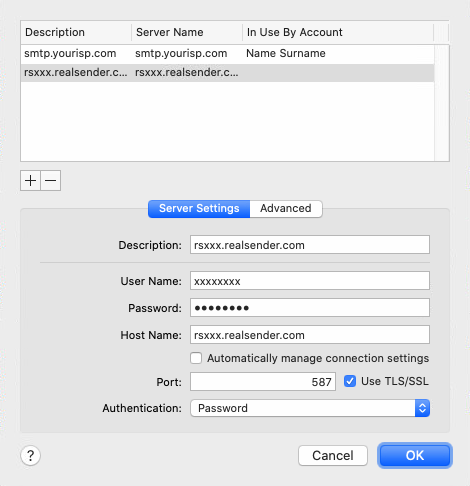
[+] Konto erstellen
Beschreibung: rsxxx.realsender.com
Benutzername: (der von uns gesendete)
Passwort: (das von uns gesendete)
Hostname: rsxxx.realsender.com
[ ] Kontoeinstellungen automatisch erkennen und verwalten
Port: 587 [x] TLS/SSL
-Authentifizierung verwenden: Passwort
[OK]
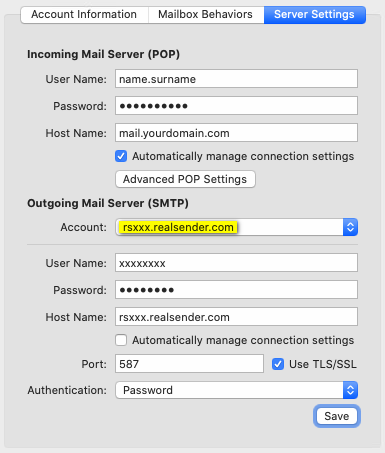
Ausgehender Mailserver (SMTP)
Konto: rsxxx.realsender.com
[Speichern]
Thunderbird

Tools > Kontoeinstellungen
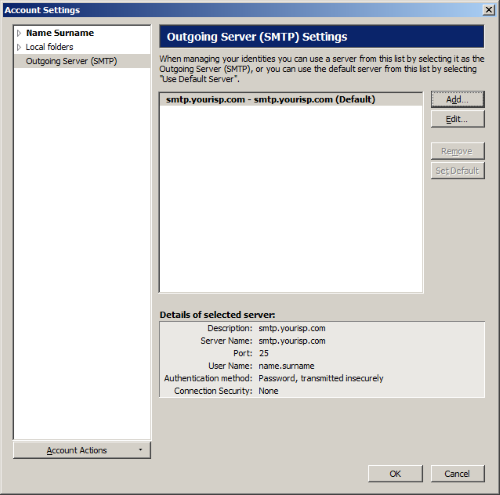
Ausgehender Server (SMTP) > [Hinzufügen…]
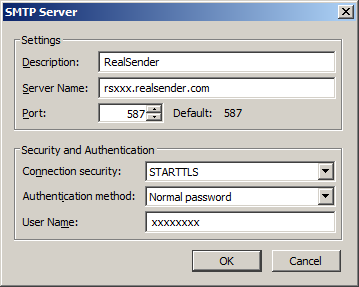
Einstellungen
Beschreibung: RealSender
-Servername: rsxxx.realsender.com
Port: 587
Sicherheit und Authentifizierung
Verbindungssicherheit: STARTTLS
Authentifizierungsmethode: Normales Passwort
Benutzername: (der von uns an Sie gesendete)
[OK]
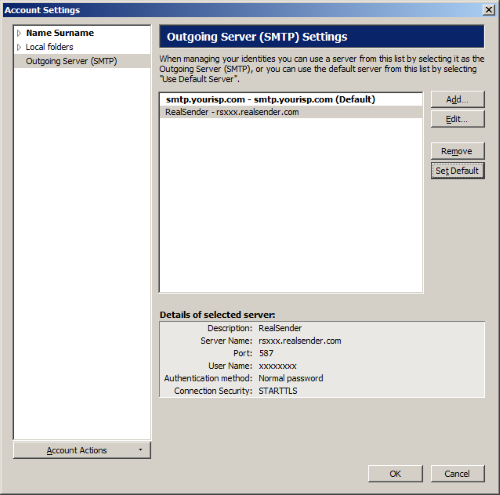
RealSender > [Standard festlegen]
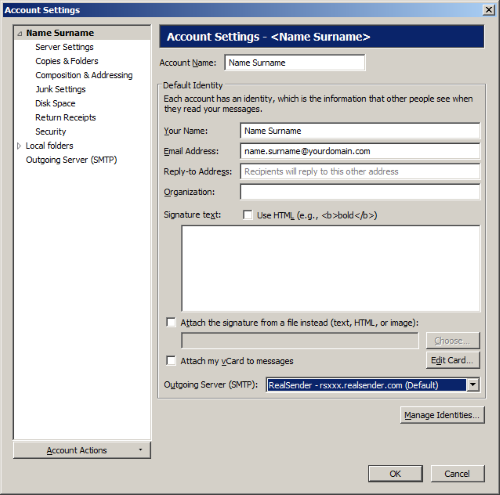
Kontoeinstellungen
(wählen Sie Ihr E-Mail-Konto in der Baumstruktur auf der linken Seite aus)
Ausgehender Server (SMTP): RealSender
[OK]
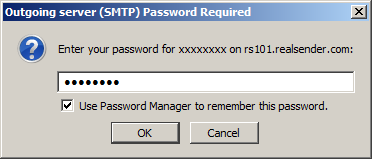
Das erste Mal, wenn Sie eine Nachricht senden
Ausgehender Server (SMTP) – Passwort erforderlich
Geben Sie Ihr Passwort für… ein: (das, das wir Ihnen zugesendet haben)
[x] Verwenden Sie einen Passwort-Manager, um dieses Passwort zu speichern
[OK]
Zimbra Desktop

Desktop starten > Setup (oben rechts)
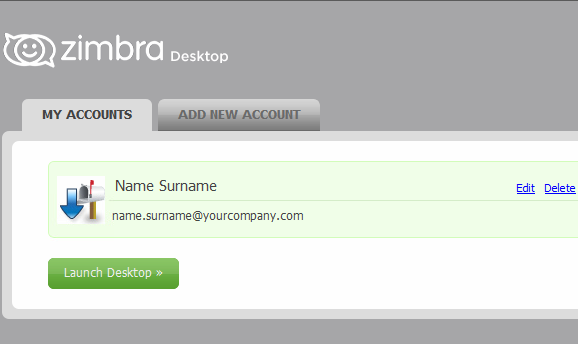
MEINE KONTEN > [Bearbeiten]
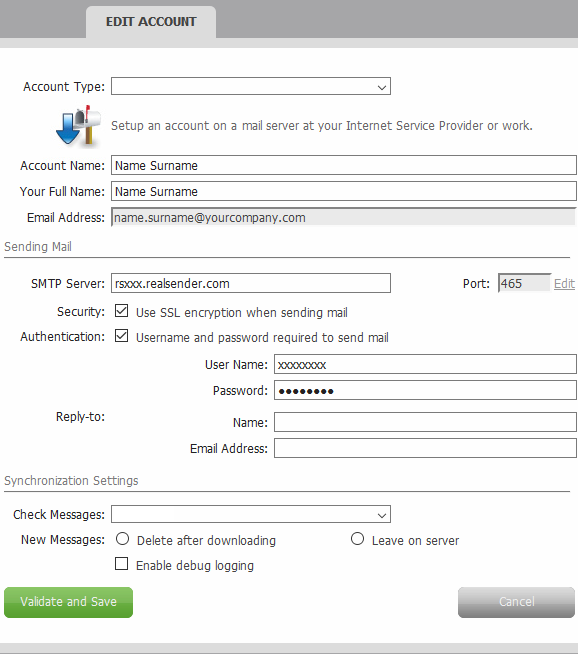
KONTO BEARBEITEN
E-Mail senden
SMTP-Server: rsxxx.realsender.com
Sicherheit: [x] Verwenden Sie SSL-Verschlüsselung beim Versenden von E-Mails
Authentifizierung: [x] Benutzername und Passwort zum Versenden von E-Mails erforderlich
Benutzername: (der, den wir Ihnen geschickt haben)
Passwort: (das, das wir Ihnen geschickt haben)
[Überprüfen und speichern]
E-Mail-Server-Einstellungen
So starten Sie die Nutzung von RealSender:
- Fordern Sie ein kostenloses Testkonto
- Ändern Sie die Einstellungen für ausgehende E-Mails (SMTP) in Ihrem E-Mail-Server:
Microsoft Exchange Server – Microsoft Office 365 – Zimbra Collaboration.
Ist Ihr Server nicht in der obigen Liste? Kontaktieren Sie uns !
Besuchen Sie die Seite „ E-Mail-Client “, wenn Sie individuell konfigurierte E-Mail-Clients verwenden.
Wenn Sie Massenmailings versenden möchten, schauen Sie in unserem Bereich „ Newsletter-Software “ vorbei
- Ändern Sie die Einstellungen Ihrer Domain, um die gesendeten Nachrichten mit SPF zu authentifizieren
(dies erfolgt in der Regel nach der Testphase).
- Warum? Wenn Sie E-Mails Ihrer Domain über einen Drittanbieterdienst versenden möchten,
müssen Sie Ihren SPF-Eintrag so konfigurieren, dass die Zustellung von den IP-Adressen des Dienstanbieters erlaubt ist.
Andernfalls riskieren Sie, dass E-Mail-Empfänger alle von Ihrer Domain gesendeten E-Mails ablehnen. - Das Einrichten des RealSender SPF-Eintrags ist einfach:
Sie müssen lediglich include:spf.realsender.com zu Ihrem SPF-Eintrag hinzufügen, und schon sind Sie fertig.
Wir signieren E-Mails automatisch mit DKIM, sodass Sie nichts weiter tun müssen.
Haben Sie Fragen? Kontaktieren Sie uns!
Unterabschnitte der E-Mail-Servereinstellungen
Exchange Server

EAC
(Exchange Admin Center)

E-Mail-Fluss > Sendekonnektoren
[+] Neuer Sende-Connector

neuer Sendeanschluss
*Name:
Internet-Mail
Typ:
[x] Internet (Zum Beispiel zum Versenden von Internet-E-Mails)
[nächste]

Smarthost bearbeiten
Geben Sie einen vollqualifizierten Domänennamen (FQDN), eine IPv4-Adresse oder eine IPv6-Adresse an:
rsxxx.realsender.com
[speichern]

neuer Sendeanschluss
*Netzwerkeinstellungen:
[x] E-Mails über Smarthosts weiterleiten
(unverändert)
[nächste]

Neuer Sendeconnector – Authentifizierung
Smart-Host-Authentifizierung:
[x] Basisauthentifizierung
[x] Basisauthentifizierung erst nach TLS-Start anbieten*Benutzername:
(der, den wir Ihnen geschickt haben)*Passwort:
(das, das wir Ihnen geschickt haben)
[nächste]

Neuer Sendekonnektor – Routing
*Adressraum:
TYP: SMTP
DOMÄNE: *
KOSTEN: 1
[nächste]

Neuer Sendeconnector – welcher Exchange-Server?
[AUSTAUSCH]
[hinzufügen ->] WECHSEL
[OK]

[beenden]
Office 365

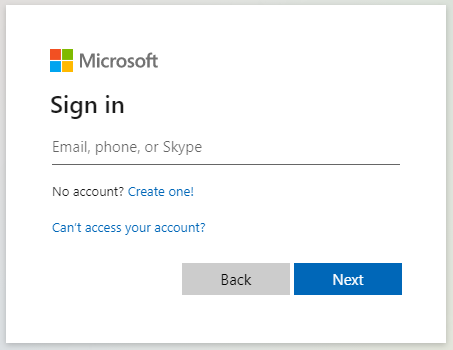
Microsoft Office 365 Admin Center

Linkes Menü > Admin

Microsoft 365 Admin Center > … Alle anzeigen
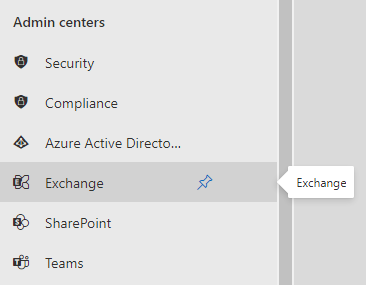
Microsoft 365 Admin Center > Admin Center > Exchange
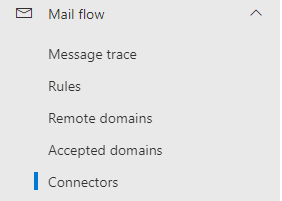
Exchange Admin Center > E-Mail-Fluss > Konnektoren
Anschlüsse > Anschluss hinzufügen
Neuer Anschluss
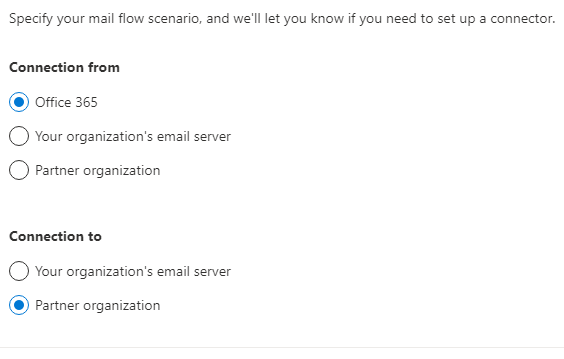
Verbindung von: [x] Office 365 Verbindung zu: [x] Partnerorganisation[Nächste]
Konnektorname
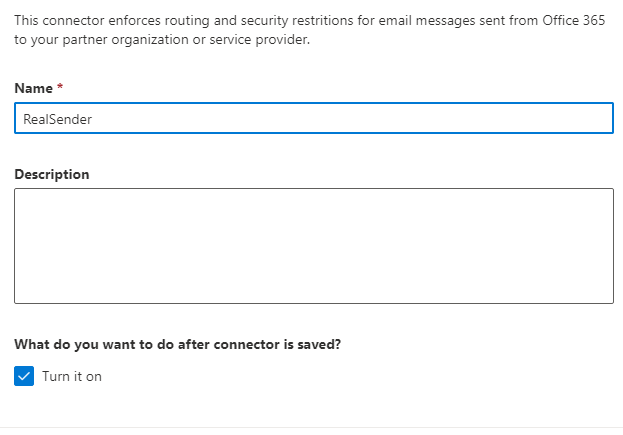
Dieser Connector erzwingt Routing- und Sicherheitsbeschränkungen für E-Mail-Nachrichten, die von Office 365 an Ihre Partnerorganisation oder Ihren Dienstanbieter gesendet werden. Name: RealSender. Was soll nach dem Speichern des Connectors geschehen? [x] Aktivieren[Nächste]
Verwendung des Steckverbinders
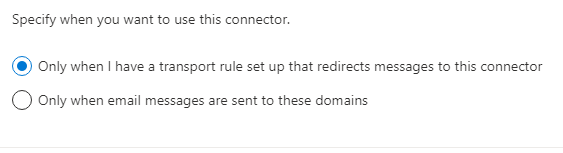
Geben Sie an, wann dieser Konnektor verwendet werden soll. [x] Nur wenn eine Transportregel eingerichtet ist, die Nachrichten an diesen Konnektor umleitet[Nächste]
Routing
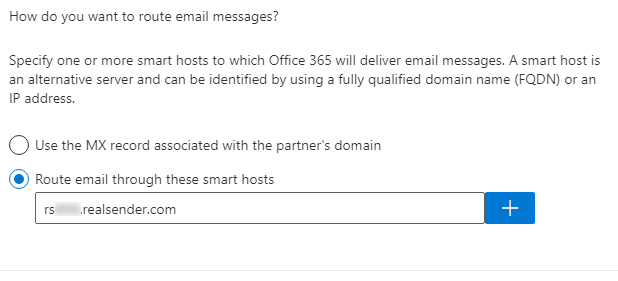
Wie sollen E-Mails weitergeleitet werden? Geben Sie einen oder mehrere Smarthosts an, an die Office 365 E-Mails zustellt. Ein Smarthost ist ein alternativer Server und kann über einen vollqualifizierten Domänennamen (FQDN) oder eine IP-Adresse identifiziert werden. [x] E-Mails über diesen Smarthost weiterleiten: rsxxx.realsender.com [+][Nächste]
Sicherheitsbeschränkungen
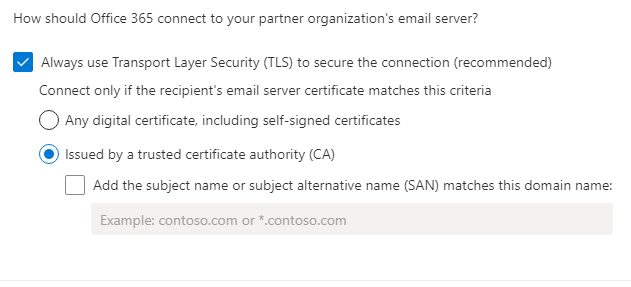
Wie soll Office 365 die Verbindung zum E-Mail-Server Ihrer Partnerorganisation herstellen? [x] Verwenden Sie immer Transport Layer Security (TLS) zur Sicherung der Verbindung (empfohlen). Stellen Sie die Verbindung nur her, wenn das Zertifikat des E-Mail-Servers des Empfängers diesem Kriterium entspricht: [x] Ausgestellt von einer vertrauenswürdigen Zertifizierungsstelle (CA)[Nächste]
Bestätigungs-E-Mail
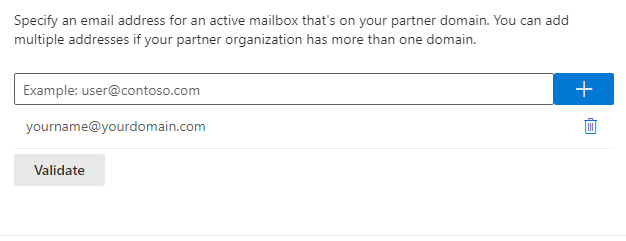
Geben Sie eine E-Mail-Adresse für ein aktives Postfach in Ihrer Partnerdomäne an. Sie können mehrere Adressen hinzufügen, falls Ihre Partnerorganisation über mehrere Domänen verfügt. IhrName@IhreDomäne.com [+] [Bestätigen]Validierung erfolgreich
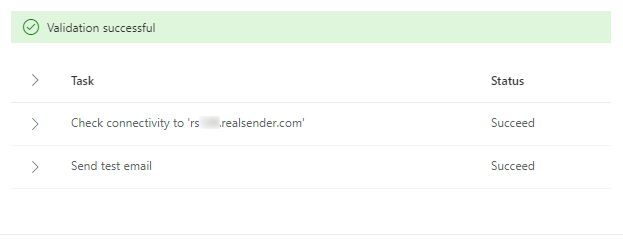
[Validierung] Validierung läuft... Validierung erfolgreich > Aufgabenstatus > Verbindung zu 'rsxxx.realsender.com' geprüft: Erfolgreich > Test-E-Mail gesendet: Erfolgreich[Nächste]
Überprüfen Sie den Konnektor
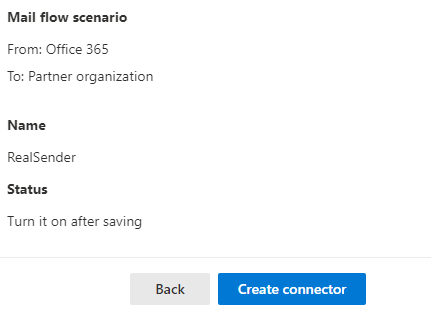
E-Mail-Flussszenario Von: Office 365 An: Partnerorganisation Name: RealSender Status: Nach dem Speichern aktivieren Verwendung des Connectors: Nur verwenden, wenn eine Transportregel eingerichtet ist, die Nachrichten an diesen Connector weiterleitet. Routing: E-Mail-Nachrichten über diese Smarthosts weiterleiten: rsxxx.realsender.com Sicherheitsbeschränkungen: Immer Transport Layer Security (TLS) verwenden und nur dann eine Verbindung herstellen, wenn das E-Mail-Serverzertifikat des Empfängers von einer vertrauenswürdigen Zertifizierungsstelle (CA) ausgestellt wurde.[Konnektor erstellen]
Zimbra-Kooperation

Zimbra Collaboration
(Netzwerkversion / Open Source)
> Administratorkonsole
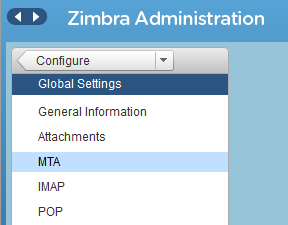
Zimbra-Verwaltung
> Konfigurieren
> Globale Einstellungen
> MTA
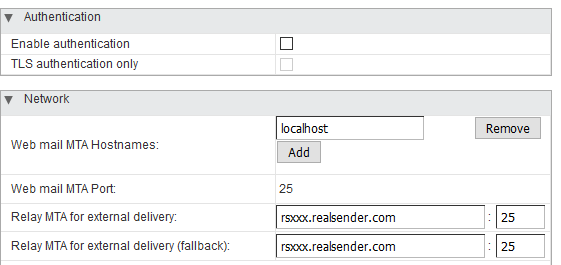
Authentifizierung
Authentifizierung aktivieren [ ]
Nur TLS-Authentifizierung [ ]
Netzwerk
Webmail-MTA-Hostnamen: localhost
Webmail-MTA-Port: 25Relay-MTA für externe Zustellung: rsxxx.realsender.com : 25
Relay-MTA für externe Zustellung (Fallback): rsxxx.realsender.com : 25
Bitte teilen Sie unserem Support-Team mit, dass Sie Zimbra Collaboration verwenden, damit wir unsere Server so konfigurieren können, dass die Verbindung ohne weitere Einrichtung Ihrerseits akzeptiert wird (es ist nicht nötig, Änderungen an den Postfix-SMTP-Einstellungen von Zimbra vorzunehmen)
Xbox-App

Die „inxbox“-App von RealSender ist ein sofort einsatzbereiter E-Mail-Server,
der alle an die autorisierte Domain gesendeten Nachrichten empfängt.
Er ist sofort betriebsbereit, sobald der MX-Eintrag auf ihn verweist.
Es wird häufig als Notfall-Mailserver verwendet.
Wenn Ihr regulärer E-Mail-Dienst ausfällt,
empfängt Inxbox sofort alle eingehenden Nachrichten.
Dafür sind keine speziellen Konfigurationen erforderlich,
wie beispielsweise die Angabe einzelner Benutzer-E-Mail-Adressen.
Bei der Konfiguration als historisches E-Mail - Archiv
werden die Nachrichten automatisch
nach Empfänger, Monat und Jahr erfasst.
Hauptmerkmale:
historisches Archiv von E-Mails
Alle E-Mails werden transparent protokolliert
Webmail-Schnittstelle
ein sicherer Webbereich zum Online-Lesen von Xbox-E-Mails
Xbox-App-Demo
ein sofort einsatzbereites Postfach, das jede Nachricht empfängt und sie für eine begrenzte Zeit aufbewahrt
Unterabschnitte der Xbox-App
historisches Archiv von E-Mails

E-Mails sind der wichtigste Kommunikationskanal in der modernen Geschäftswelt.
Ihr versehentlicher Verlust würde dem Wissensbestand des Unternehmens großen Schaden zufügen.
Darüber hinaus sollte Geschäftskorrespondenz in der Regel bis zu zehn Jahre lang aufbewahrt werden.
!! Falls Ihr Unternehmen private E-Mail-Adressen wie vorname.nachname@firmenname.com verwendet, müssen Sie die Absender vor der Aktivierung dieser Funktion informiert habenWir stellen Ihnen eine eigene E-Mail-Eingangsdomäne zur Verfügung,
sodass die „inxbox“-App von RealSender
alle E-Mails transparent archiviert, auf die Sie über Folgendes zugreifen können:
-
ein spezielles POP3-Postfach,
das für den Empfang großer Mengen von E-Mails in kurzer Zeit konfiguriert ist -
ein sicherer Webbereich, der
online über eine angepasste Version unserer Webmail-Oberfläche
Ein automatischer Prozess archiviert die Nachrichten, sortiert nach Empfänger, Monat und Jahr.
Bei Anbindung an RealSender Secure Email Gateway
werden alle gesendeten E-Mails automatisch dupliziert und archiviert.
Webmail-Schnittstelle
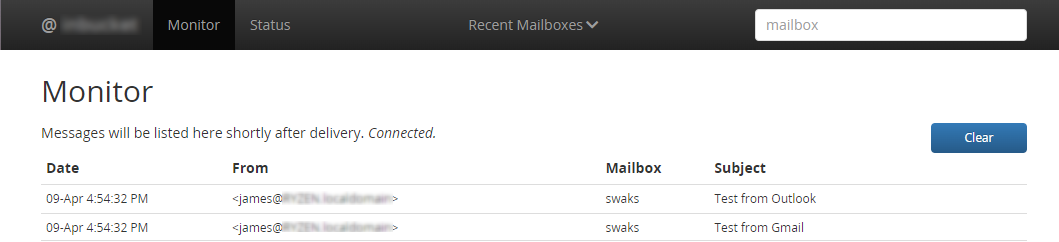
Funktionen der Weboberfläche:
- Nachrichten in einem Postfach auflisten
- Zeigt den Inhalt einer bestimmten Nachricht an
- Zeigt den Quelltext einer Nachricht an (Header + Body)
- Zeigt die HTML-Version einer Nachricht (in einem neuen Fenster)
- Liste der MIME-Anhänge mit Schaltflächen zum Anzeigen oder Herunterladen
- Eine Nachricht löschen
- Monitor: Eine Echtzeitanzeige aller empfangenen Nachrichten
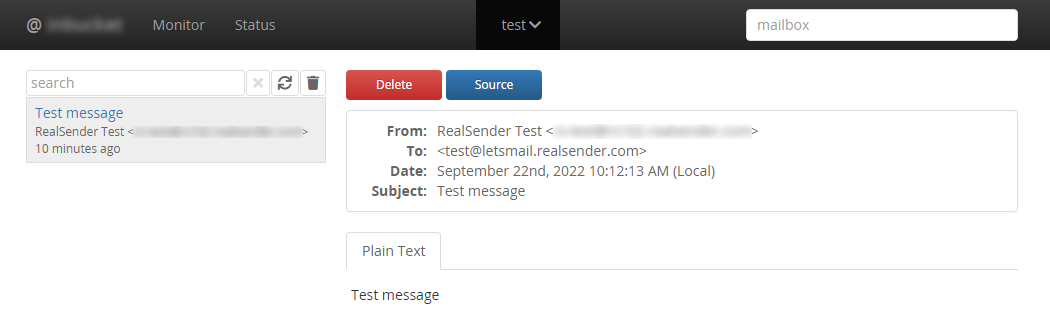
Eine funktionierende Demoversion finden Sie in unserem (kostenlosen) Postmaster-Tools-Bereich:
» inxbox demo temporary email
Xbox-App-Demo

Die Inxbox-App-Demo ist ein sofort einsatzbereites temporäres Postfach, das jede Nachricht empfängt und sie eine Stunde lang im Speicher behält! Alle empfangenen Nachrichten sind für jeden sichtbar!Probieren Sie es jetzt selbst! (1)
- Sende eine Nachricht an: [deinname]@inxbox.realsender.com
- Öffnen Sie https://inxbox.realsender.com/monitor und prüfen Sie den Empfang
(verwenden Sie dazu den Google Chrome-Browser > Neues Inkognito-Fenster oder den Microsoft Edge-Browser).
Probieren Sie es jetzt selbst! (2) mit Ihrer eigenen Domain
- Ändern/fügen Sie den MX-Eintrag Ihrer Domain wie folgt hinzu:
MX „10 inxbox1.realsender.com“ - Senden Sie eine Nachricht an: IhrName@IhreDomain
- Öffnen Sie https://inxbox1.realsender.com/monitor und prüfen Sie den Empfang
(verwenden Sie dazu den Google Chrome-Browser > Neues Inkognito-Fenster oder den Microsoft Edge-Browser).
Achtung: Der zugehörige Domainname unterscheidet sich vom vorherigen Punkt
Laden Sie die Nachrichten über POP3 herunter
- Konfigurieren Sie Ihren E-Mail-Client mit den folgenden Einstellungen
- Servertyp: POP-Mailserver
- Servername (1): inxbox.realsender.com - Port: 110 (Standard)
- Servername (2): inxbox1.realsender.com - Port: 110 (Standard)
- Benutzername: nur „IhrName“ innerhalb der Empfängeradresse
- Passwort: Jeder Wert ist zulässig
SpamStop-App

E-Mail ist der Hauptkanal für Cyberangriffe.
Absenderadressenfälschung kann anhand von E-Mail-Authentifizierungsinformationen erkannt werden.
Die „Spamstop“-App von RealSender zeigt die Ergebnisse der Authentizitätsprüfungen
direkt im Betreff der empfangenen Nachrichten an.
Es handelt sich um eine effiziente Anti-Spam-Lösung in Kombination mit einem Filter
, der Nachrichten nach Absendern aufteilt, die NICHT in Ihrem Adressbuch enthalten sind.
Es kann für die gesamte Domain oder auch nur für einige wenige E-Mail-Adressen aktiviert werden.
Hauptmerkmale:
1 - SPF-Prüfung
SPF-basierte E-Mail-Absenderprüfung
2 - dkim check
DKIM-basierte Absender- und E-Mail-Siegelprüfung
3 - DMARC-Ausrichtung
Mindestens eine der Domänen muss mit der Absenderdomäne übereinstimmen
4 - Doppelte Spam-Tags
Dem Betreff wurden zwei SPAM-Tags hinzugefügt, um auf Betrug hinzuweisen
clientseitiger Absenderfilter
Sie sollen in Ihrem Posteingang nur E-Mails von Absendern erhalten, die Sie zuvor autorisiert haben
serverseitiger Absenderfilter
Sie möchten E-Mail-Nachrichten nur von Absendern erhalten, die Sie zuvor autorisiert haben
Sicherheitseinstellungen
um Ihre E-Mail-Postfächer vor unerwünschten Absendern und gefährlichen Anhängen zu schützen
Unterabschnitte der SpamStop-App
1 - SPF-Prüfung

Wir möchten sicherstellen, dass die Absenderadresse nicht gefälscht/manipuliert wurde*.
* = Die Nachricht soll von jemand anderem als dem tatsächlichen Absender stammen.
Die SPF-Authentifizierung hilft uns festzustellen, ob die Nachricht über einen autorisierten SMTP-Server gesendet wurde.
Diese Information wird im DNS der Domain gespeichert, also an einem sicheren Ort außerhalb der E-Mail-Nachricht.
Nur wenn die Nachricht NICHT korrekt authentifiziert wurde:
Das Symbol !! (Achtung) wird dem Betreff hinzugefügt,
eine der folgenden erläuternden Hinweise wird in die Nachrichtenkopfzeile „X-RealSender“ eingefügt:
:: spf-none :: Die Absenderdomäne enthält keine Informationen zur Authentifizierung der E-Mail. :: spf-softfail :: Der SMTP-Server ist nicht unter den autorisierten Servern aufgeführt; dies sollte als „Softfail“ behandelt werden. :: spf-fail :: Der SMTP-Server ist nicht unter den autorisierten Servern aufgeführt, und die E-Mail sollte abgelehnt oder verworfen werdenManchmal sind die auf Domänenebene erfassten Informationen nicht korrekt/verständlich.
:: spf-permerror :: Es ist ein permanenter Fehler aufgetreten (z. B. ein fehlerhaft formatierter SPF-Eintrag)Die SPF-Prüfung bezieht sich auf die „Absender“-E-Mail-Adresse, die in den E-Mail-Headern verborgen ist.
Nur die „Absender“-E-Mail-Adresse ist sichtbar. Wenn sich die Stammdomänen unterscheiden, wird folgende Warnung angezeigt:
:: spf-diff :: Die Stammdomänen „Mail From“ und „From“ sind unterschiedlich2 - dkim check

DKIM (DomainKeys Identified Mail) ermöglicht es Absendern, nachzuweisen, dass die E-Mail tatsächlich von ihnen stammt und nach dem Versand nicht verändert wurde.
Dies geschieht durch das Anbringen einer digitalen Signatur (eines Siegels), die mit einem Domainnamen verknüpft ist, an jede ausgehende E-Mail.
Nur wenn die Nachricht NICHT korrekt signiert wurde:
Das Symbol !! (Achtung) wird dem Betreff hinzugefügt,
eine der folgenden erläuternden Anmerkungen wird in die Nachrichtenkopfzeile „X-RealSender“ eingefügt:
:: dkim-none :: Es wurden keine DKIM-Signatur-Header (gültig oder ungültig) gefunden. :: dkim-fail :: Es wurde ein gültiger DKIM-Signatur-Header gefunden, aber die Signatur enthält keinen korrekten Wert für die Nachricht Manchmal ist es nicht möglich, die Prüfung durchzuführen:
:: dkim-invalid :: Es liegt ein Problem mit der Signatur selbst oder dem öffentlichen Schlüssel vor. Die Signatur konnte beispielsweise nicht verarbeitet werden. :: dkim-temperror :: Es ist ein Fehler aufgetreten, der wahrscheinlich vorübergehend ist, z. B. die vorübergehende Unfähigkeit, einen öffentlichen Schlüssel abzurufenWurde die Nachricht mit einer anderen Domain signiert, wird ein „Diff“-Hinweis hinzugefügt:
Diese Warnung wird NICHT angezeigt, wenn der Absender die SPF-Prüfung besteht:
:: dkim-diff :: Die Nachricht wurde NICHT von der Domain des Absenders signiert3 - DMARC-Ausrichtung

DMARC (Domain-based Message Authentication, Reporting and Conformance)
ist ein E-Mail-Authentifizierungsstandard, der zur Bekämpfung von gefälschten Domain-E-Mails entwickelt wurde.
Im Kapitel „3.1. Identifikatorausrichtung“ heißt es:
E-Mail-Authentifizierungstechnologien authentifizieren verschiedene (und unterschiedliche) Aspekte einer einzelnen Nachricht. Beispielsweise authentifiziert DKIM die Domain, die die Signatur an die Nachricht angehängt hat, während SPF entweder die Domain im Feld „MAIL FROM“ (RFC5321.MailFrom) von SMTP oder die Domain „EHLO/HELO“ (RFC5321.EHLO/HELO) oder beide authentifizieren kann. Dies können unterschiedliche Domains sein, die dem Endbenutzer in der Regel nicht sichtbar sind. DMARC authentifiziert die Verwendung der Domain „From“ (RFC5322.From), indem es deren Übereinstimmung mit einem authentifizierten Bezeichner (Authenticated Identifier) vorschreibt. – https://tools.ietf.org/html/rfc7489#section-3.1Es bedeutet einfach:
Wenn ein Absender seine E-Mail mittels SPF und/oder DKIM authentifiziert, muss mindestens eine der Domänen mit der Absenderdomäne übereinstimmenDieser Ansatz ist weitgehend akzeptiert und gilt allgemein
als bewährte Methode zur Identifizierung vertrauenswürdiger Absenderdomänen.
**RealSender MX Protect prüft die standardmäßige DMARC-Ausrichtung "relaxed":**
-
Für die SPF-Authentifizierung
muss die Stammdomäne der Absenderadresse mit der Stammdomäne der Absenderadresse übereinstimmen.
Eine flexible Ausrichtung erlaubt die Verwendung beliebiger Subdomänen, ohne die Anforderung an die Domänenausrichtung zu beeinträchtigen. -
Für die DKIM-Authentifizierung
muss die Stammdomäne der DKIM-Signaturdomäne mit der Absenderdomäne übereinstimmen.
Eine flexible Ausrichtung erlaubt die Verwendung beliebiger Subdomänen, ohne die Domänenausrichtungsanforderung zu beeinträchtigen.
**Mögliche Ergebnisse:**
-
Beide Regeln werden eingehalten,
die Absenderdomäne genießt volles Vertrauen,
die Nachricht kommt unverändert an -
Wenn nur eine der beiden Regeln erfüllt ist,
wird dem Betreff ein Tilde-Symbol (~) hinzugefügt und
eine der folgenden Erläuterungen in den Nachrichtenkopf eingefügt.
~ ... Betreff ... X-RealSender: ~ | spf=pass (Domäne NICHT ausgerichtet) | dkim=pass | ~~ ... Betreff ... X-RealSender: ~ | spf=pass | dkim=pass (Domäne NICHT ausgerichtet) | ~- keinerlei Ausrichtung statt.
Die Warnungen „:: spf-diff ::“ und „:: dkim-diff ::“
werden im Betreff angezeigt.
4 - Doppelte Spam-Tags

DMARC wird von immer mehr Unternehmen eingesetzt, um ihre Absender vor Spoofing zu schützen.
Die Verwendung erfordert eine korrekte Authentifizierung mit SPF oder DKIM sowie die Übereinstimmung von Absender- und Mail-From-Domain.
Für weitere Informationen:
<dmarc> act on fraudulent email
Nachrichten von Absendern mit dem _dmarc-Eintrag werden,
sofern sie nicht authentifiziert sind, im Betreff mit zwei [ SPAM ]-Tags gekennzeichnet:
[ SPAM ] ... Betreff der Nachricht ... [ SPAM ]Nachrichten ohne _dmarc-Eintrag
werden, wenn sowohl die SPF- als auch die DKIM-Authentifizierung fehlschlagen, mit dem Tag [verdächtig] im Betreff gemeldet:
[verdächtig] ... Betreff der Nachricht ... clientseitiger Absenderfilter

Die „Spamstop“-App von RealSender ist eine effiziente Anti-Spam-Lösung,
wenn sie mit einem Filter kombiniert wird, der Nachrichten
nach Absendern aufteilt, die NICHT in Ihrem Adressbuch enthalten sind.
Die meisten modernen E-Mail-Clients bieten diese Funktion an.
Hier einige Konfigurationsbeispiele:
Microsoft 365 Outlook
Aktivieren Sie in den Outlook-Einstellungen die Option „E-Mails von meinen Kontakten vertrauen“
Mozilla Thunderbird
In Thunderbird einen Filter mit der Regel „Von ist nicht in meinem Adressbuch“ erstellen
Unterabschnitte des clientseitigen Absenderfilters
Microsoft 365 Outlook

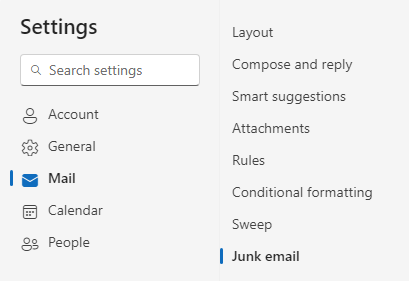
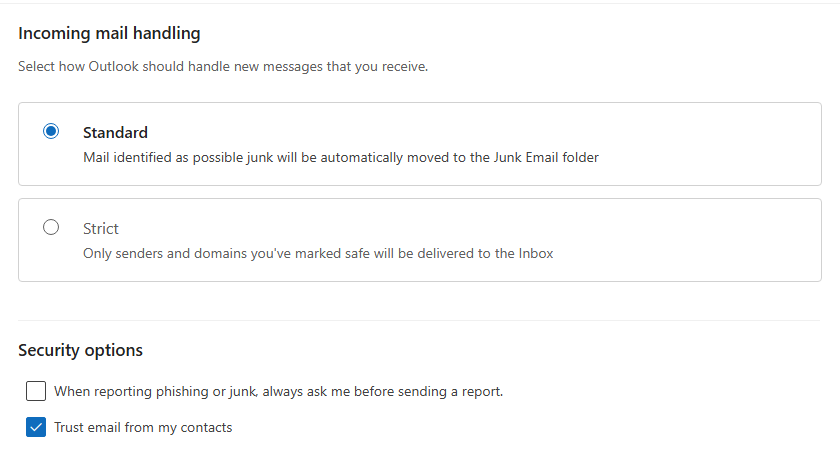
Nachfolgend sehen Sie den Bildschirm „Einstellungen“ in Outlook.
Aktivieren Sie unter „Junk-E-Mail“ die Option „E-Mails von meinen Kontakten als vertrauenswürdig einstufen“.
Klicken Sie auf [Speichern], um die Änderungen zu übernehmen.

Mozilla Thunderbird

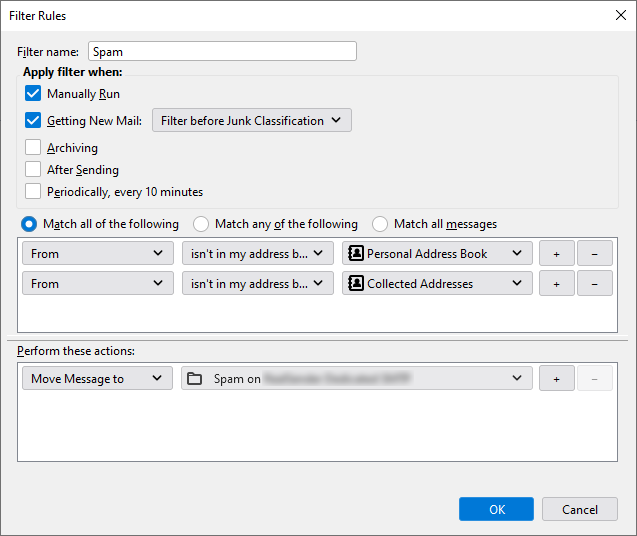
Unten sehen Sie einen Screenshot des „Nachrichtenfilter“-Tools in Thunderbird.
Fügen Sie Bedingungen mit der Option „Alle folgenden Bedingungen erfüllen“ hinzu:
- „Von“ ist nicht in meinem Adressbuch, Persönliches Adressbuch
- „Von“ ist nicht in meinem Adressbuch, Gesammelte Adressen
Führen Sie folgende Aktionen aus: Nachricht verschieben nach: Spam.
serverseitiger Absenderfilter

Nicht alle E-Mail-Clients bieten ausgefeilte Filterfunktionen.
In diesen Fällen kann man vorab eingreifen.
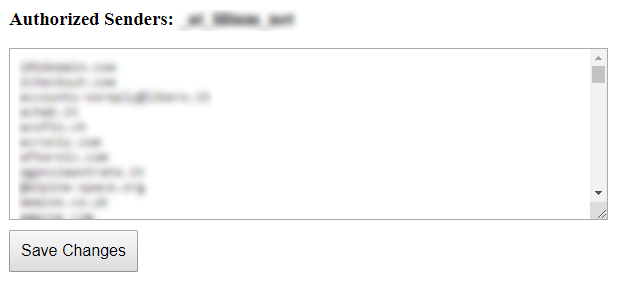
Mit der Funktion „Autorisierte Absender“ können Sie Nachrichten nur von Absendern
empfangen,
(Sie können auch die gesamte Domain angeben, z. B. @example.com):
Alle regulären Nachrichten werden wie gewohnt in Ihrem Posteingang eintreffen.
Alle Spam-Nachrichten werden in ein anderes Postfach
oder in den „Junk“-Ordner des Benutzers in Microsoft 365 Exchange.
Es gehen keine E-Mails verloren.
Sie können den Ordner mit den gelöschten Nachrichten ein- oder mehrmals täglich lesen.
Das spart Ihnen viel wertvolle Zeit.
Unterabschnitte des serverseitigen Absenderfilters
Microsoft 365 Exchange

Diese Konfiguration ermöglicht das korrekte Verschieben von E-Mails
von nicht autorisierten Absendern in den Junk-E-Mail-Ordner des Benutzers.
Die von der SpamStop-App gefilterten Nachrichten werden
mit den folgenden Anti-Spam-Headern und -Werten eintreffen:
X-Forefront-Antispam-Bericht: SFV:SKB(Diese Nachricht wurde vom Spamfilter als Spam markiert,
da die E-Mail-Adresse oder E-Mail-Domäne des Absenders
nicht in der Liste der autorisierten Absender enthalten ist.)
Folgende Aktion muss aktiviert werden:
Setzen Sie den Spam-Konfidenzgrad (SCL) dieser Nachrichten auf 6 (Spam).
Der Standardwert des SCLJunkThreshold ist 4, was bedeutet, dass
bei einem SCL-Wert von 5 oder höher die Nachricht im Junk-E-Mail-Ordner des Benutzers landen sollte.
-
Im Exchange Admin Center (EAC) gehen Sie zu E-Mail-Fluss > Regeln.
-
Auf der Seite „Regeln“ wählen Sie in der Dropdown-Liste „Hinzufügen“ > „Neue Regel erstellen“.
-
Konfigurieren Sie auf der sich öffnenden Seite „Neue Regel“ die folgenden Einstellungen:
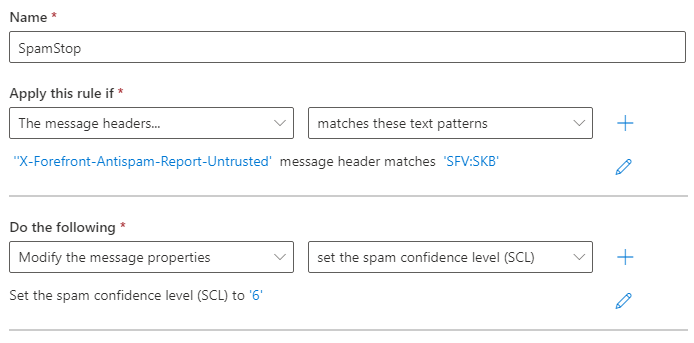
Name: SpamStop
Diese Regel wird angewendet, wenn: Der Nachrichtenkopf
'X-Forefront-Antispam-Report-Untrusted' mit 'SFV:SKB' übereinstimmt
Gehen Sie wie folgt vor:
Ändern Sie die Nachrichteneigenschaften.
Setzen Sie die Spam-Konfidenzstufe „SCL“ auf: „6“.
Regel speichern und aktivieren.
Sicherheitseinstellungen

Sie bieten eine zusätzliche Sicherheitsebene für Ihre E-Mails.
Um Ihre E-Mail-Postfächer
vor gefälschten Absendern und gefährlichen Anhängen zu schützen.
Sicherheitsoptionen, die auf Anfrage aktiviert werden:
Nur authentifizierte Absender
E-Mails nur von Absendern zu erhalten, die die Authentifizierungsprüfung bestanden haben
Gefährliche Anbauteile entfernen
um alle potenziell schädlichen Anhänge aus E-Mails zu entfernen
Unterabschnitte der Sicherheitseinstellungen
Nur authentifizierte Absender

Dies ist nützlich, wenn Sie nur Nachrichten von verifizierten Absendern erhalten möchten.
Alle E-Mails, die die Überprüfung nicht bestehen, werden gelöscht oder zurückgewiesen.
Sie müssen sicherstellen, dass die E-Mail-Adresse des Absenders nicht gefälscht wurde.
Dies lässt sich durch die Kombination von SPF- und DKIM-Authentifizierung gewährleisten.
SPF bestätigt die Absenderadresse und deren Verbindung zum Server, von dem die Nachricht gesendet wurde.
nach der Signierung beim Versand
nicht mehr verändert werden
Theoretisch ist es so einfach, in der Praxis können sich sowohl SPF als auch DKIM
auf eine andere Domain als die E-Mail-Adresse des Absenders beziehen.
Wir prüfen, ob die SPF-Authentifizierung und die DKIM-Signatur mit der Domain in der Absenderadresse verknüpft sind.
Dadurch kann nur der ursprüngliche Absender die E-Mail authentifizieren. Dies garantiert ihre Herkunft.
Gefährliche Anbauteile entfernen

Die Option „Gefährliche Anhänge entfernen“ blockiert alle potenziell schädlichen Anhänge
mit Ausnahme einiger sicherer Dateiformate wie pdf, txt, gif, jpg und png.
Der Empfänger erhält die Nachricht ohne Anhang.
Am Anfang des Inhalts wird ein Warnhinweis hinzugefügt, etwa so:
WARNUNG: Diese E-Mail verstieß gegen die E-Mail-Sicherheitsrichtlinien Ihres Unternehmens und wurde daher geändert. Für weitere Informationen wenden Sie sich bitte an Ihren IT-Administrator. Der Anhang „example.zip“ wurde aus diesem Dokument entfernt, da er ein Sicherheitsrisiko darstellte. Falls Sie dieses Dokument benötigen, kontaktieren Sie bitte den Absender, um eine alternative Übermittlungsmöglichkeit zu vereinbaren.Im Internet wurde eine interessante Fallstudie veröffentlicht, die mit folgendem Satz endet:
„Für uns war die Filterung von Anhängen sehr erfolgreich“
– web.mit.edu/net-security/Camp/2004/presentations/reillyb-mit2004.ppt (PowerPoint-Präsentation)
für E-Mail-Broadcaster

Themen in diesem Bereich:
Newsletter-Softwareeinstellungen
Konfigurationsbeispiele für Newsletter-Software: GroupMail – Inxmail Professional – Joomla AcyMailing – MaxBulk Mailer – phplist – SendBlaster – WordPress MailPoet 3 – WordPress MailPoet 2 – WordPress Mailster
Erleichtern Sie das Abmelden
Automatische Einrichtung der Ein-Klick-Abmeldung für E-Mail-Nachrichten
Bouncehandler-App
um zurückgesendete Nachrichten zu analysieren, Hard Bounces und Soft Bounces zu extrahieren
Copymail-App
Massenmailings direkt aus Ihrem E-Mail-Client versenden
Unterabschnitte für E-Mail-Sender
Newsletter-Softwareeinstellungen
So starten Sie die Nutzung von RealSender:
- Fordern Sie ein kostenloses Testkonto
- Ändern Sie die Einstellungen für ausgehende E-Mails (SMTP) in Ihrer Newsletter-Software:
GroupMail – Inxmail Professional – Joomla, AcyMailing – MaxBulk Mailer – phplist
SendBlaster – Sendy – WordPress, MailPoet 3 – WordPress, MailPoet 2 – WordPress, Mailster.
Ist Ihre Software nicht in der Liste? Kontaktieren Sie uns !
Alternativ können Sie die Option „ Copymail-App
Wenn Sie individuell konfigurierte E-Mail-Clients verwenden, besuchen Sie die Seite „ E-Mail-Client
Nutzen Sie ein zentrales E-Mail-System, besuchen Sie den Bereich „ E-Mail-Server “
- Ändern Sie die Einstellungen Ihrer Domain, um die gesendeten Nachrichten mit SPF zu authentifizieren
(dies erfolgt in der Regel nach der Testphase).
- Warum? Wenn Sie E-Mails Ihrer Domain über einen Drittanbieterdienst versenden möchten,
müssen Sie Ihren SPF-Eintrag so konfigurieren, dass die Zustellung von den IP-Adressen des Dienstanbieters erlaubt ist.
Andernfalls riskieren Sie, dass E-Mail-Empfänger alle von Ihrer Domain gesendeten E-Mails ablehnen. - Das Einrichten des RealSender SPF-Eintrags ist einfach:
Sie müssen lediglich include:spf.realsender.com zu Ihrem SPF-Eintrag hinzufügen, und schon sind Sie fertig.
Wir signieren E-Mails automatisch mit DKIM, sodass Sie nichts weiter tun müssen.
Haben Sie Fragen? Kontaktieren Sie uns!
Unterabschnitte der Newsletter-Softwareeinstellungen
Gruppenmail

GroupMail > Tools
Konten verwalten > Neu
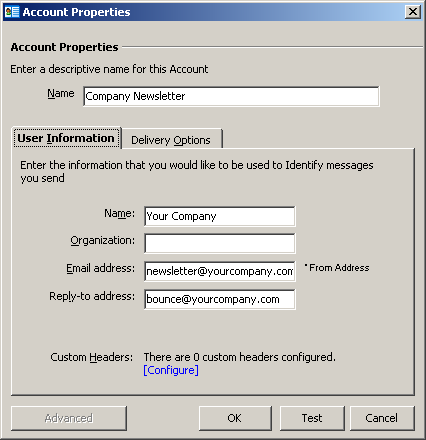
Kontoeigenschaften
Name / Benutzerinformationen:
Bitte füllen Sie das Formular mit den Daten Ihres Unternehmens aus.
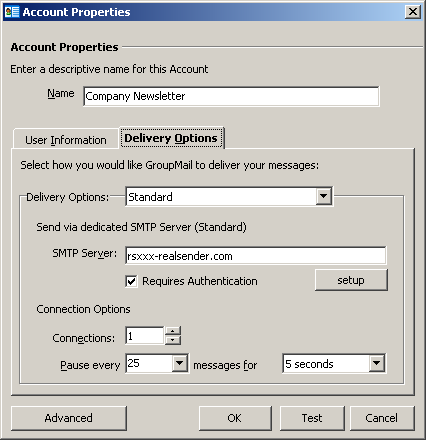
Lieferoptionen
Lieferoptionen: Standard
SMTP-Server: rsxxx-realsender.com
[x] Authentifizierung erforderlich
[aufstellen]
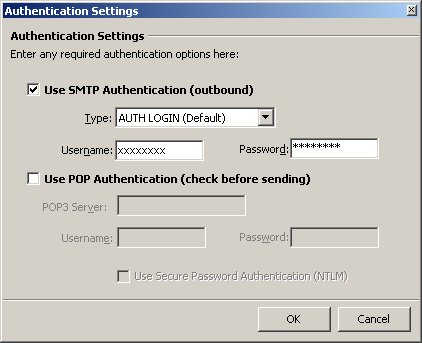
Authentifizierungseinstellungen
[x] SMTP-Authentifizierung verwenden (ausgehend)
Typ: AUTH LOGIN (Standard)
Benutzername: (der, den wir Ihnen geschickt haben)
Passwort: (das, das wir Ihnen geschickt haben)
[OK]
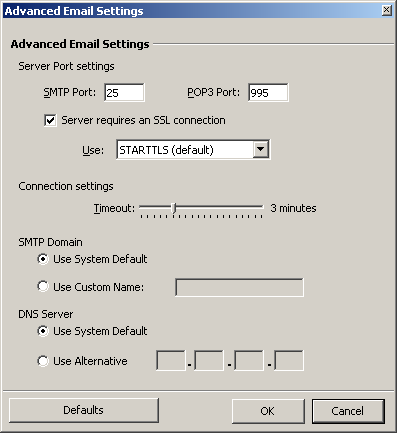
Erweiterte E-Mail-Einstellungen
SMTP-Port: 25
[x] Der Server erfordert eine SSL-Verbindung
Verwendung: STARTTLS (Standard)
[OK]
Inxmail Professional

Globale Einstellungen > Administration
Mailserver > E - Mails senden
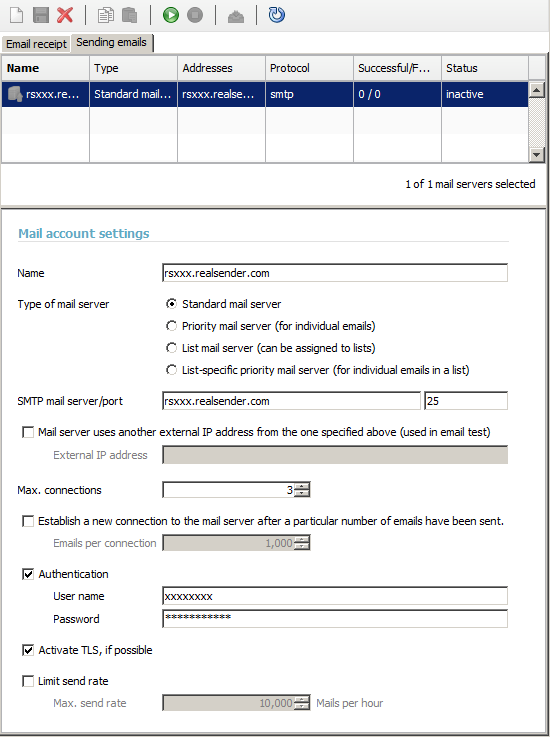
E-Mail-Kontoeinstellungen
Name: rsxxx.realsender.com
SMTP-Mailserver: rsxxx.realsender.com - Port: 25
Maximale Anzahl Verbindungen: 3
[x] Authentifizierung
Benutzername: (der von uns gesendete)
Passwort: (das von uns gesendete)[x] Aktivieren Sie TLS, falls möglich
[Speichern]
[Verbindung zum Mailserver-Konto aktivieren]
Joomla AcyMailing


Joomla > Komponenten
AcyMailing > Konfiguration
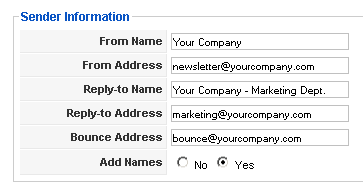
Absenderinformationen
Füllen Sie das Formular mit den Daten Ihres Unternehmens aus
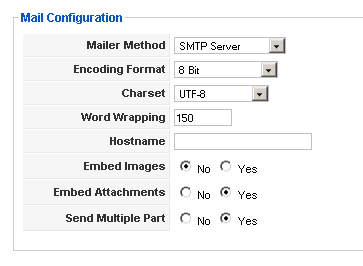
E-Mail-Konfiguration
E-Mail-Methode: SMTP-Server
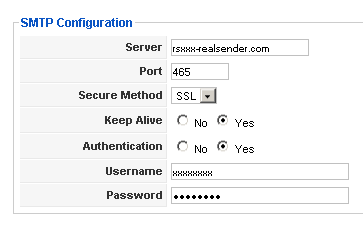
SMTP-Konfiguration
Server: rsxxx.realsender.com
Port: 465
Sicherheitsmethode: SSLLebenserhaltung: [x] Ja
Authentifizierung: [x] JaBenutzername: (der von uns gesendete)
Passwort: (das von uns gesendete)
MaxBulk Mailer
[Einstellungen]
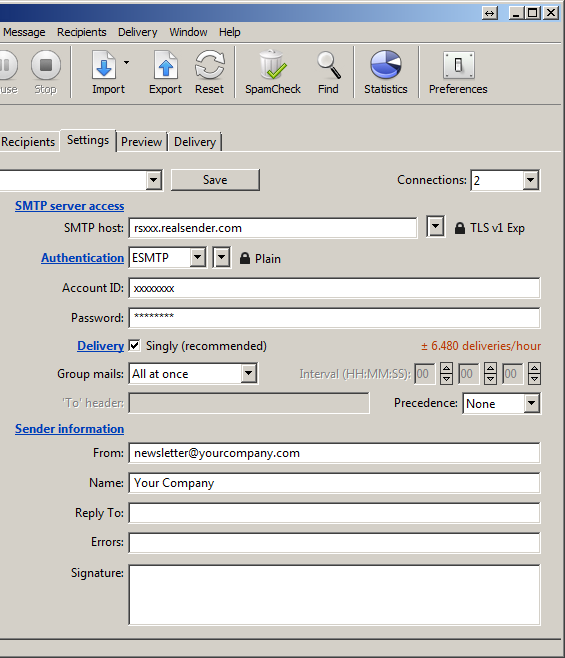
Einstellungen
Verbindungen: 2
SMTP-Serverzugriff
SMTP-Host: rsxxx.realsender.com - TLS v1 EXP
Authentifizierung: ESMTP - Einfach
Konto-ID: (diejenige, die wir Ihnen zugesandt haben)
Passwort: (das, das wir Ihnen geschickt haben)
Lieferung: [x] Einzeln (empfohlen)
Gruppenmail: Alle auf einmal
Absenderinformationen
Von: (die Absender-E-Mail-Adresse)
Name: (Absenderbeschreibung)
Dropdown-Menü (oben links)
[Neues Konto speichern unter…]
Name: rsxxx
[Erstellen]
phplist

Konfiguration getestet auf:
phplist, Version 3
Achtung: Erstellen Sie eine Sicherungskopie, bevor Sie
Änderungen an Ihren phplist-Serverkonfigurationsdateien
(phplist config).
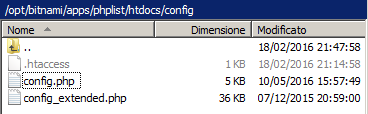
Füllen Sie die Datei phplist/htdocs/config/config.php
mit den korrekten Daten:
[…]
define('PHPMAILERHOST', 'rsxxx.realsender.com');
[…]
define('PHPMAILER',1);
define('PHPMAILER_SECURE','TLS');
$phpmailer_smtpuser = 'der Benutzername, den wir Ihnen geschickt haben'; $phpmailer_smtppassword = 'das Passwort, das wir Ihnen geschickt haben';
$phpmailer_smtpport = 587;
$pageroot = '/';
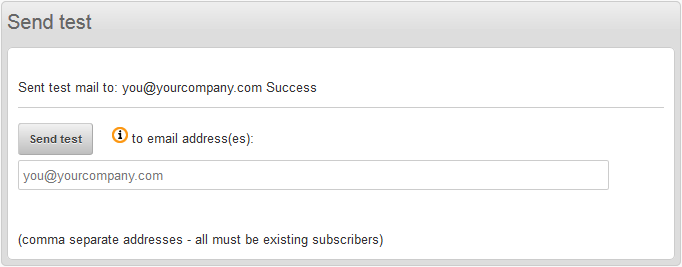
Senden Sie eine Testnachricht (phplist > Kampagnen > Kampagne senden > Test senden):
SendBlaster

Nachrichten > Senden
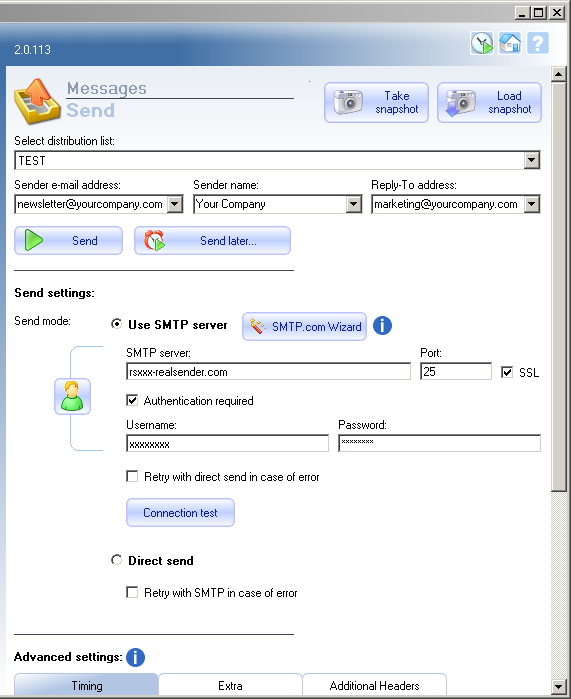
Sendeeinstellungen:
Sendemodus: [x] SMTP-Server verwenden
SMTP-Server: rsxxx.realsender.com
Port: 25 - [x] SSL[x] Authentifizierung erforderlich
Benutzername: (der von uns gesendete)
Passwort: (das von uns gesendete)
[Foto aufnehmen]
Sendy

Sendy

Marke auswählen > [Neue Marke hinzufügen]
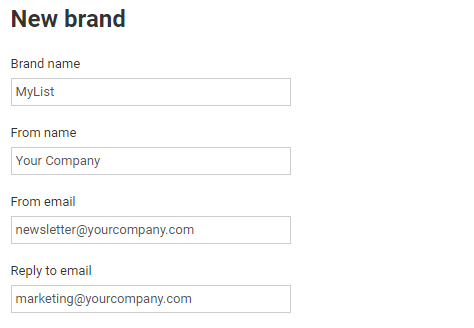
Neue Marke
Markenname
Name
Aus einer E-Mail
Auf E-Mail antworten
(Füllen Sie das Formular mit dem Listennamen und den Daten Ihres Unternehmens aus.)
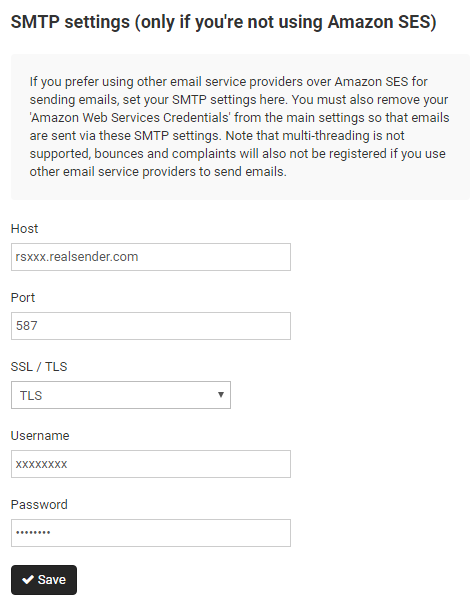
SMTP-Einstellungen
Host: rsxxx.realsender.com
Port: 587
SSL / TLS: TLS
Benutzername: (der, den wir Ihnen geschickt haben)
Passwort: (das, das wir Ihnen geschickt haben)
[Speichern]
WordPress MailPoet 3

WordPress
MailPoet > Einstellungen
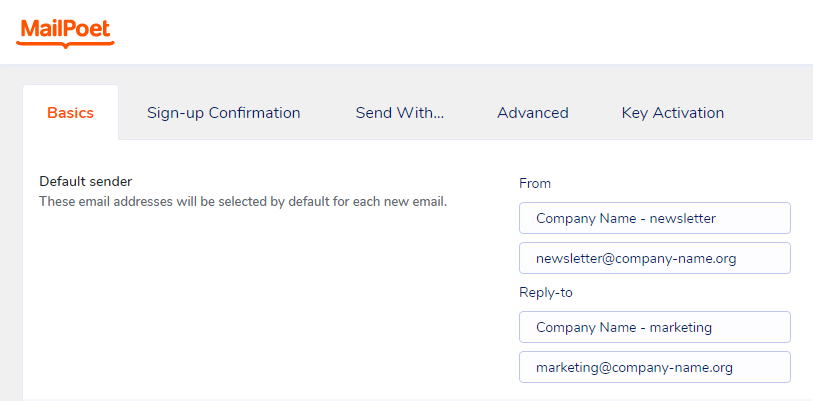
Grundlagen > Standardabsender
(Füllen Sie das Formular mit den Daten Ihres Unternehmens aus)
Von:
Firmenname - Newsletter (Beschreibung)
newsletter@firmenname.org (E-Mail-Adresse)Antwort an
Firmenname - Marketing (Beschreibung)
marketing@firmenname.org (E-Mail-Adresse)
[Einstellungen speichern]
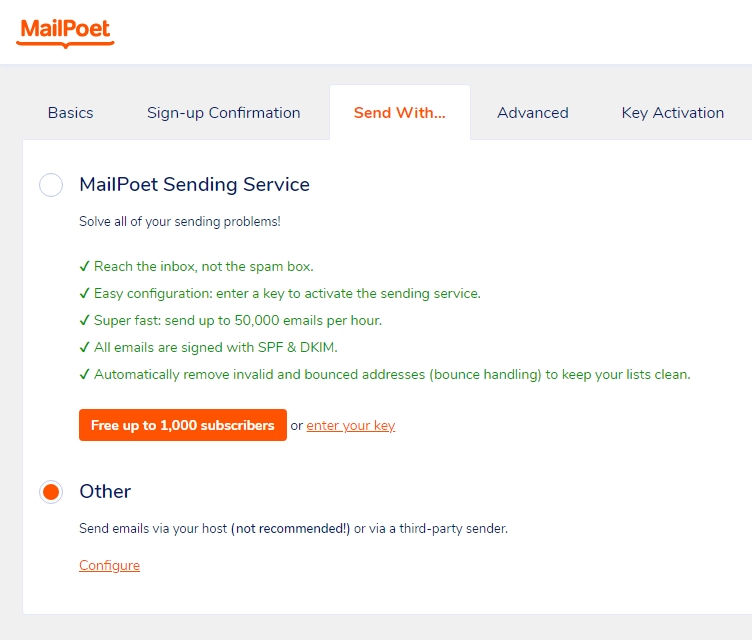
Senden mit…
[x] Sonstige
Versenden Sie E-Mails über Ihren Hosting-Anbieter (nicht empfehlenswert!)
oder über einen Drittanbieter-Versanddienst.[Konfigurieren]
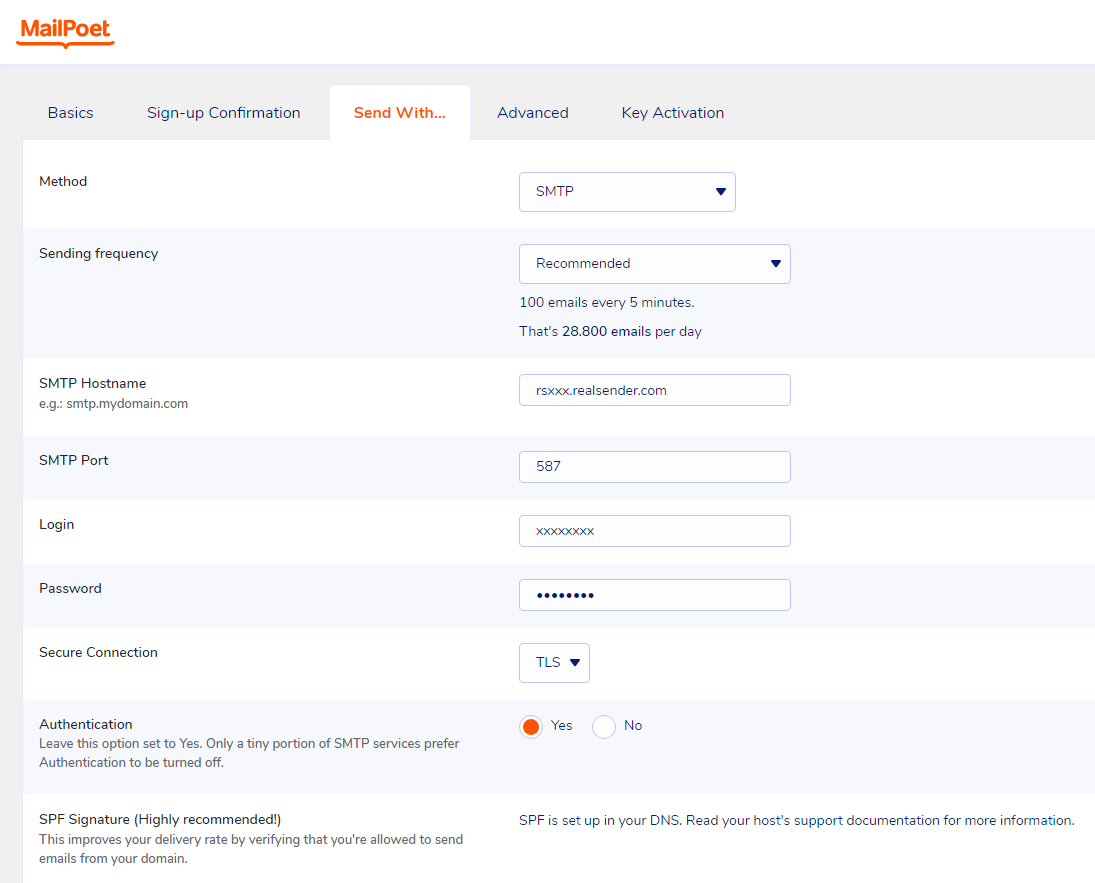
Senden mit…
Methode: SMTP
Versandhäufigkeit: Empfohlen
(100 E-Mails alle 5 Minuten. Das sind 28.800 E-Mails pro Tag)SMTP-Hostname: rsxxx.realsender.com
SMTP-Port: 587
Login: (der von uns gesendete)
Passwort: (das, das wir Ihnen geschickt haben)
Sichere Verbindung: TLS
Authentifizierung: [x] Ja
[Einstellungen speichern]
Für Premium-Funktionen und Support wählen Sie auf der Mailpoet-Preisseite
die Option „Ich möchte nur die Premium-Version ohne Versand“.
Auf diese Weise können Sie RealSender weiterhin nutzen und
es mit einer speziellen E-Mail-Adresse kombinieren, um die Bounces zu empfangen.
Das Plugin „Bounce Handler Mailpoet“ muss ebenfalls installiert werden.
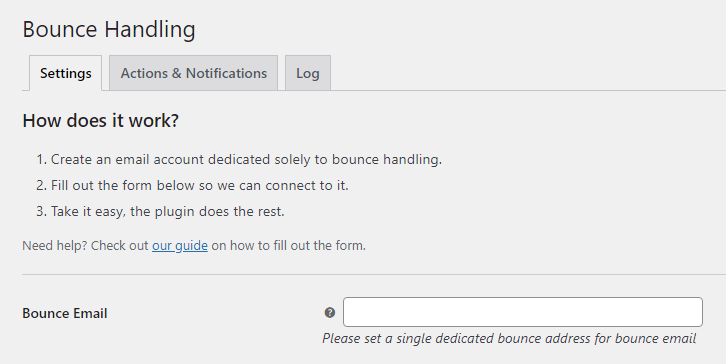
Aufprallbehandlung
Bounce-E-Mail:
Bitte richten Sie eine separate Bounce-E-Mail-Adresse ein.
Bitte kontaktieren Sie unser Support-Team, um [die Mailbox für den Empfang der unzustellbaren Nachrichten zu erhalten](../../bouncehandler-app/newsletter-mailboxes)
WordPress MailPoet 2

WordPress
MailPoet > Einstellungen
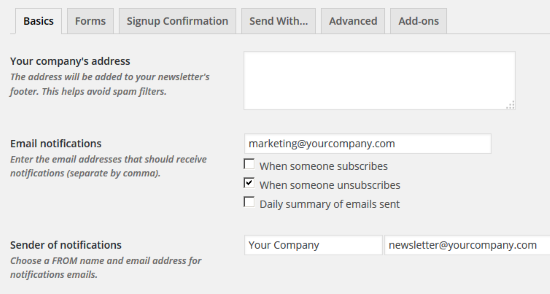
Grundlagen
E-Mail-Benachrichtigungen:
Bitte geben Sie die korrekte E-Mail-Adresse ein.Absender der Benachrichtigungen:
Absendernamen und die E-Mail-Adresse
des Newsletters ein.
[Einstellungen speichern]
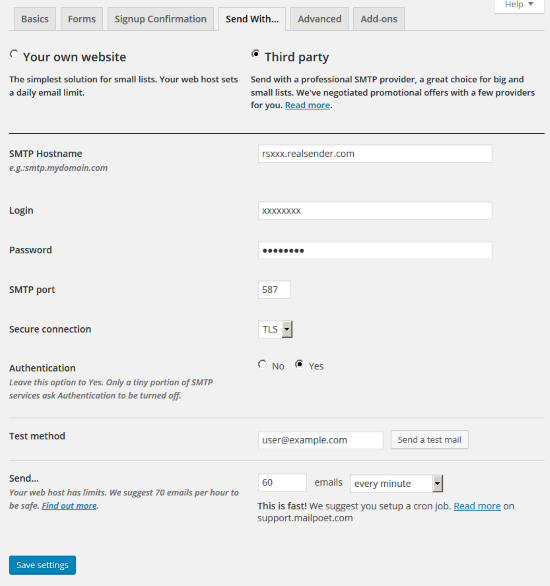
Senden mit…
[x] Dritte
SMTP-Hostname: rsxxx.realsender.com
Login: (der von uns gesendete)
Passwort: (das, das wir Ihnen geschickt haben)
SMTP-Port: 587
Sichere Verbindung: TLS
Authentifizierung: [x] Ja
Senden Sie… 60 E-Mails pro Minute
[Einstellungen speichern]
WordPress MailPress

WordPress > Plugins
MailPress > Einstellungen
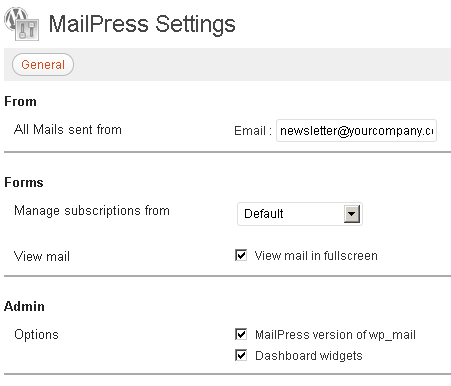
Allgemein
Absender – Alle von diesem Absender gesendeten E-Mails:
Füllen Sie das Formular mit der E-Mail-Adresse und dem Namen des Absenders aus.
Bei Ihrer ersten MailPress-Installation
müssen Sie auf [Änderungen speichern] klicken,
um die zusätzlichen Einstellungsoptionen (SMTP, Test, Protokolle) anzuzeigen.
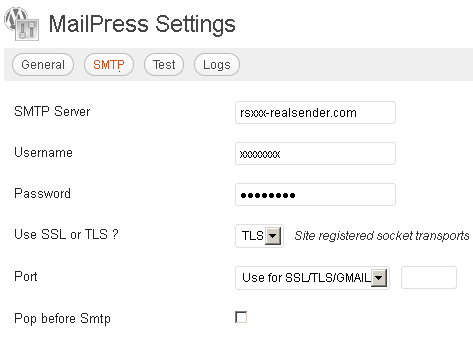
SMTP
SMTP-Server: rsxxx.realsender.com
Benutzername: (der von uns gesendete)
Passwort: (das von uns gesendete)SSL oder TLS verwenden? TLS
Port: Für SSL/TLS/GMAIL verwenden
WordPress Mailster

WordPress
Einstellungen > Newsletter
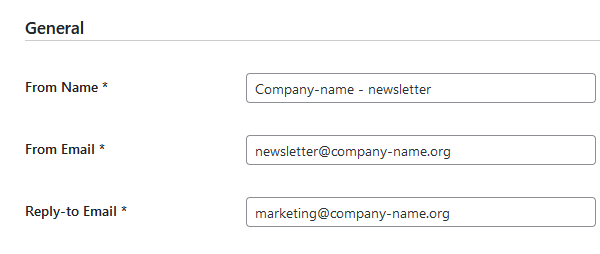
Allgemein
Von Name:
Aus einer E-Mail:
Antwort-E-Mail:
(Füllen Sie das Formular mit den Daten Ihres Unternehmens aus)
[Änderungen speichern]
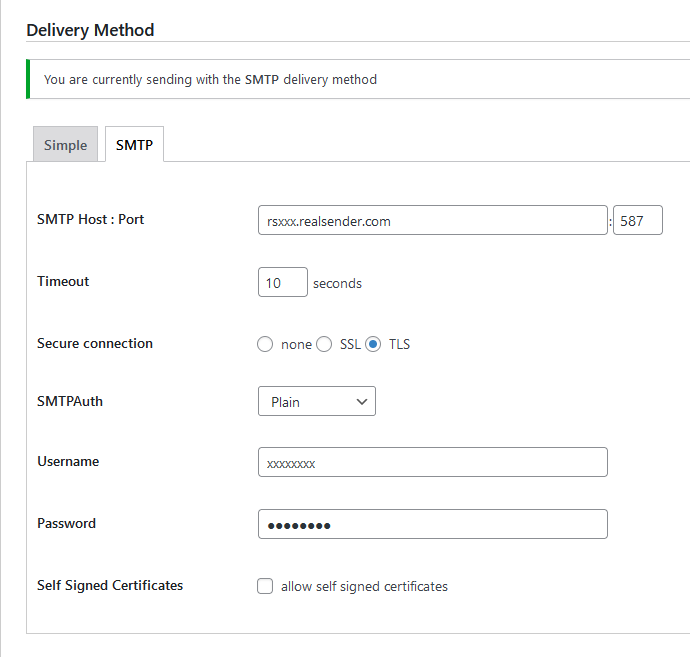
Liefermethode
[SMTP]
SMTP-Host: Port rsxxx.realsender.com: 587
Zeitüberschreitung: 10 Sekunden
Sichere Verbindung: [x] TLS
SMTPAuth: Einfach
Benutzername: (der, den wir Ihnen geschickt haben)
Passwort: (das, das wir Ihnen geschickt haben)
[Änderungen speichern]
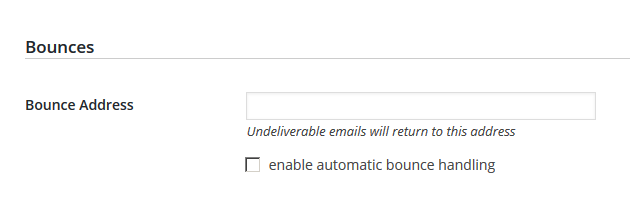
Sprünge
Unzustellbare E-Mails werden an diese Adresse zurückgesendet
.
Bitte kontaktieren Sie unser Support-Team, um [die Mailbox für den Empfang der unzustellbaren Nachrichten zu erhalten](../../newsletter-mailboxes)
Erleichtern Sie das Abmelden
Bieten Sie Ihren Empfängern stets eine einfache Möglichkeit, sich von Ihren Nachrichten abzumelden. Dies kann Öffnungs- und Klickraten sowie die Effizienz des Nachrichtenversands verbessern. Wichtig: Wenn Sie mehr als 5.000 Nachrichten pro Tag versenden, müssen Ihre Marketing- und Abonnenten-E-Mails die Abmeldung mit einem Klick ermöglichen. – Gmail, Richtlinien für E-Mail-Absender, 2024Erfahren Sie mehr über List-Unsubscribe: Header in RFC 2369 und RFC 8058.
Nachdem wir festgestellt hatten, dass die meisten unserer Kunden in ihren gesendeten Nachrichten keine List-Unsubscribe-Header verwendeten,
beschlossen wir, diese automatisch zu jeder Nachricht hinzuzufügen, sofern diese Header nicht bereits vorhanden sind.
Stornierungsanfragen müssen innerhalb von zwei Tagen bearbeitet werden.
Eine Abmeldung auf anderem Wege ist nicht zulässig.
Eine E-Mail-Nachricht wird automatisch von Gmail und anderen Anbietern generiert.
Sie wird an die E-Mail-Adresse (auch mehrere) zugestellt, die Sie uns mitgeteilt haben.
Alternativ können Sie unter der Webadresse rsXXX-realsender.com/unsubs
alle in den letzten sieben Tagen eingegangenen Abmeldeanfragen
im JSON-Format abrufen, wie im folgenden Beispiel gezeigt:
{ "mailbox": "rsXXX", "id": "20241107T001800-0000", "from": "<john.doe@gmail.com> ", "Zu": [ "<abuse@rsXXX-realsender.com> " ], "subject": "RealSender :: rsXXX Nov-7 4A6NDqsl008203 :: Bitte melden Sie mich ab ::", "date": "2024-11-07T00:18:00.938050657+01:00", "posix-millis": 1730935080938, "size": 4350, "seen": false },Bouncehandler-App

Das wiederholte Versenden von E-Mails an falsche oder inaktive Empfänger gilt als „Spammerverhalten“.
In den letzten Jahren wurden aus diesem Grund immer mehr SMTP-Server auf die schwarze Liste gesetzt.
Der auffälligste Fehler tritt auf, wenn das Postfach der Absenderadresse (Mail-From/Return-Path),
an das die unzustellbaren Nachrichten gesendet werden, voll oder nicht vorhanden ist.
Wenn beim Versenden Tausender Nachrichten 20 % zurückkommen, kann selbst ein großes Postfach innerhalb weniger Minuten voll sein.
Das Empfangen aller ungelesenen Benachrichtigungen könnte als kleiner Fehler gelten.
Sie senden weiterhin E-Mails an Adressen, die mit Fehlermeldungen zurückkommen, die niemanden interessieren.
In beiden Fällen wird der SMTP-Server auf die Blacklist gesetzt. Dadurch
werden Nachrichten nicht nur an ungültige Empfänger nicht zugestellt, sondern auch gültige Empfänger erhalten sie als Spam.
Um das erste Problem zu lösen, bieten wir schon seit Längerem „ Newsletter-Postfächer
Die Analyse unzustellbarer Nachrichten ist schwieriger und erfordert ein sehr zuverlässiges Tool.
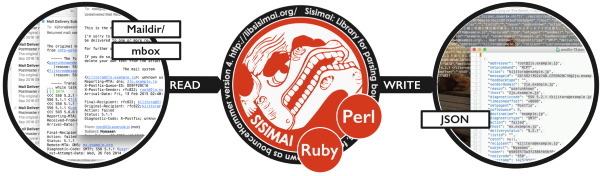
Wir haben uns für „Sisimai: Mail Analyzing Interface“ entschieden, ehemals bekannt als bounceHammer 4: ein Fehlermail-Analysator. Es handelt sich um
eine Open-Source-Software, die RFC5322-Bounce-Mails analysiert und strukturierte Daten im JSON-Format generiert.
Um einen Überblick über alle möglichen Fehlercodes zu erhalten, die Sisimai analysiert, werfen Sie einen Blick in „The SMTP Field Manual“,
eine Sammlung von unformatierten SMTP-Fehlercodeantworten der wichtigsten E-Mail-Dienstleister.
Die automatische Sperrliste
Die Implementierung des Bounce-Handlers in RealSender ist einfach.
- Aktivieren Sie das „Newsletter-Postfach“.
- Konfigurieren Sie Ihre sendende Anwendung so, dass sie die neue Return-Path-Adresse verwendet
- Bitten Sie um Überprüfung der Einrichtung und aktivieren Sie den „Bounce-Handler“
Die „Bouncehandler“-App beginnt mit der Überprüfung der zurückgesendeten Nachrichten.
Zwei Sperrlisten werden aktiviert:
-
Die Sperrliste für Hard Bounces
enthält alle E-Mail-Adressen, die einen permanenten Fehler verursacht haben,
z. B. „Benutzer unbekannt“ oder „Host nicht erreichbar“.
Das https://…hardbounces.email.weekly
wöchentliche Hard-Bounce-Protokoll ist unter folgender Webadresse verfügbar: -
Die Sperrliste für Soft Bounces
enthält alle E-Mail-Adressen, die
innerhalb von mindestens einer Woche drei oder mehr vorübergehende Fehler, wie z. B. ein volles Postfach,
. Das wöchentliche Soft-Bounce-Protokoll ist unter folgender Webadresse verfügbar:
https://…softbounces.email.weekly
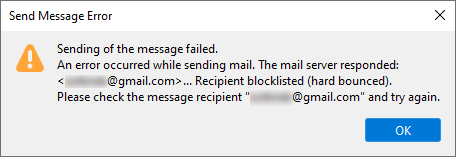
Beim Senden von Nachrichten an einen gesperrten Empfänger wird ein Fehler wie dieser erzeugt:
Verwalten Sie Ihre Blöcke unabhängig
Wir stellen Ihnen die folgenden Dateien
als Webadressen zur Verfügung, die durch ein Passwort oder eine IP-Adresse geschützt sind:
https://…bounces.json
Die Details der in den letzten sieben Tagen eingegangenen Bounces im JSON-Format, zum Beispiel:
{ „feedbacktype“: „“, „addresser“: „info@Circuitocinemascuole.com“, „Diagnostictype“: „SMTP“, „TimezoneOffset“: „+0200“, „Lhost“: „linp.arubabusiness.it“, „Destination“: „gmail.com“, „Timestamp“: 1635536166, „Senderdomain“: „Circuitocinemascuole.com“, „deliverystatus“: „5.1.1“, „token“: „daad8f8fc89cef70e1406a9d2b38be6c35326e03“, „recipient“: „...@gmail.com“, „subject“: „Prenotazioni aperte_Giornata Internazionale dei Diritti dell'Infanzia e dell'Adolescenza_Film FIGLI DEL SOLE“, „Ursprung“: "/home/rs109-bounce/Maildir/new/1635528969.21113_0.rsbox.realsender.com", "rhost": "gmail-smtp-in.l.google.com", "reason": "userunknown", "diagnosticcode": "550-5.1.1 Das E-Mail-Konto, das Sie erreichen wollten, existiert nicht. Bitte überprüfen Sie die E-Mail-Adresse des Empfängers auf Tippfehler oder unnötige Leerzeichen. Weitere Informationen finden Sie unter https://support.google.com/mail/?p=NoSuchUser z3si7494964ybg.507 - gsmtp 503 5.5.1 RCPT first. z3si7494964ybg.507 - gsmtp", "messageid": "McuPi4DjtlyhvlSMVNB4wTXsUKQeIy6XwlKoAZuJ4@www.circuitocinemascuole.com", "listid": "", "action": "failed", "softbounce": 0, "replycode": "550", "catch": null, "alias": "", "smtpagent": "Sendmail", "smtpcommand": "DATA" },https://…hardbounces.json
Die Details der Hard Bounces, die 1 in den letzten sieben Tagen erhalten hat, im JSON-Format
https://… hardbounces.email
Liste der E-Mail-Adressen, die in den letzten sieben Tagen einen Hard Bounce generiert haben
1 = Auswahlkriterien: Softbounce == 0
https://…softbounces.json
Die Details der 2 , die in den letzten sieben Tagen empfangen wurden, im JSON-Format
https://… softbounces.email
Liste der E-Mail-Adressen, die in den letzten sieben Tagen einen Soft Bounce von 2 generiert haben
2 = Auswahlkriterien: Softbounce == 1
Dies sind dieselben Dateien, die von der automatischen Sperrliste verwendet werden:
https://…hardbouncesfull.email
die Liste aller E-Mail-Adressen, die
innerhalb von mindestens einer Woche
https://…softbouncesfull.email
die Liste aller E-Mail-Adressen, die
innerhalb von mindestens einer Woche
Unterabschnitte der Bouncehandler-App
Newsletter-Postfächer
Um die durch den Versand von Newslettern und Massenmailings generierten Bounce-Nachrichten zu empfangen,
müssen Sie zusätzliche Postfächer einrichten (z. B. bounce@…).
und optional ein Postfach für den Empfang von Antwort-E-Mails (z. B. news@…),
falls Sie diese filtern und automatische Antworten auf die häufigsten Anfragen senden möchten.
Aus diesem Grund haben wir zwei Postfächer eingerichtet, die Ihrem RealSender-Konto zugeordnet sind:
bounce@email.youremaildomain.com -> bounce@rsXXX-realsender.com
news@email.youremaildomain.com -> news@rsXXX-realsender.com
Erläuterung:
Die Verwendung einer Absenderadresse (auch bekannt als Rücksendeadresse) mit einer anderen Domain als der Absenderadresse würde die DMARC-Authentifizierung beeinträchtigen. Um die Newsletter-Postfächer zu nutzen, müssen Sie eine Subdomain der Absenderadresse einrichten. Beispiel: Die Absenderadresse lautet: offers@youremaildomain.com. Die Subdomain könnte lauten: email.youremaildomain.com. CNAME rsXXX-realsender.com. Die Absenderadresse lautet dann: bounce@email.youremaildomain.comDie vorgeschlagene Konfiguration entspricht den Regeln
für den Versand von DMARC-konformen E-Mails im Namen von Kunden.
DMARC ermöglicht es Ihnen, authentifizierte E-Mails über eine Subdomain (z. B. email.youremaildomain.com) zu versenden und trotzdem die Top-Level-Domain im From:-Header zu verwenden (z. B. From: offers@youremaildomain.com).
Für Ihren Domainnamen sind keine zusätzlichen DNS-Einstellungen erforderlich.
Gemäß RFC 1912, Abschnitt 2.4, ist die gleichzeitige Existenz eines CNAME-Eintrags mit anderen Daten nicht zulässig. Anders ausgedrückt: Wenn email.youremaildomain.com ein Alias für rsXXX-realsender.com ist, darf kein MX-Eintrag, kein A-Eintrag und auch kein TXT-Eintrag für email.youremaildomain.com existieren Die Postfächer sind so konfiguriert, dass sie
große Mengen an E-Mails in kurzer Zeit empfangen können, beispielsweise im Falle von Bounces.
!!! Bitte beachten Sie: E-Mails werden nach 7 Tagen automatisch gelöscht !!!
Um die E-Mails herunterzuladen, müssen Sie Ihren E-Mail-Client
oder die Anwendung, die unzustellbare Nachrichten analysiert,
mit der folgenden POP3-Serveradresse konfigurieren: pop.rsXXX-realsender.com.
Benutzernamen und Passwörter sind im geschützten Bereich der Website verfügbar.
Abmeldung mit Block

Falls diese nicht vorhanden sind, fügt RealSender die List-Unsubscribe-Header automatisch
zu Ihren gesendeten Nachrichten hinzu, wie auf der Seite „Abmeldung leicht gemacht“ beschrieben.
In der Messaging-App des Empfängers
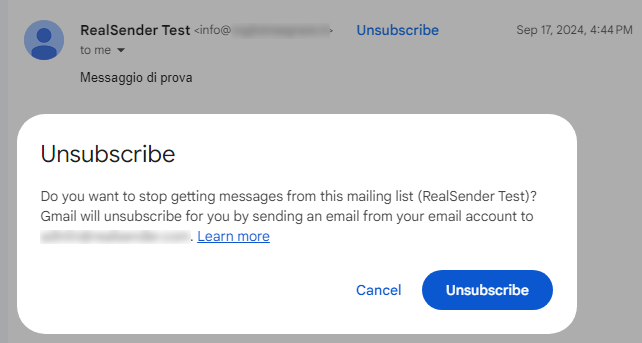
erscheint nach dem Klicken auf den Link „Abmelden“ eine Bestätigungsanfrage:
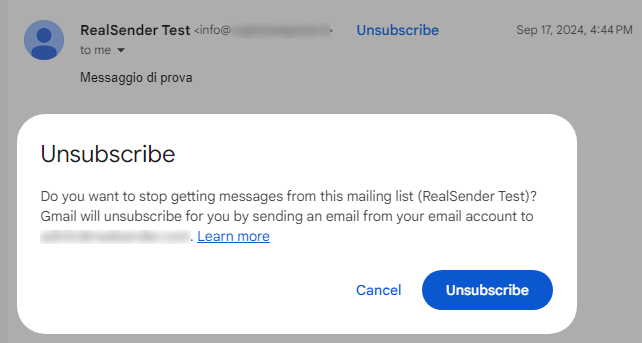
Nach Eingang der Anfrage sendet uns der Anbieter die Kündigungsbenachrichtigung,
die wir umgehend an die vom Kunden angegebene E-Mail-Adresse, gegebenenfalls auch an mehrere,
mit dem Betreff „RealSender :: rsXXX MM-DD #EMAILID# :: bitte mich abmelden ::“ weiterleiten.
Die automatische Sperrliste
Die App „bouncehandler“ prüft automatisch auf Abmeldeanfragen
und blockiert neue E-Mails von Empfängern, die darum gebeten haben, keine weiteren E-Mails zu erhalten.
Die Abmelde-Sperrliste ist aktiviert:
Sie enthält alle E-Mail-Adressen, die sich
über die Funktion „Listenabmeldung“ abgemeldet haben (siehe oben).
Das https://…unsubs.email.weekly
wöchentliche Protokoll aller Abmeldungen finden Sie unter folgender Webadresse:
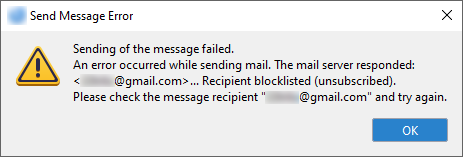
Das Senden von Nachrichten an einen Empfänger auf der Sperrliste führt zu einem Fehler wie diesem:
Verwalten Sie Ihre Blöcke unabhängig
Wir stellen Ihnen die folgenden Dateien
als Webadressen zur Verfügung, die durch ein Passwort oder eine IP-Adresse geschützt sind:
https://…unsubs.json
Die Details der in den letzten sieben Tagen eingegangenen Abmeldeanfragen im JSON-Format, wie zum Beispiel:
{ "mailbox": "rsXXX", "id": "20241121T181856-0088", "from": "Jonh Doe<john.doe@bogusemail.net> ", "Zu": [ "<abuse@rsXXX-realsender.com> " ], "subject": "RealSender :: rsXXX Nov-1 4ALGbKtb016000 :: bitte ABMELDEN ::", "date": "2024-11-21T18:18:56.908809804+01:00", "posix-millis": 1732209536908, "size": 4057, "seen": false },https://…unsubs.email
Liste der E-Mail-Adressen, die in den letzten sieben Tagen die Abmeldung beantragt haben
Dies sind dieselben Dateien, die von der automatischen Sperrliste verwendet werden:
https://…unsubssfull.email
Die Liste aller E-Mail-Adressen, die die Abmeldung angefordert haben, in alphabetischer Reihenfolge
Copymail-App

Mit der RealSender „Copymail“-App können Sie Massenmails
direkt aus Ihrem E-Mail-Client an bis zu Tausende von Empfängern versenden.
Mit drei einfachen Schritten:
- Laden Sie Ihre Empfängerliste hoch
- Senden Sie die Nachricht, die Sie verteilen möchten, an die E-Mail-Adresse „list-post“, die wir Ihnen mitteilen
- Nachricht genehmigen, um die Zustellung zu starten
Jeder Empfänger erhält die Nachricht so, als wäre sie nur an ihn selbst gesendet worden,
mit Ihrer E-Mail-Adresse als Absender.
Wesentliche Merkmale:
Mitgliederliste
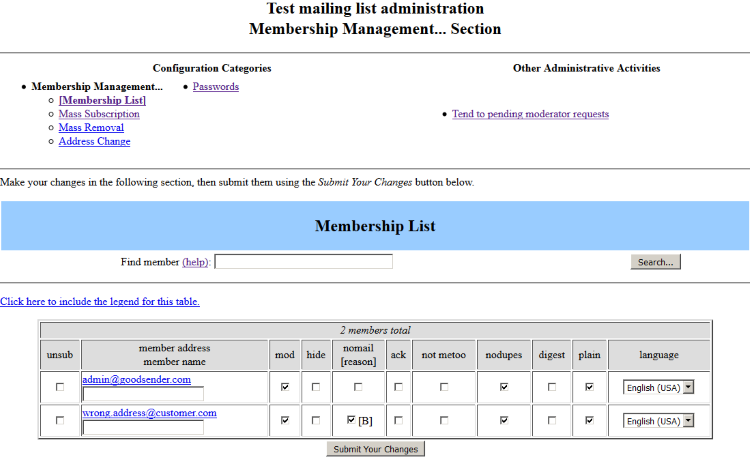
Massenabonnements
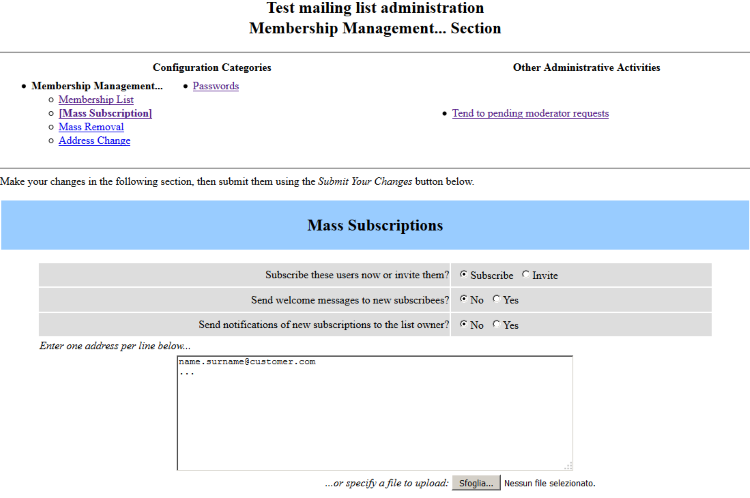
Zurückgehaltene Nachrichten (Genehmigung ausstehend)
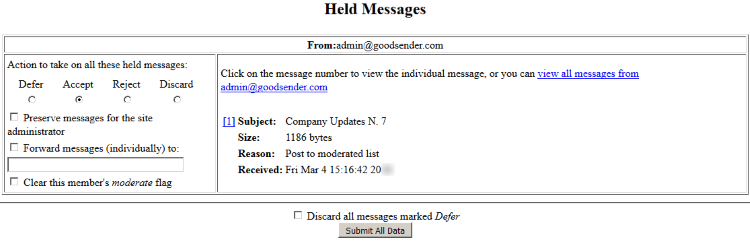
Unterabschnitte der Copymail-App
automatische Bounce-Verwaltung

Das wiederholte Versenden an falsche/inaktive Empfänger gilt als „Spammerverhalten“
Die „Copymail“-App von RealSender erledigt dies automatisch und transparent.
Der Empfänger sieht nur den ursprünglichen Absender, der weiterhin Antworten von den Empfängern erhält.
E-Mails enthalten einen Header, der für den Empfänger unsichtbar bleibt. Dieser sogenannte „Return-Path“ ermöglicht es, Fehlermeldungen an eine andere E-Mail-Adresse weiterzuleiten.
Copymail füllt diesen Header automatisch mit wichtigen Informationen, die nicht nur den Empfang der Nachricht gewährleisten, sondern auch die Herkunftsliste und die E-Mail-Adresse des Fehlers ermitteln.
Nachfolgend ein Beispiel für den Header, der in eine Nachricht eingefügt wurde,
die von der Liste „test“ an den Empfänger „wrong.address@customer.com“:
Return-Path:
Die Anwendung erkennt zwei Fehlertypen:
Hard Bounce (Statuscode 5.XXX.XXX): Die E-Mail-Adresse hat einen permanenten Fehler verursacht,
z. B. „550 5.1.1 … Benutzer unbekannt“ oder „5.1.2 … Host unbekannt“.
Ein permanenter Fehler bedeutet, dass Sie an diesen Empfänger keine E-Mails mehr senden sollten.
Soft Bounce (Statuscode 4.XXX.XXX): Die E-Mail-Adresse hat einen temporären Fehler verursacht,
z. B. „452 4.2.2 … Postfach voll“.
Ein vorübergehender Fehler bedeutet, dass Sie die Zustellung zu einem späteren Zeitpunkt erneut versuchen können.
Hier eine kurze Beschreibung, wie die automatische Bounce-Verwaltung funktioniert:
-
Nach drei Hard Bounces (dauerhafter Fehler, z. B. „Benutzer unbekannt“) oder sechs Soft Bounces (vorübergehender Fehler, z. B. „Postfach voll“) wird der Empfänger gesperrt und in der Abonnentenliste unter der Spalte „nomail“ ein Häkchen gesetzt.
-
Sobald der Empfänger blockiert ist, werden drei Nachrichten mit dem Inhalt „Ihr Abonnement der Liste … wurde deaktiviert“ versendet, bevor der Empfänger aus der Liste entfernt wird.
-
Wenn der Empfänger aus der Liste entfernt wird, erhält der Administrator eine E-Mail-Benachrichtigung.
Hinweis: Nur ein Fehler pro Tag wirkt sich auf die Punktzahl des Abonnenten aus. Selbst wenn am selben Tag zehn Bounces eingehen, erhöht sich die Punktzahl nur um eins.
All diese Vorgänge mögen einfach und selbst manuell durchführbar erscheinen.
Dies ist jedoch nur bei sehr kleinen Empfängerzahlen, bis zu einigen hundert Empfängern, möglich.
Im Durchschnitt werden etwa 20 % der versendeten Nachrichten zurückgesendet.
Von 1.000 E-Mails werden etwa 200 zurückgesendet,
was ohne ein automatisiertes System nicht mehr zu bewältigen ist.
Abmeldeverwaltung
1. Die Nutzung automatisierter Anruf- und Kommunikationssysteme ohne menschliches Eingreifen (automatische Anrufmaschinen), Faxgeräte oder E-Mails zu Direktmarketingzwecken ist nur gegenüber Abonnenten oder Nutzern zulässig, die ihre vorherige Einwilligung erteilt haben. 2. Abweichend von Absatz 1 darf eine natürliche oder juristische Person, die im Rahmen des Verkaufs eines Produkts oder einer Dienstleistung gemäß der Richtlinie 95/46/EG die elektronischen Kontaktdaten ihrer Kunden für Direktmarketingzwecke für eigene ähnliche Produkte oder Dienstleistungen erhält, diese elektronischen Kontaktdaten auch für Direktmarketingzwecke nutzen, sofern den Kunden zum Zeitpunkt der Erhebung ihrer elektronischen Kontaktdaten und bei jeder Nachricht – sofern sie dieser Nutzung nicht bereits zuvor widersprochen haben – klar und deutlich die Möglichkeit eingeräumt wird, dieser Nutzung kostenlos und auf einfache Weise zu widersprechen. – Unerwünschte Kommunikation, Auszug aus Artikel 13 der Richtlinie 2002/58/EGDiese mittlerweile überholte Regel dient weiterhin als Grundlage für die Prinzipienfindung. Kurz gesagt:
- Die Empfänger müssen den Empfang von Nachrichten angefordert haben
- Die einzige Ausnahme besteht, wenn sie bereits Kunde sind, und auch dann
muss ihnen stets die Möglichkeit zur Abmeldung eingeräumt werden.
Abgesehen von den rechtlichen Konsequenzen führt die Nichteinhaltung dieser einfachen Regeln im Wesentlichen dazu, als „Spammer“ abgestempelt zu werden. Der dadurch entstehende Schaden kann sogar dazu führen, dass Sie selbst diejenigen Empfänger nicht mehr erreichen können, die Ihre Mitteilungen erhalten möchten.
Die „Copymail“-App von RealSender bietet einen Link zu einer Optionsseite, über die man sich von jeder Liste abmelden
kann. Dieser Link kann vom Kunden in E-Mails eingefügt werden. Hier ein Beispiel:
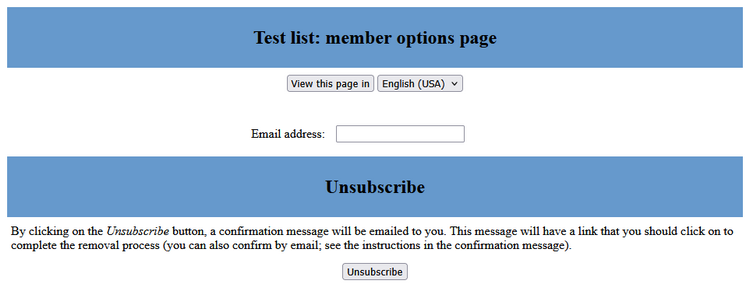
Nach dem Ausfüllen des Formulars erhält die angegebene Adresse eine E-Mail
mit der Aufforderung, auf den Link zu klicken, um die Stornierung zu bestätigen:
Wir haben eine Anfrage zur Löschung Ihrer E-Mail-Adresse aus der Mailingliste erhalten. Um Ihre Abmeldung zu bestätigen, besuchen Sie bitte diese Webseite: (http-Adresse für die Abmeldebestätigung)Dieselbe Nachricht wird auch an diejenigen gesendet, die sich
über den Header „List-Unsubscribe: …“ abmelden möchten. Dieser Header wird automatisch in jede versendete E-Mail eingefügt.
Dieser Header ermöglicht es Webmail-Anwendungen wie Gmail, den Link „Abmelden“ direkt in der Benutzeroberfläche zu aktivieren
, ohne dass der Benutzer ihn in der Nachricht suchen muss.
Um über alle von Empfängern selbstständig vorgenommenen Abmeldungen benachrichtigt zu werden, wird empfohlen,
die Benachrichtigungsfunktion an die E-Mail-Adresse des Administrators
in den „Allgemeinen Optionen“ der Liste zu aktivieren:

für Systemintegratoren

Themen in diesem Bereich:
SMTP ohne Authentifizierung
E-Mails ohne Authentifizierung senden
SMTP mit dediziertem Hostnamen
Verwenden Sie Ihre eigene Subdomain, zum Beispiel: smtp.yourdomain.com
Senden über API
Wie man E-Mail-Nachrichten über eine API versendet
Senden per HTTP-Anfrage
Wie erhalte ich die Ausgabe von HTTP-Anfragen, die von Webformularen oder Textnachrichten generiert werden, per E-Mail?
Senden über Formulargenerator
Erstellen Sie einfache Formulare und erhalten Sie die Daten per E-Mail
Versand über Link-Builder
Fügen Sie vorausgefüllte personalisierte Links in E-Mails ein und erhalten Sie sofortiges Feedback
Benutzercode-Schlüsselmanager
Erstellt und sendet einen alphanumerischen Code, den der Benutzer beim Anmelden an einem geschützten System eingibt
E-Mail-Verbindungs-App
Das flussbasierte visuelle Entwicklungstool, das E-Mails mit Geräten und Online-Diensten integriert
Reverse-Proxy-App
Der E-Mail-Proxy-Server, der die elektronische Kommunikation vereinfacht
Unterabschnitte für Systemintegratoren
SMTP ohne Authentifizierung

Manchmal erlauben
ältere Software oder sehr einfache Anwendungen keine sichere Authentifizierung, wie sie RealSender erfordert
Die Lösung besteht darin, einen Port für den SMTP-Server zu öffnen und dabei
nur die IP-Adresse der Verbindung und die E-Mail-Adresse des Absenders zu überprüfen.
Auf diese Weise können Sie Ihre E-Mail-Nachrichten ohne Authentifizierung versenden,
haben aber jederzeit die Möglichkeit, sich zu authentifizieren.
RealSender-Partner und große Organisationen
können die Liste der autorisierten IPs selbstständig aktualisieren.
SMTP mit dediziertem Hostnamen

Ein unternehmensinterner SMTP-Hostname wird in den Einstellungen mehrerer Anwendungen verwendet.
Ihn zu ändern ist fehleranfällig und zeitaufwändig.
Mit RealSender können Sie Ihre Subdomain definieren, zum Beispiel:
smtp.youremaildomain.comWir kümmern uns um alles, einschließlich der SSL-Zertifikate
, die für eine sichere SMTP-Authentifizierung erforderlich sind.
Diese Konfiguration gibt Ihnen absolute Sicherheit,
da Sie wissen, dass der SMTP-Hostname unter Ihrer Kontrolle steht.
Ihre IT-Mitarbeiter müssen sich nicht mehr merken, wo die Konfiguration ist,
da eine Änderung nicht mehr erforderlich sein wird.
Bitte beachten Sie: Die erforderliche Sonderkonfiguration
verursacht zusätzliche jährliche Kosten
, die während der Angebotsphase angegeben werden.
Senden über API
Themen in diesem Bereich:
API-Übersicht
Serveradresse, obligatorische Parameter, JSON-Antworten
API-Details
Zeichensatz, Inhaltstyp, optionale Parameter, JSON-Antworten
API-Beispiele
PHP- und cURL-Beispiele
API-Beispiele mit Anhängen
PHP- und cURL-Beispiele mit Anhängen
Unterabschnitte des Sendens über die API
API-Übersicht
Mit RealSender können Sie E-Mail-Nachrichten über eine API (Programmierschnittstelle) versenden.
So können Sie E-Mails direkt aus Ihrer Anwendung versenden, ohne den Umweg über SMTP (Simple Mail Transfer Protocol). Aktuell unterstützen wir nur POST-Anfragen.
Serveradresse:
https://rsXXX-api.realsender.com/mail/send
Erforderliche/obligatorische Parameter:
| apiuser | Benutzername für Authentifizierung |
| API-Passwort | Authentifizierungspasswort |
| aus | Absender-E-Mail-Adresse |
| Zu | E-Mail-Adresse des Empfängers |
| Thema | Betreff der E-Mail |
| Text | E-Mail-Text im Klartext |
| html | E-Mail-Text im HTML-Format |
Wenn alles in Ordnung ist, wird die Nachricht gesendet und Sie erhalten eine positive JSON-Antwort:
{"success":true}
Im Fehlerfall erhalten Sie eine Fehlermeldung wie diese:
{"success":false,"errorMsgs":["Bitte geben Sie den Wert für 'subject' an."]}
API-Details
Der Inhalt muss im internationalen Zeichensatz UTF-8.
Um dies zu testen, fügen Sie „€uro“ in den Betreff ein und senden Sie die E-Mail ab. Bei einem falschen Zeichensatz erhalten Sie folgende JSON-Warnung:
{"success":false,"errorMsgs":["Der Wert 'subject' ist nicht korrekt kodiert. Er muss UTF-8-kodiert sein."]}
Je nachdem, ob Sie eines oder beide Felder „text“ und/oder „html“ ausgefüllt haben, werden die Nachrichten mit einem der folgenden „Content-Type“-Typen gesendet:
| Text | text/plain (nur Text) |
| html | text/html (nur HTML) |
| text+html | multipart/alternative (sowohl Text als auch HTML) legen fest, welcher Teil angezeigt wird. |
Nicht erforderliche/optionale Parameter:
| Vorname | Absenderbeschreibung |
| umbenennen | Empfängerbeschreibung |
| Antwort an | E-Mail-Adresse, an die die Antworten gesendet werden |
| Rückweg | Die E-Mail-Adresse, an die die unzustellbaren E-Mails gesendet werden sollen, muss in der Liste der autorisierten Absender von RealSender aufgeführt sein. |
| cc | E-Mail-Adresse in Kopie |
| ccname | Beschreibung der Kohlekopie |
| bcc | E-Mail-Adresse in Blindkopie |
| bccname | Beschreibung der Blindkopie |
| befestigen | Anzuhängende Datei(en) – können mehrfach im Formular vorhanden sein – maximale Größe 3 MB. Der Dateiinhalt muss Teil der Multipart-HTTP-POST-Anfrage sein. enctype="multipart/form-data" ist für INPUT TYPE=FILE erforderlich. |
Die Felder „An“, „Cc“ und „Bcc“ können entweder eine einzelne E-Mail-Adresse oder eine durch Kommas getrennte Liste von E-Mail-Adressen.
!! Bei RealSender ist die Gesamtzahl der Empfänger pro E-Mail auf 25 begrenzt (sie kann auf bis zu 100 erhöht werden).
Die Serverantworten erfolgen im JSON-Format (JavaScript Object Notation):
| E-Mail gesendet | {"success":true} |
| E-Mail nicht gesendet | {"success":false,"errorMsgs":["..."]} |
API-Beispiele
POST-Anfrage
ohne cURL mit PHP
<?php $url = 'https://rsXXX-api.realsender.com/mail/send'; $data = array('apiuser' =>'die von uns bereitgestellte', 'apipass' => 'die von uns bereitgestellte', 'from' => 'sender@example.com', 'to' => 'recipient@example.com', 'subject' => 'Betreff der Nachricht', 'text' => 'E-Mail-Text im Klartext', 'html' => 'E-Mail-Text im HTML-Format'); // Verwenden Sie den Schlüssel 'http', auch wenn Sie die Anfrage an https:// senden... $options = array( 'http' => array( 'header' => "Content-type: application/x-www-form-urlencoded\r\n", 'method' => 'POST', 'content' => http_build_query($data), ), ); $context = stream_context_create($options); $result = file_get_contents($url, false, $context); var_dump($result); ?>POST-Anfrage
CURL-Methode
curl -d 'apiuser=der von uns bereitgestellte Benutzername&apipass=der von uns bereitgestellte Benutzername&from=sender@example.com&to=recipient@example.com&subject=Betreff der Nachricht&text=E-Mail-Text im Klartext&html=E-Mail-Text im HTML-Format'https://rsXXX-api.realsender.com/mail/sendAPI-Beispiele mit Anhängen
POST-Anfrage mit Anhängen (max. 5: attach1, attach2, …) –
Methode ohne CURL mit PHP
<?php require_once 'HTTP/Request2.php'; $config = array('use_brackets' =>false, ); $request = new HTTP_Request2('https://rsXXX-api.realsender.com/mail/send', HTTP_Request2::METHOD_POST, $config); $data = array('apiuser' => 'der von uns bereitgestellte Benutzername', 'apipass' => 'das von uns bereitgestellte Passwort', 'from' => 'sender@example.com', 'to' => 'recipient@example.com', 'subject' => 'Betreff der Nachricht', 'text' => 'E-Mail-Text im Klartext', 'html' => 'E-Mail-Text im HTML-Format'); foreach ($data as $k => $d) { $request->addPostParameter($k, $d); }; $request->addUpload('attach1', './sample.pdf', 'sample.pdf', 'application/pdf'); $request->addUpload('attach2', './sample.txt', 'sample.txt', 'text/plain'); $result = $request->send(); var_dump($result); ?>POST-Anfrage mit Anhängen
CURL-Methode
curl -F 'apiuser=die von uns bereitgestellte API-ID' \ -F 'apipass=die von uns bereitgestellte API-ID' \ -F 'from=sender@example.com' \ -F 'to=recipient@example.com' \ -F 'subject=Betreff der Nachricht' \ -F 'text=E-Mail-Text im Klartext' \ -F 'html=E-Mail-Text im HTML-Format' \ -F 'attach=@sample.pdf;type=application/pdf' \ -F 'attach=@sample.txt;type=text/plain' \ https://rsXXX-api.realsender.com/mail/sendSenden per HTTP-Anfrage
Themen in diesem Bereich:
Überblick
Skriptadresse, Pflichtparameter, versteckte und nicht versteckte Felder
Details
nicht erforderliche/optionale Parameter, versteckte und nicht versteckte Felder
Beispiel für ein Webformular
einfaches HTML-Webformularbeispiel
SMS zu HTTP-Beispiel
SMS-Weiterleitung an HTTP: Konfigurationsbeispiel mit Teltonika-Routern
Unterabschnitte des Sendens per HTTP-Anfrage
Überblick
Mit RealSender können Sie HTTP-Anfragen, wie beispielsweise Inhalte von Webformularen, einfach per E-Mail senden.
So erhalten Sie die Ergebnisse Ihrer Feedback-Formulare direkt in Ihr Postfach.
Sie müssen keine speziellen Einstellungen vornehmen.
Die Formulare können auf jeder HTML-Webseite veröffentlicht oder direkt in Ihre E-Mails eingefügt werden.
Skriptadresse:
<form action="https://rsXXX.realsender.com/script/form.pl" method="post" accept-charset="utf-8">
Erforderliche/obligatorische Parameter (versteckte Felder):
| Empfänger | Die E-Mail-Adresse oder der „Alias“, an den die Formularübermittlung aus Sicherheitsgründen gesendet wird; die „echte“ Adresse sollte auf Serverebene konfiguriert werden. |
| erforderlich | Dies ist eine Liste der Felder, die der Benutzer vor dem Absenden des Formulars ausfüllen muss. Wir empfehlen, nur das Feld „E-Mail“ zu überprüfen (Inhalt und Syntax werden geprüft). Zusätzliche Prüfungen erfolgen üblicherweise per JavaScript; wir können Ihnen Beispiele zur Verfügung stellen. |
| umleiten | Nach erfolgreicher Formularübermittlung wird der Nutzer auf diese URL weitergeleitet |
| Umleitung für fehlende Felder | Der Benutzer wird hierher weitergeleitet, wenn eines der Pflichtfelder leer gelassen wird |
Erforderliche/obligatorische Parameter (nicht versteckte Felder):
| Sie wird zur Absender-E-Mail-Adresse der Nachricht | |
| wenn die E-Mail-Adresse korrekt ist |
Die Daten werden an den konfigurierten Empfänger gesendet. Der Benutzer wird zur „Redirect“-URL weitergeleitet. |
| wenn die E-Mail-Adresse fehlt oder syntaktisch falsch ist |
Es wird keine E-Mail versendet; der Benutzer wird zur URL „missing_fields_redirect“ weitergeleitet. |
Details
Nicht erforderliche/optionale Parameter (versteckte Felder):
| Thema | die Betreffzeile der E-Mail |
| env_report | Eine Liste der Umgebungsvariablen des Benutzers, die in die E-Mail aufgenommen werden sollen. Nützlich, um beispielsweise die IP-Adresse des Benutzers zu erfassen. Beispiel: Wert=“REMOTE_HOST,REMOTE_ADDR,HTTP_USER_AGENT” |
| print_blank_fields | Wenn dieser Wert auf „1“ gesetzt ist, werden auch leere Felder in die E-Mail aufgenommen |
Nicht erforderliche/optionale Parameter (nicht versteckte Felder):
| echter Name | Der vollständige Name des Nutzers wird Teil der E-Mail-Adresse des Absenders |
| jedes_andere_Feld | Sie können beliebig viele Felder hinzufügen; eine Konfiguration auf Serverebene ist nicht erforderlich |
Für die Formularübermittlung wird die internationale Zeichenkodierung UTF-8 verwendet.
Um dies zu testen, fügen Sie „€uro“ in ein beliebiges Feld ein, senden Sie das Formular ab und überprüfen Sie die E-Mail-Bestätigung.
Beispiel für ein Webformular
Dies ist ein einfaches HTML-Webformularbeispiel
mit zwei optionalen Parametern: „realname“ und „notes“.
<form action="https://rsXXX.realsender.com/script/form.pl" method="post" accept-charset="utf-8"><input type="hidden" name="recipient" value="email_address-or-alias" /><input type="hidden" name="required" value="email" /><input type="hidden" name="redirect" value="/form/thankyou.html" /><input type="hidden" name="missing_fields_redirect" value="/form/error.html" /> Name:<br /><input name="realname" /><br /> E-Mail:<br /><input name="email" /><br /> Anmerkungen:<br /><textarea cols="40" rows="2" name="notes"></textarea><br /><input type="submit" /></form>Die Landingpages „redirect“ und „missing_fields_redirect“ können auf Ihrem Server gehostet werden.
Sie können beliebig viele Felder hinzufügen; serverseitig ist keine Konfiguration erforderlich.
SMS zu HTTP-Beispiel
Um SMS-Nachrichten direkt in Ihrem Postfach zu empfangen,
bieten Teltonika-Router die Option „SMS-Weiterleitung an HTTP-Konfiguration“ an.
Sie finden es in der Teltonika-Weboberfläche: Dienste > Mobile Utilities > SMS-Gateway.
!! Die Empfängerdomäne (yourdomain.com) muss von RealSender vorautorisiert werden !!
Name des Zahlenwerts: E-Mail Methode: POST URL: https://rsXXX.realsender.com/script/sms.pl Name des Nachrichtenwerts: Nachricht Zusätzliches Datenpaar 1: Empfänger | name@yourdomain.com Zusätzliches Datenpaar 2: Betreff | SMS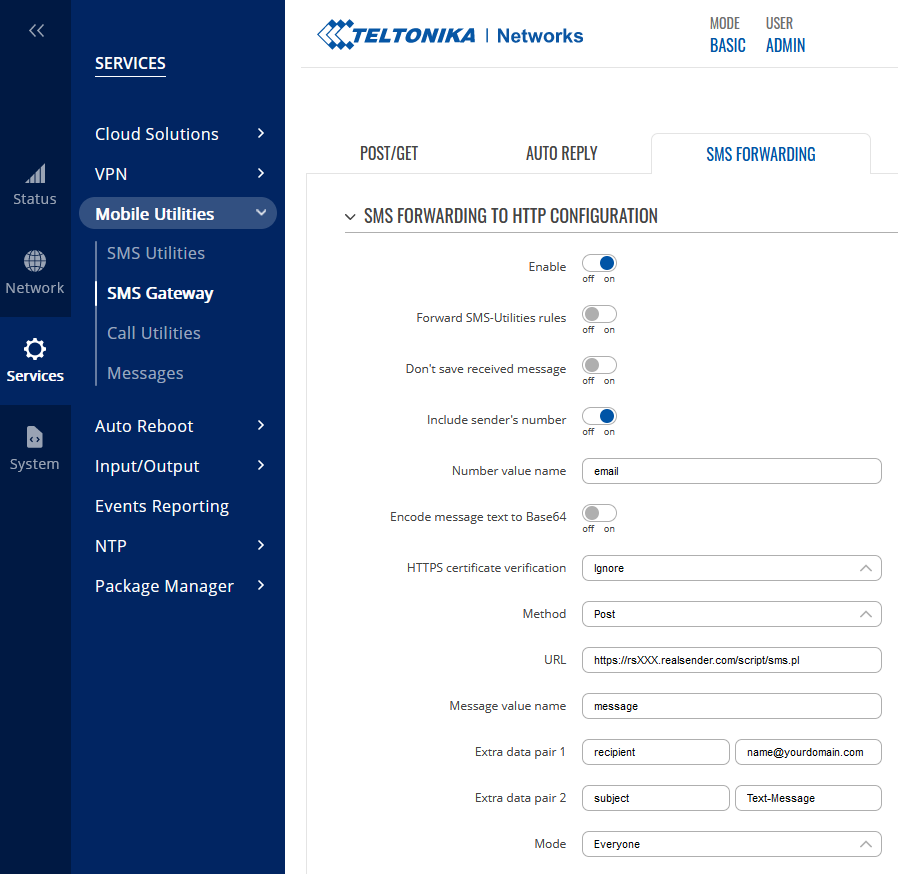
Option 1 – Nutzung mobiler Daten
Für die einwandfreie Funktion von RealSender ist eine 4G-Verbindung (LTE) erforderlich.
Sie können diese in der Teltonika-Weboberfläche einrichten: Netzwerk > Mobilfunk > SIM-Karteneinstellungen
Netzwerktyp: Nur 4G (LTE)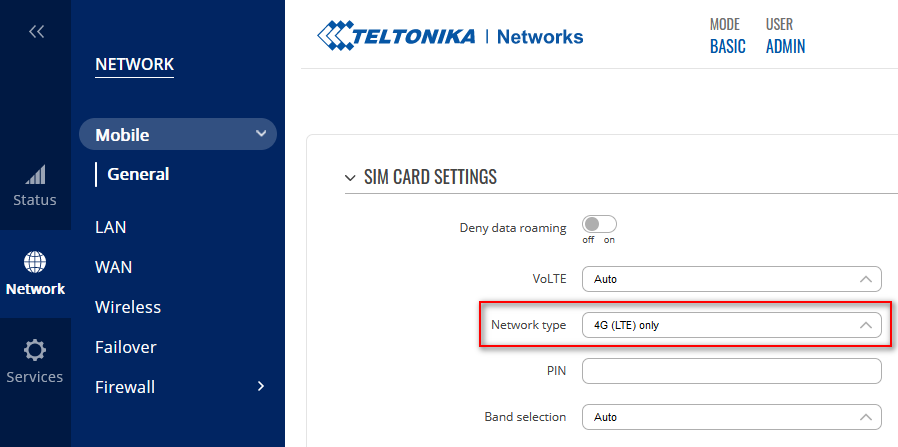
Option 2 – Verwendung von LAN-Gateway-Daten
Sie können das Internet-Gateway so konfigurieren, dass es über Ihr LAN läuft.
Teltonika WebUI: Netzwerk > LAN > Netzwerkschnittstellen > [Bearbeiten]
Konfigurieren Sie einfach das IPv4-Gateway und die DNS-Server.
Siehe das folgende Beispiel (passen Sie es mit Ihren eigenen Parametern an):
Schnittstellen: LAN ... IPv4-Gateway: 192.168.1.1 DNS-Server: 8.8.8.8 !! erforderlich !!Die mobile Datenverbindung kann auf verschiedene Arten deaktiviert werden, siehe: Mobile Daten deaktivieren.
Wenn mobile Daten deaktiviert sind, funktioniert der SMS-Versand weiterhin.
Die einfachste Möglichkeit, mobile Daten zu deaktivieren, besteht darin, eine SMS an die Mobilnummer: <router_password> mobileoff
Die Änderungen können Sie auf die gleiche Weise mit dem Befehl „status“ überprüfen: <router_password> status
Beispiel einer empfangenen E-Mail-Nachricht
Betreff: SMS (+41790000000) Nachfolgend die empfangene SMS. Sie wurde am Montag, den 26. Juni 2023 um 08:31:29 Uhr MESZ von (+41790000000) gesendet. --------------------------------------------------------------------------- Testnachricht ---------------------------------------------------------------------------Senden über Formulargenerator

Der Empfang klarer und strukturierter Informationen über das Internet kann kompliziert sein.
Er erfordert eine Benutzeroberfläche zum Ausfüllen und eine Serveranwendung, die die Daten sendet.
Mit dem „Formulargenerator“ von RealSender können Sie einfache und responsive Formulare erstellen, die
somit auch auf Tablets und Smartphones mit kleinen Bildschirmen nutzbar sind
und die Daten direkt an Ihre E-Mail-Adresse senden.
Einige „Drag & Drop“-Komponenten helfen Ihnen dabei, Ihre Fragen zu strukturieren:
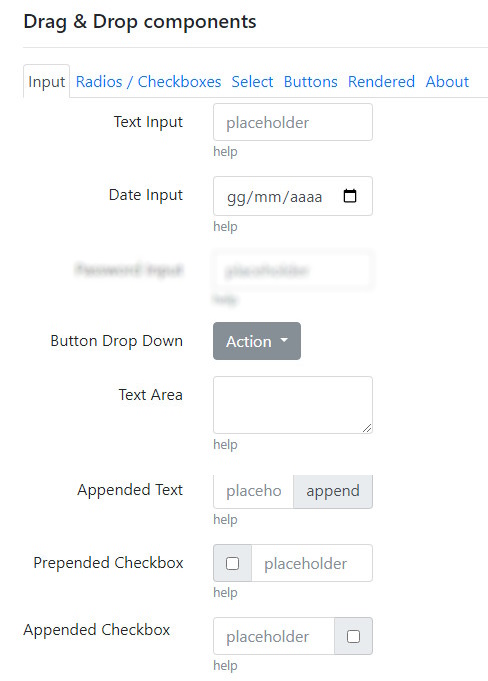
Der Quellcode kann als sofort einsatzbereite „form.html“-Datei heruntergeladen werden:
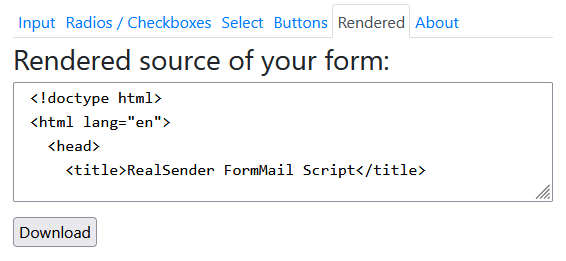
Sie können den „Formulargenerator“ selbst ausprobieren unter:
» formmail.realsender.com/form_builder
- Fügen Sie ein „Texteingabefeld“ und eine „Schaltfläche“ (auf der Registerkarte „Schaltflächen“) hinzu, mit der Sie das Formular absenden können
- Klicken Sie auf die Schaltfläche „Herunterladen“ (im Tab „Gerendert“), um die Datei lokal zu speichern
- Öffnen Sie form.html, geben Sie einen Text ein und drücken Sie die Schaltfläche, um den Inhalt abzusenden
(HINWEIS: Da es nicht online veröffentlicht wird, wird die „Danke“-Seite grob sein).
Die Nachricht wird im temporären E-Mail- Dienst von RealSender empfangen : inxbox.realsender.com
HINWEIS: In der Datei form.html können drei Parameter geändert werden: - recipient = Der Code, der der E-Mail-Adresse des Empfängers zugeordnet ist, um Missbrauch zu verhindern. Die E-Mail-Adresse wird im Sendeskript vorkodiert, sodass „0“ steht. Die Nachricht wird in der temporären E-Mail-Adresse des Absenders empfangen. - email = Die E-Mail-Adresse der Person, die das Formular ausfüllt (ID=email). Dieser Parameter wird nur verwendet, wenn im Formular kein Feld „E-Mail“ vorhanden ist. - subject = Der Betreff der E-Mail-NachrichtFordern Sie eine kostenlose Testversion an, wenn Sie die HTML-Datei online veröffentlichen möchten.
Sie erhalten dann ein elegantes Bestätigungsfenster wie unten abgebildet.
Die eingegebenen Daten werden direkt an Ihre E-Mail-Adresse gesendet.
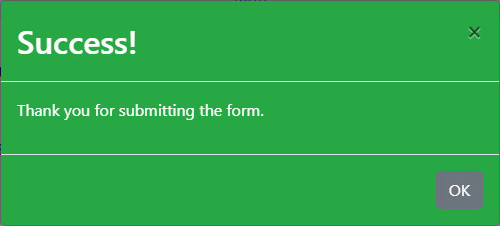
Versand über Link-Builder

Ein einfacher Link, den Sie in die E-Mail einfügen können, ermöglicht es Ihnen
, sofortiges Feedback vom Empfänger zu erhalten.
Sie können den „Link-Builder“ unter folgendem Link ausprobieren:
» flashmail.realsender.com/link_builder
Einige Beispiele
Für weitere Informationen zur Aktion dieses Monats klicken Sie hier: https://click.youremaildomain.com/s/flash.pl?promo=yesWenn Sie an der Veranstaltung teilnehmen möchten, klicken Sie hier: https://click.youremaildomain.com/s/flash.pl?event=yesUm das neue Produkt zu bestellen, klicken Sie hier: https://click.youremaildomain.com/s/flash.pl?newproduct=yesWenn Sie die E-Mail-Adresse am Ende des Links hinzufügen, wie unten angegeben,
wird die Antwortadresse eingefügt und die Antwort wird an die E-Mail-Adresse der Person gesendet, die geklickt hat:
&email=name@example.comUm die „Landingpage“ festzulegen, die nach dem Senden der Daten angezeigt wird,
fügen Sie den Parameter „rdir“ am Ende des Links hinzu, wie unten gezeigt:
&rdir=/okAlternativ können Sie Ihre Website-Adresse angeben, zum Beispiel:
&rdir=www.example.com/thankyouAufstellen
Um zu verhindern, dass die in Ihren Mitteilungen enthaltenen Links
als „Phishing-Versuch“ eingestuft werden,
muss eine Subdomain der Absenderdomain konfiguriert werden, zum Beispiel:
click.youremaildomain.com CNAME click.realsender.comDer Empfänger der Benachrichtigungen, gegebenenfalls auch mehrere, wird im Skript festgelegt.
Sie teilen uns dies während der Konfigurationsphase mit.
Webmail
In den obigen Beispielen werden Benachrichtigungen an
unsere temporäre E-Mail-Adresse gesendet, die unter folgender Adresse zu finden ist:
https://inxbox.realsender.com/monitor
Benutzercode-Schlüsselmanager

Ein „Benutzercode“ ist ein alphanumerischer Code, den der Benutzer beim Anmelden an einem geschützten System eingibt.
Der RealSender „Usercode Key Manager“ generiert automatisch stündlich einen eindeutigen Benutzercode,
der auf Anfrage an die zugehörige E-Mail-Adresse gesendet wird.
Nur vorab autorisierte E-Mail-Adressen können den Benutzercode anfordern.
Länge und Komplexität des Benutzercodes werden bei der Systemkonfiguration festgelegt.
Dies ist beispielsweise der Inhalt der E-Mail-Nachricht, die dem Benutzer den Code sendet:
Ihr Benutzercode lautet: 665407 !! Der Benutzercode läuft stündlich um 03:03 Uhr abDie Integration in Ihr sicheres System ist einfach:
- Wir konfigurieren die IP-Adresse, die zum Abrufen des Benutzercodes berechtigt ist
- Sie richten einen Cronjob* ein, der das Passwort automatisch anhand des abgerufenen Benutzercodes aktualisiert
(die Aktualisierung muss für jeden Benutzer durchgeführt werden, der zum Zugriff auf das System berechtigt ist).
* = ein zeitbasierter Aufgabenplaner, der verwendet wird, um Befehle automatisch in bestimmten Intervallen auszuführen.
Zur Erhöhung der Sicherheit empfehlen wir die Aktivierung des „fail2ban“-Schutzes,
der Besucher nach einer bestimmten Anzahl erfolgloser Anmeldeversuche sperrt.
Sie können es selbst ausprobieren, indem Sie ein RealSender-Testkonto aktivieren.
Neben den Daten zum Versenden von E-Mails erhalten Sie auch eine Anleitung für den Zugriff auf Ihren Benutzerbereich.
Dies ist beispielsweise der Inhalt der E-Mail-Nachricht mit Anweisungen
für den Zugriff auf den RealSender-Benutzerbereich und Webspace:
Ihr Zugangslink zum Benutzerbereich: https://username:usercode@rsXXX.realsender.com/reserved.area/ Ihr Zugangslink zum Webbereich: https://username:usercode@rsXXX.realsender.com/view/ !! Die Zugangslinks verfallen stündlich um 0:03 UhrIn diesem Fall wird der Benutzercode in einem webbasierten Zugriffssystem verwendet, das durch „Basisauthentifizierung“ geschützt ist.
Sowohl der Benutzername als auch der Benutzercode werden automatisch ausgefüllt,
wodurch dem Benutzer ein einfacher und sofortiger Zugriff ermöglicht wird.
Falls Ihr System keine automatische Anmeldung unterstützt,
können Sie den Benutzercode einfach
als PIN oder Zugangscode in der E-Mail-Nachricht übermitteln, der vom Benutzer manuell eingegeben werden muss, zum Beispiel:
Ihr sicherer Beispiellink: https://secure.example.com - Zugangscode: 000000E-Mail-Verbindungs-App

Die RealSender-App „emailconnect“ ist ein Open-Source-Tool zur visuellen Entwicklung mit Flow-Architektur,
das auf Node-RED v5 basiert und ursprünglich von IBM entwickelt wurde.
Es dient der Integration von E-Mails mit netzwerkfähigen Hardwaregeräten, APIs und Online-Diensten.
Es bietet eine webbasierte Benutzeroberfläche, auf der vordefinierte Elemente per Drag & Drop angeordnet
und die einzelnen Bausteine – sogenannte Knoten – miteinander verbunden werden können, um automatisierte Anwendungen zu erstellen.
Die App enthält einige Abläufe, die für bestimmte Aufgaben entwickelt wurden, wie zum Beispiel:
Kunden können die Abläufe selbst anpassen oder ihre eigenen Abläufe unabhängig entwickeln und
E-Mails einfach über den integrierten RealSender-Dienst versenden.
Das angebotene System wird auf dedizierten virtuellen Servern (einer pro Kunde)
in einer ständig aktualisierten, sicheren und zuverlässigen Umgebung gehostet.
Die Dienste werden permanent überwacht und bei Bedarf automatisch neu gestartet.
Unterabschnitte der E-Mail-Connect-App
Google News-Benachrichtigungen

Google News ist ein von Google entwickelter und betriebener Nachrichtenaggregator.
Er bietet einen kontinuierlichen Strom von Links zu Artikeln, die von Tausenden von Verlagen und Magazinen zusammengestellt werden.
Der Dienst ist in über 60 Ländern und in mehr als 35 Sprachen verfügbar.
Die Google News-Website erstellt automatisch eine Liste von Nachrichtenartikeln
aus großen Online-Zeitungen (des jeweiligen Landes)
und gruppiert diese nach inhaltlicher Ähnlichkeit, sortiert nach Thema und Veröffentlichungsdatum.
Die Nachrichten werden stets als kurze Zusammenfassungen veröffentlicht.
Der „Google News-Benachrichtigungs“-Ablauf für die Emailconnect-App
extrahiert den RSS-Feed und sendet E-Mail-Benachrichtigungen
im gewünschten Intervall zu einem bestimmten Thema an den zugehörigen Empfänger:

Duplizieren Sie einfach den Ablauf, bearbeiten Sie den ersten und letzten Knoten, und Sie erhalten
mehrere Benachrichtigungen zu verschiedenen Themen, die an mehrere Empfänger gesendet werden.
Wenn in den letzten 24 Stunden keine Neuigkeiten vorliegen, wird keine Nachricht versendet.
Mit der Schaltfläche links neben „Erstes Thema“ können Sie die Ausführung manuell erzwingen.
SMTP-Statusprüfung

Die SMTP-Statusprüfung verifiziert die Verfügbarkeit, Sicherheit und Funktionalität Ihres Mailservers.
Sie stellt sicher, dass der Server TCP-Verbindungen akzeptiert, sich ordnungsgemäß authentifiziert und E-Mails verarbeitet.
Die Überprüfung ist so konfiguriert, dass sie in regelmäßigen Abständen, alle zehn Minuten, ausgeführt wird.
Der Benutzer kann das vordefinierte Intervall selbst ändern.
Der Ablauf „SMTP-Statusprüfung“ der EmailConnect-App
überprüft die ordnungsgemäße Funktion des SMTP-Dienstes durch das Senden echter Nachrichten;
nur im Falle einer Fehlfunktion sendet das System eine Warn-E-Mail:
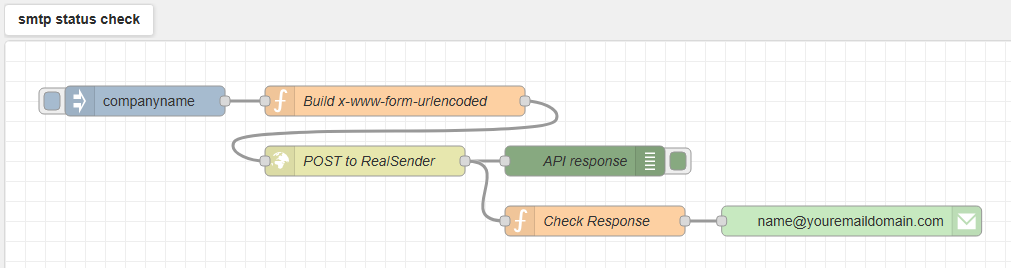
Duplizieren Sie einfach den Ablauf, bearbeiten Sie den ersten und letzten Knoten, und Sie erhalten
mehrere Benachrichtigungen für verschiedene SMTP-Server, die an die gewünschten Empfänger gesendet werden.
Benutzername und Passwort sind als „Umgebungsvariablen“ auf Systemebene festgelegt und können vom Benutzer nicht gelesen werden.
Mit der Schaltfläche links neben dem ersten „Firmenname“-Knoten können Sie die Ausführung manuell erzwingen
und das Ergebnis im Debug-Bereich auf der rechten Seite des Bildschirms anzeigen lassen.

Website-Statusprüfung

Die Website-Statusprüfung verifiziert die Verfügbarkeit, die SSL-Sicherheit und die Funktionalität Ihrer Website.
Sie überwacht den Betrieb Ihres Webservers, die Gültigkeit der SSL-Zertifikate und die Antwortzeit der Webseite.
Die Überprüfung ist so konfiguriert, dass sie in regelmäßigen Abständen, alle zehn Minuten, ausgeführt wird.
Der Benutzer kann das vordefinierte Intervall selbst ändern.
Der Ablauf der „Website-Statusprüfung“ der Emailconnect-App
sendet eine HTTP-Anfrage an die Adresse der Website und analysiert die Antwort;
nur im Falle einer Fehlfunktion sendet das System eine Warn-E-Mail:
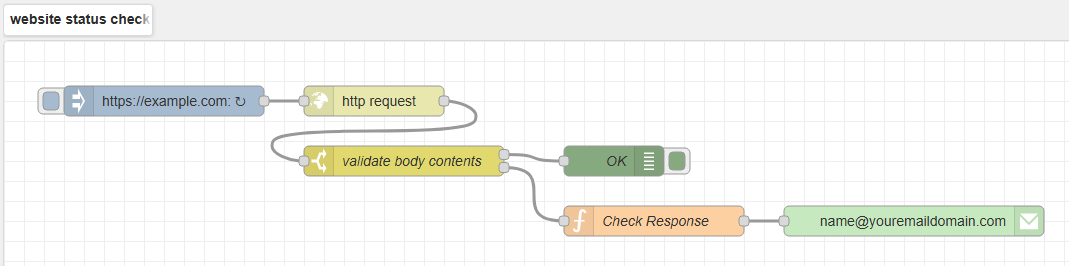
Duplizieren Sie einfach den Ablauf, bearbeiten Sie den ersten und letzten Knoten, und Sie erhalten
mehrere Benachrichtigungen für verschiedene Websites, die an die gewünschten Empfänger gesendet werden.
Mit der Schaltfläche links neben dem ersten https://example.com-Knoten können Sie die Ausführung manuell erzwingen
und das Ergebnis im Debug-Bereich auf der rechten Seite des Bildschirms anzeigen lassen:

Reverse-Proxy-App

Der E-Mail-Proxy-Server ermöglicht Ihnen Folgendes:
- Verbessern Sie die Sicherheit, Leistung und Skalierbarkeit Ihres SMTP-Servers
- Verbinden Sie sich problemlos mit zertifizierten E-Mail-Anbietern
- E-Mail-Kommunikation mit einer einzigen Zeile vereinfachen
- Benachrichtigungen an die ntfy-App senden (verfügbar für Android und iPhone)
- Kommunikation mit Empfängern, deren Mobilnummern nur
Hauptmerkmale:
Reverse-Proxy für SMTP-Server
verbessert die Sicherheit, Leistung und Skalierbarkeit Ihres SMTP-Servers
zertifiziertes E-Mail-Gateway
Verbinden Sie Ihre gesamte IT-Infrastruktur im Handumdrehen mit zertifizierten E-Mail-Anbietern
einzeilige Text-E-Mails
Packen Sie Ihre E-Mails in eine einzige Zeile, wandeln Sie E-Mail-Anhänge in Links um
Benachrichtigungen an die ntfy-App
Benachrichtigungen werden an die ntfy-App gesendet, die für Android- und iPhone-Systeme verfügbar ist
Nachrichten an Mobilnummern
Senden Sie E-Mails an mobile Geräte, empfangen Sie SMS per E-Mail und antworten Sie auf SMS direkt aus Ihrer E-Mail-Adresse
Unterabschnitte der Reverse-Proxy-App
Reverse-Proxy für SMTP-Server
um Clientanfragen zu bearbeiten und so Sicherheit, Leistung und Skalierbarkeit zu verbessern.
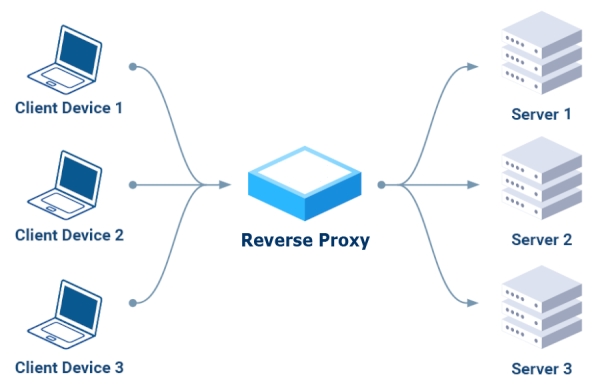
senden die Clients ihre Anfragen an den Reverse-Proxy,
der sie an die entsprechenden Server weiterleitet
und dabei als einziger, sicherer Zugriffspunkt fungiert.
Wichtigste Vorteile:
- Sicherheit:
Es kann bösartige Anfragen blockieren, den Datenverkehr verschlüsseln
und Backend-Server vor direkten Angriffen schützen. - Leistung:
Der eingehende Datenverkehr wird auf mehrere Server verteilt, wodurch eine Überlastung
einzelner Server verhindert und eine höhere Verfügbarkeit gewährleistet wird. - Skalierbarkeit:
Sie ermöglicht das Hinzufügen oder Entfernen von Backend-Servern ohne Serviceunterbrechung und
bietet somit die Möglichkeit, wachsendes Datenaufkommen zu bewältigen.
zertifiziertes E-Mail-Gateway

Zertifizierte elektronische Post ist eine E-Mail, die den Versand und die Zustellung einer Nachricht bestätigen und Empfangsbestätigungen liefern kann, die gegenüber Dritten verwendet werden können.
Es gibt drei Betriebsmodi, die auch kombiniert werden können, um den Versand von E-Mail-Nachrichten über zertifizierte E-Mail zu ermöglichen:
- Empfänger mit vordefinierten Domänenerweiterungen (z. B. pec.it, legalmail.it, pec.poste.it)
- Bei E-Mail-Adressen mit der Endung „.xx“ (z. B. domainname.com.xx)
wird die Endung „.xx“ automatisch entfernt. - bestimmte Absender (z. B. invoices@…)
Diese E-Mail-Nachrichten werden an einen anderen Server übermittelt, der sich beim zertifizierten E-Mail-SMTP-Dienst des Kunden authentifiziert (z. B. Aruba, Legalmail, Register, um nur einige zu nennen).
Der Absender wird automatisch auf die zertifizierte E-Mail-Adresse des Kunden geändert.
Unzustellbare Nachrichten (z. B. Benutzer unbekannt/Postfach voll) werden an die als Absender angegebene zertifizierte E-Mail-Adresse gesendet.
Falsche oder nicht mehr gültige E-Mail-Adressen müssen manuell korrigiert oder gelöscht werden, um den weiteren Versand zu verhindern, da sie den Spamschutz in den Postfächern der Empfänger auslösen könnten.
einzeilige Text-E-Mails

Die App „plainmail“ reduziert Ihre E-Mails auf eine einzige Textzeile,
entfernt E-Mail-Anhänge und versendet stattdessen Links:
Komprimieren Sie Ihre E-Mails
Fügen Sie einfach „.plain“ an die E-Mail-Domain der Empfänger an,
diese erhalten dann nur noch den Betreff:
Empfänger: email@example.com.plain Betreff: Ihre Kurznachricht (Emoticons sind erlaubt)Zusätzlicher E-Mail-Inhalt und Anhänge werden ignoriert;
stattdessen wird folgende Meldung angezeigt:
< PlainMail > Sämtlicher Inhalt außer der Betreffzeile wurde entfernt.E-Mail-Anhänge in Links umwandeln
Schreiben Sie einfach „[A]“ in die Betreffzeile und fügen Sie der E-Mail einen Anhang hinzu.
Die App „plainmail“ wandelt diesen automatisch in einen Link um.
Die Domain im Link kann eine beliebige dedizierte Domain oder Subdomain sein.
Die Datei wird nach sechs Monaten gelöscht.
Benachrichtigungen an die ntfy-App

Was ist ntfy?
ntfy (ausgesprochen „notify“) funktioniert als „Publish-Subscribe“-Benachrichtigungsdienst, bei dem Sie eine Nachricht an ein „Thema“ senden. Ein Smartphone oder Computer, auf dem die ntfy-App läuft und der dasselbe Thema abonniert hat, empfängt die Nachricht als Push-Benachrichtigung in Echtzeit.
Dies ermöglicht die Zustellung von Sofortbenachrichtigungen, die von Skripten, Servern oder anderen Diensten generiert werden, sodass Benutzer Benachrichtigungen ohne aufwendige Konfiguration erhalten können.
So funktioniert es mit RealSender:
-
Herausgeber:
Sie können Beiträge zu einem Thema per E-Mail veröffentlichen, indem Sie eine E-Mail an eine bestimmte Adresse senden. Beispielsweise können Sie einen Beitrag veröffentlichen, indem Sie eine E-Mail an topic@ntfy.youremaildomain.com.
Der Inhalt des Beitrags entspricht dem Betreff der E-Mail.
Nur RealSender-Benutzer sind berechtigt, E-Mails an diese Adresse zu senden. -
Abonnenten:
Sie erhalten Benachrichtigungen über ihr Smartphone oder ihren Computer,
sofern die ntfy-App installiert ist und sie das abonnierte Thema abonniert haben. -
Themen:
Stellen Sie sich Themen wie Kanäle vor, mit eindeutigen Namen und darin veröffentlichten Ereignisströmen.
Sie müssen Themen nicht explizit erstellen; wählen Sie einfach einen Namen und verwenden Sie ihn.
Themennamen sind öffentlich, daher ist es ratsam, einen Namen zu wählen, der nicht leicht zu erraten ist.
Nach dem Versand der E-Mail empfängt der ntfy-Server die Nachricht und speichert sie für die Abonnenten des jeweiligen Themas.
Ein Abonnent (über die ntfy-App) ist mit dem Thema verbunden und empfängt die Nachricht in Echtzeit.
Es handelt sich um ein „entkoppeltes System“: Herausgeber müssen ihre Abonnenten nicht kennen und umgekehrt.
Dies vereinfacht die Nutzung und Verwaltung sowohl für Herausgeber als auch für Abonnenten.
E-Mail-Anhänge in Links umwandeln
Schreiben Sie einfach „[A]“ in die Betreffzeile und fügen Sie der E-Mail einen Anhang hinzu.
Die App „plainmail“ wandelt diesen automatisch in einen Link um.
Die Domain im Link kann eine beliebige dedizierte Domain oder Subdomain sein.
Die Datei wird nach sechs Monaten gelöscht.
Nachrichten an Mobilnummern

Verbinden Sie Ihre E-Mails mit der mobilen Welt,
maximieren Sie Ihre Möglichkeiten der Geschäftskommunikation,
ohne Ihre Arbeitsgewohnheiten zu ändern:
- Senden Sie SMS von Ihrer E-Mail-Adresse
- Empfangen Sie SMS-Nachrichten per E-Mail
- Beantworten Sie SMS aus Ihrer E-Mail-Adresse
- E-Mail-Anhänge in Links umwandeln
Senden Sie SMS von Ihrer E-Mail-Adresse
Push-Benachrichtigungen sind der effektivste Weg, Ihre Kunden schnell zu erreichen.
Sie zeichnen sich durch extrem hohe Öffnungsraten (bis zu 95 %) und Spitzenantwortraten (bis zu 45 %) aus.
– Quelle: Gartner-Studie zu SMS, Jahr 2019
Empfänger: mobilenumber@text.yourdomain.com Betreff: Der Text der SMS, Emoticons sind erlaubt (zusätzlicher E-Mail-Inhalt und Anhänge werden ignoriert)Wir liefern Ihnen einen Industrierouter, der für Ihren Mobilfunkbetreiber vorkonfiguriert ist.
Die Kontrolle über das Senden und Empfangen von SMS muss über den verwendeten Mobilfunkanbieter erfolgen.
Unser System prüft alle zehn Minuten, ob der Router reagiert (Stromversorgung und Internetverbindung prüfen).
Um Missbrauch zu verhindern, müssen Nachrichten über RealSender mit vorab autorisierten Absendern und
unter Einhaltung der SPF- und DKIM-Standards („strict“) versendet werden. Weitere Informationen zur E-Mail-Authentifizierung (Fortgeschritten).
Empfangen Sie SMS-Nachrichten per E-Mail
Die SMS-Antworten werden direkt an Ihr bevorzugtes Postfach zugestellt,
zusammen mit einer E-Mail-Nachricht wie dieser:
Betreff: SMS (+41790000000) Nachfolgend die empfangene SMS. Sie wurde am Montag, den 29. Juli 2025 um 10:57:00 Uhr MESZ von (+41790000000) gesendet. --------------------------------------------------------------------------- Testnachricht ---------------------------------------------------------------------------Beantworten Sie SMS aus Ihrer E-Mail-Adresse
Mit der „plainmail“-App von RealSender können Sie Textnachrichten direkt aus Ihrem E-Mail-Konto versenden.
Sie können also über Ihr bevorzugtes E-Mail-Programm antworten.
Die Empfängeradresse ist bereits mit der ursprünglichen Absendernummer ausgefüllt:
Empfänger: mobilenumber@text.yourdomain.com Betreff: Inhalt der Antwort (zusätzlicher E-Mail-Inhalt und Anhänge werden ignoriert)Die Kommunikation zwischen E-Mail-Anwendung und Mobilgerät kann somit fortgesetzt werden.
E-Mail-Anhänge in Links umwandeln
Schreiben Sie einfach „[A]“ in die Betreffzeile und fügen Sie der E-Mail einen Anhang hinzu.
Die App „plainmail“ wandelt diesen automatisch in einen Link um.
Die Domain im Link kann eine beliebige dedizierte Domain oder Subdomain sein.
Die Datei wird nach sechs Monaten automatisch gelöscht.
Lass uns deine E-Mails optimieren

Themen in diesem Bereich:
über uns
unsere Geschichte und unsere Aufgabe
Kontakte
So erreichen Sie uns bei kommerziellen oder technischen Fragen
Tarife & Preise
Pläne für einen einzelnen dedizierten SMTP-Server oder mehrere dedizierte SMTP-Server
Nutzungsbedingungen
Anti-Spam-Richtlinie und weitere Service-Details
Grenzen unseres Angebots
was wir Ihnen nicht bieten können
Datenschutzrichtlinie
Wie gehen wir mit Datenschutz um?
Glossar
Erläuterung der Fachbegriffe
Unterabschnitte von „Lasst uns eure E-Mails optimieren“
über uns

In den Jahren 2006-2009, nachdem wir über ein Jahrzehnt lang eine deutsche E-Mail-Marketing-Plattform
vertrieben hatten
wurde uns die Bedeutung der SMTP-Server-Reputation bewusst.
Es gab nur eine Möglichkeit, dies zu gewährleisten:
einen dedizierten SMTP-Server mit eigener IP-Adresse für jeden Kunden.
Es war unser erster Schritt hin zur Bereitstellung innovativer Lösungen
in einer zuverlässigen, ständig überwachten Umgebung.
Unsere Aufgabe ist es, „Ihre E-Mails zu optimieren“.
Dafür arbeiten wir jeden Tag hart.
Wir geben Ihnen die volle Kontrolle und Transparenz über die ausgehenden E-Mails,
sodass die Empfänger Ihre Nachrichten erhalten und ihnen vertrauen.
Kontakte

Bei kommerziellen oder technischen Fragen:
- Erhalten Sie einen Link zum Chat mit einem Experten
-
E-Mail: contact@mx.realsender.com
-
Telefon: +41 61 5000365
-
SMS: +41 79 6276163
Unser Büro ist von Montag bis Freitag zwischen 9:00 und 19:00 Uhr (Mitteleuropäischer Zeit) geöffnet.
So erreichen Sie uns:
- Park+Rail am Bahnhof
6855 Stabio – Schweiz
- Internationaler Flughafen
Mailand Malpensa (MXP).
USt-IdNr./EU-USt-IdNr. IT02457460125
Tarife & Preise
 |
RealSender verfügt über einen dedizierten SMTP-Server, der bis zu 10.000 E-Mails pro Woche versenden kann (wird im Allgemeinen für 1:1-Kommunikation/Transaktions-E-Mails verwendet). |
 |
HighSender ist , das über 2 bis 100 dedizierte SMTP-Server mit automatischer Lastverteilung an mehrere bis zu 1.000.000 E-Mails pro Woche versenden kann (wird im Allgemeinen für Newsletter/Massenmailings verwendet). |
Für als „Apps“ gekennzeichnete Dienste fallen zusätzliche Kosten an. Bitte kontaktieren Sie uns für weitere Informationen. |
Unterabschnitte der Tarife & Preise
RealSender-Preise
Völlig kostenlos und unverbindlich.
90 Tage Geld-zurück-Garantie nach dem Kauf.
Absenderadressen |
(GB) |
(€ gilt nur für EU-Bürger) |
(Anzahl der E-Mails, die versendet werden können) |
|
|---|---|---|---|---|
| RealSender 100x3 | 100 | 9 | 990 $/€ | bis zu 30.000 |
| RealSender 50x2 | 50 | 6 | 590 $/€ | bis zu 20.000 |
| RealSender 25 | 25 | 3 | 390 $/€ | bis zu 10.000 |
| RealSender 10 | 10 | 2 | 240 $/€ | bis zu 4.000 |
| RealSender 5 | 5 | 0.5 | 190 $/€ | bis zu 1.000 |
Das wöchentliche Limit kann niedriger ausfallen, falls es zu Zustellungsproblemen kommt.
Benötigen Sie mehr Absenderadressen oder mehr E-Mail-Traffic? Bitte kontaktieren Sie uns.
x3 = Die Nachrichten werden über drei dedizierte SMTP-Server in zwei verschiedenen Rechenzentren gesendet:
Sollte einer ausfallen oder nicht erreichbar sein, leiten die beiden anderen Ihre Nachrichten weiterhin weiter.
x2 = Die Nachrichten werden über zwei dedizierte SMTP-Server in verschiedenen Rechenzentren gesendet:
Wenn einer ausfällt oder nicht erreichbar ist, leitet der andere Ihre Nachrichten weiterhin weiter.
Beim Versenden von ca. 10.000 E-Mails à 100 KB
über die Felder „E-Mail-Absenderadressen“ und „Wöchentlicher Datenverkehr“ wird ein Datenvolumen von 1 GB generiert. Wir haben eine Toleranzgrenze von +20 %.
Wird diese überschritten, werden Sie kontaktiert, um das Upgrade durchzuführen.
RealSender duldet keinerlei Spam (unerwünschte E-Mail-Werbung).
oder andere belästigende oder illegale Inhalte per E-Mail
versenden
werden ohne Rückerstattung umgehend von der Plattform gesperrt.
HighSender-Preise
Völlig kostenlos und unverbindlich.
90 Tage Geld-zurück-Garantie nach dem Kauf.
Absenderadressen |
(GB) |
(Anzahl der E-Mails, die versendet werden können) |
||
|---|---|---|---|---|
| HighSender 4 | n / A. | 8 | Kontaktieren Sie uns für ein Angebot | bis zu 40.000 |
| HighSender 3 | n / A. | 6 | Kontaktieren Sie uns für ein Angebot | bis zu 30.000 |
| HighSender 2 | n / A. | 4 | Kontaktieren Sie uns für ein Angebot | bis zu 20.000 |
Das wöchentliche Limit kann niedriger ausfallen, falls es zu Lieferproblemen kommt.
Benötigen Sie ein höheres wöchentliches Limit? Bitte kontaktieren Sie uns.
Beim Versand von ca. 10.000 E-Mails à 100 KB pro Woche werden ca. 1 GB Datenvolumen generiert.
Wir haben eine Toleranzgrenze von +20 %.
Wird diese überschritten, werden Sie kontaktiert, um das Upgrade durchzuführen.
na: In der Regel wird nur eine „E-Mail-Absenderadresse“ verwendet. Bitte fragen Sie nach, falls Sie weitere benötigen
RealSender duldet keinerlei Spam (unerwünschte E-Mail-Werbung).
oder andere belästigende oder illegale Inhalte per E-Mail
versenden
werden ohne Rückerstattung umgehend von der Plattform gesperrt.
Nutzungsbedingungen
RealSender duldet keinerlei Spam (unerwünschte E-Mail-Werbung). Kunden, die unerwünschte kommerzielle E-Mails, verbotene Werbung oder andere belästigende oder illegale Inhalte per E-Mail versenden, werden ohne Rückerstattung umgehend von der Kontosperrung ausgeschlossen. Wiederholtes Versenden an falsche Empfänger und die Überschreitung des wöchentlichen E-Mail-Limits gelten als Spam-Verhalten.
Die Absenderadressen jedes RealSender-Kontos müssen zu einer oder mehreren Domains desselben Unternehmens gehören. Jeder Server kann bis zu 10.000 E-Mails pro Woche versenden. Die Anzahl der Empfänger pro E-Mail ist auf 100 begrenzt. RealSender ist ausschließlich für geschäftliche Zwecke bestimmt: Eine vollständige Postanschrift und eine Steueridentifikationsnummer sind erforderlich.
RealSender leitet die E-Mails lediglich weiter und prüft deren Inhalt weder auf rechtliche, sachliche noch sonstige Aspekte. RealSender übernimmt darüber hinaus keine Verantwortung für den Inhalt der weitergeleiteten E-Mails.
Der Kunde verpflichtet sich, RealSender von jeglicher Haftung für die Nutzung seines Kontos freizustellen. Darüber hinaus verpflichtet sich der Kunde, RealSender von allen Ansprüchen und Kosten, einschließlich angemessener Anwaltskosten, freizustellen und schadlos zu halten, die im Zusammenhang mit einem Verstoß des Kunden gegen die Servicevereinbarung oder einem vom Kunden verursachten direkten oder indirekten Schaden für Dritte entstehen.
Der Kunde erklärt sich ausdrücklich damit einverstanden, dass die Nutzung des Dienstes von RealSender auf sein alleiniges Risiko erfolgt. Weder RealSender noch seine Informationsanbieter, Lizenzgeber, Mitarbeiter oder Beauftragten gewährleisten, dass der Dienst ununterbrochen oder fehlerfrei funktioniert. Ebenso wenig übernehmen RealSender oder seine Informationsanbieter, Lizenzgeber, Mitarbeiter oder Beauftragten eine Gewähr für die Ergebnisse, die durch die Nutzung des Dienstes erzielt werden. Der Dienst wird ohne jegliche Gewährleistung, weder ausdrücklich noch stillschweigend, bereitgestellt. Dies schließt insbesondere Gewährleistungen des Eigentumsrechts, der Handelsüblichkeit oder der Eignung für einen bestimmten Zweck aus, mit Ausnahme derjenigen Gewährleistungen, die nach den auf diese Dienstleistungsvereinbarung anwendbaren Gesetzen zwingend vorgeschrieben und nicht ausschließbar, einschränkbar oder abänderbar sind. Weder RealSender noch sonstige an der Erstellung, Produktion oder Bereitstellung des Dienstes Beteiligte haften für direkte, indirekte, zufällige, besondere oder Folgeschäden, die aus der Nutzung oder der Unmöglichkeit der Nutzung des Dienstes oder aus einem Verstoß gegen eine Gewährleistung entstehen. Der Kunde erkennt ausdrücklich an, dass die Bestimmungen dieses Absatzes auch für alle Inhalte Dritter und alle anderen über den Dienst verfügbaren Inhalte gelten.
RealSender kann nach schriftlicher, per Fax oder E-Mail übermittelter Mitteilung an den Kunden diese Servicevereinbarung oder die Preise ändern und nach eigenem Ermessen ohne vorherige Ankündigung einzelne oder alle Aspekte des Service einstellen oder überarbeiten.
RealSender und Inxbox sind eingetragene Warenzeichen in der EU.
Grenzen unseres Angebots
-
Für jeden Kunden wird ein eigener SMTP-Server eingerichtet, konfiguriert und rund um die Uhr aktiv gehalten.
Dies bietet minimale Kosten, die Sie in gemeinsam genutzten SMTP-Umgebungen nicht finden,
welche andererseits nur sehr wenige Garantien und hohe Risiken für die Nutzer bieten. -
Wir haben keinen Einfluss auf den Inhalt der versendeten Nachrichten; diese können dazu führen, dass sie im Spam-/Junk-Ordner landen.
-
Einige kostenlose E-Mail-Anbieter sortieren Nachrichten unbekannter Absender standardmäßig in den Spam-Ordner.
Ihr Antispam-System lernt aus dem Verhalten der Nutzer.
Markiert ein Empfänger eine E-Mail einmal als „Kein Spam
“, erkennt das System, dass es sich um gültige Nachrichten handelt und sortiert sie in den Posteingang statt in den Spam-Ordner aus.
Alternativ muss der Absender im Adressbuch des Empfängers gespeichert sein oder es muss bereits ein E-Mail-Austausch stattgefunden haben.
Unsere technischen Experten unterstützen Sie gerne dabei, diese Fälle zu identifizieren und eine effektive Zustellstrategie zu implementieren.
Datenschutzrichtlinie
RealSender übermittelt die E-Mails lediglich im Auftrag seiner Kunden und überwacht oder archiviert deren Inhalt nicht.
Wir speichern die Protokolle der letzten 7 Tage sowie Statistiken zum generierten Datenverkehr, die den Kunden wie hier beschrieben zur Verfügung stehen:
Protokolle &
Zustellungsstatistiken
Die Nutzung des Dienstes setzt die Zustimmung unserer Kunden zu den Nutzungsbedingungen.
Im Falle eines Missbrauchs handeln wir dank des automatischen Überwachungssystems für Sperrlisten schnell.
Auf den Homepages aller unserer Server wird die E-Mail-Adresse zur Meldung unerwünschter Werbe-E-Mails unserer Kunden angegeben: [abuse@realsender.com] (mailto: abuse@realsender.com)
Der Datenschutzbeauftragte ist über dieses Formular.
Glossar
-
Closed-Loop-Marketing
ist der Prozess, bei dem Kundendaten in Ihre Marketingkampagnen einfließen und die Verkaufsleistung steigern. -
DomainKeys Identified Mail (DKIM)
ist ein E-Mail-Authentifizierungsprotokoll, das es dem Absender ermöglicht, ausgehende E-Mails mithilfe von Public-Key-Kryptografie so zu signieren, dass sie vom Empfänger verifiziert werden können. Die DKIM-Spezifikation basiert auf den Vorgängerprotokollen Domain Keys und Identified Internet Mail. DKIM ist in IETF RFC 4871 definiert. Der DKIM-Standard wird bereits von Gmail und anderen großen Unternehmen eingesetzt, um Phishing und Spoofing im Internet-E-Mail-Verkehr vollständig zu unterbinden. -
E-Mail-Authentifizierungstechnologie, die überprüft, ob eine E-Mail tatsächlich von der angegebenen Domain stammt [2] . Die Sicherstellung einer gültigen Absenderidentität ist zu einem entscheidenden ersten Schritt geworden, um Spam, Fälschung, Betrug und sogar schwerwiegendere Straftaten zu verhindern [3] .
-
Internet Engineering Task Force (IETF)
ist eine große, offene, internationale Gemeinschaft von Netzwerkdesignern, -betreibern, -anbietern und Forschern, die sich mit der Weiterentwicklung der Internetarchitektur und dem reibungslosen Betrieb des Internets befassen. Die Mitgliedschaft steht allen Interessierten offen. Ziel der IETF ist es, die Funktionsweise des Internets zu verbessern. -
Ein Message Transfer Agent (MTA)
ist ein System, das SMTP-Routing-Software ausführt und Nachrichten entgegennehmen, verarbeiten, Zielinformationen im DNS (oder einer anderen Routing-Tabelle) nachschlagen und an das vorgesehene Empfängersystem zustellen kann. Typische MTAs sind Serveranwendungen wie Sendmail, Microsoft Exchange, Postfix, Lotus Domino, qmail, PowerMTA usw. -
Secure SMTP
ist eine Erweiterung des SMTP-Dienstes, die es einem SMTP-Server und -Client ermöglicht, TLS (Transport Layer Security) zu verwenden, um eine private, authentifizierte Kommunikation über das Internet zu gewährleisten. [1] -
Sender Policy Framework (SPF)
ist ein pfadbasiertes E-Mail-Authentifizierungsprotokoll, das es E-Mail-Empfängern ermöglicht, anhand der IP-Adresse des ausgehenden Mailservers (MTA) des Absenders und der vom Absender in DNS-TXT-Einträgen veröffentlichten Informationen zu ermitteln, ob der Absender zur Verwendung der im Nachrichtenkopf angegebenen Domains berechtigt ist. SPF ist in IETF RFC 4408 definiert. -
Das Simple Mail Transfer Protocol (SMTP)
ist ein Internetstandard für die Übertragung von E-Mails über IP-Netzwerke. SMTP wurde erstmals von Jonathan Postel im IETF RFC 821 (1982) definiert und zuletzt im IETF RFC 5321 (2008) aktualisiert, der die Erweiterungen von ESMTP (Extended SMTP) enthält. SMTP ist das heute weit verbreitete Protokoll. Es ist für den Versand ausgehender E-Mails spezifiziert und verwendet Port 25. -
Transport Layer Security (TLS) ist
das TLS-Protokoll, das die sichere Kommunikation über das Internet gewährleistet. Es ermöglicht Client-Server-Anwendungen die Kommunikation auf eine Weise, die das Abhören, Manipulieren und Fälschen von Nachrichten verhindern soll. TLS ist ein Protokoll, das sich im Rahmen des IETF-Standardisierungsprozesses befindet und zuletzt in RFC 5246 aktualisiert wurde.
Referenzen:
[1] RFC 3207 – SMTP-Diensterweiterung für sicheres SMTP über Transport Layer Security
[2] OTA-Bericht zum Stand der E-Mail-Authentifizierung 2008
[3] E-Mail-Authentifizierung von David MacQuigg
Sie erhalten E-Mail-Kontrolle

Themen in diesem Bereich:
Grundlagen der E-Mail-Authentifizierung
die erforderlichen Mindesteinstellungen
Erweiterte E-Mail-Authentifizierung
Erhalten Sie die volle Kontrolle über den Ruf Ihrer E-Mails
E-Mail-Zustellungsanalyse
Sie bestimmen, was mit Ihren E-Mails geschieht
Systemstatusseite
Überprüft automatisch alle zehn Minuten die korrekte Funktion der Dienste
Unterabschnitte von Ihnen erhalten E-Mail-Kontrolle
Grundlagen der E-Mail-Authentifizierung
Themen in diesem Bereich:
<spf>Geben Sie Ihre SMTP-Server an
Einführung des Sender Policy Frameworks
<spf>Online prüfen
Überprüfen Sie Ihre SPF-Einstellungen für E-Mails beim Senden einer E-Mail-Nachricht
<dkim>E-Mail-Inhalt versiegeln
Einführung in DomainKeys Identified Mail
<dkim>Online prüfen
Überprüfen Sie Ihre E-Mail-DKIM-Einstellungen beim Senden einer E-Mail-Nachricht
Unterabschnitte der Grundlagen der E-Mail-Authentifizierung
<spf>Geben Sie Ihre SMTP-Server an

Sonnenschutzmittel erklärt
SPF ist die Abkürzung für Sender Policy Framework, einen E-Mail-Authentifizierungsstandard,
mit dem Sie festlegen können, welche SMTP-Server berechtigt sind, E-Mails für Ihre Domain zu versenden.
Es ermöglicht Ihnen, die Absenderadresse und deren Verbindung zum Server, von dem die Nachricht gesendet wurde, zu bestätigen.
Wenn E-Mails mit Ihrer Absenderdomäne versendet werden, kann der Empfänger feststellen, ob sie von einem von Ihnen erkannten SMTP-Server stammen.
Es wird empfohlen, SPF zu konfigurieren, da einige Empfänger Ihre Nachrichten ablehnen könnten, wenn SPF gar nicht eingerichtet ist.
Wie man Sonnenschutzmittel zum Funktionieren bringt
Es gibt zwei unterschiedliche Ansätze:
- ein „weicher“ Fehler (~all-Tag), der einen „softfail“-Fehler erzeugt, wenn die Nachricht von einem nicht deklarierten Server gesendet wurde
- eine „harte“ Ausnahme (-all-Tag), die einen „fail“-Fehler erzeugt, wenn die Nachricht von einem nicht deklarierten Server gesendet wurde
Die „weiche“ Konfiguration führt zu weniger oder gar keinen Ablehnungen durch die Empfänger.
Die „harte“ Konfiguration kann dazu führen, dass einige Nachrichten abgelehnt werden, wenn der Server nicht angegeben wurde oder in bestimmten Fällen, wenn die E-Mail umgeleitet oder über eine Mailingliste versendet wurde.
Die „harte“ Konfiguration gibt dem Ziel-Mailserver mehr Möglichkeiten, zu entscheiden, ob er die Nachricht annimmt oder nicht. Dies ist die Vorgehensweise, die wir empfehlen.
Wie konfiguriert man SPF?
Für die SPF-Einrichtung ist es erforderlich, genau zu wissen, welche Server Sie zum Versenden von E-Mail-Nachrichten verwenden.
Bei RealSender sollte der TXT-Eintrag Ihrer Domain (example.com) die Zeichenkette
a:example.realsender.com und folgendermaßen aussehen:
example.com TXT "v=spf1 a:example.realsender.com ~all" Bei Verwendung von HighSender sollte der TXT-Eintrag Ihrer Domain (example.com) die Zeichenkette
include:spf.realsender.com und folgendermaßen aussehen:
example.com TXT "v=spf1 include:spf.realsender.com ~all" Diese Tools helfen Ihnen bei der Überprüfung der Konfiguration:
www.kitterman.com/spf/validate.html *
Ruft SPF-Einträge für den angegebenen Domainnamen ab und prüft, ob der Eintrag gültig ist.
spf check online
validiert Ihre E-Mail-SPF-Einstellungen. Senden einer E-Mail-Nachricht.
* = externer Website-Link, wird in einem neuen Fenster geöffnet
Nachteile des Lichtschutzfaktors
Selbst wenn alles korrekt eingestellt ist, kann die Nachrichtenverifizierung fehlschlagen,
wenn die E-Mail umgeleitet oder über eine Mailingliste versendet wurde.
Um in diesen Fällen eine konsistente E-Mail-Authentifizierung zu gewährleisten,
konfigurieren Sie die DKIM-Signaturdomäne so, dass sie mit der Absenderadresse übereinstimmt.
Siehe: Erweiterte E-Mail-Authentifizierung » <dkim> alignment for dmarcDie
<spf>Online prüfen

- Senden Sie eine E-Mail an:
spf@tester.realsender.com- Überprüfen Sie online die Ergebnisse der SPF-Validierung:
(Es dauert eine Minute, bis sie angezeigt werden)
https://tester.realsender.com/spfDie Online-SPF-Prüfung von RealSender fügt ein Betreffpräfix hinzu, falls die Nachricht nicht korrekt authentifiziert wurde:
!! SPF-Fehler !! Der SMTP-Server ist nicht unter den autorisierten Servern aufgeführt, und die E-Mail sollte abgelehnt oder verworfen werden. !! SPF-Softfail !! Der SMTP-Server ist nicht unter den autorisierten Servern aufgeführt, aber dieser Fall sollte als „Softfail“ behandelt werden. !! SPF-Neutral !! Der SPF-Eintrag gibt explizit an, dass keine Aussage über die Gültigkeit getroffen werden kann. !! SPF-None !! Die Absenderdomäne enthält keine Informationen zur Authentifizierung der E-Mail Manchmal sind die auf Domänenebene erfassten Informationen nicht korrekt/verständlich.
!! spf-permerror !! Es ist ein permanenter Fehler aufgetreten (z. B. ein fehlerhaft formatierter SPF-Eintrag). !! spf-temperror !! Es ist ein vorübergehender Fehler aufgetretenDie SPF-Prüfung erfolgt anhand der „Mail-From“-E-Mail-Adresse, die in den E-Mail-Headern verborgen ist.
Nur die „From“-E-Mail-Adresse ist sichtbar. Wenn sich die Stammdomänen unterscheiden, wird folgende Warnung angezeigt:
!! spf-diff !! Die Root-Domains „Mail-From“ und „From“ sind unterschiedlichWenn die Nachricht sowohl die SPF-Prüfung als auch die SPF-Ausrichtungsprüfung für DMARC (relaxierte Ausrichtung) besteht, erhalten Sie Folgendes:
|OK| SPF-Prüfung bestanden: Ihre E-Mail hat die SPF-Prüfung und die SPF-Ausrichtungsprüfung bestandenWenn nur eines der beiden Protokolle, SPF ODER DKIM, die Ausrichtungsprüfung für DMARC (relaxierte Ausrichtung) besteht,
wird die Nachricht dennoch als „OK“ (vertrauenswürdig) betrachtet und das Symbol ~ (Tilde) wird am Anfang hinzugefügt:
|~OK| spf-pass Ihre E-Mail hat die SPF-Prüfung (nicht die Ausrichtung) + DKIM-Ausrichtungsprüfung bestanden<dkim>E-Mail-Inhalt versiegeln

DKIM erklärte
DKIM ist die Abkürzung für DomainKeys Identified Mail, einen E-Mail-Authentifizierungsstandard,
der gewährleisten soll, dass die E-Mail (einschließlich der Anhänge) seit dem Anbringen der „Signatur“ nicht verändert wurde.
Dies wird erreicht, indem jeder ausgehenden E-Mail eine digitale Signatur hinzugefügt wird, die mit einem Domainnamen verknüpft ist.
Es werden zwei Schlüssel verwendet: ein „öffentlicher“ und ein „privater“ Schlüssel:
- Der „öffentliche“ Schlüssel wird im TXT-Eintrag der Signaturdomäne veröffentlicht
- Der „private“ Schlüssel wird auf dem SMTP-Server gespeichert und zum „Signieren“ der E-Mail-Nachrichten verwendet
Beim Senden einer Nachricht generiert der SMTP-Server eine „verschlüsselte Hash-Signatur“ auf Basis des Inhalts der E-Mail-Nachricht und des privaten Schlüssels.
Das Empfängersystem kann die Signatur im E-Mail-Header überprüfen, indem es sie mit dem E-Mail-Inhalt und dem „öffentlichen“ Schlüssel des Absenders vergleicht.
Wie man DKIM zum Laufen bringt
DKIM-Signaturen sind für Endbenutzer nicht sofort sichtbar, sie werden von der E-Mail-Infrastruktur hinzugefügt und verifiziert.
RealSender SMTP-Server signieren alle ausgehenden E-Mail-Nachrichten mit der DKIM-Signatur.
Wie konfiguriert man DKIM?
RealSender signiert alle ausgehenden Nachrichten standardmäßig mit seiner eigenen Domain, die mit dem SMTP-Server verbunden ist.
Eine Konfiguration seitens des Benutzers/Administrators ist nicht erforderlich.
Um die „DKIM-Domänenausrichtung für DMARC“ zu erhalten,
muss die Nachricht mit der gleichen Domäne wie der Absender signiert sein.
Bei Verwendung von RealSender sollten Sie zwei CNAME-Einträge
in den DNS-Einstellungen Ihrer Domain (example.com) hinzufügen, etwa so:
key1._domainkey.example.com CNAME key1._domainkey.yourcompany.realsender.com key2._domainkey.example.com CNAME key2._domainkey.yourcompany.realsender.comDieses Tool hilft Ihnen bei der Überprüfung der Konfiguration:
toolbox.googleapps.com *
* = externer Website-Link, wird in einem neuen Fenster geöffnet
DKIM-Nachteile
Eine mit DKIM versiegelte Nachricht kann nicht verändert werden, aber sie kann trotzdem von jedem gelesen werden.
Eine signierte Nachricht, die die Überprüfung nicht besteht, wird üblicherweise abgelehnt.
Wenn auf dem Weg vom Absender zum Empfänger keine Änderungen vorgenommen wurden, sollte dies nicht passieren.
Wir haben seltene Fälle beobachtet, die alle mit der Zeilenlänge zusammenhängen (maximal 990 Zeichen).
Manche Anwendungen senden den gesamten Inhalt in einer einzigen Zeile oder übertragen eine sehr lange Zeile innerhalb des HTML-Codes.
In diesen Fällen wird die DKIM-Signatur beschädigt, was zum Prüfergebnis „dkim=fail“ führt.
<dkim>Online prüfen

- Senden Sie eine E-Mail an:
dkim@tester.realsender.com- Überprüfen Sie online die DKIM-Validierungsergebnisse:
(Es dauert eine Minute, bis sie angezeigt werden)
https://tester.realsender.com/dkimDie Online-DKIM-Prüfung von RealSender fügt ein Betreffpräfix hinzu, falls die Nachricht nicht korrekt signiert wurde:
!! dkim-none !! Es wurden keine DKIM-Signatur-Header (gültig oder ungültig) gefunden. !! dkim-fail !! Es wurde ein gültiger DKIM-Signatur-Header gefunden, aber die Signatur enthält keinen korrekten Wert für die Nachricht Manchmal ist es nicht möglich, die Prüfung durchzuführen:
!! dkim-invalid !! Es liegt ein Problem mit der Signatur selbst oder dem öffentlichen Schlüssel vor. Die Signatur konnte nicht verarbeitet werden. !! dkim-temperror !! Es ist ein Fehler aufgetreten, der wahrscheinlich vorübergehend ist, z. B. die vorübergehende Unfähigkeit, einen öffentlichen Schlüssel abzurufenWurde die Nachricht mit einer anderen Domain signiert, wird dem Betreff ein „Diff“-Hinweis hinzugefügt.
Diese Warnung wird NICHT angezeigt, wenn der Absender die SPF-Prüfung und die SPF-Ausrichtung für DMARC besteht.
!! dkim-diff !! Die Nachricht wurde NICHT von der Domain des Absenders signiertWenn die Nachricht sowohl die DKIM-Prüfung als auch die DKIM-Ausrichtungsprüfung für DMARC (relaxierte Ausrichtung) besteht, erhalten Sie Folgendes:
|OK| dkim-pass Ihre E-Mail besteht die DKIM-Prüfung + DKIM-AusrichtungsprüfungWenn nur eines der beiden Protokolle, DKIM ODER SPF, die Ausrichtungsprüfung für DMARC (lockere Ausrichtung) besteht,
wird die Nachricht dennoch als „OK“ (vertrauenswürdig) betrachtet und das Symbol ~ (Tilde) wird am Anfang hinzugefügt:
|~OK| dkim-pass Ihre E-Mail besteht die DKIM-Prüfung (nicht die Ausrichtung) + SPF-AusrichtungsprüfungErweiterte E-Mail-Authentifizierung
Themen in diesem Bereich:
<spf>Ausrichtung für DMARC
Nicht übereinstimmende SPF-Domänen können dazu führen, dass die DMARC-Prüfung fehlschlägt
<dkim>Ausrichtung für DMARC
Nicht übereinstimmende DKIM-Domänen können dazu führen, dass die DMARC-Prüfung fehlschlägt
<dmarc>erkennt gefälschte E-Mails
Domänenbasierte Nachrichtenauthentifizierung, Berichterstellung und Konformitätsprüfung
<dmarc>rua berichtet online
Sammlung von RUA-Nachrichten und Erstellung täglicher DMARC-Berichte online
Unterabschnitte der erweiterten E-Mail-Authentifizierung
<spf>Ausrichtung für DMARC

SPF-Domänenausrichtung für DMARC
DMARC ist ein E-Mail-Authentifizierungsstandard, der zur Bekämpfung von gefälschten Domain-E-Mails entwickelt wurde.
Für die Domain-Angleichung ist Folgendes erforderlich:
Wenn ein Absender seine E-Mail mittels SPF und/oder DKIM authentifiziert, muss mindestens eine der Domänen mit der Absenderdomäne übereinstimmenUm dies innerhalb des SPF (Sender Policy Framework) zu erreichen, müssen Sie mit zwei Domänen arbeiten:
- Die Absenderadresse, die für die Empfänger sichtbar ist
- die Mail-From-Adresse (auch „Absenderadresse“ oder „Rücksendeadresse“ genannt), die verborgen ist
DMARC erlaubt zwei Arten der SPF-Ausrichtung: lockere und strikte Ausrichtung.
Wenn Sie keine strikte Ausrichtung angeben, wird standardmäßig die lockere Ausrichtung verwendet.
entspannte Ausrichtung
Bei der flexiblen Domainausrichtung muss lediglich die Stammdomäne der Absenderadresse mit der Stammdomäne der Absenderadresse übereinstimmen.
Diese flexible Domainausrichtung ermöglicht die Verwendung beliebiger Subdomains und erfüllt dennoch die Anforderung der Domainausrichtung.
Beispiel:
-
Wenn Ihre Mail-From-Domain mail.abc.com und Ihre From-Domain abc.com lautet,
besteht Ihre E-Mail die SPF-Prüfung (die Stammdomänen „abc.com“ stimmen überein). -
Wenn Ihre Mail-From-Domain abc.mail.com und Ihre From-Domain abc.com lautet,
wird Ihre E-Mail die SPF-Prüfung NICHT bestehen (die Stammdomänen „mail.com“ und „abc.com“ stimmen nicht überein).
strikte Ausrichtung
Bei strikter Übereinstimmung muss die Domain der Mail-From-Adresse exakt mit der Domain der From-Adresse übereinstimmen.
Beispiel:
-
Wenn Ihre Mail-From-Domain mail.abc.com lautet und Ihre From-Domain ebenfalls mail.abc.com ist,
besteht Ihre E-Mail die SPF-Prüfung (die Domains „mail.abc.com“ stimmen überein). -
Wenn Ihre Mail-From-Domain mail.abc.com und Ihre From-Domain abc.com lautet,
wird Ihre E-Mail die SPF-Prüfung NICHT bestehen (die Domains „mail.abc.com“ und „abc.com“ stimmen nicht überein).
<dkim>Ausrichtung für DMARC

DKIM-Domänenausrichtung für DMARC
DMARC ist ein E-Mail-Authentifizierungsstandard, der zur Bekämpfung von gefälschten Domain-E-Mails entwickelt wurde.
Bezüglich der Domain-Ausrichtung fordert er Folgendes:
Wenn ein Absender seine E-Mail mittels SPF und/oder DKIM authentifiziert, muss mindestens eine der Domänen mit der Absenderdomäne übereinstimmenDamit die E-Mail innerhalb von DKIM (DomainKeys Identified Mail) geschützt ist,
muss die DKIM-Signaturdomäne (DKIM-Signatur: d=…) mit der Absenderdomäne übereinstimmen.
DMARC erlaubt zwei Arten der DKIM-Ausrichtung: die flexible und die strikte Ausrichtung.
Wird keine strikte Ausrichtung angegeben, wird standardmäßig die flexible Ausrichtung verwendet.
entspannte Ausrichtung
Bei der gelockerten Domain-Ausrichtung muss lediglich die Wurzel der DKIM-Signaturdomäne mit der Absenderdomäne übereinstimmen.
Diese gelockerte Ausrichtung ermöglicht die Verwendung beliebiger Subdomänen, ohne die Anforderungen an die Domain-Ausrichtung zu beeinträchtigen.
Beispiel:
-
Wenn Ihre DKIM-Signaturdomäne mail.abc.com und Ihre Absenderdomäne abc.com lautet,
besteht Ihre E-Mail die DKIM-Prüfung (die Stammdomänen „abc.com“ stimmen überein). -
Wenn Ihre DKIM-Signatur abc.mail.com lautet und Ihre Absenderdomäne ebenfalls abc.com ist,
wird Ihre E-Mail die DKIM-Prüfung NICHT bestehen (die Stammdomänen „mail.com“ und „abc.com“ stimmen nicht überein).
strikte Ausrichtung
Bei strikter Ausrichtung muss die DKIM-Signaturdomäne exakt mit der Domäne der Absenderadresse übereinstimmen.
Beispiel:
-
Wenn Ihre DKIM-Signaturdomäne mail.abc.com lautet und Ihre Absenderdomäne ebenfalls mail.abc.com lautet,
besteht Ihre E-Mail die DKIM-Prüfung (die Domänen „mail.abc.com“ stimmen überein). -
Wenn Ihre DKIM-Signaturdomäne mail.abc.com lautet und Ihre Absenderdomäne abc.com ist,
wird Ihre E-Mail die DKIM-Ausrichtung NICHT bestehen (die Domänen „mail.abc.com“ und „abc.com“ stimmen nicht überein).
<dmarc>erkennt gefälschte E-Mails

DMARC erklärte
DMARC steht für: Domain-based Message Authentication, Reporting and Conformance (Domänenbasierte Nachrichtenauthentifizierung, Berichterstattung und Konformität).
Es handelt sich um einen E-Mail-Authentifizierungsstandard, der zur Bekämpfung von gefälschten Domain-E-Mails entwickelt wurde.
Absender:
- Authentifizieren Sie deren E-Mails mit SPF und DKIM
- Eine „DMARC-Richtlinie“ für den Umgang mit nicht authentifizierten E-Mails veröffentlichen
Empfänger:
- Maßnahmen gegen nicht authentifizierte E-Mails auf Grundlage der DMARC-Richtlinie des Absenders ergreifen
- Bericht über das Ergebnis an den Absender
Bei einigen E-Mail-Anbietern hat dies einen signifikanten Einfluss auf die Zustellbarkeit (siehe:
Funktionsweise von DMARC mit Google Mail und Office 365 im Jahr 2020). *
„Office 365 reagiert im Allgemeinen auf SPF- und DKIM-Authentifizierung.
Die einzige Möglichkeit, konsistente Ergebnisse und die Zustellung im Posteingang zu gewährleisten, besteht darin, diese mit DMARC zu verknüpfen.“
* = externer Website-Link, wird in einem neuen Fenster geöffnet
Wie man DMARC zum Laufen bringt
DMARC verwendet SPF (Sender Policy Framework) und DKIM (Domain Keys Identified Emails),
um die Situation zu steuern, wenn E-Mails die Authentifizierungstests nicht bestehen.
SPF erfordert, dass Sie die Server angeben, die Sie zum Versenden von E-Mails verwenden.
Informationen zur Konfiguration von SPF und zur korrekten Einrichtung finden Sie hier.
RealSender SMTP-Server signieren alle ausgehenden E-Mails mit der DKIM-Signatur.
Wenn Sie mit derselben Domain wie der Absender signieren möchten, ist eine Konfiguration erforderlich.
Weitere Informationen finden Sie unter „DKIM konfigurieren“
RealSender stellt Ihnen ein Postfach zur Verfügung, das die von den Empfängern generierten DMARC-Berichte sammelt.
Wie konfiguriert man DMARC?
- Zunächst sollten Sie das Policy-Tag auf „none“ (p=none) setzen.
Das bedeutet, dass der E-Mail-Anbieter mit den gefälschten/Phishing-E-Mails nichts unternimmt.
Fügen Sie einen TXT-Eintrag für Ihre Domain (example.com) hinzu, der wie folgt aussehen sollte:
_dmarc.example.com. IN TXT "v=DMARC1; p=none; rua=mailto:dmarc.example@rsbox.com"-
Ab dem Folgetag erhalten Sie die DMARC-RUA-Berichte online.
Möglicherweise stellen Sie fest, dass Sie eine E-Mail-Kampagne, die von einem Drittanbieter versendet wird, nicht authentifiziert haben.
In diesem Fall authentifizieren Sie die Kampagne einfach und prüfen Sie, ob der nächste Versand die DMARC-Prüfungen besteht. -
Wenn die Berichte einige Wochen lang korrekt sind, weisen Sie die E-Mail-Anbieter an, diese gefälschten/Phishing-E-Mails abzulehnen/zu blockieren.
Der _dmarc-TXT-Eintrag Ihrer Domain sollte wie folgt geändert werden:
„v=DMARC1; p=reject; rua=mailto:dmarc.example@rsbox.com“Nachteile von DMARC
Wenn Ihre Organisation DMARC einsetzt, müssen Sie dies sorgfältig prüfen,
bevor Sie eine neue Methode zum Versenden von E-Mails einführen.
Dmarc wendet strenge Richtlinien für die Prüfung von SPF und DKIM an.
Dies kann dazu führen, dass E-Mails, die diese Tests ansonsten bestehen würden,
von E-Mail-Anbietern abgelehnt werden.
Selbst wenn alles korrekt eingestellt ist, kann die Überprüfung fehlschlagen:
- die SPF-Prüfung, falls die E-Mail umgeleitet oder über eine Mailingliste versendet wurde
- Die DKIM-Prüfung, ob die Nachricht verändert wurde und dadurch die DKIM-Signatur ungültig wird
<dmarc>rua berichtet online

RealSender sammelt und analysiert für Sie die dmarc rua(*)-Berichte.
* = rua Bedeutung: Reporting-URI(s) für aggregierte Daten. Bei RealSender ist die „rua“ die E-Mail-Adresse, die den Kunden mitgeteilt wird und
an die aggregierte Berichte von Domains gesendet werden
, die E-Mails erhalten haben, die vorgeben, von Ihrer Domain zu stammen.
Die Berichte werden täglich um 13:00 Uhr (MEZ) erstellt und enthalten die Daten der letzten sieben Tage.
Dies ist ein DMARC-Online-Bericht, Beispielseite:
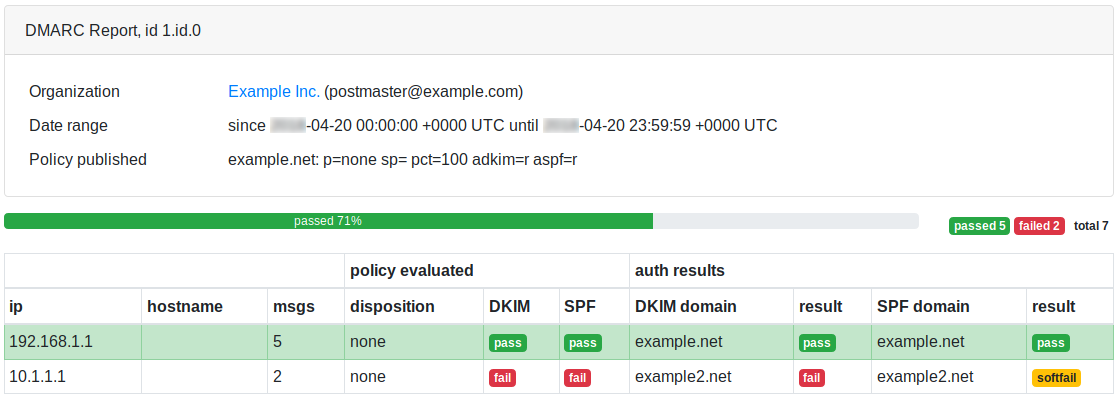
E-Mail-Zustellungsanalyse
Themen in diesem Bereich:
Statistiken
Detaillierte Berichte pro Monat, Tag, Stunde, Hosts, Absender-E-Mail
Protokolle & Lieferung
E-Mail-Protokolle, Zustellstatusbenachrichtigungen (DSN), Benachrichtigungen über erfolgreiche Zustellungen
E-Mail-Nachrichten prüfen
Schauen Sie sich die versendeten E-Mails an, um zu verstehen, was vor sich geht
Teilbereiche der E-Mail-Zustellungsanalyse
Statistiken
Detaillierte Berichte
RealSender bietet detaillierte Berichte über die Aktivitäten jedes SMTP-Servers bzw. ausgehender E-Mails.
Die Daten werden alle fünf Minuten automatisch aktualisiert.
Auf Wunsch senden wir Ihnen gerne eine wöchentliche Zusammenfassung per E-Mail zu.
Weitere Informationen auf dieser Seite:
- Zusammenfassung
- Monatsverlauf
- Tage des Monats
- Wochentage
- Std
- Gastgeber
- Absender-E-Mail
- SMTP-Fehlercodes
Zusammenfassung
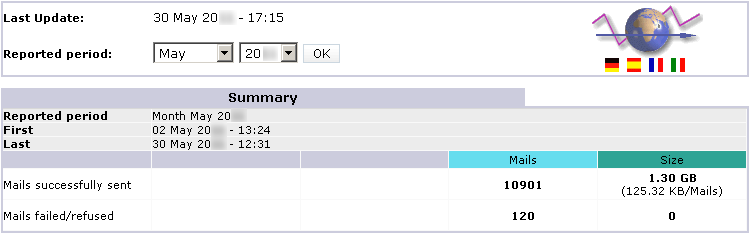
Monatsverlauf
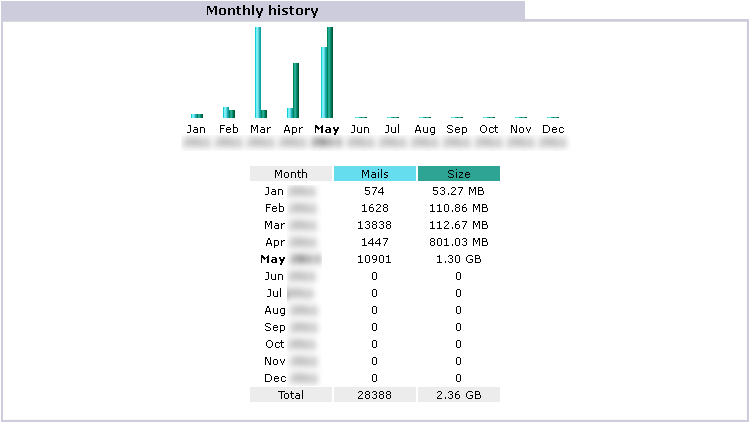
Tage des Monats
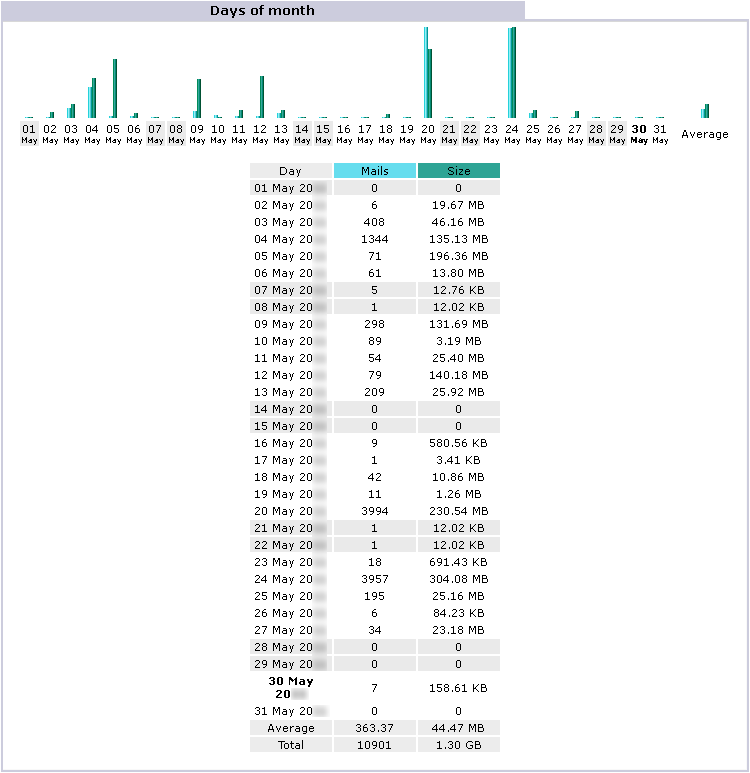
Wochentage
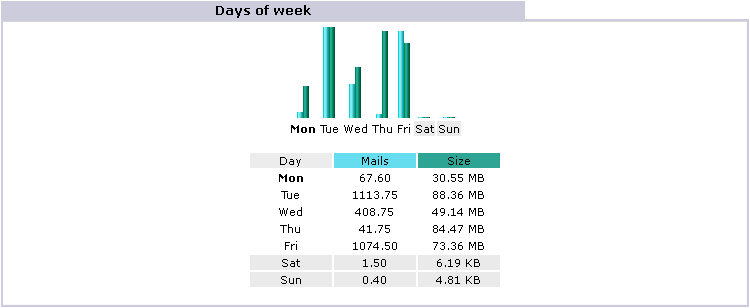
Std
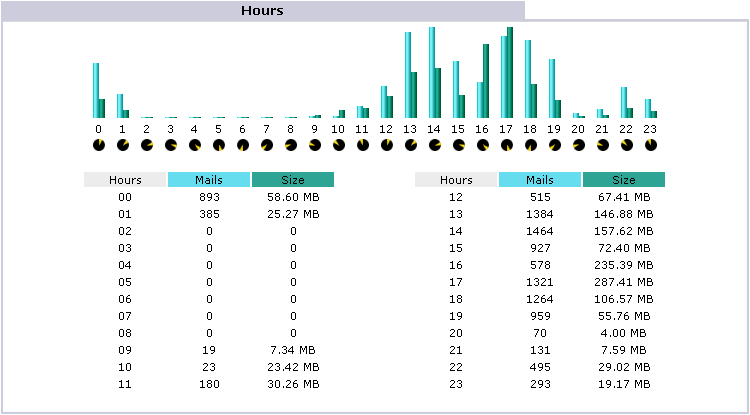
Gastgeber

Absender-E-Mail
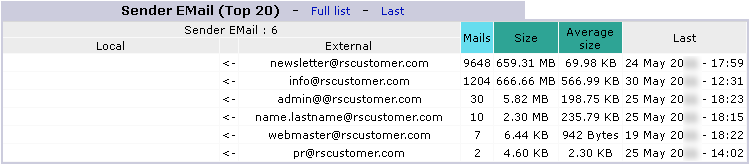
SMTP-Fehlercodes

Hinweis: Diese Fehler entstehen durch unautorisierte Versuche, E-Mails über den Server zu versenden
Protokolle & Lieferung
E-Mail-Daten
RealSender ermöglicht Ihnen den Zugriff auf die verarbeiteten E-Mail-Daten über den Browser:
- Statusseite mit den letzten 100 heute versendeten E-Mails, in Echtzeit aktualisiert.
- vollständige Seite mit allen an diesem Tag versendeten E-Mails
- vollständige Seite mit allen in den letzten sieben Tagen versendeten E-Mails
- Vollständiges Protokoll (roh, unverarbeitet) mit allen an diesem Tag versendeten E-Mails, nützlich zur Überprüfung der Verbindungen
- vollständiges Protokoll (roh, unverarbeitet) der letzten sieben Tage
Die angezeigten Daten können direkt im Browser lokal gespeichert oder in regelmäßigen Abständen (z. B. einmal täglich) automatisch protokolliert werden, um einen Verlauf zu führen.
Weitere Informationen auf dieser Seite:
- Beispiele für E-Mail-Protokolle
- Zustellstatusbenachrichtigungen (DSN)
- Benachrichtigungen über erfolgreiche Zustellung
Beispiele für im Protokoll verfügbare Informationen
31. Mai 06:26:22 rs336 v4V4QL1K030027: from=sender@yourcompany.com
31. Mai 06:26:25 rs336 v4V4QL1K030027: to=recipient@yourcustomer.com, dsn=2.0.0, stat=Sent (Nachricht zur Zustellung angenommen)
31. Mai 08:58:04 rs336 v4V6w3jN001390: from=sender@yourcompany.com
31. Mai 08:58:05 rs336 v4V6w3jN001390: to=recipient@yourcustomer.com, dsn=4.0.0, stat=Deferred: 421 recipient@yourcustomer.com Dienst nicht verfügbar - zu ausgelastet
31. Mai 09:02:03 rs336 v4V6w3jN001390: to=recipient@yourcustomer.com, dsn=4.0.0, stat=Deferred: 421 recipient@yourcustomer.com Dienst nicht verfügbar - zu ausgelastet
31. Mai 09:12:42 rs336 v4V6w3jN001390: to=recipient@yourcustomer.com, dsn=2.0.0, stat=Sent (Nachricht zur Zustellung angenommen)
31. Mai 10:00:22 rs336 v4V80L9Z004176: from=sender@yourcompany.com
31. Mai 10:00:24 rs336 v4V80L9Z004176: to=recipient@yourcustomer.com, dsn=4.7.1, stat=Deferred: 451 4.7.1 recipient@yourcustomer.com: Empfängeradresse abgelehnt: Greylisting aktiv, bitte versuchen Sie es später erneut.
31. Mai 10:02:03 rs336 v4V80L9Z004176: to=recipient@yourcustomer.com, dsn=4.7.1, stat=Deferred: 451 4.7.1 recipient@yourcustomer.com: Empfängeradresse abgelehnt: Greylisting aktiv, bitte versuchen Sie es später erneut.
31. Mai 10:12:04 rs336 v4V80L9Z004176: to=recipient@yourcustomer.com, dsn=2.0.0, stat=Sent (Nachricht zur Zustellung angenommen)
31. Mai 16:17:14 rs336 v4VEHCk6017038: from=sender@yourcompany.com
31. Mai 16:17:15 rs336 v4VEHCk6017038: to=recipient@yourcustomer.com, dsn=5.1.1, stat=Benutzer unbekannt
31. Mai 16:17:15 rs336 v4VEHCk6017038: v4VEHFk5017041: DSN: Benutzer unbekannt
25. Mai 12:43:37 rs336 v4PAhZw1019212: from=sender@yourcompany.com
25. Mai 12:43:38 rs336 v4PAhZw1019212: to=recipient@yourcustomer.com, dsn=5.0.0, stat=Dienst nicht verfügbar
25. Mai 12:43:38 rs336 v4PAhZw1019212: v4PAhcw0019217: DSN: Dienst nicht verfügbar
25. Mai 09:17:41 rs336 v4P7Hc6P011481: from=sender@yourcompany.com
25. Mai 09:17:42 rs336 v4P7Hc6P011481: to=recipient@yourcustomer.com, dsn=4.1.1, stat=Deferred: 452 4.1.1 recipient@yourcustomer.com 4.2.2 Postfach voll
[…] Das System versucht die Zustellung alle zehn Minuten erneut* […]
25. Mai 13:25:47 rs336 v4P7Hc6P011481: to=recipient@yourcustomer.com, dsn=4.1.1, stat=Deferred: 452 4.1.1 recipient@yourcustomer.com 4.2.2 Postfach voll
25. Mai 13:25:48 rs336 v4P7Hc6P011481: v4PBPko0020848: Absenderbenachrichtigung: Nachricht kann für 4 Stunden nicht gesendet werden*
* = siehe Anmerkung am Ende des nächsten Absatzes
Zustellstatusbenachrichtigungen (DSN)
Unzustellbare E-Mails (z. B. Benutzer unbekannt) werden an die E-Mail-Adresse des Absenders oder an die Rücksendeadresse (falls angegeben) zurückgesendet.
Im Falle einer Verzögerung bei der Zustellung der Nachrichten erhalten Sie nach 30 Minuten* eine Warnung, etwa so:
Betreff: Warnung: Nachricht konnte in den letzten 30 Minuten nicht gesendet werden. Nachrichtentext: ********************************************** ** DIES IST NUR EINE WARNUNG ** ** SIE MÜSSEN IHRE NACHRICHT NICHT ERNEUT SENDEN ** ********************************************** [...] Das System versucht die Zustellung automatisch vier Stunden lang erneut*. Sollten Sie keine weiteren Benachrichtigungen erhalten, wurde die Nachricht erfolgreich zugestellt. Details dazu finden Sie in den Protokollen (siehe die oben genannten Beispiele).
Nach vier Stunden* erfolgloser Wiederholungsversuche wird eine eindeutige Fehlermeldung an die E-Mail-Adresse des Absenders oder an die Rücksendeadresse (falls angegeben) zurückgesendet, etwa so:
Betreff: Zurückgesendete Post: Details siehe Protokoll. Nachrichtentext: Die ursprüngliche Nachricht wurde empfangen unter ... ----- Bei den folgenden Adressen traten dauerhafte, schwerwiegende Fehler auf -----<recipient@yourcustomer.com> ----- Protokoll der Sitzung folgt ----- Verzögert: Zeitüberschreitung der Verbindung zu yourcustomer.com. Die Nachricht konnte nicht innerhalb von 4 Stunden zugestellt werden. Die Nachricht wird aus der Warteschlange gelöscht. [...] * = beim Versand von Massenmailings:
Benachrichtigungen über verzögerte Zustellungsstatus sind deaktiviert,
das Intervall zwischen den Zustellversuchen wird erhöht (von zehn auf dreißig Minuten),
die maximale Verweildauer in der Warteschlange wird verlängert (von vier auf vierundzwanzig Stunden).
Benachrichtigungen über erfolgreiche Zustellung
Auf Wunsch können wir die Zustellbestätigung auch für erfolgreich zugestellte E-Mails aktivieren. So erhält der Absender für jede zugestellte Nachricht eine Zustellbestätigung vom Zielserver, wie unten dargestellt. Diese Option ist nützlich für alle, die für jede gesendete E-Mail eine Zustellbestätigung benötigen.
Betreff: Rückschein Nachrichtentext: Die ursprüngliche Nachricht wurde empfangen unter ... ----- Die folgenden Adressen erhielten erfolgreiche Zustellbenachrichtigungen -----<recipient@yourcustomer.com> (Erfolgreich an die Mailbox zugestellt) ----- Es folgt das Protokoll der Sitzung -----<recipient@yourcustomer.com> ... Erfolgreich durchgeführt [...]In seltenen Fällen (weniger als 1 % der versendeten E-Mails) wird dem Absender keine Empfangsbestätigung zugestellt. Dies geschieht, wenn der Empfänger auf seinem Mailserver die Option „Datenschutz/keine Empfangsbestätigungen“ aktiviert hat. Diese Einstellung wird generell nicht empfohlen, da sie auch den Versand von Standard-Unzustellbarkeitsbenachrichtigungen blockiert.
E-Mail-Nachrichten prüfen

Um zu verstehen, was vor sich geht, ist es manchmal notwendig, die versendeten E-Mails zu untersuchen.
Auf Anfrage kann RealSender die automatische Kopie aller ausgehenden E-Mails in ein separates Postfach aktivieren.
Das Postfach ist so konfiguriert, dass es große Mengen an E-Mails in kurzer Zeit problemlos empfangen kann.
E-Mails werden nach 7 Tagen automatisch gelöscht.
Achtung: Werden die Nachrichten von privaten E-Mail-Konten gesendet (auch wenn es sich um Firmenkonten handelt),
müssen Sie den Absender darüber informieren, dass die von ihm gesendeten Nachrichten zu technischen Überprüfungen gelesen werden können.
Systemstatusseite

Um die korrekte Funktion des Dienstes zu überprüfen,
haben wir eine automatische Kontrollumgebung aktiviert.
Eine externe Anwendung verbindet sich alle zehn Minuten mit jedem SMTP-Server
und versendet eine echte Nachricht. Der erfolgreiche E-Mail-Versand gewährleistet
die Verfügbarkeit und korrekte Funktion des Systems.
Das Ergebnis wird auf der Statusseite Ihres RealSender-Servers veröffentlicht, die
unter der Webadresse rsXXX-realsender.com/status frei zugänglich ist.
Die Daten werden in Echtzeit angezeigt, wie beispielsweise die unten stehenden Beispieldaten.
Die angezeigten Informationen beziehen sich auf die letzten 24 Stunden.
11.09.2024 06:25:26 UTC rsXXX – Verfügbarkeitsprüfung alle zehn Minuten (E-Mail erfolgreich gesendet) – OK 11.09.2024 06:16:18 UTC rsXXX – Verfügbarkeitsprüfung alle zehn Minuten (E-Mail erfolgreich gesendet) – OK 11.09.2024 06:05:56 UTC rsXXX – Verfügbarkeitsprüfung alle zehn Minuten (E-Mail erfolgreich gesendet) – OK 11.09.2024 05:55:41 UTC rsXXX – Verfügbarkeitsprüfung alle zehn Minuten (E-Mail erfolgreich gesendet) – OK 11.09.2024 05:45:57 UTC rsXXX – Verfügbarkeitsprüfung alle zehn Minuten (E-Mail erfolgreich gesendet) – OK 11.09.2024 05:35:58 UTC rsXXX – Verfügbarkeitsprüfung alle zehn Minuten (E-Mail erfolgreich gesendet) E-Mail erfolgreich gesendet) - OK 11.09.2024 05:25:27 UTC rsXXX - alle zehn Minuten Verfügbarkeitsprüfung (E-Mail erfolgreich gesendet) - OK 11.09.2024 05:16:30 UTC rsXXX - alle zehn Minuten Verfügbarkeitsprüfung (E-Mail erfolgreich gesendet) - OK 11.09.2024 05:05:57 UTC rsXXX - alle zehn Minuten Verfügbarkeitsprüfung (E-Mail erfolgreich gesendet) - OK 11.09.2024 04:55:36 UTC rsXXX - alle zehn Minuten Verfügbarkeitsprüfung (E-Mail erfolgreich gesendet) - OK(kostenlose) Postmaster-Tools

Themen in diesem Bereich:
click.it generiert Tracking-Links
Erstellen Sie Tracking-Links mit sofortigem E-Mail-Feedback
Enigma teilt Geheimnisse sicher
Teilen Sie geheime Nachrichten, Passwörter und Dateien per E-Mail über einen sicheren, einmalig verwendbaren, passwortlosen Link
temporäres Archiv von email.locker
ein Ort, an dem E-Mail-Nachrichten gespeichert und bei Bedarf abgerufen werden können
inxsend gefälschter SMTP/API-Dienst
Ein simulierter SMTP-/API-Dienst mit Web-GUI zum einfachen Testen von E-Mails in Anwendungen
Tester für SPF- und DKIM-Validierung
ein Online-Prüftool zur Validierung von SPF- und DKIM-Einstellungen, das eine E-Mail-Nachricht sendet
Unterabschnitte der (kostenlosen) Postmaster-Tools
click.it generiert Tracking-Links

mit sofortigem E-Mail-Feedback
Diese Seite erstellt Tracking-Links, die die Daten senden:
» clickit.realsender.com
Die kostenlose Version ist voll funktionsfähig, weist jedoch einige Einschränkungen auf:
- Die E-Mail-Nachrichten werden an das temporäre Postfach der Xbox-Demo gesendet und sieben Tage lang aufbewahrt
- Nach dem Klick zeigt der Browser eine Standard-„Dankeschön“-Seite an
- Die Tracking-Domain lautet „click.it“
Die kostenpflichtige Version ist individuell anpassbar und bietet Ihnen folgende Möglichkeiten:
- Senden Sie die Nachrichten an Ihre E-Mail-Adresse, z. B.: test@example.com
- Geben Sie Ihre eigene Landingpage an, z. B.: www.example.com/thankyou
- Verwenden Sie Ihre Tracking-Subdomain, z. B.: https://click.example.com
Enigma teilt Geheimnisse sicher

E-Mails sind weder privat noch sicher. Sie wurden nicht mit Blick auf Datenschutz oder Sicherheit entwickelt.
Jeder, der Ihre E-Mails während der Übertragung verarbeitet, kann sie lesen,
darunter Ihr Internetanbieter, ein Hacker oder die NSA (US-amerikanische National Security Agency).
Die Ende-zu-Ende-Verschlüsselung (E2EE) für E-Mails stellt sicher,
dass nur Absender und Empfänger den Inhalt einer Nachricht lesen können.
PGP ist die beste Lösung für die sichere Kommunikation mit einem Partner, der
es bereits verwendet. Es kann jedoch schwierig sein, den Geschäftspartner zur Nutzung von PGP zu bewegen.
enigma.realsender.com
„ Enigma “ ist eine Open-Source-Anwendung, die auf dem Yopass -Projekt basiert und von RealSender ausgewählt und gehostet wird.
Sie ermöglicht das sichere und kurzzeitige Verschlüsseln von Nachrichten, Passwörtern und Dateien.
Geben Sie ein ein- oder mehrzeiliges Geheimnis und dessen Gültigkeitsdauer ein und klicken Sie auf „Nachricht verschlüsseln“.
Teilen Sie die einmalig verwendbare URL mit dem gewünschten Empfänger.
temporäres Archiv von email.locker
email.locker ist ein Speicherort für E-Mails, die bei Bedarf abgerufen werden können.
Nach sieben Tagen werden die E-Mails automatisch gelöscht.
Probieren Sie es jetzt aus:
- Sende eine Nachricht an: any.word@email.locker
- Sie können auf die Box unter folgendem Link zugreifen: https://email.locker/any.word
email.locker- Boxen werden spontan erstellt, indem man eine E-Mail an sie sendet.
Da keine Registrierung erforderlich ist, ist die email.locker-Adresse im Prinzip ein Passwort.
Wählen Sie daher etwas, das nicht leicht zu erraten ist.
Wenn Sie vertrauliche Informationen erhalten, empfehlen wir Ihnen, ein separates Postfach zu reservieren und den Zugriff darauf einzuschränken
oder eine dedizierte E-Mail-Adresse unter „@locker.yourcompany.com“ einzurichten. Kontaktieren Sie uns für weitere Informationen.
Alle eingehenden Nachrichten an email.locker werden mit RealSender-Authentifizierungsprüfungen gescannt,
sodass Sie überprüfen können, ob die Absenderadresse echt oder gefälscht ist.
Jeder empfangenen E-Mail wird ein Präfix vorangestellt, das
angibt, ob die Absenderdomain korrekt mit SPF und DKIM.
Ein abschließendes „|| OK ||“ wird hinzugefügt, wenn Sie sich der Authentizität der Absenderdomain zu 100 % sicher sein können.
inxsend gefälschter SMTP/API-Dienst

inxsend ist ein simulierter SMTP/API-Dienst zum einfachen Testen von E-Mails in Anwendungen, indem alle Nachrichten an einen einzigen Mailserver gesendet werdenSMTP-Servereinstellungen
Konfigurieren Sie den SMTP-Server mit den folgenden Parametern:
Servername: inxsend.realsender.com Port: 25 | oder| 2525 | oder| 587 (+TLS) | oder| 465 (+SSL) Benutzername: CDED54 Passwort: 478DEDAPI-Servereinstellungen
Nutzen Sie den API-Zugriff wie in der Anleitung „Senden per API“ beschrieben, mit den folgenden Parametern:
Serveradresse: (https://) inxsend-api.realsender.com/mail/send Benutzername: CDED54 Passwort: 478DEDSende eine Testnachricht
Sende eine Nachricht an:
[deinname]@inxbox.realsender.com
!! Alle empfangenen Nachrichten sind für jeden sichtbar !!
(andere Empfänger werden abgewiesen)
Melden Sie sich bei uns, falls Sie auf Probleme stoßen.
Empfang prüfen
Öffnen Sie https://inxbox.realsender.com/monitor und prüfen Sie den Empfang
(verwenden Sie dazu den Google Chrome-Browser > Neues Inkognito-Fenster oder den Microsoft Edge-Browser).
Weitere Informationen zu diesem Postfach finden Sie unter: inxbox app demo.
Tester für SPF- und DKIM-Validierung

RealSender bietet ein kostenloses Online-Prüftool
zur Überprüfung Ihrer SPF- und DKIM-Einstellungen beim Versenden einer E-Mail an:
- Senden Sie eine E-Mail an spf@tester.realsender.com
- Die Ergebnisse der SPF-Validierung können Sie online unter tester.realsender.com/spf
(es kann einen Moment dauern, bis sie angezeigt werden).
Bei der Überprüfung wird dem Betreff ein Präfix hinzugefügt,
wenn die Nachricht nicht korrekt authentifiziert werden konnte.
Einzelheiten zur Funktionsweise finden Sie im
Bereich „Grundlagen der E-Mail-Authentifizierung“ auf der Webseite:
E-Mail-Trends

Themen in diesem Bereich:
Richtlinien zur E-Mail-Authentifizierung
Richtlinien für die Konfiguration der SPF-, DKIM- und DMARC-Protokolle zur E-Mail-Authentifizierung
eine gute Alternative zu BCC-E-Mails
Mailman-Einwegliste, eine spezielle Konfiguration für Newsletter oder Ankündigungen
Reverse-Proxy für SMTP-Server
Wie Sie die Sicherheit, Leistung und Skalierbarkeit Ihres SMTP-Servers verbessern können
Wie man E-Mail-Adressen extrahiert
Sie können die gewünschten Daten mithilfe von regulären Ausdrücken abrufen
Wie man "NO-MAIL"-Domains schützt
Eine einfache Möglichkeit, Domains, die keine E-Mails versenden, vor Missbrauch zu schützen
Warum nutzen Unternehmen SMS?
Warum SMS-Nachrichten von Unternehmen genutzt werden
Wie man mit zurückgewiesenen E-Mails umgeht
Wie man mit unzustellbaren E-Mails umgeht, um Schaden zu vermeiden
Wie kann ich überprüfen, ob mein SMTP-Server sicher ist?
Wie kann ich überprüfen, ob mein SMTP-Server sicher ist?
DNS-Einstellungen zum Senden von E-Mails
Welche Domain-DNS-Einstellungen sind erforderlich, um E-Mails zu versenden?
Wie man Mailinglisten verwaltet
Wie man Mailinglisten vorausschauend verwaltet
Wie man Newsletter versendet
Wie man Newsletter versendet und dabei die Listenpflege und das Interesse der Empfänger wahrt
Wie man private E-Mails versendet
So versenden Sie private und verschlüsselte E-Mails
Wie man BCC-E-Mails versendet und einschränkt
Wie man BCC-E-Mails versendet und einschränkt: Vor- und Nachteile, Fazit
E-Mail-Marketing messen
Wie Sie die Leistung Ihrer E-Mail-Marketing-Kampagnen messen können
Was gilt als SPAM?
Welche Benutzer und Mailserver stufen E-Mails als Spam ein?
Open-Source-E-Mail-Clients
Wie Sie mithilfe sofort einsatzbereiter Open-Source-E-Mail-Clients die Kontrolle über Ihre E-Mails zurückgewinnen
dienstliche E-Mail und Datenschutz
Mitarbeiter-E-Mails: Können sie gelesen werden? Können sie gesichert werden? Können sie archiviert werden?
E-Mails vor SPAM schützen
Wie man geschäftliche E-Mails vor Spam schützt
So funktioniert DMARC – aktualisiert
Wie DMARC mit Google Mail und Office 365 funktioniert – aktualisiert
DKIM-Domäne für DMARC
wie die DKIM-Domänenausrichtung die DMARC-Authentifizierung beeinflusst
die beliebtesten E-Mail-Anbieter
Welche sind die beliebtesten E-Mail-Anbieter im Jahr 2020?
wie DMARC funktioniert
Wie DMARC mit Google Mail und Office 365 funktioniert
Unterabschnitte der E-Mail-Trends
Richtlinien zur E-Mail-Authentifizierung

!! ACHTUNG !! Dieses Dokument wurde automatisch aus dem Italienischen übersetzt
Richtlinien
Konfiguration des E-Mail-Dienstes zur Authentifizierung
Die italienische nationale Agentur für Cybersicherheit hat die Richtlinien für die Konfiguration des E-Mail-Dienstes zur Authentifizierung, mit dem Ziel, die Zuverlässigkeit des E-Mail-Dienstes für alle interessierten Organisationen zu stärken und sein allgemeines Sicherheitsniveau zu erhöhen.
Versionskontrolle
| VERSION | VERÖFFENTLICHUNGSDATUM | ANMERKUNGEN |
|---|---|---|
| 1.0 | April 2026 | Erste Veröffentlichung. |
INDEX
1. Einleitung
1.1. Prämisse
E-Mail zählt heute zu den wichtigsten Diensten im digitalen Kontext, da sie zu den Hauptkanälen gehört, die von Organisationen und Nutzern für die Kommunikation und den Informationsaustausch verwendet werden1.
Die Funktionsweise des E-Mail-Dienstes und insbesondere die Übermittlung von Nachrichten basieren auf dem SMTP-Protokoll, das jedoch keine adäquaten Mechanismen zur Absenderauthentifizierung und zum Schutz der Vertraulichkeit und Integrität der Nachrichten nativ integriert. Diese Schwachstellen machen den Dienst anfällig für Angriffe wie Spoofing, Phishing, Manipulation und das Abfangen von Nachrichten während der Übertragung.
Um die Schwächen des SMTP-Protokolls zu beheben und dadurch das Risiko der zuvor genannten Angriffe zu verringern, wurden im Laufe der Zeit Mechanismen zur Absenderauthentifizierung und zum Schutz der Nachrichtenintegrität entwickelt, wie beispielsweise SPF (Sender Policy Framework), DKIM (DomainKeys Identified Mail) und DMARC (Domain-based Message Authentication, Reporting and Conformance).
Diese Richtlinien veranschaulichen diese Mechanismen mit dem Ziel, die Zuverlässigkeit des E-Mail-Dienstes zu stärken und sein allgemeines Sicherheitsniveau zu erhöhen, insbesondere im Hinblick auf die in Kapitel 4 beschriebenen Bedrohungen.
Die Gegenmaßnahmen und Protokolle, die zum Schutz der Vertraulichkeit von E-Mail-Nachrichten erforderlich sind (wie S/MIME und OpenPGP, die die Nachrichtenverschlüsselung betreffen), sind nicht Gegenstand dieser Richtlinien.
1.2. Verweisbestimmungen
| VERORDNUNG | BESCHREIBUNG |
|---|---|
| Nationaler Cybersicherheitsperimeter (PSNC) | Gesetzesdekret vom 21. September 2019, Nr. 105. Dringende Bestimmungen über den nationalen Cybersicherheitsperimeter und die Disziplinierung besonderer Befugnisse in Sektoren von strategischer Bedeutung. |
| Cloud-Regulierung für die öffentliche Verwaltung | ACN-Direktoriumsdekret Nr. 21007/24 vom 27. Juni 2024. |
| Gesetzesdekret Nr. 138 vom 4. September 2024 | Gesetzesdekret Nr. 138 vom 4. September 2024. Umsetzung der Richtlinie (EU) 2022/2555 über Maßnahmen für ein hohes gemeinsames Niveau der Cybersicherheit in der gesamten Union, zur Änderung der Verordnung (EU) Nr. 910/2014 und der Richtlinie (EU) 2018/1972 und zur Aufhebung der Richtlinie (EU) 2016/1148. |
1.3. Referenzdokumente
| TITEL UND VERÖFFENTLICHUNGSADRESSE |
|---|
| NIST Technical Note 1945. https://nvlpubs.nist.gov/nistpubs/TechnicalNotes/NIST.TN.1945.pdf |
| NIST SP 800-177 R1 https://nvlpubs.nist.gov/nistpubs/SpecialPublications/NIST.SP.800-177r1.pdf |
| ACN. Framework zur E-Mail-Authentifizierung. https://www.acn.gov.it/portale/w/framework-di-autenticazione-per-la-posta-elettronica |
| RFC 5321 – Simple Mail Transfer Protocol https://datatracker.ietf.org/doc/html/rfc5321 |
| RFC 5322 – Internet Message Format https://datatracker.ietf.org/doc/html/rfc5322 |
| RFC 7208 – Sender Policy Framework (SPF) zur Autorisierung der Nutzung von Domains in E-Mails, Version 1 https://datatracker.ietf.org/doc/html/rfc7208 |
| RFC 6376 – DomainKeys Identified Mail (DKIM)-Signaturen https://datatracker.ietf.org/doc/html/rfc6376 |
| RFC 7489 – Domänenbasierte Nachrichtenauthentifizierung, Berichterstattung und Konformität (DMARC) https://datatracker.ietf.org/doc/html/rfc7489 |
2. Regulatorischer Kontext
Zum Schutz der digitalen Vermögenswerte des Landes, einschließlich E-Mail-Dienste und der dazugehörigen Infrastrukturen, besteht ein breites Spektrum an Sicherheitsmaßnahmen, die sich aus der geltenden Gesetzgebung ableiten und ständig aktualisiert werden.
Der höchste Schutzstandard für die kritischsten Dienste des Landes im Zusammenhang mit der nationalen Sicherheit wird durch den Nationalen Cybersicherheitsperimeter gewährleistet. Dieser wurde mit dem Gesetzesdekret Nr. 105 vom 21. September 2019, geändert durch das Gesetz Nr. 133 vom 18. November 2019, eingerichtet. Er sieht Sicherheitsmaßnahmen mit besonders hohem Schutzniveau vor, die in Anhang B des Dekrets des Premierministers Nr. 81 vom 14. April 2021 detailliert beschrieben sind. Diese Maßnahmen gelten für die Netzwerke, Informationssysteme und IT-Dienste öffentlicher und privater Einrichtungen, von denen die Ausübung einer wesentlichen Staatsfunktion oder die Bereitstellung einer wesentlichen Dienstleistung zur Aufrechterhaltung ziviler, sozialer oder wirtschaftlicher Tätigkeiten abhängt, die für die Interessen des Staates von grundlegender Bedeutung sind. Eine Gefährdung dieser Systeme könnte die nationale Sicherheit beeinträchtigen.
Darüber hinaus unterliegen E-Mail-Dienste, wie alle digitalen Dienste der öffentlichen Verwaltung, den Bestimmungen der sogenannten Cloud-Verordnung. Diese wurde gemäß Artikel 33-septies des Gesetzesdekrets Nr. 179 vom 18. Oktober 2012 erlassen und von der Nationalen Agentur für Cybersicherheit (ACN) mit dem Dekret Nr. 21007 vom 27. Juni 2024 aktualisiert. Gemäß dieser Verordnung sind alle öffentlichen Verwaltungen verpflichtet, ihre digitalen Daten und Dienste nach dem von der ACN erstellten Modell als gewöhnlich, kritisch oder strategisch einzustufen. Ziel dieser Maßnahme ist es, sicherzustellen, dass die digitalen Daten und Dienste der öffentlichen Verwaltung über digitale Infrastrukturen und Cloud-Dienste verarbeitet und bereitgestellt werden, die den in der Verordnung festgelegten Anforderungen, einschließlich der Sicherheitsanforderungen, entsprechend den Risiken der jeweiligen Einstufung entsprechen.
Mit dem Gesetzesdekret Nr. 138 vom 4. September 2024 (dem sogenannten NIS-Dekret) zur Umsetzung der Richtlinie (EU) 2022/2555 wurden auch – durch die Anhänge 1 und 2 der ACN-Festlegung 379907/2025 – die grundlegenden Sicherheitsmaßnahmen festgelegt, die wesentliche und wichtige Einrichtungen für die Zwecke der Verpflichtungen nach Artikel 23 und 24 des NIS-Dekrets ergreifen müssen, und ein Sicherheitsrahmen zur Stärkung des Schutzes von Netzwerk- und Informationssystemen, einschließlich E-Mail-Diensten, definiert.
3. E-Mail-Dienstarchitektur
Wie bereits in der Einleitung erwähnt, basiert die Funktionsweise des E-Mail-Dienstes auf dem SMTP-Protokoll, das die Übertragung von E-Mail-Nachrichten vom Absender zum Empfänger regelt.
Das SMTP-Protokoll wurde ursprünglich 1982 als Store-and-Forward-Protokoll definiert . Dabei generiert der Absender eine Nachricht über seinen E-Mail-Client (Mail User Agent, MUA), der diese an den Mailserver des Absenders sendet. Dieser leitet die Nachricht über einen Mail Transfer Agent (MTA) – gegebenenfalls über einen oder mehrere zwischengeschaltete MTAs – an den MTA des Ziel-Mailservers weiter. Der Empfänger ruft die Nachricht über seinen E-Mail-Client (MUA) ab . [1]
Der Mail Transfer Agent (MTA) ist somit eine Komponente des E-Mail-Dienstes, die die Übertragung von E-Mail-Nachrichten vom Absender zum Empfänger übernimmt. MTA-Komponenten sind auf den Mailservern von Absender und Empfänger vorhanden, und es können auch zwischengeschaltete MTAs konfiguriert werden, beispielsweise zur Verwaltung von Verteilerlisten.
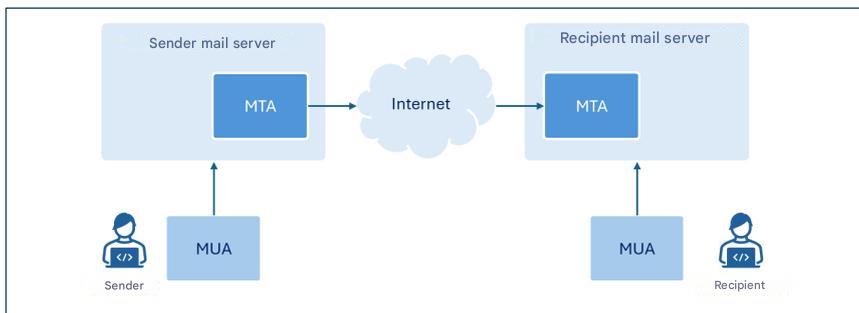
Die Abbildung zeigt nur die für diese Richtlinien relevanten Komponenten.
Obwohl der Begriff MTA eine bestimmte Komponente von E-Mail-Servern bezeichnet3, wird im Rahmen dieses Dokuments hauptsächlich auf die Funktion von E-Mail-Servern als MTAs Bezug genommen, wo keine Unklarheiten bestehen. Daher wird zur Vereinfachung der Darstellung häufig der Begriff E-Mail-Server anstelle des spezifischeren Begriffs MTA verwendet.
In diesem Leitfaden konzentrieren wir uns auf die Konfiguration der SPF-, DKIM- und DMARC-Protokolle, um Mailservern die Überprüfung der Authentizität und Integrität von E-Mail-Nachrichten zu ermöglichen.
4. Bedrohungen
Das im vorherigen Kapitel vorgestellte SMTP-Protokoll war ursprünglich für den Einsatz in einem relativ kleinen akademischen Netzwerk konzipiert und berücksichtigte keine Aspekte der Sicherheit übertragener Nachrichten oder der Absenderauthentifizierung [1].
Die zunehmende Verbreitung von E-Mails und die systembedingten Schwächen des SMTP-Protokolls haben im Laufe der Zeit das Auftreten von Angriffen begünstigt, deren Haupttypen in den folgenden Absätzen kurz erläutert werden.
4.1. Absender-Spoofing
Spoofing ist eine Cyberangriffstechnik, bei der die Absenderadresse einer Nachricht gefälscht wird, sodass die Nachricht von einer vertrauenswürdigen Adresse zu stammen scheint (zum Beispiel von einem Kollegen, einem Bekannten oder dem eigenen Bankinstitut). Dadurch wird der Empfänger dazu verleitet, potenziell gefährliche Handlungen vorzunehmen, wie zum Beispiel einen E-Mail-Anhang zu öffnen oder auf in der Nachricht enthaltene Links zu klicken.
Diese Art von Angriff ist relativ einfach durchzuführen, da das SMTP-Protokoll keine Absenderauthentifizierungsmechanismen beinhaltet und es daher über den E-Mail-Client möglich ist, beim Versenden der Nachricht eine beliebige Absenderadresse zu konfigurieren.
Absender-E-Mail-Adresse: envelope-from und message-from
Das E-Mail-Nachrichtenformat sieht zwei separate Felder zur Angabe der Absenderadresse vor. Diese Felder heißen „envelope-from“ und „message-from“ : Das erste (auch als Rücksendeadresse bezeichnet, da es die E-Mail-Adresse angibt, an die Fehlermeldungen gesendet werden müssen, wenn eine E-Mail den Empfänger nicht erreicht) ist die Adresse, die für die korrekte Weiterleitung der Nachricht verwendet wird; das zweite ist die Adresse, die dem Empfänger im Nachrichtenkopf angezeigt wird.
In Anlehnung an das Versenden eines Briefes in einem Umschlag per Post stellt der Absendervermerk die Adresse des Absenders dar, die auf dem Briefumschlag angegeben ist, während der Absendervermerk der Kopfzeile im Brief entspricht, die angibt, wer den Brief an den Empfänger geschrieben hat.
Es ist wichtig zu beachten, dass die beiden Adressen nicht übereinstimmen müssen. Diese Unterscheidung ermöglicht die Verwaltung von Situationen wie beispielsweise dem Weiterleiten von Nachrichten von Drittanbietern, dem Versand über Mailinglisten oder automatischen E-Mail-Antworten.
Es ist durchaus möglich, jeden Absender sowohl auf der der Absenderadresse (die E-Mail-Adresse des Absenders, die dem Empfänger im Header der empfangenen Nachricht angezeigt wird) als auch auf der Ebene der Absenderadresse (die E-Mail-Adresse des Absenders, die für die Nachrichtenübermittlung verwendet wird) anzugeben.
Um diesen Bedrohungen entgegenzuwirken, ist es daher unerlässlich, Mechanismen bereitzustellen, die eine zuverlässige Authentifizierung des Absenders ermöglichen und überprüfen, ob die Person, die die Nachricht gesendet hat, tatsächlich dazu berechtigt ist.
4.2. Phishing
Phishing ist eine Cyberangriffstechnik, die auf den betrügerischen Erwerb von Informationen (wie zum Beispiel Anmeldeinformationen, Kreditkartennummern oder anderen sensiblen Daten) abzielt, in der Regel durch das Versenden von irreführenden Nachrichten, die den Anschein erwecken, von zuverlässigen Absendern zu stammen3.
Spoofing, das im vorangegangenen Absatz untersucht wurde, zählt zu den wichtigsten Techniken, die ein Angreifer einsetzt, um die Identität des Absenders zu fälschen und die Nachricht so aussehen zu lassen, als käme sie von einem legitimen Benutzer oder einer legitimen Domain.
Alternativ kann eine Absenderadresse/Domain verwendet werden, die einer für den Empfänger erkennbaren Adresse/Domain ähnelt. Dazu wird beispielsweise der sogenannte Anzeigename4 , um die scheinbare Authentizität der Nachricht zu verstärken.
Zum Versenden von Phishing-Nachrichten können auch legitime Konten verwendet werden, die zuvor vom Angreifer kompromittiert wurden.
Eine Phishing-Nachricht ist typischerweise so aufgebaut, dass sie beim Empfänger Dringlichkeit, Alarm oder wirtschaftliches Interesse erzeugt und Situationen schafft, die ihn zu impulsiven Reaktionen und bestimmten Aktionen verleiten, wie z. B. das Öffnen schädlicher Anhänge oder das Klicken auf Links, die zu scheinbar legitimen Webseiten weiterleiten, die aber in Wirklichkeit vom Angreifer mit dem Ziel erstellt wurden, Informationen zu stehlen und/oder Schadsoftware zu installieren.
Üblicherweise werden Phishing-Angriffe durchgeführt, indem dieselbe E-Mail-Nachricht an eine große Anzahl von Opfern versendet wird, ohne den Text an das jeweilige Profil der Opfer anzupassen.
Eine Variante des Phishings ist das sogenannte Spear-Phishing, bei dem der Angreifer das Profil des Opfers kennt und gezielt ins Visier nimmt.
Im Gegensatz zu einer herkömmlichen Phishing-E-Mail verwendet eine Spear-Phishing-Nachricht präzisere Kontextinformationen, um den Empfänger davon zu überzeugen, dass er mit einem vertrauenswürdigen Absender kommuniziert [2].
4.3. Manipulation von Nachrichten
Der Inhalt einer E-Mail kann, wie jede andere Kommunikation, die über das Internetnetzwerk übertragen wird und keine Ende-zu-Ende-Verschlüsselung (E2EE) verwendet, während der Übertragung zwischen Absender und Empfänger abgefangen und verändert werden (eine Art von Bedrohung, die gemeinhin als Man-in-the-Middle bezeichnet wird).
Folglich besteht neben dem Verlust der Vertraulichkeit die Möglichkeit, dass die empfangene Nachricht nicht mehr der ursprünglich vom Absender verfassten Nachricht entspricht.
Ein Angreifer könnte beispielsweise den Nachrichteninhalt manipulieren, um den Anschein zu erwecken, die Nachricht stamme von einem vertrauenswürdigen Absender, den Text oder darin enthaltene Links und/oder Anhänge verändern oder bösartigen Code einfügen.
Der Empfänger, der auf die scheinbare Echtheit der Nachricht vertraut, kann so dazu verleitet werden, potenziell schädliche Handlungen vorzunehmen, wie z. B. die Übermittlung von Anmeldeinformationen, die Autorisierung von Zahlungen oder das Öffnen schädlicher Dateien.
Um diesen Bedrohungen entgegenzuwirken, ist es daher unerlässlich, Mechanismen einzuführen, die die Integrität und Authentizität der Nachricht gewährleisten und sicherstellen, dass der empfangene Inhalt nicht verändert wurde und dass der Absender tatsächlich derjenige ist, für den er sich ausgibt.
5. Gegenmaßnahmen
Kapitel 2 erinnerte an die Vorschriften, die Sicherheitsmaßnahmen auch zum Schutz von E-Mail-Diensten vorsehen. Dieses Dokument dient in erster Linie als Leitfaden für die Umsetzung der in diesen Vorschriften vorgesehenen und in Anhang Adie auch für die Konfiguration von E-Mail-Diensten relevant sind, um die mit den in Kapitel 4. Es sei jedoch darauf hingewiesen, dass die in diesem Leitfaden enthaltenen Hinweise auch für diejenigen empfohlen werden, die nicht den genannten Vorschriften unterliegen.
Die betreffenden Sicherheitsmaßnahmen beziehen sich nicht explizit auf die Konfiguration des E-Mail-Dienstes, sondern – je nach der betrachteten Verordnung – auf die Konfiguration von IT-Systemen und industriellen Steuerungssystemen (PSNC- und Cloud-Verordnung) bzw. Informations- und Netzwerksystemen (NIS2). Die in diesen Richtlinien behandelten E-Mail-Dienste fallen in beide Systemkategorien.
Im Folgenden werden insbesondere die SPF, DKIMund DMARC erläutert. Diese bieten Sicherheitsmechanismen, die darauf abzielen, die allgemeine Sicherheit des E-Mail-Dienstes und insbesondere die Absenderauthentifizierung und die Integritätskontrolle der Nachrichten zu stärken.
5.1. Lichtschutzfaktor
SPF – Sender Policy Framework ist ein Authentifizierungsprotokoll, das in RFC 7208und es einem Domaininhaber ermöglicht, festzulegen, welche IP-Adressen berechtigt sind, in seinem Namen E-Mails zu versenden, und die Richtlinien festzulegen, die der Empfänger anwenden muss, wenn die mit der Domain5 der E-Mail-Adresse des Absenders verknüpfte IP-Adresse nicht zu den explizit autorisierten Adressen gehört.
Die autorisierten IP-Adressen sind in einem DNS-TXT-Eintrag aufgeführt, der sich auf die Absenderdomäne bezieht und als SPF-Eintrag bezeichnet wird. Dies wird im nachfolgenden Abschnitt dieses Absatzes erläutert.
Auf diese Weise kann der E -Mail-Server des Empfängers beim Empfang einer Nachricht von einer bestimmten Domain den zugehörigen SPF-Eintrag abfragen und deren Ursprung authentifizieren, indem er überprüft, ob die IP-Adresse, von der die Nachricht empfangen wurde, zu denjenigen gehört, die berechtigt sind, Nachrichten im Namen der Domain zu senden.
Es ist wichtig zu beachten, dass die auf SPF-Ebene verifizierte Domain diejenige ist, die sich auf den Absender des Umschlags bezieht. Folglich reicht die alleinige Anwendung des SPF-Protokolls nicht aus, um Spoofing zu verhindern, da diese Art von Angriff auch auf der Absenderebene der Nachricht erfolgen kann7.
Wenn eine Organisation ihren E-Mail-Dienst ganz oder teilweise an einen Drittanbieter, beispielsweise einen Cloud-Anbieter, auslagert, muss sie sicherstellen, dass die von diesem Anbieter versendeten Nachrichten die SPF-Prüfung bestehen. Zu diesem Zweck sollte die Organisation die IP-Adressen, von denen die Anbieter im Namen der Domain der Organisation E-Mails versenden, in ihren SPF-Eintrag aufnehmen.
Bei automatischer E-Mail-Weiterleitung werden Nachrichten üblicherweise über einen Zwischenserver umgeleitet. Daher stimmt die IP-Adresse des Empfängers nicht mehr mit der ursprünglich vom Absender autorisierten Adresse überein. Um in solchen Fällen einen Fehler bei der SPF-Verifizierung zu vermeiden, müssen auch alle zwischengeschalteten Weiterleitungsserver autorisiert werden. Alternativ können Mechanismen wie SRS (Sender Rewriting Scheme) oder ARC (Authenticated Received Chain) eingesetzt werden, die insbesondere bei einer Vielzahl von zwischengeschalteten Weiterleitungsservern effektiver sein können.
Es sollte hervorgehoben werden, dass SPF nur dann wirklich effektiv ist, wenn es nicht nur vom Absender, sondern auch vom Empfänger korrekt konfiguriert wird. Insbesondere:
- Der Absender muss den SPF-Eintrag auf dem entsprechenden DNS-Server veröffentlichen, in dem die Adressen aufgeführt sind, die berechtigt sind, in seinem Namen E-Mails zu versenden;
- Der Empfänger muss seinen eigenen Mailserver so konfigurieren, dass er eine SPF-Verifizierung für empfangene Nachrichten durchführt und die daraus resultierenden Richtlinien einheitlich anwendet.
5.1.1. SPF-Aufzeichnung
Ein SPF-Eintrag ist ein DNS-Eintrag vom Typ TXT, dessen Name der Absenderdomäne entspricht und dessen Inhalt aus dem Abschnitt, der die Version angibt , und einer Reihe von Direktiven besteht, die das Verhalten des Mailservers des Empfängers festlegen, wenn eine Übereinstimmung zwischen der IP-Adresse der Absenderdomäne und einer Direktive vorliegt.
Die Direktiven werden durch einen Mechanismus gebildet, dem ein Qualifikator vorangestellt ist. Die wichtigsten in SPF-Einträgen verwendeten Mechanismen sind: [2]:
- ip4, listet autorisierte IPv4-Adressen auf;
- ip6, listet autorisierte IPv6-Adressen auf;
- a, autorisiert IP-Adressen, die im A-Record der Domain vorhanden sind;
- mx, autorisiert IP-Adressen, die sich auf die MX-Einträge der Domain beziehen;
- include, autorisiert IPs, die im SPF-Eintrag einer anderen Domain vorhanden sind;
- all, repräsentiert alle IP-Adressen, die nicht explizit über die anderen Mechanismen autorisiert wurden.
Der „All“ -Mechanismus ermöglicht insbesondere die Festlegung von Richtlinien für Nachrichten, die von IP-Adressen stammen, die von früheren Mechanismen nicht erfasst wurden.
Darüber hinaus stellt SPF die folgenden Qualifikatoren zur Verfügung, die Mechanismen zugeordnet werden können:
- + (pass) bedeutet, dass IP-Adressen, die dem zugehörigen Mechanismus entsprechen, autorisiert sind. Es ist der Standardqualifizierer, wenn kein anderer angegeben ist;
- - (Fehler) bedeutet, dass IP-Adressen, die dem zugehörigen Mechanismus entsprechen, nicht autorisiert sind;
- ~ (softfail) bedeutet, dass IP-Adressen, die dem zugehörigen Mechanismus entsprechen, wahrscheinlich nicht autorisiert sind. Diese Aussage ist weniger eindeutig als die vorherige. In diesen Fällen sollte die Meldung zwar akzeptiert, aber zur genaueren Analyse markiert werden. Sie wird beispielsweise bei der Fehlersuche oder wenn absehbar ist, dass die SPF-Verifizierung fehlschlagen könnte, verwendet
- ? (neutral) bedeutet, dass keine Angabe zu IP-Adressen erfolgt, die dem zugehörigen Mechanismus entsprechen. Standardmäßig wird die Nachricht akzeptiert.
Es ist wichtig zu betonen, dass der SPF-Eintrag in der Praxis so zusammengesetzt ist, dass er autorisierte IP-Adressen angibt. Anschließend wird die Direktive `-all` , um festzulegen, dass alle anderen Adressen nicht autorisiert sind (siehe dazu die folgenden Beispiele). Dies ist die empfohlene Konfiguration, da sie die explizite Angabe autorisierter IP-Adressen und den Ausschluss aller anderen ermöglicht.
In jedem Fall wird davon abgeraten, die Direktive +all (oder das äquivalente all) zu verwenden, da dies der Autorisierung aller IP-Adressen entsprechen würde.
Beispiele für SPF-Einträge
Eine bestimmte IP-Adresse autorisieren
v=spf1 ip4:203.0.113.0 -all
Der oben gezeigte SPF-Eintrag verwendet SPF Version 1 und autorisiert über den IPv4- Mechanismus die IP-Adresse 203.0.113.0 (da für den IPv4- Mechanismus kein Qualifizierer angegeben ist, wird implizit das Standardpluszeichen (+ ) verwendet). Die „-all“ bestehend aus dem „all“ -Mechanismus und dem „-“ (Fehler), legt fest, dass alle anderen Adressen nicht autorisiert sind.
Einen bestimmten IP-Adressraum autorisieren
v=spf1 ip4:203.0.113.0/24 -all
Der oben gezeigte SPF-Eintrag ist analog zum vorherigen, autorisiert aber alle IP-Adressen des Adressraums 203.0.113.0/24
Mehrere IP-Adressen autorisieren
v=spf1 ip4:203.0.113.22 ip4:203.0.113.44 -all
Der oben gezeigte SPF-Eintrag autorisiert ausschließlich die IPv4-Adressen 203.0.113.22 und 203.0.113.44.
MX-Record-Adressen und eine bestimmte Domain autorisieren
v=spf1 mx include:spf.emailprovider.it -all
Der oben gezeigte SPF-Eintrag autorisiert ausschließlich die IP-Adressen der MX-Einträge derselben Domain wie der SPF-Eintrag sowie diejenigen, die für die Domain spf.emailprovider.it (zum Beispiel die Domain eines E-Mail-Dienstleisters) autorisiert sind.
5.1.2. Authentifizierungsprozess
Wenn der E-Mail-Server des Empfängers für die SPF-Verifizierung korrekt konfiguriert ist, ruft er beim Empfang einer neuen E-Mail den SPF-Eintrag der Absenderdomain ab, indem er den DNS-Server abfragt, der die Einträge dieser Domain enthält. Die Abfrage basiert auf der im Feld „Absender“ angegebenen Adresse. Lautet die Adresse im Feld „Absender“ beispielsweise alice@example.com, ruft der E-Mail-Server des Empfängers den SPF-Eintrag der Domain example.com.
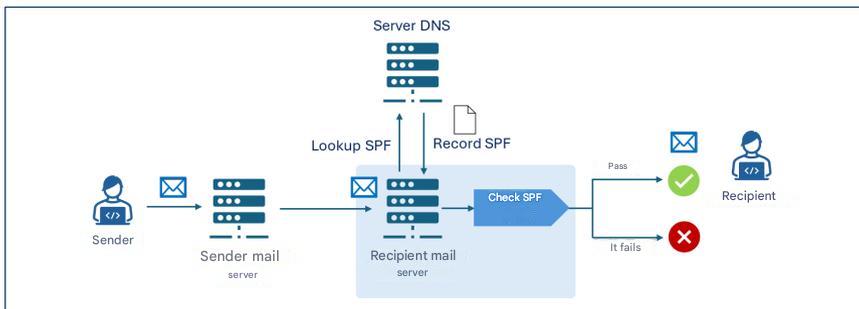
Der Mailserver des Empfängers führt anschließend die SPF-Verifizierung durch und analysiert den SPF-Eintrag, um festzustellen, ob die IP-Adresse, von der die Nachricht empfangen wurde, berechtigt ist, E-Mails für die example.com . Besteht die E-Mail die SPF-Verifizierung, wird sie an den Empfänger zugestellt.
Wenn beispielsweise der SPF-Eintrag der Domain example.com v=spf1 ip4:203.0.113.22 -all lautet , würde die Überprüfung nur dann erfolgreich sein, wenn die IP-Adresse des Absenderservers 203.0.113.22 lautet ; bei jeder anderen Adresse würde sie fehlschlagen.
5.2. DKIM
DKIM – DomainKeys Identified Mail ist ein Authentifizierungsprotokoll, das in RFC 6376 formalisiert ist und es einem Domaininhaber ermöglicht, die Authentizität von E-Mail-Nachrichten zu gewährleisten, indem er eine digitale Signatur (DKIM-Signatur) anhängt, die vom Mailserver mithilfe öffentlicher kryptografischer Algorithmen generiert und in die Header der zu übertragenden Nachricht eingefügt wird.
Damit der Empfänger überprüfen kann, ob die Nachricht während der Übertragung verändert wurde, wird der mit der DKIM-Signatur verknüpfte öffentliche Schlüssel in einem TXT-Eintrag des öffentlichen DNS der Absenderdomäne, dem sogenannten DKIM-Eintrag, gespeichert, der vom Empfänger-Mailserver beim Empfang der Nachricht abgefragt wird.
Die DKIM-Signatur und der DKIM-Datensatz werden in den nachfolgenden Abschnitten dieses Absatzes erläutert.
Wie bei SPF muss auch DKIM vom Absender und Empfänger korrekt konfiguriert werden, insbesondere:
- Der Absender muss seinen Mailserver so konfigurieren, dass er DKIM-Signaturen generiert und den DKIM-Eintrag im entsprechenden DNS-Server veröffentlicht;
- Der Empfänger muss seinen Mailserver so konfigurieren, dass er eine DKIM-Verifizierung für empfangene Nachrichten durchführt.
5.2.1. DKIM-Signatur
Die DKIM-Signatur wird aus bestimmten Elementen des Nachrichtentextes und der Header generiert und besteht aus einer Reihe von Schlüssel-Wert-Paaren, die Elemente spezifizieren, darunter:
- v: Protokollversion10;
- a: verwendeter Verschlüsselungsalgorithmus11;
- d: Signaturdomäne, die die Authentizität der Nachricht erklärt12;
- s: Selektor, der angibt, nach welchem DKIM-öffentlichen Schlüssel im DNS-Eintrag gesucht werden soll13;
- h: Liste der in der Signatur enthaltenen E-Mail-Header14;
- bh: Hash des Nachrichtentextes im Base64-Format15;
- b: tatsächliche digitale Signatur, die mit dem privaten Schlüssel erzeugt und im Base64-Format kodiert wurde16;
- x: Gültigkeitsdatum der Unterschrift;
- c: Art der Kanonisierung.
Die Kanonisierung ist der Prozess der Normalisierung von Nachrichtenelementen vor der digitalen Signatur. Dadurch werden die Auswirkungen kleiner Änderungen, die während der Übertragung auftreten können, wie z. B. wiederholte Leerzeichen oder Zeilenumbrüche, minimiert. Es gibt zwei Arten der Kanonisierung: die einfache, die eine exakte Übereinstimmung zwischen Original- und Empfangsnachricht erfordert, und die erweiterte, die Normalisierungen wie das Entfernen von Leerzeichen, die Umwandlung von Groß- in Kleinbuchstaben in den Headern und die Reduzierung aufeinanderfolgender Leerzeilen im Nachrichtentext anwendet.
5.2.2. DKIM-Datensatz
Der DKIM-Eintrag wird in einem DNS-Eintrag vom Typ TXT gespeichert, dessen Name die Struktur „ Selektor._Domainschlüssel.Domain “ aufweist. „_Domainschlüssel“ ist dabei eine Bezeichnung, die angibt, dass es sich um einen DKIM-Eintrag handelt. Der Inhalt des DKIM-Eintrags besteht aus einer Reihe von Schlüssel-Wert-Paaren, die unter anderem folgende Elemente spezifizieren:
- v: Protokollversion;
- k: Schlüsseltyp, standardmäßig RSA;
- p: Öffentlicher Schlüssel im Base64-Format.
Beispiel eines DKIM-Eintrags
Name: s1._domainkey.example.com
Wert: v=DKIM1; k=rsa; p=Y2hpYXZ1cHViYmxpY2FkaWVzZW1waW8h...
Der Beispiel-DKIM-Eintrag ist mit dem Selektor s1 der example.com , verwendet Version 1 und enthält den RSA-Public-Key im Base64-Format (Y2hpYXZ1cHViYmxpY2FkaWVzZW1waW8h...).
5.2.3. Authentifizierungsprozess
Wenn das DKIM-Protokoll auf den Mailservern von Absender und Empfänger korrekt konfiguriert ist, erstellt der Absender-Mailserver gemäß Abschnitt 5.2.1 die DKIM-Signatur der Nachricht, die dieser beigefügt wird. Die DKIM-Signatur enthält im „d“ die Signaturdomäne17 und im „b“ die mit dem privaten Schlüssel der Signaturdomäne erzeugte digitale Signatur der Nachricht.
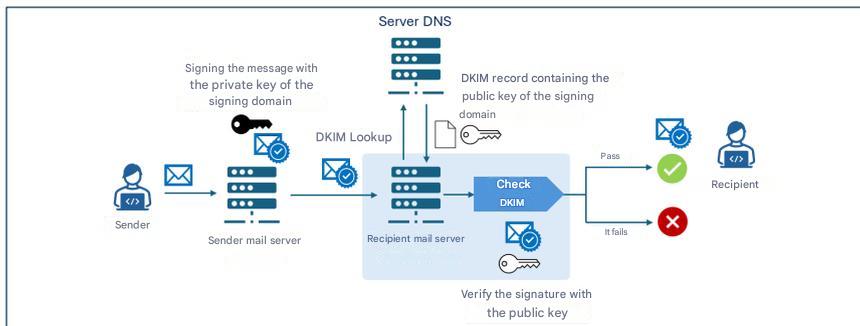
Nach dem Empfang einer Nachricht ruft der Empfänger-Mailserver den DKIM-Eintrag der signierenden Domain („d“ der DKIM-Signatur) vom DNS-Server ab, der die Einträge dieser Domain enthält. Anschließend verwendet er den im DKIM-Eintrag enthaltenen öffentlichen Schlüssel, um die digitale Signatur („b“ ) zu verifizieren. Bei erfolgreicher Verifizierung wird die Nachricht an den Empfänger zugestellt.
5.2.4. Kryptografische Aspekte
Im Bereich der Kryptographie hat DKIM historisch gesehen den RSA- Algorithmus verwendet, insbesondere in der rsa-sha256 , die seit 2007 als Standard gilt. Die neue Alternative, die mit RFC 8463, ist Ed25519-SHA256, eine moderne Form der digitalen Signatur auf Basis elliptischer Kurven, die eine höhere Effizienz und wesentlich kompaktere Schlüssel gewährleistet.
Technisch gesehen ist RSA mit einer Schlüssellänge von 2048 Bit nach wie vor der universelle Standard. Allerdings sind die Schlüssel lang und die Signaturen relativ groß. Ed25519 hingegen bietet neunmal kürzere Schlüssel und viermal kleinere Signaturen bei einer bis zu dreißigmal höheren Signierleistung im Vergleich zu RSA 2048. Trotz dieser Vorteile ist die praktische Anwendung begrenzt: Im Jahr 2026 wird Ed25519 nur von wenigen Anbietern verifiziert, und einige große Netzbetreiber unterstützen weder Signierung noch Verifizierung zuverlässig. Daher eignet sich Ed25519 nicht als alleinige Lösung für den Produktiveinsatz.
Aus diesem Grund wird die Verwendung von Ed25519 trotz seiner technischen Überlegenheit zum Zeitpunkt der Erstellung dieses Dokuments nur in Kombination mit RSA mittels doppelter Signatur empfohlen – sowohl aus experimenteller Sicht als auch zur Gewährleistung zukünftiger Kompatibilität. Solange die großen Anbieter die Verifizierung nicht vollständig implementieren, bleibt RSA unerlässlich, um eine maximale Zustellungssicherheit zu gewährleisten.
Im Hinblick auf die langfristige Sicherheit ist zu beachten, dass weder RSA noch Ed25519 gegen Angriffe zukünftiger Quantencomputer resistent sind [3]und der Übergang zu Post-Quanten-Algorithmen neue DKIM-Standards erfordert, die derzeit noch nicht existieren. Daher ist es unerlässlich, die Entwicklungen der Kryptographie der nächsten Generation und zukünftige ACN-Empfehlungen in diesem Bereich zu beobachten.
Im Hinblick auf die Verwaltung kryptografischer Schlüssel muss der DKIM-Privatschlüssel durch strenge Sicherheitsmaßnahmen geschützt werden. Dazu gehört die Aufbewahrung auf isolierten Systemen, auf die nur autorisierte Dienste Zugriff haben, die Anwendung restriktiver Berechtigungen, die regelmäßige Rotation und die ständige Überwachung, um unbefugten Zugriff oder Kompromittierungen zu verhindern.
5.3. DMARC
DMARC – Domain-based Message Authentication, Reporting and Conformance ist ein Authentifizierungsprotokoll, das in RFC 7489integriert.Dadurch kann ein Domaininhaber den Empfängern von Nachrichten, die von dieser Domain gesendet werden, die Richtlinien für den Umgang mit Nachrichten mitteilen, die die SPF- und DKIM-Verifizierung nicht bestehen.
DMARC führt insbesondere einen Authentifizierungsmechanismus ein – die sogenannte Ausrichtung –, der die Übereinstimmung zwischen den von SPF und DKIM authentifizierten Domänen und der Domäne des „message-from“ -Felds der empfangenen Nachricht überprüft. Die Ausrichtungsprüfung zwischen dem „message-from “-Feld und der SPF/DKIM-Domäne schlägt in jedem Fall fehl, wenn die entsprechende SPF/DKIM-Verifizierung fehlschlägt (siehe Abbildung 4).
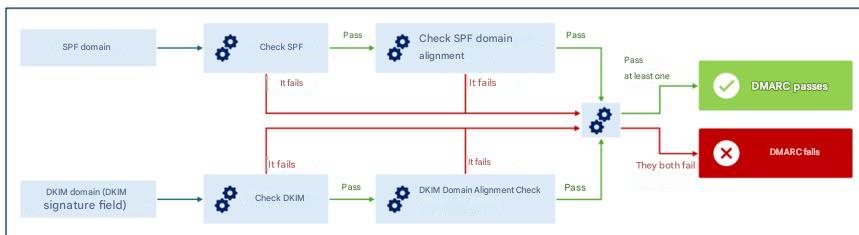
Die Ausrichtung kann im strikten Modus überprüft werden , bei dem eine exakte Übereinstimmung zwischen den durch SPF/DKIM authentifizierten Domänen und derjenigen im Feld „message-from“ erforderlich ist , oder im lockeren Modus , bei dem es ausreicht, dass die primären Domänen übereinstimmen, selbst wenn die Subdomänen unterschiedlich sind.
Im Relaxed- Modus würde beispielsweise für die Domains sub1.example.com und sub2.example.com eine Übereinstimmung für die DMARC-Verifizierung gefunden (da die primäre Domain example.com identisch ist). Im Strict- Modus hingegen würde die DMARC-Überprüfung aufgrund der fehlenden exakten Übereinstimmung der Domains fehlschlagen.
Durch die Überprüfung der Ausrichtung würde DMARC selbst dann, wenn es einem Angreifer gelänge, die SPF- und/oder DKIM-Prüfungen mit einer anderen Absenderadresse als der von SPF und/oder der authentifizierten Signaturdomäne authentifizierten Absenderadresse zu bestehen, die Diskrepanz erkennen und so eine kohärente und zuverlässige Überprüfung der Identität des Absenders gewährleisten [2] .
Die Richtlinien für den Umgang mit Nachrichten, die die DMARC-Verifizierung nicht bestehen,sind in einem TXT-Eintrag des zugehörigen DNS-Servers der Absenderdomäne, dem sogenannten DMARC-Eintrag, festgelegt und werden im nachfolgenden Abschnitt dieses Absatzes erläutert.
DMARC ermöglicht es Empfängern außerdem, Berichte an die Inhaber der Absenderdomain zu senden, wenn Nachrichten vorgeben, von dieser Domain zu stammen. So kann der Domaininhaber überprüfen, ob und in welchem Umfang seine Domain unberechtigt genutzt wird, indem er beispielsweise analysiert, wie viele der Nachrichten, die vorgeben, von seiner Domain zu stammen, tatsächlich auf ihn zurückführbar sind.
Wie bei SPF und DKIM muss auch DMARC vom Sender und Empfänger korrekt konfiguriert werden, insbesondere:
- Der Absender muss den DMARC-Eintrag in seinem DNS veröffentlichen, in dem die Richtlinien für den Umgang mit Nachrichten, die die DMARC-Verifizierung nicht bestehen, angegeben sind;
- Der Empfänger muss seinen Mailserver so konfigurieren, dass er eine DMARC-Verifizierung für empfangene Nachrichten durchführt.
5.3.1. DMARC-Datensatz
Der DMARC-Eintragsname hat die Struktur _dmarc.domain, wobei _dmarc eine Bezeichnung ist, die angibt, dass es sich bei dem DNS-Eintrag um einen DMARC-Eintrag handelt, und domain die Domäne ist, auf die sich die Richtlinie bezieht.
Der DMARC-Eintrag besteht aus einer Reihe von Schlüssel-Wert-Paaren, die Elemente spezifizieren, darunter:
- v: DMARC-Protokollversion20;
- p: Richtlinie, die auf Nachrichten angewendet werden soll, die die DMARC-Verifizierung nicht bestehen; kann einen der Werte
none,quarantineoderreject; - aspf: Ausrichtungsmodus für die SPF-Prüfung (kann
relaxiert, Standardwert oderstrikt); - adkim: Ausrichtungsmodus für die DKIM-Prüfung (kann
relaxiert, Standardwert oderstrikt); - rua: E-Mail-Adressen, an die aggregierte Berichte mit statistischen und zusammenfassenden Informationen über Nachrichten, die von der Absenderdomäne empfangen wurden, gesendet werden sollen;
- ruf: E-Mail-Adressen, an die detaillierte Berichte über einzelne Nachrichten gesendet werden sollen, die von der Absenderdomäne empfangen wurden und bei denen die DMARC-Verifizierung fehlgeschlagen ist.
Beispiel eines DMARC-Eintrags
Name:
_dmarc.example.com
Wert:
v=DMARC1; p=reject; rua=mailto:dmarc-reports@example.com; ruf=mailto:dmarc-fail@example.com; adkim=s; aspf=s
Der Beispiel-DMARC-Eintrag ist mit der example.com , verwendet Version 1 und legt die Ablehnungsrichtlinie für Nachrichten fest, die die DMARC-Verifizierung nicht bestehen. Er fordert strikten Modus (s) für die Überprüfung der Ausrichtung von SPF- und DKIM-Domains an und sendet aggregierte Berichte an die E-Mail-Adresse dmarc-reports@example.com und Fehlerberichte an die Adresse dmarc-fail@example.com.
5.3.2. DMARC-Richtlinien
Wie im vorherigen Absatz beschrieben, gibt der DMARC-Eintrag die Richtlinie an, die der empfangende Mailserver für Nachrichten anwenden soll, die die DMARC-Verifizierung nicht bestehen. Folgende Richtlinien sind möglich:
- keine: Die Absenderdomäne gibt keine Hinweise auf die Zustellung von Nachrichten, die die DMARC-Verifizierung nicht bestehen;
- Quarantäne: Die Absenderdomäne gibt an, dass Nachrichten, die die DMARC-Verifizierung nicht bestehen, als verdächtig einzustufen sind (z. B. einer weiteren Prüfung unterzogen, als Spam behandelt oder als verdächtig gekennzeichnet werden);
- reject: Die Absenderdomäne gibt an, dass Nachrichten, die die DMARC-Verifizierung nicht bestehen, zurückgewiesen werden sollen.
5.3.3. Richtlinienprüfung und Antragsverfahren
Wenn das DMARC-Protokoll auf den Mailservern von Absender und Empfänger korrekt konfiguriert ist, ruft der Empfänger-Mailserver nach dem Empfang einer Nachricht die SPF- und DKIM-Einträge ab, um die entsprechenden Überprüfungen durchzuführen, sowie die DMARC-Überprüfung (detailliert im Anfang von Abschnitt 5.2.4 beschrieben). Falls die Nachricht die DMARC-Überprüfung nicht besteht, wird die im DMARC-Eintrag angegebene Richtlinie (keine, Quarantäne oder Ablehnung) angewendet.
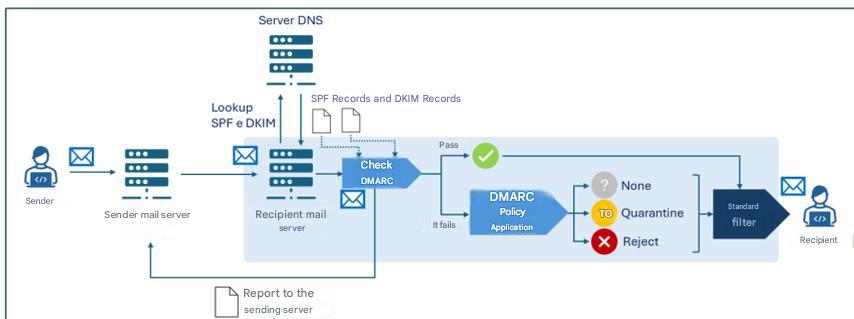
Beachten Sie, dass jeder Mailserver eigene Heuristiken und Richtlinien zur Bestimmung der Zustellung einer Nachricht anwenden kann und dabei auch die Ergebnisse von SPF-, DKIM- und DMARC-Prüfungen berücksichtigt. Daher gibt es im Allgemeinen nach den genannten Prüfungen einen zusätzlichen Entscheidungsprozess („Standardfilter“ in Abbildung 5), der weitere Prüfungen (wie beispielsweise Anti-Spam- und Anti-Malware-Filter) umfassen kann.
Des Weiteren kann der empfangende Mailserver Folgendes übertragen:
- an die im
„rua“des DMARC-Eintrags angegebenen Adressen: Zusammenfassungsberichte mit statistischen und zusammenfassenden Informationen über Nachrichten, die von der Absenderdomäne empfangen wurden; - An die im
„ruf“des DMARC-Eintrags angegebenen Adressen werden detaillierte Berichte über einzelne Nachrichten gesendet, die von der Absenderdomäne empfangen wurden und bei denen die DMARC-Verifizierung fehlgeschlagen ist.
6. Schlussfolgerungen
Wie im vorangegangenen Kapitel erörtert, ist es zur bestmöglichen Abwehr von Bedrohungen im Zusammenhang mit der Identitätsfälschung des Absenders erforderlich, dass alle drei untersuchten Protokolle gemeinsam implementiert werden und insbesondere, dass [3]:
- Die Absenderdomäne veröffentlicht SPF-, DKIM- und DMARC-Einträge korrekt im DNS;
- Der Mailserver des Absenders ist so konfiguriert, dass Nachrichten mit DKIM signiert werden;
- Der Mailserver des Empfängers ist so konfiguriert, dass er SPF- und DKIM-Verifizierungen durchführt und DMARC-Richtlinien anwendet.
Im Hinblick auf die Protokollumsetzung werden außerdem folgende Empfehlungen formuliert: [2]:
- Konfigurieren Sie SPF, indem Sie festlegen, welche IP-Adressen berechtigt sind, E-Mails im Namen der Domain zu versenden; für Domains, die nicht für die E-Mail-Übertragung verwendet werden, z. B. solche, die ausschließlich für Websites bestimmt sind, sollte dennoch ein SPF-Eintrag erstellt werden, der explizit angibt, dass es für diese Domain keine gültigen E-Mail-Absender gibt;
- Verwenden Sie modernste Verschlüsselungsprotokolle und -algorithmen, die für DKIM-Schlüssel als sicher gelten. Zum Zeitpunkt der Erstellung dieses Dokuments wird 2048-Bit-RSA empfohlen
- den auf dem Mailserver gespeicherten DKIM-Privatschlüssel angemessen schützen, indem restriktive Zugriffsrechte festgelegt werden und sichergestellt wird, dass nur die Mailserver-Software Leserechte für den Schlüssel besitzt;
- Um die Auswirkungen einer möglichen Kompromittierung des privaten Schlüssels zu minimieren, sollte jeder Mailserver mit einem eindeutigen Schlüsselpaar und Selektor konfiguriert werden
- den privaten Schlüssel sowohl vor versehentlicher Offenlegung als auch vor Zugriffs- oder Änderungsversuchen durch einen Angreifer schützen;
- vorausgesetzt, dass die Software, die mit Mailinglisten zusammenhängt, die DKIM-Signaturen eingehender Nachrichten überprüft und ausgehenden Nachrichten neue DKIM-Signaturen hinzufügt;
- Verwenden Sie für jeden Drittanbieter, der im Namen der Organisation E-Mails versendet, eindeutige DKIM-Schlüsselpaare;
- DKIM-Schlüsselpaare sollten regelmäßig (mindestens alle sechs Monate) rotiert werden, um die Auswirkungen einer möglichen Kompromittierung zu minimieren
- Schlüssel bei Verdacht auf Kompromittierung unverzüglich widerrufen;
- DMARC-Berichte überwachen, um Konfigurationsfehler oder Missbrauchsversuche zu erkennen.
Weitere Einzelheiten entnehmen Sie bitte den in den Referenzdokumenten.
Es ist festzustellen, dass zum angemessenen Schutz der E-Mail-Sicherheit neben den hier untersuchten Authentifizierungsprotokollen weitere Protokolle existieren, die nicht Gegenstand dieser Richtlinien sind, wie beispielsweise TLS (Transport Layer Security) , das die Verschlüsselung des Übertragungskanals gewährleistet, sowie SMIME und OpenPGP , die sich mit der Ende-zu-Ende-Verschlüsselung und der Nachrichtenauthentifizierung befassen.
Es sei außerdem darauf hingewiesen, dass – obwohl es sich im engeren Sinne nicht um ein E-Mail-Sicherheitsprotokoll handelt – die Implementierung von DNSSEC (Domain Name System Security Extensions) zur Erhöhung der Sicherheit von E-Mail-Diensten empfohlen wird. DNSSEC ist eine DNS-Protokollerweiterung, die DNS-Einträgen kryptografische Signaturen hinzufügt, um die Integrität und Authentizität von DNS-Anfragen zu gewährleisten. Dank DNSSEC werden beispielsweise Informationen zu SPF-, DKIM- und DMARC-Einträgen während der Übertragung geschützt, wodurch das Risiko von Manipulationen verringert und somit die Sicherheit von E-Mail-Diensten erhöht wird.
Anhang A: Sicherheitsmaßnahmen
Nationaler Cybersicherheitsperimeter (PSNC)
PR.IP-1: Referenzverfahren (sogenannte Baselines) werden für die Konfiguration von IT-Systemen und industriellen Steuerungssystemen definiert und verwaltet, die Sicherheitsprinzipien (z. B. das Prinzip der minimalen Funktionalität) beinhalten.
- Es gibt ein detailliertes, aktualisiertes Dokument, das – auch in Bezug auf die Kategorie ID.AM – mindestens Folgendes aussagt:
- a) die für die Entwicklung von Konfigurationen von IT- und industriellen Steuerungssystemen geltenden Sicherheitsrichtlinien und die ausschließliche Verwendung der gewählten Konfigurationen;
- b) die Liste der verwendeten IT- und industriellen Steuerungssystemkonfigurationen und die Verweise auf entsprechende Referenzverfahren;
- c) die Prozesse, Methoden und Technologien, die zur Einhaltung der Sicherheitsrichtlinien beitragen.
Cloud-Regulierung – Digitale Infrastrukturen und Dienste für die öffentliche Verwaltung
PR.IP-01: Referenzverfahren (sogenannte Baselines) werden für die Konfiguration von IT-Systemen und industriellen Steuerungssystemen definiert und verwaltet, die Sicherheitsprinzipien (z. B. das Prinzip der minimalen Funktionalität) beinhalten.
- Richtlinien und Verfahren werden unter Berücksichtigung der Anwendungssicherheit definiert, um eine angemessene Unterstützung für die Planung, Realisierung und Aufrechterhaltung von Anwendungssicherheitsfunktionen zu gewährleisten. Diese müssen mindestens jährlich überprüft und aktualisiert werden.
- Es gibt ein detailliertes, aktualisiertes Dokument, das – auch in Bezug auf die Kategorie ID.AM – mindestens Folgendes aussagt:
- a) die für die Entwicklung von Konfigurationen von IT- und industriellen Steuerungssystemen geltenden Sicherheitsrichtlinien und die ausschließliche Verwendung der gewählten Konfigurationen;
- b) die Liste der verwendeten IT- und industriellen Steuerungssystemkonfigurationen und die Verweise auf entsprechende Referenzverfahren;
- c) die Prozesse, Methoden und Technologien, die zur Einhaltung der Sicherheitsrichtlinien beitragen.
- Die grundlegenden Sicherheitsanforderungen für verschiedene Anwendungen werden definiert und dokumentiert.
- Es werden Kennzahlen technischer Art definiert und implementiert, die zur Überwachung des Grades der Einhaltung festgelegter Sicherheitsanforderungen und Compliance-Verpflichtungen nützlich sind.
- Zur Behebung von Anwendungsschwachstellen und zur Wiederherstellung der Anwendungssicherheit gibt es einen Prozess, der die Behebung nach Möglichkeit automatisiert.
- Es gibt ein Verfahren zur Überprüfung der Gerätekompatibilität mit Betriebssystemen und Anwendungen.
- Es gibt ein System zur Verwaltung von Abweichungen im Hinblick auf Betriebssysteme, Patches und/oder Anwendungen.
Cloud-Regulierung – Cloud-Dienste für die öffentliche Verwaltung
PR.IP-01: Referenzverfahren (sogenannte Baselines) werden für die Konfiguration von IT-Systemen und industriellen Steuerungssystemen definiert und verwaltet, die Sicherheitsprinzipien (z. B. das Prinzip der minimalen Funktionalität) beinhalten.
- Richtlinien und Verfahren werden unter Berücksichtigung der Anwendungssicherheit definiert, um eine angemessene Unterstützung für die Planung, Realisierung und Aufrechterhaltung von Anwendungssicherheitsfunktionen zu gewährleisten, die mindestens jährlich überprüft und aktualisiert werden müssen [IaaS, SaaS].
- Es gibt ein detailliertes, aktualisiertes Dokument, das – auch in Bezug auf die Kategorie ID.AM – mindestens Folgendes aussagt:
- a) die für die Entwicklung von Konfigurationen von IT- und industriellen Steuerungssystemen geltenden Sicherheitsrichtlinien und die ausschließliche Verwendung der gewählten Konfigurationen;
- b) die Liste der verwendeten IT- und industriellen Steuerungssystemkonfigurationen und die Verweise auf entsprechende Referenzverfahren;
- c) die Prozesse, Methoden und Technologien, die zur Einhaltung der Sicherheitsrichtlinien beitragen [SaaS].
- Die grundlegenden Sicherheitsanforderungen für verschiedene Anwendungen werden definiert und dokumentiert.
- Es werden technische Kennzahlen definiert und implementiert, die zur Überwachung der Einhaltung definierter Sicherheitsanforderungen und Compliance-Vorgaben dienen. 5. Für die Anwendungssicherheit existiert ein Prozess zur Behebung von Anwendungsschwachstellen und zur Wiederherstellung, der die Behebung nach Möglichkeit automatisiert.
- Es gibt ein Verfahren zur Überprüfung der Gerätekompatibilität mit Betriebssystemen und Anwendungen [PaaS, SaaS].
- Es gibt ein Variationsmanagementsystem in Bezug auf Betriebssysteme, Patches und/oder Anwendungen [PaaS, SaaS].
NIS 2
PR.PS-01: Konfigurationsmanagementpraktiken werden etabliert und angewendet.
- Für zumindest relevante Informations- und Netzwerksysteme sind deren sichere Basiskonfigurationen (gehärtet) definiert und in einer aktualisierten Liste dokumentiert.
- In Übereinstimmung mit den in Maßnahme GV.PO-01 genannten Richtlinien werden Verfahren in Bezug auf Punkt 1 eingeführt und dokumentiert.
Bibliographie
[1] NIST, „Technische Notiz 1945“.
[2] NIST, „NIST-Sonderveröffentlichung 800-177 Revision 1“.
[3] Nationale Agentur für Cybersicherheit, „Post-Quanten- und Quantenkryptographie – Vorbereitung auf die Quantenbedrohung“.
[4] Nationale Agentur für Cybersicherheit, „Framework für E-Mail-Authentifizierung“.
-
Eurostat-Daten 2026, https://ec.europa.eu/eurostat/databrowser/view/tin00094/default/table?lang=en&category=f_isoc_t_isoc_i_t_isoc_iu ↩︎
-
RFC 821 wurde später durch RFC 5321 aus dem Jahr 2008 aktualisiert. ↩︎
-
Tatsächlich enthalten E-Mail-Server im Allgemeinen zusätzliche Module, die andere Aufgaben als die des MTA übernehmen, wie zum Beispiel Module für die lokale Speicherung von Nachrichten und für den Zugriff der Clients auf ihre E-Mail-Postfächer. ↩︎ ↩︎
-
Der Anzeigename ist das Textfeld, das der E-Mail-Adresse des Absenders zugeordnet ist und dem Empfänger vom E-Mail-Client in der Nachrichtenkopfzeile angezeigt wird. Er unterscheidet sich von der E-Mail-Adresse und dient dazu, den Absender auf lesbare und erkennbare Weise zu identifizieren. ↩︎
-
Eine E-Mail-Adresse hat die Struktur
local-part@domain-part,wobeilocal-partden spezifischen Benutzer innerhalb des E-Mail-Systems oder Servers identifiziert, der mitdomain-partverknüpft ist. domain-part entspricht wiederum dem Domänennamen des Systems oder Dienstes, der das durchlocal-partidentifizierte Benutzerkonto hostet [2] . ↩︎ -
Um Missverständnisse zu vermeiden, wird im Sinne der Lesbarkeit der Begriff „E-Mail-Server“ anstelle von MTA verwendet. MTA ist die Komponente des E-Mail-Servers, die für die Übertragung von Nachrichten vom Absender zum Empfänger zuständig ist. ↩︎
-
Zur Unterscheidung zwischen „Envelope-From“ und „Message-From“ siehe den ausführlichen Kasten „Absender-E-Mail-Adresse: Envelope-From und Message-From“ in Absatz 4.1. ↩︎
-
Es können auch sogenannte Modifikatoren vorhanden sein, die zusätzliche Informationen, Ausnahmen von Regeln und Abweichungen von Standardwerten festlegen. ↩︎
-
Aktuell existiert nur eine Version des Protokolls (
v=spf1). ↩︎ -
Momentan existiert nur eine Version des Protokolls (
v=1). ↩︎ -
Der Standardalgorithmus ist
rsa-sha256. ↩︎ -
Die Signaturdomäne gewährleistet die Authentizität der Nachricht mittels digitaler Signatur. Empfänger greifen auf diese Domänen zu, um den öffentlichen DKIM-Schlüssel vom DNS abzurufen und die Signatur zu verifizieren. Sie muss nicht zwingend mit der Absenderdomäne der Nachricht und/oder der Absenderdomäne übereinstimmen, jedoch können DMARC-Richtlinien eine solche Angleichung erfordern (siehe dazu den Abschnitt zu DMARC). ↩︎
-
Der Selektor ermöglicht die eindeutige Identifizierung des kryptografischen Schlüsselpaares, das zur Erstellung der Signatur verwendet wurde. Für eine gegebene Domäne können mehrere Schlüsselpaare generiert werden, sodass MTAs derselben Domäne unterschiedliche Schlüssel verwenden oder eine effektive periodische Schlüsselrotation durchgeführt werden kann. ↩︎
-
Insbesondere werden bestimmte Nachrichtenkopfzeilen (wie From, To, Subject, Date) signiert, die während der Nachrichtenübertragung nicht verändert werden. ↩︎
-
Der Hashwert einer Nachricht wird üblicherweise anhand des gesamten Nachrichtentextes berechnet. Um Szenarien zu berücksichtigen, in denen die Nachricht während der Übertragung verändert wird, beispielsweise durch Hinzufügen von Elementen wie Fußzeilen oder Haftungsausschlüssen (wie bei Mailinglisten-Diensten oder automatischer Weiterleitung), kann für die Signatur nur ein Teil der Nachricht verwendet werden. Dieses Vorgehen birgt jedoch Risiken, da die vollständige Integrität der empfangenen Nachricht nicht gewährleistet ist. ↩︎
-
Die digitale Signatur wird aus den in
hund dem Hash des Nachrichtentextes inbh. ↩︎ -
Wie bereits in Absatz 5.2.1 erwähnt, stimmt die Signaturdomäne im Allgemeinen nicht mit der Message-From- und/oder Envelope-From-Domäne überein, aber DMARC-Richtlinien können deren Angleichung erfordern (wie im DMARC-Abschnitt beschrieben). ↩︎
-
Damit DMARC funktioniert, muss mindestens eines der Protokolle SPF oder DKIM implementiert sein. In diesem Leitfaden wird, wie in Kapitel 5 beschrieben, die gemeinsame Implementierung aller drei Protokolle empfohlen. ↩︎
-
Für das Bestehen der DMARC-Verifizierung ist es erforderlich, dass mindestens eine der beiden Alignments (SPF oder DKIM) gültig ist. ↩︎
-
Aktuell existiert nur eine Version des Protokolls (
v=DMARC1). ↩︎
eine gute Alternative zu BCC-E-Mails

In einem früheren Beitrag haben wir die Vor- und Nachteile der Verwendung von BCC-E-Mails erläutert,
siehe: „Wie man BCC-E-Mails sendet und einschränkt“.
In den Schlussfolgerungen stellten wir unter anderem Folgendes fest:
Nutzen Sie spezielle Apps für den Massenversand. Die professionellen Systeme verfügen über einen Genehmigungsworkflow und eine schrittweise Kontrolle und sind darauf ausgelegt, Fehler zu vermeiden.
Zusammenfassung dieses Artikels:
- So funktioniert es
- GNU Mailman „Einwegliste“
- Ein wenig Geschichte zu GNU Mailman
- VERP-Bounce-Management
- Ausrichtung von Absender- und Mail-Absenderadresse
So funktioniert es
E-Mail-Marketing-Plattformen können schwierig zu erlernen und zu betreuen sein (falls Sie diese Ihren Kunden anbieten).
Wir beschreiben hier die Idee, die Open-Source-Software „GNU Mailman“ für den Versand von Massenmails zu nutzen.
Dieser Vorschlag basiert auf unserer eigenen Erfahrung mit der benutzerfreundlichenApp „copymail“.
Eine Mailman-„Einweg“-Liste ist eine Konfiguration für Newsletter oder Ankündigungen,
bei der nur autorisierte Moderatoren Beiträge veröffentlichen können und Mitglieder nicht auf die Liste antworten können.
So funktioniert es:
-
Der Nutzer sendet die Nachricht von seinem E-Mail-Programm oder über Webmail an die E-Mail-Adresse der Liste.
Anschließend muss er die Zustellung bestätigen; die Nachricht wird dann serverseitig an alle Abonnenten verteilt. -
Das System verarbeitet automatisch Bounces (zurückgesendete E-Mails) und, falls gewünscht, Abmeldungen.
Abonnements müssen manuell registriert werden. -
Der Dienst ist äußerst zuverlässig und kann problemlos Tausende von Adressen verarbeiten.
Der Versand erfolgt über RealSender- oder andere SMTP-Server.
GNU Mailman „Einwegliste“
GNU Mailman ist eine weit verbreitete Software, die von den meisten Internetdienstanbietern angeboten wird.
Im Internet finden sich einige Anleitungen, die erklären, wie man sie konfiguriert und für Massenmailings verwendet:
- Mitglieder treten bei, indem sie ein Formular auf Ihrer Website ausfüllen (und auf die Bestätigungs-E-Mail antworten)
- Sie erhalten eine Willkommensnachricht, in der nicht erwähnt wird, wie man Beiträge auf der Liste veröffentlicht
- Sie erhalten Ihre Newsletter mit einer Fußzeile, die einfache Anweisungen zum Abmelden enthält
- Nur autorisierte Personen können Beiträge in die Liste eintragen (Newsletter versenden)
Die Hauptreferenz ist dieses Dokument, das aus zwei Beiträgen von Barry Warsaw in der Mailman-Benutzerliste stammt:
Wie erstelle ich einen Newsletter/eine Ankündigung/eine Einwegliste?
Der Text erläutert die wichtigsten Punkte im Detail:
- Wie erstellt man eine personalisierte Willkommensnachricht und eine Listeninfoseite, die keine Hinweise zum Posten in der Liste enthält?
- Wie lassen sich Passwortprobleme und Abmeldeprobleme minimieren, die bei dieser Art von Liste häufig auftreten?
- Wie kann ich die Liste so einschränken, dass nur autorisierte Personen Beiträge veröffentlichen können?
- Wie richte ich eine Benachrichtigungsliste ein, die auf eine Kontaktadresse antwortet?
- Wie man in der Ankündigungsliste postet
Ein weiterer Artikel der Stanford University erklärt, wie man mit Mailman
eine Liste einrichten kann, die nur Ankündigungen versendet:
So richten Sie eine „unidirektionale“ Ankündigungs- oder Newsletter-Liste ein – Wissensartikel KB00010792
Ein wenig Geschichte zu GNU Mailman
Mailinglisten können diskussions- oder ankündigungsbasiert sein. Die Mailman-Software ist in Python geschrieben; vor ihrer Veröffentlichung nutzte die Python-Community Majordomo, einen Perl-basierten Mailinglisten-Manager.
Mark Sapiro betreut heute den stabilen 2.1-Zweig,
während sich Barry Warsaw auf die neue Version 3.X konzentriert.
Zwei übergeordnete Prinzipien, die für den anhaltenden Erfolg von Mailman entscheidend sind:
- Keine Nachricht sollte jemals verloren gehen
- Keine Nachricht sollte jemals mehr als einmal übermittelt werden
In Mailman 2 überarbeiteten die Entwickler das Nachrichtenverarbeitungssystem, um sicherzustellen, dass diese beiden Prinzipien stets höchste Priorität haben. Dieser Teil des Systems ist seit mindestens einem Jahrzehnt stabil und einer der Hauptgründe für die heutige weite Verbreitung von Mailman.
VERP-Bounce-Management
VERP steht für Variable Envelope Return Path (Variabler Rückumschlagpfad). Es handelt sich um eine gängige Methode, mit der Mailinglisten die Adressen von Empfängern, die nicht zugestellt werden können, eindeutig ermitteln. Erhält die Mailingliste eine solche Fehlermeldung, kann sie darauf reagieren, beispielsweise die betreffende Adresse deaktivieren oder sie aus der Liste entfernen.
Für die Unzustellbarkeitsbenachrichtigungen gibt es ein Standardformat, die sogenannten Zustellstatusbenachrichtigungen. Mailman verwendet eine Bibliothek mit Dutzenden von Heuristiken für das Unzustellbarkeitsformat, die alle in den zwanzig Jahren des Bestehens von Mailman in der Praxis beobachtet wurden.
VERP nutzt eine Anforderung des SMTP-Protokolls, um eine eindeutige Bounce-Erkennung zu gewährleisten, indem solche Benachrichtigungen an den Absender im Nachrichtentext zurückgesendet werden. Dies ist nicht das „ From:“- Feld im Nachrichtentext, sondern der „MAIL FROM“, der während des SMTP-Dialogs festgelegt wurde. Dieser Wert bleibt auf dem gesamten Zustellungsweg erhalten, und der empfangende Mailserver ist standardgemäß verpflichtet, die Bounces an diese Adresse zu senden.
Wenn der Mailman-Server mylist@example.org, ist der VERP-kodierte Absender für eine Mailinglisten-Nachricht an anne@example.com :
mylist-bounce+anne=example.com@example.org. Unzustellbare E-Mails werden an die VERP-kodierte Empfängeradresse gesendet. Mailman kann dann den „An:“ -Header analysieren, um den ursprünglichen Empfänger als anne@example.com
Die Verwendung von VERP erfordert, dass Mailman genau eine Kopie der Nachricht pro Empfänger versendet. VERP benötigt für jeden Empfänger eine eindeutige Absenderadresse (MAIL FROM) , und dies lässt sich nur durch den Versand einer individuellen Kopie der Nachricht gewährleisten. Dadurch wird auch verhindert, dass die Nachricht als Spam eingestuft wird.
Ausrichtung von Absender- und Mail-Absenderadresse
Während der Testphase verwendet die Standardkonfiguration der „Copymail-App“ eine von uns bereitgestellte Domain als Absenderadresse (auch bekannt als Bounce-/Return-Path-/Envelope-Adresse). An diese Adresse werden unzustellbare E-Mails zurückgesendet. Diese Absenderdomain unterscheidet sich von der Absenderadresse (der für Empfänger sichtbaren Absenderadresse).
Vor der Produktivsetzung müssen einige DNS-Änderungen vorgenommen werden, um die mit der Absenderdomäne gesendeten Nachrichten zu authentifizieren . Die neuesten E-Mail-Standards ermöglichen es Ihnen, authentifizierte E-Mails mit einer Subdomain als Absenderadresse (z. B. email.youremaildomain.com) zu versenden, während Sie weiterhindie Basisdomäne als Absenderadresse verwenden können ( z. B. info@youremaildomain.com). Weitere Details finden Sie auf der Erweiterte Einstellungen für die E-Mail-Authentifizierung“ .
Die gleiche Situation kann auch in anderen Umgebungen auftreten. Wir empfehlen Ihnen, dies mit Ihrem Internetanbieter zu klären.
Reverse-Proxy für SMTP-Server
um Clientanfragen zu bearbeiten und so Sicherheit, Leistung und Skalierbarkeit zu verbessern.
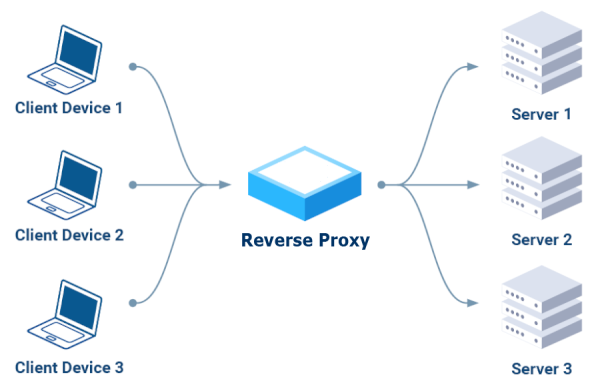
senden die Clients ihre Anfragen an den Reverse-Proxy,
der sie an die entsprechenden Server weiterleitet
und dabei als einziger, sicherer Zugriffspunkt fungiert.
Wichtigste Vorteile:
- Sicherheit:
Es kann bösartige Anfragen blockieren, den Datenverkehr verschlüsseln
und Backend-Server vor direkten Angriffen schützen. - Leistung:
Der eingehende Datenverkehr wird auf mehrere Server verteilt, wodurch eine Überlastung
einzelner Server verhindert und eine höhere Verfügbarkeit gewährleistet wird. - Skalierbarkeit:
Sie ermöglicht das Hinzufügen oder Entfernen von Backend-Servern ohne Serviceunterbrechung und
bietet somit die Möglichkeit, wachsendes Datenaufkommen zu bewältigen.
HTTP-only Reverse-Proxy (Schicht 7)
Im Internet sind verschiedene Tools verfügbar; nach eingehender Recherche haben wir zunächst diejenigen ausgeschlossen, die nur das HTTP-Protokoll (Schicht 7) unterstützen:
Kein Apache
„Oh je. Nehmen Sie sich einen Moment Zeit, um sich mit den Technologien vertraut zu machen, mit denen Sie arbeiten. E-Mails nutzen SMTP. Apache nutzt HTTP. Apache weiß absolut nichts über SMTP. Wenn Sie mit E-Mails arbeiten möchten, benötigen Sie eine Technologie, die SMTP unterstützt.“ – EEAA, Kommentar vom 18. August 2016 um 2:49 Uhr
kein
TCP-Proxying, sondern nur HTTP über TCP. Verwenden Sie einen Reverse-Proxy, der TCP-Proxying unterstützt, wie Traefik, Nginx oder HAProxy, oder nutzen Sie dieses experimentelle Plugin. – ElevenNotes, Kommentar vom 24. September 2024
Anschließend konzentrierten wir uns auf die drei in den Kommentaren empfohlenen Lösungen: „Traefik, NginX oder HAProxy“ und installierten und testeten sie nacheinander.
Traefik war die erste Wahl.
Die meisten Tutorials begannen mit Docker, einer Plattform, die ich vermeiden wollte. Stattdessen entschied ich mich für eine einfache Lösung, möglicherweise basierend auf einem der Linux-Paketmanager, wie YUM für RPM-basierte Distributionen wie Fedora und CentOS oder APT (Advanced Package Tool), das bei Debian-basierten Distributionen wie Ubuntu und Debian verwendet wird.
Nach langer Suche stießen wir auf diesen aktuellen Artikel, der die Art der Installation beschreibt, nach der wir gesucht hatten: Traefik als systemd-Dienst einrichten.
Ein Hinweis: Sie müssen die SELinux-Einstellungen von „Enforcing“ auf „Permissive“ ändern
Nachdem wir zwei Udemy-Kurse ausprobiert hatten, stießen wir auf diesen hervorragenden Kurs:
Traefik Crashkurs (ohne Docker).
Wir konnten ihn mithilfe der gezeigten Beispiele zum Laufen bringen. Gegen Ende des Videos äußerte der exzellente Dozent jedoch seine völlige Ablehnung dieses Tools:
Traefik Crashkurs – Zusammenfassung (53:50).
Dies entmutigte uns, weitere Tests durchzuführen, und veranlasste uns, etwas anderes auszuprobieren.
NginX war die zweite Wahl
In diesem Fall war die Installation einfacher und erfolgte mit YUM:
`yum install epel-release nginx nginx-mod-stream nginx-mod-mail`.
Hinweis: Unter SELinux muss das Relay aktiviert werden:
`setsebool -P httpd_can_network_relay 1`.
Für das Training gingen wir auf Nummer sicher und wählten denselben Dozenten wie beim vorherigen Kurs:
NginX Crashkurs (der erste Teil dauert etwa eine Stunde und zwanzig Minuten). Auch der Dozent ist von dieser Anwendung nicht überzeugt, insbesondere nicht davon, dass sie sowohl als Webserver als auch als Reverse-Proxy fungiert:
NginX Crashkurs – Zusammenfassung (1:20:10).
Der Bericht endet mit dem Hinweis „Ich bevorzuge HAProxy gegenüber Nginx“, daher beschlossen wir, HAProxy ebenfalls auszuprobieren.
Schließlich haben wir auch HAProxy ausprobiert.
Die Installation erwies sich als kinderleicht, da es sich um eine sehr verbreitete Anwendung handelt, die in allen Linux-Paketmanagern verfügbar ist, zum Beispiel: `yum install haproxy`
Wir haben auch unseren bewährten Ausbilder konsultiert: HAProxy Crashkurs.
Es funktioniert, ist aber leider NICHT für die SMTP-Authentifizierung geeignet:
„HAProxy lässt sich so nicht konfigurieren, da HAProxy SMTP überhaupt nicht unterstützt.“
– Kommentar von lukastribus, 17. August 2023
Ein Standard-SMTP-Server als Reverse-Proxy
Nach zweiwöchigen Tests stellten wir fest, dass
es besser ist, einen Standard-SMTP-Server als Reverse-Proxy für andere SMTP-Server zu verwenden.
Es erfüllt seine Aufgabe, indem es ausschließlich das SMTP-Protokoll verwendet, Verbindungen ordnungsgemäß authentifiziert
und Anfragen über die „smarthost“-Funktion an andere SMTP-Server weiterleiten kann.
In Postfix, in main.cf, als
relayhost = [smarthost_address]:port
In Sendmail, in sendmail.mc, as
define(`SMART_HOST',`mail.example.com')
Wie man E-Mail-Adressen extrahiert
Manchmal haben Sie Daten von Ihrer Website oder Ihrer Unternehmenssoftware exportiert,
die Bestellinformationen oder Kundendaten enthalten.
Möglicherweise benötigten Sie nur die E-Mail-Adresse und das Bestelldatum.
Eine Möglichkeit besteht darin, alle Daten in Excel zu importieren, die nicht benötigten Spalten zu löschen
und die verbleibenden zu exportieren.
Dies funktioniert möglicherweise nicht gut, wenn das E-Mail-Feld auch die Beschreibung der E-Mail-Adresse enthält,
zum Beispiel: „Dave Martin
Es kann mühsam sein, wenn man die Aufgabe mehrmals wiederholen muss
oder wenn man alle Schritte jemand anderem erklären muss.
Extrahieren Sie die gewünschten Daten mithilfe von „regulären Ausdrücken“
Ein regulärer Ausdruck (kurz „Regex“ oder „Regexp“)
ist eine Zeichenkette, die ein übereinstimmendes Muster in einem Text angibt.
Ein sehr einfaches Beispiel ist die Suche nach einem Wort, das in einem Texteditor auf zwei verschiedene Arten geschrieben wird.
Der reguläre Ausdruck seriali[sz]e findet sowohl „serialise“ als auch „serialize“.
Komplexer gestaltet sich die Syntax zur Identifizierung im Text
-
E-Mail-Adressen:
[a-zA-Z0-9._-]+@[a-zA-Z0-9._-]+\.[a-zA-Z0-9_-]+
Quelle: stackoverflow - regulärer Ausdruck zum Extrahieren von E-Mail-Adressen aus Zeichenketten -
Datum:
\d{4}-\d{2}-\d{1,2}
Quelle: Stack Overflow – Regulärer Ausdruck zum Extrahieren des Datums aus einer Zeichenkette
Tutorial zu regulären Ausdrücken (Regex)
Empfohlenes YouTube-Video
„38 Minuten gut investiert, es hat sich absolut gelohnt“ :
Wie man beliebige Textmuster erkennt
(ab Minute 25 wird die Syntax zum Extrahieren von E-Mail-Adressen erklärt)
Kurzanleitung zur Verwendung regulärer Ausdrücke
RegExr Online-Tool
Reguläre Ausdrücke werden in fortgeschrittenen Texteditoren wie Notepad++ oder Atom
im Allgemeinen akzeptiert
Es gibt auch kostenlose Online-Tools, eines davon ist:
https://regexr.com - ein Online-Dienst zum Erlernen, Erstellen und Testen von regulären Ausdrücken.
Erläuterung der Weboberfläche:
„Ausdruck“ ist das Feld, das die Regex-Syntax enthält.
„Text“ ist der zu analysierende Inhalt. Unter
„Tools > Liste“ werden die Extraktionsergebnisse angezeigt.
Beispiel 1: Nur die E-Mail-Adresse extrahieren
Ausdruck:
[a-zA-Z0-9._-]+@[a-zA-Z0-9._-]+\.[a-zA-Z0-9_-]+
Text:
Dave Martin 615-555-7164 173 Main St., Springfield, RI 55924 davemartin@bogusemail.com Charles Harris 800-555-5669 969 High St., Atlantis, VA 34075 charlesharris@bogusemail.com Eric Williams 560-555-5153 806 1st St., Faketown, AK 86847 laurawilliams@bogusemail.comWerkzeuge > Liste:
$&\n
Ergebnis:
davemartin@bogusemail.com charlesharris@bogusemail.com laurawilliams@bogusemail.comBeispiel 2: E-Mail-Adresse und Datum extrahieren
Ausdruck:
","(.*?)([a-zA-Z0-9._-]+@[a-zA-Z0-9._-]+\.[a-zA-Z0-9_-]+)(.*?)",".*",(\d{2}\.\d{2}\.\d{4})
Text:
„lorem ipsum dolor sit amet“, Robert Farrell<rmfarrell@bogusemail.com> ","",02.01.2024, ,5379, "consectetur adipiscing elit","""Mesa, Rene<rmesa@bogusemail.com> „““, „“,04.01.2024, ,20826, „sed do eiusmod tempor incididunt“, „Antonio Bugan<antonio@bogusemail.com> ","",04.01.2024, ,2856, "ut laboure et dolore magna aliqua", "Crawley Down Tennis Club<hello@bogusemail.com> ","",05.01.2024, ,4453,Werkzeuge > Liste:
$2,$4\n
Ergebnis:
rmfarrell@bogusemail.com, 02.01.2024 rmesa@bogusemail.com, 04.01.2024 antonio@bogusemail.com, 04.01.2024 hello@bogusemail.com, 05.01.2024Kurzanleitung zur Verwendung regulärer Ausdrücke
. - Beliebiges Zeichen außer Zeilenumbruch \d - Ziffer (0-9) \D - Keine Ziffer (0-9) \w - Wortzeichen (az, AZ, 0-9, _) \W - Kein Wortzeichen \s - Leerzeichen (Leerzeichen, Tabulator, Zeilenumbruch) \S - Kein Leerzeichen (Leerzeichen, Tabulator, Zeilenumbruch) \b - Wortgrenze \B - Keine Wortgrenze ^ - Anfang einer Zeichenkette $ - Ende einer Zeichenkette [] - Entspricht Zeichen in Klammern [^ ] - Entspricht Zeichen außerhalb von Klammern | - Entweder oder ( ) - Gruppierungsquantifizierer: * - 0 oder mehr + - 1 oder mehr ? - 0 oder 1 {3} - Exakte Zahl {3,4} - Zahlenbereich (Minimum, Maximum)Quelle: GitHub-Code-Snippets
Wie man "NO-MAIL"-Domains schützt
Die meisten Unternehmen und öffentlichen Einrichtungen registrieren mehrere Domains.
Unternehmen erwerben häufig mehr als eine Domain, um sich gegen Benutzerfehler abzusichern und ihre Marken zu schützen.
Manchmal werden auch mehrere Domains genutzt, um Veranstaltungen oder Projekte zu bewerben, die besondere Aufmerksamkeit verdienen.
Die Zahlen können von einigen Dutzend Domains bis zu mehreren Hundert für eine einzelne Aktivität variieren.
Sie reichen von etwa zweihundert in einer Gemeinde einer Großstadt bis zu Tausenden bei Ferrari und Goldman Sachs.
Bis hin zu schwindelerregenden Zahlen, wenn man die Gesamtzahl der registrierten Domains betrachtet,
die Ende 2022 laut Verisign 350 Millionen Domainnamen erreichte
Viele dieser Domains dienen als „Schaufenster“. Auf der Website sind keine E-Mail-Adressen angegeben.
Kontaktanfragen werden in der Regel auf auszufüllende Formulare oder Social-Media-Kanäle weitergeleitet.

Die Verwaltung des E-Mail-Versands mit den erforderlichen Authentifizierungen (SPF, DKIM, DMARC usw.) wird immer komplexer.
Daher wird üblicherweise nur eine einzige Domain für die offizielle externe Kommunikation per E-Mail verwendet.
Der Gedanke, die eigene Online-Präsenz zu schützen, kann sich jedoch als zweischneidiges Schwert erweisen.
Falsch konfigurierte „Showcase-Domains“ können leicht von Angreifern missbraucht werden.
Sie missbrauchen oft den bekannten Namen des Absenders, um das Vertrauen der Empfänger zu gewinnen und Handlungen zu fordern,
die vertrauliche Informationen oder das Öffnen von Links und Anhängen offenlegen.
Die Empfänger laufen Gefahr, die Sicherheit ihrer Systeme zu gefährden und
so Banden von Cyberkriminellen von außen Zugriff zu ermöglichen.

Die oben genannten komplexen Authentifizierungssysteme haben auch ihre Vorteile.
Das DMARC-Protokoll wurde entwickelt, um gefälschte E-Mails zu erkennen und
zu verhindern, dass unbefugte Personen oder Organisationen mit unseren Absendern kommunizieren.
Eine schnelle Einrichtung ermöglicht es Ihnen, eine bestimmte Domain als NICHT in Gebrauch zu kennzeichnen und
Empfänger zu warnen, E-Mails von dieser Domain abzulehnen.
Es genügt, einen Eintrag (eine einzelne Zeile) mit folgendem Hinweis im Domain-DNS einzufügen:
_dmarc.yourdomain.com. TXT "v=DMARC1; p=reject"
Ob diese Regel Anwendung findet, hängt vom empfangenden System ab.
seit März 2015 ein anerkannter IETF-Standard ist.
Die meisten Online-E-Mail-Dienste implementieren es zum Schutz ihrer Nutzer.
Nachrichten von „NO-MAIL“-Domains werden automatisch abgewiesen.
Auf diese Weise schützen Sie nicht nur Ihr Unternehmen vor Missbrauch, sondern verhindern auch, dass „alte“ Domains,
die weder zum Senden von E-Mails berechtigt noch authentifiziert sind, versehentlich verwendet werden.
Warum nutzen Unternehmen SMS?
Das Problem: ungelesene E-Mails, unbeantwortete Anrufe
Ein E-Mail-Postfach ist voller Konkurrenz um die Aufmerksamkeit der Verbraucher,
was es für Unternehmen umso schwieriger macht, von ihren Kunden und potenziellen Kunden wahrgenommen zu werden.
Es wird immer schwieriger,
jemanden dazu zu bringen, eine wichtige E-Mail zu lesen (oder ihn überhaupt zu einem Telefonat zu bewegen)
48 % der Verbraucher haben mehr als 50 ungelesene Nachrichten in ihrem Posteingang.
Die meisten Verbraucher sortieren diese Nachrichten nicht aus, sodass sich die E-Mails immer weiter anhäufen.
– Quelle: ZipWhip Warum Ihre Kunden Ihre E-Mails nicht mehr lesen (PDF, 15 MB)
Manche Aktualisierungen sind dringend und möglicherweise von entscheidender Bedeutung. Der Versand per E-Mail birgt das Risiko
, dass die Nachricht nicht gelesen wird oder im Spam-Ordner landet.
Auf die Frage „Wie viele E-Mail-Konten haben Sie?“ antworteten 77 % mit „zwei oder mehr“.
Normalerweise ist jedoch nur eines auf dem Smartphone eingerichtet.

Es kommt immer häufiger vor,
dass Kunden anrufen und keine Antwort erhalten
oder der Anruf auf der Mailbox landet
97 % der Verbraucher geben zu, Anrufe von Unternehmen und unbekannten Nummern zu ignorieren.
– Quelle: ZipWhip Warum Ihre Kunden nicht mehr ans Telefon gehen (PDF, 15 MB)
Die Lösung: Schreib mir eine SMS
Covid-19 hat die Nutzung elektronischer Geräte erhöht;
64 % der Befragten gaben an: „Ich verbringe mehr Zeit mit meinem Handy.“

58 % der Verbraucher geben an, dass SMS für Unternehmen der effektivste Weg ist, sie schnell zu erreichen.
– Quelle: ZipWhip State of texting 2021 (PDF, 21 MB)
Selbst im E-Commerce, wo für die Registrierung üblicherweise eine E-Mail-Adresse erforderlich ist,
bieten einige große Unternehmen, darunter Amazon, die Möglichkeit, sich über die Mobiltelefonnummer zu registrieren.
Die Erklärung: Fünf gute Gründe fürs Texten
-
SMS werden fast immer gelesen, meist nur Sekunden nach dem Empfang.
Die
Öffnungsrate liegt bei über 95 % (davon erfolgen 90 % innerhalb von drei Minuten nach Zustellung).
SMS sind kurz und prägnant, die Kommunikation ist wichtig und erfolgt umgehend. -
Es ist ganz einfach:
Die Inhalte benötigen keine Internetverbindung, um den Empfänger zu erreichen.
So kann Ihre Marke Zielgruppen ansprechen, die sich mit Technologie nicht so gut auskennen.
Die Nutzung ist ähnlich wie bei Videoinhalten (schnell, unmittelbar, prägnant). -
allgegenwärtig und
mit jedem Mobiltelefon weltweit kompatibel, ohne dass zusätzliche Apps installiert werden müssen.
Das Smartphone (oder ein älteres Mobiltelefon) ist stets griffbereit wie Portemonnaie und Hausschlüssel.
So können Kunden jederzeit und überall über einen zuverlässigen Kanal erreicht werden. -
sind günstig, da
der Versand von SMS-Nachrichten kostengünstig ist.
Die durchschnittliche Länge einer SMS beträgt maximal 155 Zeichen (maximal 160 Zeichen pro Nachricht).
Die Kombination von SMS mit Telefonaten oder E-Mails spart Zeit bei der Kundenkommunikation. -
Es handelt sich um interaktive
Kommunikation über einen entspannten Kanal, der nicht aufdringlich oder stressig ist.
SMS werden als wichtiger wahrgenommen und daher eher geöffnet, gelesen und beantwortet.
Die Sprache von Textnachrichten ist einfach und fördert die Interaktion. Die Antwortraten liegen bei bis zu 45 %.
Wie man mit zurückgewiesenen E-Mails umgeht
Unzustellbare E-Mails oder einfach „Bounces“ sind E-Mails, die automatisch
von einem MTA (Mail Transfer Agent) an den Absender gesendet werden,
um ihn darüber zu informieren, dass die Nachricht vom Empfänger nicht korrekt empfangen wurde.
Der Betreff lautet üblicherweise „Zurückgesendete E-Mail: Details siehe Protokoll“.
Die erläuternden Informationen zur Unzustellbarkeit, ein Code mit Beschreibung, finden sich im Inhalt.
Der „Statuscode“ sollte die Art des Fehlers, der die Rücksendung verursacht hat, eindeutig identifizieren.
Oft müssen jedoch die von den einzelnen E-Mail-Dienstleistern verwendeten Codes und Beschreibungen
analysiert und interpretiert werden, um den Bounce korrekt zu klassifizieren.
- Welche Risiken bergen unzustellbare E-Mails?
- Überprüfen Sie die Anzahl der Bounces
- Neue Trends beim Umgang mit Bouncern
- Statuscodes für zurückgesendete Nachrichten
Welche Risiken bergen unzustellbare E-Mails?
Das Versenden von E-Mails an falsche/inaktive Empfänger gilt als „Spammerverhalten“.
Man kann sie nicht ignorieren
Wenn Sie den Rest Ihrer Liste erreichen möchten, sollten Sie aufhören, E-Mails an die „schlechten“ Kontakte zu senden.
Manchmal wird dies auch als „Listenhygiene“ bezeichnet.
Sie sollten deren Bedeutung verstehen
Es gibt drei Arten von Zustellstatusbenachrichtigungen (DSN): Erfolg – Die E-Mail wurde zugestellt (die Benachrichtigung wird nur auf Anfrage des Absenders gesendet).
Hard Bounce – Es ist ein dauerhafter Fehler aufgetreten.
Soft Bounce – Es ist ein vorübergehender Fehler aufgetreten.
Hard Bounce (Statuscode 5.XXX.XXX): Die E-Mail-Adresse hat einen dauerhaften Fehler verursacht
, z. B. „550 5.1.1 … Benutzer unbekannt“ oder „5.1.2 … Host unbekannt“.
Ein dauerhafter Fehler bedeutet, dass Sie diesem Empfänger keine E-Mails mehr senden sollten.
Eine einzige unzustellbare Nachricht sollte zur Sperrung der E-Mail-Adresse führen.
Soft Bounce (Statuscode 4.XXX.XXX): Die E-Mail-Adresse hat einen vorübergehenden Fehler verursacht,
z. B. „452 4.2.2 … Postfach voll“.
Ein vorübergehender Fehler bedeutet, dass Sie die Zustellung später erneut versuchen können.
Mindestens drei unzustellbare Nachrichten innerhalb weniger Tage sollten zur Sperrung der E-Mail-Adresse führen.
Sie sollten wissen, wie die Ballrückprallbehandlung funktioniert (und wie man sie anpassen kann)
- Alle zurückgegebenen Nachrichten werden von einer Anwendung heruntergeladen und anschließend
zur menschlichen Überprüfung bereitgestellt, entweder über die Benutzeroberfläche der Anwendung oder über eine JSON-Datei.
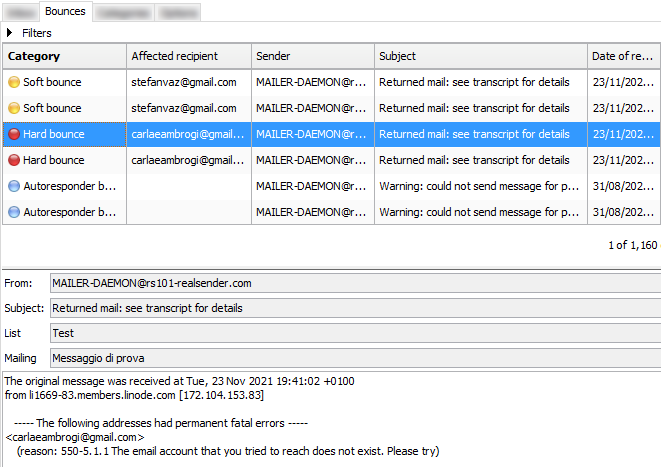
- Die Klassifizierung folgt bestimmten Regeln, die bearbeitet werden können
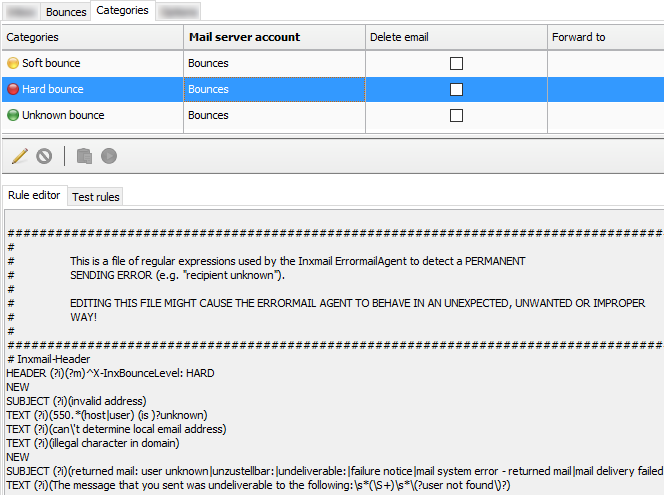
- Die Optionen legen fest, wann weiche Bounces auf harte Bounces „aufgewertet“ werden

Überprüfen Sie die Anzahl der Bounces
Manchmal kann ein Konfigurationsfehler sowohl auf der Sender- als auch auf der Empfängerseite
zu einem Soft Bounce oder sogar zu einem Hard Bounce führen.
Es empfiehlt sich, die Anzahl der unzustellbaren E-Mails der letzten Woche zu überprüfen,
um festzustellen, ob die Werte mit denen der Vorwoche übereinstimmen oder ob es Unregelmäßigkeiten gibt.
Sollte etwas nicht stimmen, fällt es Ihnen sofort auf. Die Analyse der Details der unzustellbaren E-Mails hilft Ihnen, die Ursache zu finden.
Manche Systeme ermöglichen es, die Anzahl der Tage (z. B. 180) festzulegen,
nach denen die Bounce-Informationen eines Abonnenten verworfen werden.
Auf diese Weise versucht der SMTP-Server erneut, den Empfänger zu kontaktieren.
Irrtümlich aktivierte Sperren werden automatisch aufgehoben,
die Reputation des SMTP-Servers kann jedoch darunter leiden.
Neue Trends beim Umgang mit Bouncern
In einem Satz: Vorbeugen ist besser als Heilen.
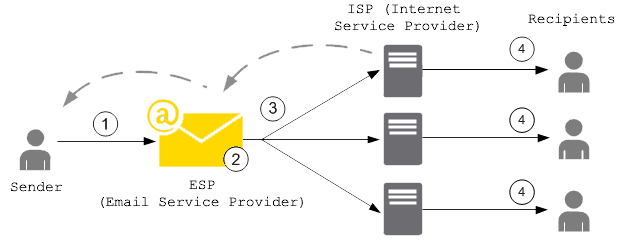
Um den Ruf ihrer SMTP-Server nicht zu schädigen,
verwenden immer mehr ESPs (E-Mail-Dienstanbieter) eine „E-Mail-Sperrliste“
, die greift, bevor die Nachrichten das Postfach des Empfängers erreichen.
Wenn ein Kunde eine E-Mail sendet, die zu einem Hard Bounce führt,
wird die E-Mail-Adresse, von der der Bounce verursacht wurde, der Sperrliste hinzugefügt.
Die Sperrliste gilt für alle Kunden. Das heißt,
wenn ein anderer Kunde versucht, eine E-Mail an eine Adresse auf der Sperrliste zu senden,
wird diese vom SMTP-Server nicht zugestellt, da die E-Mail-Adresse gesperrt ist.
Die Verwendung von SMTP-Servern mit dedizierter IP-Adresse kann Probleme im Zusammenhang mit der Reputationsteilung vermeiden.
Beispielsweise kann die Sperrliste für E-Mails auf Ihre IP-Adresse beschränkt werden,
sodass Ihre E-Mails nicht beeinträchtigt werden, falls ein anderer Kunde den SMTP-Server auf die Blacklist setzt und die damit verbundenen Bounces verursacht
.
Statuscodes für zurückgesendete Nachrichten
Statuscodes zur Identifizierung von Hard Bounces und Soft Bounces haben folgende Syntax:
Statuscode = Klasse "." Betreff "." Details
Statuscodes bestehen aus drei durch "." getrennten numerischen Feldern
- Der erste Untercode (Klasse) gibt an, ob der Verteilungsversuch erfolgreich war
- Der zweite Untercode (Betreff) gibt die wahrscheinliche Ursache einer etwaigen Zustellungsanomalie an
- Der dritte Untercode (Detail) kennzeichnet einen spezifischen Fehlerzustand
Der Untercode (die Klasse) dient der allgemeinen Klassifizierung des Status.
Die für jede Klasse aufgeführten Werte sind in RFC 3463 und RFC 6522:
2.XXX.XXX Erfolg (Wird nur auf Anfrage des Absenders gesendet) Erfolg bedeutet, dass die DSN eine positive Zustellung meldet. Detaillierte Untercodes können Informationen zu für die Zustellung erforderlichen Transformationen enthalten. 4.XXX.XXX Anhaltender vorübergehender Fehler Ein anhaltender vorübergehender Fehler liegt vor, wenn die gesendete Nachricht gültig ist, jedoch ein vorübergehender Zustand zum Abbruch oder zur Verzögerung von Sendeversuchen geführt hat. Wenn dieser Code zusammen mit einer Zustellungsfehlermeldung auftritt, kann der Versand in Zukunft erfolgreich sein. 5.XXX.XXX Dauerhafter Fehler Ein dauerhafter Fehler lässt sich voraussichtlich nicht durch erneutes Senden der Nachricht in ihrer aktuellen Form beheben. Für eine erfolgreiche Zustellung muss die Nachricht oder das Ziel geändert werden.Einige Code- und Beschreibungsbeispiele:
2.0.0: Gesendet (Nachricht zur Zustellung angenommen) 4.2.2: Speicherkontingent überschritten 4.4.5: Nicht genügend Speicherplatz 5.0.0: Ungültiger Domänenname 5.1.1: Benutzer unbekannt 5.7.1: Nachrichteninhalt abgelehntWie kann ich überprüfen, ob mein SMTP-Server sicher ist?
Angesichts der zunehmenden Zahl von Ransomware-Angriffen in den 2020er Jahren
: Ist E-Mail, unser wichtigster Kommunikationskanal im Internet, noch sicher?
Die SMTP-Server stellen eine besonders sensible Infrastruktur dar.
Sie können in unserem Namen E-Mails versenden,
die von unseren Geschäftspartnern als von vertrauenswürdigen Absendern stammend akzeptiert werden,
da sie vom sendenden Server ordnungsgemäß authentifiziert wurden.
SMTP-Server stellen eine besonders sensible Infrastruktur dar.
Sie verteilen in unserem Auftrag E-Mail-Nachrichten,
die von unseren Geschäftspartnern als von vertrauenswürdigen Absendern stammend akzeptiert werden,
da sie vom SMTP-Server des Absenders ordnungsgemäß authentifiziert wurden.
Was passiert, wenn jemand anderes meinen SMTP-Server benutzt?
Wie kann ich überprüfen, ob mein SMTP-Server sicher ist?
Die Nutzung sensibler Infrastrukturen im Internet
erfordert ein hohes Schutzniveau, um Missbrauch zu verhindern.
Wenn Sie versuchen, Nachrichten über smtp.gmail.com zu senden,
werden Sie blockiert und erhalten diese „Kritische Sicherheitswarnung“:
Weniger sichere App blockiert Google hat die App, die Sie verwenden wollten, blockiert, da sie nicht unseren Sicherheitsstandards entspricht. [...]Die einzige Alternative ist die Verwendung von OAuth2, einem Protokoll, das keine Passwortdaten weitergibt
, sondern stattdessen Autorisierungstoken zur Identitätsprüfung verwendet.
Die meistgenutzten Mailserver im Internet (Stand: August 2021) sind:
Exim (58 %), Postfix (35 %), Sendmail (4 %).
Um Ihren eigenen Mailserver weiterhin nutzen
und das Risiko eines Hackerangriffs verringern zu können, sollten Sie mindestens folgende Anforderungen überprüfen:
-
Es werden nur sichere Authentifizierungsmethoden akzeptiert.
Benutzername und Passwort müssen über sichere Verbindungen übertragen werden,
typischerweise Port 587+TLS , Port 25+TLS oder Port 465+SSL.
Die Übertragung sensibler Daten im Klartext ist deaktiviert. -
Die Absenderadresse („Mail-From“) muss überprüft werden;
nur autorisierte Personen können die E-Mail öffnen. -
Konfigurieren Sie Fail2ban so, dass alle externen Angriffe blockiert werden
, um Versuche, Ihre Schutzmaßnahmen zu umgehen, zu verhindern.
Insbesondere sollte Fail2ban alle wiederholten Angriffe blockieren.
- sich mit dem falschen Benutzernamen oder Passwort anzumelden
- E-Mails mit einem nicht autorisierten Absender versenden
- um die SMTP-Verbindung während des Authentifizierungsprozesses zu unterbrechen
(mehrere Verbindungsabbrüche führen dazu, dass der SMTP-Dienst für legitime Benutzer nicht verfügbar ist)
Die Sperre erfolgt üblicherweise zwischen drei und zehn Versuchen
und führt zu einer Sperrung der Quell-IP-Adresse für drei bis vierundzwanzig Stunden.
Diese Punkte lassen sich recht einfach überprüfen, um festzustellen, ob
Ihre SMTP-Infrastruktur ein Sicherheits-Upgrade benötigt.
Fail2ban schützt Ihren Server vor Brute-Force- und DDoS-Angriffen.
Es funktioniert so, als würde ein Fremder an die Tür klopfen;
nach einer bestimmten Anzahl von Klopfzeichen verschwindet die Tür.

Ein Bericht von Hacker News:
Ich betreibe seit einigen Jahren meinen eigenen Mailserver und denke, dass viele andere hier Lösungen wie Mail-in-a-box, Mailcow, Mailu usw. nutzen. Bis Corona hatte ich nie größere Probleme mit meinem Mailserver, aber in den letzten Wochen hatte ich extrem viel eingehenden Traffic – das war zu viel für meinen Server, und ich musste ihn jedes Mal manuell neu starten. [...] Nachtrag: Ich habe meine fail2ban-Einstellungen geändert und festgestellt, dass ich hauptsächlich Ziel von Brute-Force-Angriffen war, gegen die ich mich mit Tools wie fail2ban eigentlich schützen können sollteFail2ban ist eine Log-Parsing-Anwendung, die Systemprotokolle überwacht
und nach Anzeichen eines automatisierten Angriffs sucht.
Wird ein Missbrauchsversuch anhand der definierten Parameter erkannt,
fügt Fail2ban der Firewall (iptables oder firewalld) eine neue Regel hinzu,
um die IP-Adresse des Angreifers entweder für eine bestimmte Zeit oder dauerhaft zu blockieren.
Fail2ban kann Sie außerdem per E-Mail über einen Angriff informieren.
Fail2ban konzentriert sich primär auf SSH-Angriffe, kann aber auch so konfiguriert werden,
dass es für jeden Dienst funktioniert, der Protokolldateien verwendet und somit einem Angriff ausgesetzt sein kann.
Es ist weit verbreitet. Eine Suche danach bei Google liefert leicht
Konfigurationsbeispiele zum Schutz von Mailservern.
DNS-Einstellungen zum Senden von E-Mails
Welche Domain-DNS-Einstellungen sind erforderlich, um E-Mails zu versenden?
E-Mail-Dienstleister verlangen in der Regel, dass Sie die Absenderdomäne verifizieren,
bevor Sie ihre SMTP-Server nutzen können. Dafür gibt es zwei Gründe:
-
Weisen Sie den Besitz der Domain nach,
indem Sie die DNS-Einstellungen verwalten. Dadurch beweisen Sie, dass Sie die Domain des Absenders kontrollieren und
somit nicht die Domain einer anderen Person verwenden (Spoofing). -
Durch den Versand authentifizierter E-Mails
mit SPF- und DKIM-Authentifizierung
werden Ihre Nachrichten von den Empfängern als von einem „echten“ Absender stammend erkannt.
Bei guter Reputation Ihrer Domain und Ihres SMTP-Anbieters
sollten die Nachrichten die Postfächer der Empfänger erreichen.
Zusammenfassung:
- E-Mail-Dienstleister: Anforderungen an verifizierte Absender
- Warum ist ein verifizierter Absender so wichtig?
- Was versteht man unter Domänenausrichtung?
- CNAME-Eintrag oder TXT-Eintrag – welcher ist der bessere?
- Was ist eine dedizierte IP-Adresse?
- Sollen wir die DNS-Einstellungen der Unternehmensdomain direkt verwalten?
E-Mail-Dienstleister: Anforderungen an verifizierte Absender
Nachfolgend finden Sie einige der wichtigsten Anbieter, die wir geprüft haben, in alphabetischer Reihenfolge.
Ende Juli 2021 testeten wir die grundlegenden Einstellungen für den E-Mail-Versand.
Die verifizierte Domain lautete „emailperfect.com“. Sie wurde 2012 registriert und zuvor noch nie zum Versenden von E-Mails genutzt.
| Name des Anbieters | DKIM „From“ -Domänenausrichtung |
SPF-„Mail-From“ -Domänenausrichtung |
Anmerkungen |
|---|---|---|---|
| Amazon SES | Ja (3 CNAME-Einträge) | NEIN (@amazonses.com) | |
| Mailgun | Ja (TXT-Eintrag) | Ja (TXT-Eintrag) | Hotmail- und Yahoo-Zustellungsprüfung* |
| Mailjet | Ja (TXT-Eintrag) | NEIN (@mailjet.com) | Hotmail- und Yahoo-Zustellungsprüfung* |
| RealSender | Ja (2 CNAME-Einträge) | Ja (TXT-Eintrag) | dedizierte IP-Adresse |
| Sendgrid | Ja (2 CNAME-Einträge) | Ja (CNAME-Eintrag) | Hotmail-Zustellprüfung* |
| SMTP2GO | Ja (1 CNAME-Eintrag) | Ja (CNAME-Eintrag) |
* = Wir haben an jedes der folgenden Postfächer eine Nachricht gesendet und vermerkt, ob es Hinweise gab, die eine erneute Überprüfung nahelegten:
Gmail, Hotmail, Yahoo, Gmx, Aruba, Tiscali, Exchange Online
Warum ist ein verifizierter Absender so wichtig?
Im Jahr 2021 halten wir die Authentifizierung der Absenderdomäne für obligatorisch,
damit der Empfänger sicher sein kann, dass die E-Mail-Adresse des Absenders nicht gefälscht ist.
Die präventive Authentifizierungsprüfung reduziert zudem das Missbrauchsrisiko von Versandsystemen erheblich.
Aus diesem Grund haben wir einen Anbieter aus der Liste „gelöscht“:
Er verlangt keine Domainvalidierung, bevor er Nachrichten senden darf.
Was versteht man unter Domänenausrichtung?
Beim Versenden einer Nachricht haben wir es mit zwei Domänen zu tun:
- in der Absenderadresse, die für die Empfänger sichtbar ist
- in der Mail-From-Adresse (auch „Envelope-Absender“ oder „Return-Path“ genannt),
die vom ESP direkt verwaltet und verborgen wird, um die zurückgesendeten E-Mails zu empfangen.
Die Anforderung der „Domänenübereinstimmung“ lässt sich in folgendem Satz zusammenfassen:
„Wenn ein Absender seine E-Mail mittels SPF und/oder DKIM authentifiziert,
muss mindestens eine der Domänen mit der Absenderdomäne übereinstimmen.“
CNAME-Eintrag oder TXT-Eintrag – welcher ist der bessere?
Für die DKIM-Authentifizierung ist ein CNAME-Eintrag einfacher zu implementieren.
Dasselbe Ergebnis lässt sich zwar auch mit einem 2048-Bit-TXT-Eintrag erzielen, dies ist jedoch komplexer.
Darüber hinaus ermöglicht die Delegierung des DKIM-Eintrags über CNAME Ihrem Provider,
den Schlüssel bei Bedarf aus Sicherheitsgründen anzupassen.
Bei der SPF-Authentifizierung mit einem CNAME-Eintrag
wird die Absenderadresse (Mail-From) als Subdomain Ihres E-Mail-Anbieters verwendet, z. B. bounce.your-company-name.org.
Der Anbieter kümmert sich um die SPF-Authentifizierung und die Bearbeitung unzustellbarer Nachrichten.
Für die SPF-Authentifizierung ist ein TXT-Eintrag die beste Wahl bei E-Mail-Servern wie Zimbra oder Exchange,
da hier jeder Absender die unzustellbaren Nachrichten direkt erhält.
Für die Domänenauthentifizierung gibt es nur einen TXT-Eintrag,
dessen Verwaltung bei mehreren SMTP-Servern aufwendig sein kann.
Was ist eine dedizierte IP-Adresse?
Die „Internetprotokolladresse“ oder „IP-Adresse“
ist vergleichbar mit einer Telefonnummer auf Ihrem Festnetztelefon oder Mobilgerät.
Die meisten SMTP-Dienste stellen ihren Kunden gemeinsam genutzte IP-Adressen zur Verfügung.
Bei jedem E-Mail-Versand wird eine andere IP-Adresse zugewiesen.
Eine „dedizierte IP-Adresse“ bedeutet, dass sich Ihre E-Mail-Sende-IP-Adresse nicht ändert.
Dadurch haben Sie die volle Kontrolle über Ihre Absenderreputation, die durch die Nutzung durch Dritte nicht beeinträchtigt werden kann.
Sollen wir die DNS-Einstellungen der Unternehmensdomain direkt verwalten?
Nicht unbedingt, denn es erfordert gewisse technische Kenntnisse.
Die Unternehmensleitung sollte sich darüber im Klaren sein, dass bereits wenige Änderungen an den DNS-Einstellungen
schwerwiegende Folgen haben können, wie zum Beispiel:
- Website-Besucher auf einen anderen Webserver umleiten
- eingehende Nachrichten an einen anderen Mailserver umleiten
- Die E-Mail-Authentifizierung umgehen, sodass Nachrichten als Spam eingestuft oder abgelehnt werden
Wie man Mailinglisten verwaltet
Wie verwaltet man Mailinglisten vorausschauend?
-
Zunächst einmal: Warum sollte man einen Mailinglisten-Manager verwenden?
CRM-Systeme (wie Salesforce und Microsoft CRM)
und geschäftliche E-Mail-Dienste (wie Office 365 und Google Apps Gmail)
eignen sich nicht für Massenmailings.
Sie wurden für die Einzelkommunikation entwickelt.
Um Missbrauch zu verhindern, legen sie oft tägliche Sendelimits fest.
Häufig müssen Unternehmen E-Mails an die meisten ihrer Kontakte oder an ausgewählte Gruppen senden.
Massenmailings erfordern daher spezielle Systeme, die
große Mengen an Nachrichten verarbeiten und automatische Abmeldungen ermöglichen. -
Zweiter Schritt: Wo findet man diese Lösungen?
Die naheliegendste Antwort ist, sich SaaS-Angebote (Software as a Service) anzusehen
(Mailchimp ist das bekannteste System, Inxmail ist weniger bekannt, wird aber von großen Unternehmen genutzt). Die
Entscheidung zwischen lokaler Installation und Cloud-Diensten ist stets wichtig.
Wir sind der Ansicht, dass die lokale Option hilft, die Kontrolle über die E-Mails zurückzugewinnen, was wir fördern.
Selbst wenn Sie sich für eine selbstgehostete Anwendung in der Cloud entscheiden,
ermöglicht Ihnen dies einen einfachen Anbieterwechsel bei gleichbleibender Lösung. -
Drei Lösungsansätze sind erwähnenswert:
- Sendy ist ausgereift, aber „Closed Source“ und kostenpflichtig.
- Listmonk ist Open Source. Version 1 wurde 2021 veröffentlicht. Es wurde in Go entwickelt,
ist als eigenständige Binärdatei verfügbar und benötigt lediglich eine PostgreSQL-Datenbank. Auf GitHub hat es 5.400 Sterne.
- Mailtrain ist ebenfalls Open Source. Die erste Version erschien 2016, Version 2 im Jahr 2021.
Es verwendet eine MySQL-Datenbank. Auf GitHub hat es 4.800 Sterne.
Auf der Suche nach einer übersichtlichen Benutzeroberfläche, einer listenorientierten Lösung, die einfach zu warten
und im Problemfall leicht wiederherzustellen ist, haben wir Listmonk als beste Wahl in Betracht gezogen.
Listmonk ist ein selbstgehosteter, leistungsstarker Mailinglisten- und Newsletter-Manager. Er wird als eigenständige Binärdatei bereitgestellt und benötigt lediglich eine Postgres-Datenbank.
Erste Schritte der Bewerbung
Dies ist die Originalmeldung auf Hacker News:
knadh am 12. Juli 2019 [–] Autor hier. Um den Hintergrund für die Entwicklung von Listmonk zu erläutern: In unserem Unternehmen (reguliertes Finanzdienstleistungsunternehmen) müssen wir regelmäßig E-Mails, hauptsächlich wichtige Updates, an über 1,5 Millionen Kunden versenden. Wir nutzten lange Zeit phpList und testeten anschließend MailTrain und Sendy, bevor wir uns schließlich aufgrund einiger Probleme, von denen einige wichtige im Folgenden aufgeführt sind, dazu entschlossen, das Rad neu zu erfinden. - Performance: Unangemessen lange Versandzeiten. phpList war so langsam, dass die Verarbeitung einer Kampagne mehrere Tage dauerte. Listmonk kann N Goroutinen (~Threads) starten und E-Mails an mehrere SMTP-Server senden. Auf einer Standard-EC2-Instanz können wir über 1,5 Millionen E-Mails in wenigen Stunden versenden. - Der Import von Abonnenten war extrem langsam. Die direkte Integration zur Synchronisierung der Abonnenten mit externen CRM-Systemen war umständlich. Direkte Datenbankeinfügungen waren aufgrund der komplexen Tabellenstrukturen kompliziert. Listmonk importiert 10.000 Datensätze pro Sekunde in eine PostgreSQL-Datenbank auf einer Standard-EC2-Instanz. – Segmentierung: Häufig müssen wir Benutzer schnell anhand benutzerdefinierter Attribute und Bedingungen segmentieren und ihnen Aktualisierungen übermitteln. Listmonk unterstützt SQL-Ausdrücke zur Segmentierung von Benutzern anhand ihrer Attribute, die als beliebige JSON-Maps definiert sind (dank des PostgreSQL-Datentyps JSONB). – Fehlende dynamische Vorlagen: Listmonk-Vorlagen unterstützen Go-Vorlagenausdrücke, sodass es möglich ist, Logik in Nachrichten zu schreiben, um diese dynamisch zu gestalten.Kailash Nadhist ein sehr aktiver Entwickler im Bereich freier und Open-Source-Software (FOSS).
Er arbeitet bei Zerodha, Indiens größtem Online-Broker.
Der Blog des technischen Teams von Zerodha wird unter zerodha.tech.
Die Details
Listmonk ist sowohl für den Standardgebrauch (über eine Weboberfläche) als auch für Entwickler (über eine API) gut dokumentiert.
Die Lösung eignet sich sowohl für große Listen (bis zu Millionen von Abonnenten) als auch für kleine Gruppen.
Dank der Funktion zum Abfragen und Segmentieren von Abonnenten
können Sie eine Auswahl von Abonnenten anhand ihrer Profile und Attribute abfragen und exportieren.
Die extrahierten Daten lassen sich anschließend problemlos in eine neue, zielgerichtete Mailingliste importieren.
Es fehlen noch einige wichtige Funktionen wie die Behandlung von E-Mail-Bounces.
Diese sollten aber im nächsten größeren Release verfügbar sein:
Bounce-Verarbeitung #166
(Screenshot-Vorschau der Bounce-Verarbeitung)
Technische Überlegungen
Wir haben in der Vergangenheit eine andere Go-Anwendung verwendet: RealSender – DMARC-Berichte.
Quelle: dmarc-report-converter. Sie funktionierte sofort und problemlos.
„Das Datenbankmanagementsystem PostgreSQL, dessen Entwicklung über zwei Jahrzehnte zurückreicht, ist heute die fortschrittlichste Open-Source-Datenbank weltweit.“ – Eine kurze Geschichte von PostgreSQL – https://www.postgresql.org/docs/9.3/history.htmlWir hatten damit bereits einige Erfahrungen bei der Installation des Inxmail Professional-Servers gesammelt.
Im Jahr 2017 kündigte die Inxmail GmbH an, künftig nur noch PostgreSQL zu unterstützen und alle anderen Datenbanken einzustellen.
Ab dem 1. Januar 2019 konzentrieren wir uns auf die optimale technische Basis und stellen den Support für Windows-Server sowie MySQL-, Oracle- und MS SQL Server-Datenbanken ein. Wir bieten daher nur noch Support für Inxmail Professional auf Basis von Linux-Servern und PostgreSQL an. – Inxmail Professional-Lizenzlösung: Änderungen an unserem Systemsupport https://www.inxmail.de/files/files/de/downloads/Inxmail-Professional-licence-solution-EN.pdfFür Einsteiger ist das sicherlich eine gute Wahl und eine Investition in wertvolles Wissen.
Udemy-Onlinekurse können bei der Erstinstallation und Wartung von PostgreSQL helfen.
Open Source birgt Risiken: Wird ein Projekt, das 2019 gestartet wurde, auch in Zukunft weiterentwickelt?
Niemand weiß es. Im schlimmsten Fall kümmert sich vielleicht ein anderer Entwickler darum, aber:
- Seine Eigenschaften scheinen wesentlich zu sein; wenn es zu komplex wird, ist es schwer aufrechtzuerhalten
- Wir haben einen Fehlerbericht für Listmonk und innerhalb von zwei Stunden eine Antwort vom Entwickler erhalten.
- Der Autor arbeitet in einem großen Unternehmen, das es intern verwendet
E-Mail-Zustellbarkeit
E-Mail-Zustellbarkeit, Fragen und Antworten:
hemancuso am 12. Juli 2019 [–] Projekte wie dieses scheinen eine tolle Idee zu sein, aber die Zustellbarkeit ist ein großes Problem, das sich ohne ausreichende Erfahrung nur schwer einschätzen lässt. Was sind die Best Practices für die Nutzung/Auswahl eines E-Mail-Service-Providers (ESP), wenn man ein solches Projekt einsetzen und eine gute Zustellbarkeit gewährleisten möchte? knadh am 12. Juli 2019 [–] Hier spricht der Autor. Wir nutzen Listmonk seit über sechs Monaten produktiv in unserem Unternehmen (reguliertes Finanzinstitut) für den Versand von E-Mail-Updates, einschließlich regulatorischer Mitteilungen. Wir hosten unsere eigenen SMTP-Instanzen mit Postal auf EC2-Instanzen und hatten noch nie Probleme mit der Zustellbarkeit. Bei legitimen E-Mails sollte das meiner Meinung nach kein großes Problem darstellen.Wir stimmen zu, dass das Versenden erwarteter Mitteilungen an Kunden die meisten Zustellungsprobleme vermeiden sollte.
Erfahrungsgemäß steigt jedoch mit der Anzahl der Mitteilungen auch das Risiko von Problemen.
AWS EC2-Server werden häufig von Gmail auf die Blacklist gesetzt – alle gesendeten Nachrichten landen im Spam-Ordner.
RealSender bietet dedizierte IP-SMTP-Server,
die in einer zuverlässigen und ständig überwachten Umgebung arbeiten.
Über den Namen

goberoi am 13. Juli 2019 [–] Eine völlig zufällige Frage: Wie haben Sie den Namen ausgewählt? knadh am 13. Juli 2019 [–] Ich kann mich nicht mehr genau erinnern, aber ich glaube, der Gedankengang war in etwa: „Problemlose, reibungslose Listenverwaltung“.Lass es uns versuchen
Sie können innerhalb weniger Minuten eine funktionierende Demo-Installation mithilfe des Docker-Images.
Alternativ können Sie bei RealSender einen Listmonk-Demo-Account.
Wie man Newsletter versendet
Nach der Aufnahme auf die Blacklist antwortet der Kundendienst eines großen Anti-Spam-Dienstes oft:
„Bitte überprüfen Sie die Qualität Ihrer Empfängerliste, um sicherzustellen, dass die Empfänger Interesse an Ihren Mailings haben.“
„Listenhygiene“ und „Interessen der Empfänger“ haben viele Facetten:
A – auf der Maschinenseite – „Listenhygiene“
-
Bei gut verwalteten Abonnements und Abmeldungen
muss der Abonnent seine E-Mail-Adresse bestätigt haben (Double-Opt-in),
Empfänger sollten sich einfach und sicher abmelden können (Opt-out). -
Senden Sie E-Mails nur an aktive und engagierte Empfänger.
Senden Sie keine E-Mails wiederholt an Empfänger mit vollem Postfach oder
inaktiven Empfängern. Stellen Sie den Versand an inaktive Empfänger ein, da fehlende Interaktion ein klares Zeichen für Desinteresse ist. -
Der Inhalt muss gut strukturiert (nicht nur ein einzelnes Bild) und responsiv sein, damit er auf verschiedenen Geräten lesbar ist.
Andernfalls kann es passieren, dass Spamfilter die Nachricht blockieren, bevor sie den Posteingang des Empfängers erreicht. -
Stellen Sie sicher, dass die Maschinen erkennen, wer die E-Mail sendet.
Die Authentifizierung ermöglicht es den Ziel-Mailservern, Nachrichten als von vertrauenswürdigen Absendern gesendet zu identifizieren.
B – auf der menschlichen Seite – „Interesse der Empfänger“
-
Abonnenten sollten erwarten können, dass die
Empfänger sich auf Ihre Nachricht freuen und sie wertschätzen. -
Nutzerreaktionen sollten verwaltet werden,
falls etwas schiefgeht oder ein Empfänger mit Ihnen kommunizieren möchte,
beispielsweise um Ihnen mitzuteilen, dass er keine weiteren Nachrichten erhalten möchte, selbst wenn ein Abmeldelink vorhanden ist.
Maschinenseite – „Listenhygiene“
Die oben genannten Punkte lassen sich bei kleinen Listen mit einigen hundert Empfängern problemlos umsetzen.
Oft kennt der Absender die Empfänger persönlich, da es sich um Kunden oder Mitglieder eines Vereins handelt.
Die Sache wird komplizierter, wenn die Liste größer ist, Tausende von Empfängern umfasst
und mehr Personen an den Mailings beteiligt sind.
In diesem Fall ist der Einsatz professioneller Tools unerlässlich.
Im Internet gibt es viele professionelle Lösungen für E-Mail-Marketing,
die international bekannteste ist MailChimp.
Viele Websites listen auch MailChimp-Alternativen.
Die Mission von EmailTrends ist es, „die Kontrolle über E-Mails zurückzugewinnen“,
aus diesem Grund schlagen wir einen alternativen Weg vor.
Laut W3Techs basiert WordPress auf 40 % aller Websites im Internet
und ist die beliebteste Technologie im gesamten Internet in der Kategorie Open Source.


Mit über 200.000 aktiven Installationen Mailpoet
eines der meistgenutzten WordPress-Plugins für Newsletter.
MailPoet ist Open-Source-Software seit Ende 2020
gehört zu den Unternehmen, die mit Automattic , dem Mutterkonzern von WordPress, verbunden sind.
Einige Screenshots geben Ihnen einen Eindruck davon, wie die verschiedenen Punkte erfüllt werden:

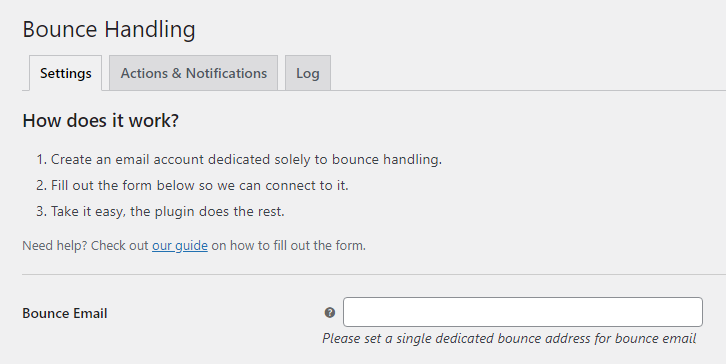
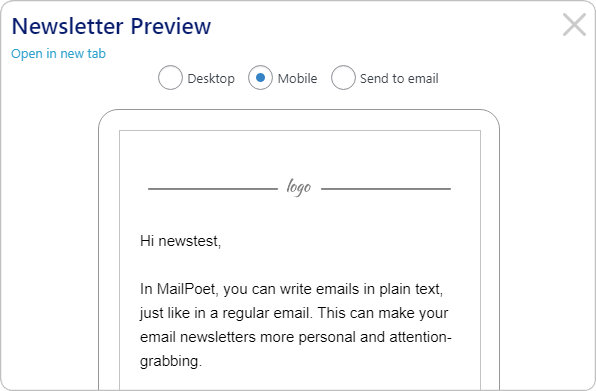
Mailpoet hat ein „Freemium“-Geschäftsmodell, das es Ihnen ermöglicht, die Option zu wählen:
„Ich möchte nur die Premium-Version ohne Versandfunktion“.
Der dedizierte SMTP-Server von RealSender lässt sich über die Option „Senden mit… > Andere“ konfigurieren.
gewährleistet
zusammen mit den von RealSender bereitgestellten Newsletter-Postfächern die korrekte Authentifizierung der versendeten E-Mails
Die menschliche Seite – „Interessen der Empfänger“
Die menschliche Komponente ist schwieriger zu erreichen,
und genau hier liegt der Unterschied,
wenn das technische Management nicht perfekt ist.

„BE RELEVANT“
ist ein Slogan, der vor einigen Jahren im E-Mail-Marketing verwendet wurde.
Wenn man Menschen,
die man gut kennt, nach einem langen Gespräch wertvolle Informationen schickt,
spielt es keine Rolle, wie schlecht die Formatierung ist
oder ob die Nachricht im Spam-Ordner landet.
Technische Unvollkommenheiten werden sie stets verzeihen,
sie werden auf Ihre E-Mails warten, sie lesen
und gegebenenfalls auf den „Kein Spam“-Button klicken.
Wie man private E-Mails versendet
Wie kann ich private und verschlüsselte E-Mails versenden?
E-Mails sind weder privat noch sicher.
Sie wurden nicht mit Blick auf Datenschutz oder Sicherheit entwickelt.
Jeder, der Ihre E-Mails während der Übertragung bearbeitet, kann sie lesen,
einschließlich Ihres Internetanbieters, eines Hackers oder der NSA (US National Security Agency).
Zusammenfassung:
- E-Mail-Datenschutz: Was geschieht heute?
- auf der „rechtlichen“ Seite
- auf der „illegalen“ Seite
- E-Mail-Datenschutz: Die Herausforderungen
- Anonymität und Vertraulichkeit
- Ende-zu-Ende-Verschlüsselung
- E-Mail-Datenschutz: Die Lösungen
- <technisch> Pretty Good Privacy – auch bekannt als PGP
- <technisch> Wie man die PGP-Verschlüsselung verwendet
- < einfach > Alternativen zur PGP-Verschlüsselung
Was geschieht heute?
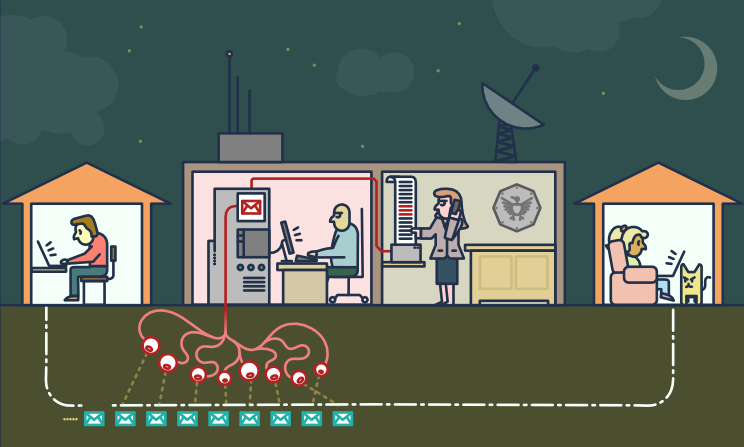
auf der „rechtlichen“ Seite
„Der Wert einer Information wird erst dann deutlich, wenn man sie
mit etwas anderem verknüpfen kann, das zu einem späteren Zeitpunkt eintrifft.
Da man keine Verbindungen herstellen kann, die man nicht hat, verfällt man in einen Modus, in dem
wir im Grunde versuchen, alles zu sammeln und für immer festzuhalten.“
- - Gus Hunt von der CIA über Big Data, auf der Huffington Post
- - Gus Hunt von der CIA über Big Data, auf YouTube
„Sie haben gesagt, es seien nur Metadaten, nur Metadaten, […]
mit wem man spricht, wann man mit ihm spricht, wohin man gereist ist.
Das sind alles Metadatenereignisse.
Bei PRISM geht es um Inhalte. […] Sie können sie alle sehen, weil sie unverschlüsselt sind.“
Dutzende psychologische Studien belegen,
dass das Verhalten von Menschen, die wissen, dass sie überwacht werden könnten,
deutlich konformistischer und angepasster ist.
[…] Massenüberwachung schafft ein Gefängnis im Kopf […]
auf der „illegalen“ Seite
Betrüger könnten auch Schadsoftware einsetzen, um in das Computernetzwerk eines Unternehmens einzudringen
und auf E-Mail-Korrespondenzen über Finanzangelegenheiten zuzugreifen.
Business Email Compromise (BEC) – auch bekannt als Email Account Compromise (EAC) –
ist eine der finanziell schädlichsten Online-Straftaten.
Bei einem BEC-Betrug versenden Kriminelle eine E-Mail, die scheinbar von einem bekannten Absender stammt
und eine legitime Anfrage enthält.
die Herausforderungen
Anonymität und Vertraulichkeit
Anonymität ist etwas anderes als Vertraulichkeit.
[…] Wir verschlüsseln Nachrichten,
sodass selbst wenn jemand sieht, dass wir eine Nachricht gesendet haben,
er sie nicht lesen kann.
Manchmal wollen wir aber gar nicht, dass jemand sieht, dass wir überhaupt eine Nachricht gesendet haben.
Internetanonymität ist schwer zu erreichen.
Sie erfordert profunde Kenntnisse der verwendeten Tools.
Dieser Leitfaden vermittelt Ihnen möglicherweise einen Eindruck von der Komplexität:
Anbieter privater E-Mail-Dienste
Vertraulichkeit lässt sich leichter erreichen.
Auch wenn Sie nichts zu verbergen haben,
hilft die Verschlüsselung dabei, die Privatsphäre der Personen, mit denen Sie kommunizieren, zu schützen
und erschwert Massenüberwachungssystemen das Leben.
Falls Sie etwas Wichtiges zu verbergen haben, befinden Sie sich in guter Gesellschaft;
es handelt sich um dieselben Instrumente, die Whistleblower nutzen, um ihre Identität zu schützen
und gleichzeitig Menschenrechtsverletzungen, Korruption und andere Verbrechen aufzudecken.
Der wichtigste erste Schritt ist, sich selbst zu schützen
und die Überwachung der eigenen Kommunikation so schwierig wie möglich zu gestalten.
Ende-zu-Ende-Verschlüsselung
Die Ende-zu-Ende-Verschlüsselung (E2EE) für E-Mails kann verwendet werden, um sicherzustellen,
dass nur der Absender und die Empfänger einer Nachricht den Inhalt lesen können.
Ohne diesen Schutz können Netzwerkadministratoren,
E-Mail-Anbieter und Regierungsbehörden Ihre Nachrichten leicht lesen.
Die Gewährleistung von Ende-zu-Ende-Verschlüsselung erfordert Sorgfalt sowohl vom Sender als auch vom Empfänger.
Ein einziger Fehler einer der beteiligten Parteien kann ausreichen, um die Sicherheit der Ende-zu-Ende-Verschlüsselung zu gefährden.
E-Mail-Metadaten wie Absender- und Empfänger-E-Mail-Adresse, Datum und Uhrzeit können durch Ende-zu-Ende-Verschlüsselung nicht geschützt werden.
Auch der Betreff der E-Mail kann ungeschützt und leicht lesbar bleiben, selbst wenn Ende-zu-Ende-Verschlüsselung verwendet wird.
die Lösungen
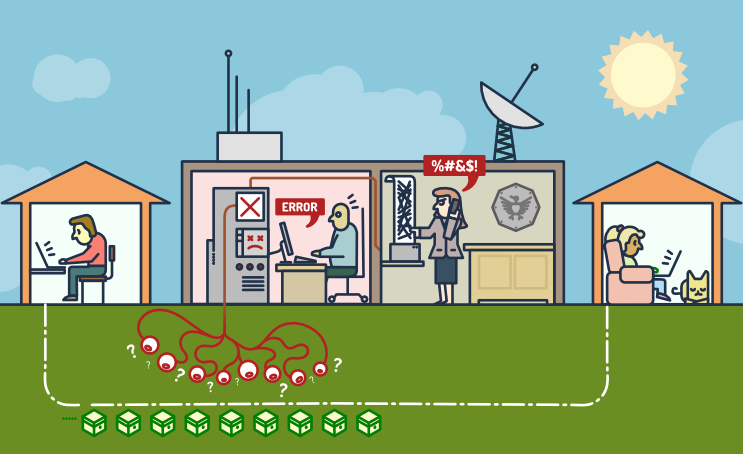
<technisch> Pretty Good Privacy – auch bekannt als PGP
Die PGP-Software folgt dem OpenPGP-Verschlüsselungsstandard
(RFC 4880) für die Ver- und Entschlüsselung von Daten.
PGP verschlüsselt den Inhalt Ihrer E-Mail in einen Code
, den nur die berechtigte Person lesen kann.
PGP läuft auf so gut wie jedem Computer oder Smartphone.
Es ist frei lizenziert und kostenlos.
Jeder Benutzer besitzt einen eindeutigen öffentlichen Schlüssel und einen privaten Schlüssel,
die zufällige Zahlenfolgen sind.
Ihr öffentlicher Schlüssel ist kein physischer Schlüssel, da er in einem Online-Verzeichnis gespeichert ist und von anderen heruntergeladen werden kann.
Andere nutzen Ihren öffentlichen Schlüssel zusammen mit PGP, um E-Mails an Sie zu verschlüsseln.
Ihr privater Schlüssel ist eher mit einem physischen Schlüssel vergleichbar, da Sie ihn nur für sich behalten (auf Ihrem Computer).
Sie verwenden PGP und Ihren privaten Schlüssel, um verschlüsselte E-Mails zu entschlüsseln, die Ihnen andere Personen senden.
Gelangt eine mit PGP verschlüsselte E-Mail in die falschen Hände, ist sie völlig sinnlos.
Ohne den privaten Schlüssel des eigentlichen Empfängers ist sie nahezu unmöglich zu lesen.
Um uns vor Überwachung zu schützen, müssen wir lernen, wann wir PGP verwenden sollten
und unsere öffentlichen Schlüssel immer dann weitergeben, wenn wir E-Mail-Adressen austauschen.
<technisch> Wie man die PGP-Verschlüsselung verwendet
Um PGP zu verwenden, benötigen Sie einen öffentlichen und einen privaten Schlüssel (zusammen ein Schlüsselpaar).
Jeder Schlüssel ist eine lange, zufällig generierte Zeichenkette aus Zahlen und Buchstaben, die für Sie einzigartig ist.
Ihre öffentlichen und privaten Schlüssel sind durch eine spezielle mathematische Funktion miteinander verknüpft.
Es wird eine Anwendung benötigt, die die Schlüssel und die Ver-/Entschlüsselung von Nachrichten verwaltet.
Hier ist eine Auswahl der beliebtesten Anwendungen:
-
Mailvelope ist ein kostenloses Open-Source-Browser-Plugin für Mozilla Firefox und Google Chrome und
wahrscheinlich der einfachste Weg, sich mit PGP vertraut zu machen.
Die „Mailvelope-Demonstration“ ist ein gelungenes Tutorial. -
Die Mozilla Thunderbird-Anwendung integriert alles, was zum Versenden PGP-signierter Nachrichten benötigt wird.
Einführung in die Ende-zu-Ende-Verschlüsselung in Thunderbird -
GnuPG ist eine vollständige und kostenlose Implementierung des OpenPGP-Standards.
Eine PGP-Anleitung für Anfänger mit Gpg4Win [Einfache 5-Minuten-Einrichtung] erklärt die Verwendung.
< einfach > Alternativen zur PGP-Verschlüsselung
PGP ist die beste Lösung für sichere Kommunikation mit einem Partner, der es bereits nutzt.
Es könnte sich jedoch als schwierig erweisen, den Geschäftspartner zur Nutzung von PGP zu bewegen.
Dienste, die es ermöglichen, ein Geheimnis nur einmal weiterzugeben, stellen eine Alternative dar.
Wenn Sie etwas nur einmal senden möchten, gibt es Open-Source-Webanwendungen
, mit denen Sie Informationen eingeben können, die nur einmal angezeigt werden können.
Nachdem der Empfänger die Seite geöffnet hat, werden die Informationen gelöscht,
und das Einzige, was in Ihren Chatprotokollen oder E-Mails verbleibt, ist ein ungültiger Link.
Es ist zwar nicht so robust wie die Nutzung von PGP durch das gesamte Team, aber deutlich einfacher einzurichten und zu erklären.
Wir konnten es erfolgreich einsetzen, um Anmeldeinformationen an technisch weniger versierte Personen zu senden, und diese finden es benutzerfreundlich.
Beispiel (ohne Hinzufügen eines Passworts):
Angenommen, Sie haben ein Passwort. Sie möchten es Ihrer Kollegin Jane geben. Sie könnten es ihr per E-Mail schicken, aber dann landet es in ihrem Posteingang, der möglicherweise gesichert wird und sich wahrscheinlich auf einem vom NSA kontrollierten Speichermedium befindet. Wenn Jane einen Link zum Passwort erhält und ihn nicht ansieht, ist das Passwort verloren. Wenn der NSA den Link in die Hände bekommt und das Passwort ansieht … nun, dann hat er das Passwort. Jane kann zwar nicht mehr an das Passwort gelangen, weiß aber nun, dass nicht nur jemand ihre E-Mails liest, sondern auch auf die Links klickt.Einige dieser Dienste, die alle kostenlos und Open Source sind, sind unten aufgeführt. Alternativ
können Sie auch eine Instanz auf Ihrem eigenen Webserver hosten.
PrivateBin (eine Art sichere Version von Pastebin) ist in PHP entwickelt.
Der Quellcode von PrivateBin ist auf GitHub veröffentlicht und hat 3100 Sterne.
Anleitungen zu PrivateBin finden Sie auf einer anderen Website.
OneTimeSecret wurde in Ruby entwickelt.
Der Quellcode und die Anleitung sind auf GitHub veröffentlicht – 1200 Sterne.
SnapPass ist in Python geschrieben. Es wurde ursprünglich von Pinterest entwickelt.
Der SnapPass-Code und die Anleitung sind auf GitHub veröffentlicht – 600 Sterne
Wie man BCC-E-Mails versendet und einschränkt
Wie kann ich BCC-E-Mails versenden und die Anzahl der BCC-E-Mails begrenzen?
„Cc“ bedeutet „Carbon Copy“ im (alten) Sinne der Anfertigung einer Kopie
mit einer Schreibmaschine unter Verwendung von Kohlepapier.
Das Feld „Bcc:“ in E-Mails (wobei „Bcc“ für „Blindkopie“ steht)
enthält die Adressen der Empfänger der Nachricht
, deren Adressen den anderen Empfängern der Nachricht nicht mitgeteilt werden dürfen.
– IETF RFC 2822 „Internet Message Format“
Der Unterschied zwischen Bcc und Cc liegt im Datenschutz der Empfänger.
Bei Verwendung der Cc-Funktion sind die E-Mail-Adressen im Cc-Feld
für alle Empfänger der E-Mail sichtbar.
Ein Bcc-Empfänger sieht den direkten Empfänger (An:),
kann aber nicht erkennen, wer sonst noch in der E-Mail in Bcc gesetzt wurde.
Bcc gilt oft als benutzerfreundliches System für den Massenversand von E-Mails.
Im Folgenden finden Sie eine kurze Analyse der Vor- und Nachteile der Verwendung von Bcc.
Am Ende der Seite finden Sie die Schlussfolgerungen mit einigen Verbesserungsvorschlägen.
VORTEILE
Es ist ganz einfach: Jeder kann es benutzen.
- Es ist eine einfache Möglichkeit, mehrere E-Mail-Empfänger zu kontaktieren
- Jeder mit einem E-Mail-Client kann es nutzen
- Bei korrekter Anwendung respektiert es die Privatsphäre der Empfänger, indem es deren E-Mail-Adressen nicht offenlegt
Nachteile
E-Mail ist ein ausgehender Nachrichtenkanal ohne vorherige Prüfung.
Bcc erhöht die Reichweite auf Hunderte oder Tausende von Kontakten.
Bcc sollte als ein risikoreiches,
potenziell gefährliches Kommunikationsmittel betrachtet werden.
- Es handelt sich um einen fehleranfälligen Prozess, die Risiken sind:
- Wenn versehentlich Bcc-Empfänger ins Cc-Feld eingetragen werden,
führt dies in der Regel zu erheblichen Imageschäden.
Eine neue Entschuldigungsnachricht ist der häufigste Ausweg aus dieser Situation.
» Die Namen aller Empfänger werden öffentlich gemacht.
» Unbeabsichtigte (und manchmal auch absichtliche) Verwendung von „Allen antworten“,
was zu unkontrollierten E-Mail-Ketten führt.
» Jemand könnte aus DSGVO-Sicht einen Datenschutzvorfall melden,
wenn der Betreff/Text „besondere Kategorien“ personenbezogener Daten enthält und somit
die Personen identifiziert, die derselben Kategorie angehören (z. B. Krankheit, sexuelle Orientierung oder Weltanschauung). - jemanden irrtümlich als Hauptempfänger (sichtbarer Empfänger) hinzugefügt
- Vergessen, jemanden hinzuzufügen oder jemanden hinzuzufügen, der die Nachricht nicht erhalten soll
- Wenn versehentlich Bcc-Empfänger ins Cc-Feld eingetragen werden,
- Es besteht eine hohe Wahrscheinlichkeit, als Spam eingestuft zu werden
- Das Problem ist, dass die meisten Spammer BCC-E-Mails versenden,
die Ziel-Mailserver aber vorsichtig sind, BCC-Nachrichten anzunehmen. - Wenn ich Ihnen eine Nachricht mit BCC sende,
erhalten Sie eine E-Mail, die nicht an Sie adressiert ist.
Dies wird bei der Bewertung der Spam-Einstufung der Nachricht negativ bewertet. - Dieselbe Nachricht wird
gleichzeitig an mehrere E-Mail-Adressen derselben Domain gesendet; man kann sie leicht zählen und blockieren.
- Das Problem ist, dass die meisten Spammer BCC-E-Mails versenden,
- Über falsche Adressen kann keine Kontrolle ausgeübt werden
- Es können doppelte oder dreifache E-Mail-Adressen für denselben Empfänger vorhanden sein.
Dies beeinträchtigt den Versand an diesen Empfänger, selbst wenn eine oder mehrere Adressen korrekt sind. - Syntaktisch fehlerhafte Adressen werden ohne Warnung akzeptiert
, beispielsweise wenn das @-Symbol fehlt oder Leerzeichen vorhanden sind.
- Es können doppelte oder dreifache E-Mail-Adressen für denselben Empfänger vorhanden sein.
- keine Personalisierung / geringe Auswirkungen / wenige oder keine Reaktionen
- Die Nachricht wird zwangsläufig standardisiert und „anonym“ sein;
eine individuelle Anrede ist nicht möglich, kein „Sehr geehrter Herr/Sehr geehrte Frau …“. - Die Empfänger in BCC erhalten eine Nachricht, die an eine andere Person gerichtet ist;
es ist unwahrscheinlich, dass sie diese beachten oder darauf reagieren.
- Die Nachricht wird zwangsläufig standardisiert und „anonym“ sein;
- Es ist sehr wahrscheinlich, dass es technische Probleme geben wird
- Jeglicher Missbrauch durch Spammer oder Hacker kann schnell viele Empfänger betreffen
und den Ruf des SMTP-Servers schädigen (z. B. durch Aufnahme auf die Server-Blacklist). - Das Absenderpostfach könnte mit Unzustellbarkeitsbenachrichtigungen (Absender unbekannt, Postfach voll usw.) überlastet sein;
deren Anzahl kann zwischen 5 % und 20 % der gesendeten E-Mails variieren. - Der Versand kann sich negativ auf E-Mail-Zustellungssysteme (SMTP-Server) auswirken, z. B.:
viele „Bitte später erneut versuchen“-Antworten, eine große Anzahl von Nachrichten in der Mail-Warteschlange, Systemabsturz
- Jeglicher Missbrauch durch Spammer oder Hacker kann schnell viele Empfänger betreffen
SCHLUSSFOLGERUNGEN
- Grenzen setzen
- Prüfen Sie die von Ihrem E-Mail-Anbieter erlaubte Empfängeranzahl.
Um ganz sicherzugehen, testen Sie es selbst.
RealSender stellt eine Liste mit 300 @bogusemail.net-Adressen zum Testen bereit.
Die Nachrichten landen auf einem „Blackhole“-Mailserver:
bogusemail-test.txt
- Die Beschränkung der Empfängerzahl einer einzelnen Nachricht auf eine kleine Zahl, beispielsweise 20,
ermöglicht es, durch die Zulassung von mehr Empfängern problemlos Nachrichten
an Tausende von E-Mail-Adressen zu senden, indem diese in kleine Gruppen aufgeteilt werden.
- Werden Sie Profi
- Massen-E-Mails nur über verschiedene Kanäle zulassen
- Verwenden Sie beim Versenden vieler Nachrichten eine andere Absenderadresse,
beispielsweise eine andere Subdomain wie @news.firmenname.com.
Nur autorisierte Personen haben Zugriff darauf
und gehen sorgsamer damit um.
- In strukturierten Büros, in denen viele Mitarbeiter mit E-Mails arbeiten und
spezielle Apps für den Massenversand nutzen
verfügen die professionellen Systeme über einen Genehmigungsworkflow
und eine schrittweise Kontrolle; sie sind darauf ausgelegt, Fehler zu vermeiden.
E-Mail-Marketing messen
Wie lässt sich der Erfolg Ihrer E-Mail-Marketing-Kampagnen messen?
Die folgenden Informationen basieren auf unserer fünfzehnjährigen Erfahrung
mit der E-Mail-Marketing-Plattform Inxmail.
Was sind „E-Mail-Marketing-Kampagnen“?
Es handelt sich um massenhaft versendete E-Mails,
deren Inhalt in der Regel auf die Interessen des Empfängers zugeschnitten ist.
Der Absender kann so Feedback-Daten über das Verhalten der Empfänger erhalten.
Die Antworten bzw. „Feedbackdaten“ bilden die Grundlage für die Kennzahlen
in den Berichten zur Performance von E-Mail-Marketingkampagnen.
Im Folgenden erläutern wir, was diese Kennzahlen sind und wie sie gemessen werden:
- Verfolgung der Nutzerreaktionen
- zwei Berechtigungsstufen (Datenschutzfragen)
- wie Nutzer-Tracking funktioniert
- wie die Messung der Öffnungsrate funktioniert
Die besten technischen Hilfsmittel sind nutzlos, wenn die Nachrichten den Posteingang des Empfängers nicht erreichen.
Hier kommt die „E-Mail-Zustellbarkeit“ ins Spiel:
E-Mail-Marketing-Kampagnen
Einwilligungsbasiertes Marketing
Permission-basiertes Marketing, auch „Dialogmarketing“ genannt,
ist ein Konzept, das Seth Godin 1999 in seinem Bestseller „Permission Marketing“ vorstellte.
Im Buch wird es als das Gegenteil von „Unterbrechungsmarketing“ definiert, das
üblicherweise in traditionellen Massenmedien wie Fernsehen und Zeitungen Anwendung findet.
Ziel ist es, eine persönliche und direkte Kommunikation, eine Beziehung zwischen den beiden Parteien
herzustellen und einen „menschlichen“ Dialog zu
, dessen Erfahrung für beide nützlich und bereichernd ist.
Verfolgung der Nutzerreaktionen
Zwei Berechtigungsstufen – datenschutzbezogene Probleme
Abhängig von den eingeholten Datenschutzberechtigungen kann der Absender Folgendes aufzeichnen:
- aggregierte Daten
- Daten des einzelnen Nutzers (z. B. wer die E-Mail geöffnet hat, wer darauf geklickt hat)
Anhand aggregierter Daten
liefern sie globales Feedback und Informationen zu allgemeinen Trends
(z. B. wie viele die E-Mail geöffnet haben, wie viele darauf geklickt haben).
mithilfe von Einzelnutzerdaten
individuelle Informationen zu erhalten,
indem personenbezogene Daten gesammelt und anschließend personalisierte Nachrichten
auf Grundlage vorheriger Interaktionen und des Nutzerverhaltens
wie Nutzer-Tracking funktioniert
Link-Tracking ist die Aktivität, bei der die endgültige URL der Website
durch eine fiktive Adresse ersetzt wird, die den Besuch aufzeichnet und den Benutzer auf die Zielseite weiterleitet.
Innerhalb von E-Mails lassen sich nur Klicks auf Links erfassen.
Externe Bilder, bei denen der E-Mail-Client vor dem Herunterladen eine Bestätigung anfordert,
werden als Links behandelt. Daher genügt es, die URL eines externen Bildes zu erfassen,
um die Öffnungsrate der E-Mail zu ermitteln.
Bei der Sendungsverfolgung wird üblicherweise nur die „Mailid“ erfasst,
eine eindeutige Kennung der versendeten Mail.
Personalisierte Nachverfolgung wird erreicht, indem den besuchten Seiten
ein oder mehrere von der Software generierte Parameter hinzugefügt werden,
wie zum Beispiel: example.com/test.html?id=54725788327466628654.
Der Parameter „id“ bezieht sich auf einen bestimmten Benutzer und einen bestimmten Link in der Nachricht.
Die gewonnenen Informationen können
die Empfängerdaten in der E-Mail-Marketing-Anwendung automatisch aktualisieren
oder die Details zum Ursprung des Klicks an die Webanalyse-Plattform weitergeben.
Ein Reisebüro könnte beispielsweise messen,
wie oft ein Nutzer auf Nachrichten über Meer oder Berge klickt und
dabei einen Zähler entsprechend erhöhen.
Die gesammelten Daten geben Aufschluss über das bevorzugte Reiseziel des Nutzers.
wie die Messung der Öffnungsrate funktioniert
Die Öffnungsraten werden gemessen, indem Daten aus Klicks auf verfolgte Links
und „versteckte Klicks“, die durch heruntergeladene verfolgte Bilder generiert werden, kombiniert werden.
Wenn eine Nachricht in der Vorschau des E-Mail-Clients geöffnet wird,
ohne dass die Bilder heruntergeladen oder auf Links geklickt wird,
ist es nicht möglich festzustellen, dass sie geöffnet wurde.
Seit 2003 haben zunächst Outlook und später die meisten E-Mail-Clients
zum Schutz der Privatsphäre ihrer Nutzer
damit begonnen, den automatischen Download von Bildern zu blockieren,
die andernfalls bei jeder gelesenen E-Mail erfasst worden wären.
Seit 2013 werden Bilder in Gmail standardmäßig automatisch angezeigt.
Der Download erfolgt über einen Drittanbieter-Server, einen sogenannten „Proxy“.
Dieser maskiert das Endgerät des Nutzers, ermöglicht es den E-Mail-Marketing-Betreibern aber dennoch,
zu erkennen, dass das Bild heruntergeladen und die Nachricht geöffnet wurde.
Weitere Informationen finden Sie hier:
Wie der neue Gmail-Bild-Proxy funktioniert und was das für Sie bedeutet.
Die Erfassung von Öffnungsraten ist ungenau und
liefert einen niedrigeren Wert als die tatsächlichen Öffnungen.
Es ist dennoch ratsam, sie zu messen,
und sei es nur, um die Ergebnisse verschiedener Kampagnen zu vergleichen.
E-Mail-Zustellbarkeit
E-Mails mit Bezug auf Saatgut
Zunächst muss überprüft werden, ob die E-Mails in den Postfächern
der wichtigsten Freemail-Domains Ihrer Liste
sowie im Posteingang der beiden Hauptanbieter von Firmen-E-Mail-Diensten,
Google Apps und Office 365, ankommen.
Inhaltsbasierte Spamfilter werden in der Regel durch Domains in URLs (http…) ausgelöst.
Ein guter Tipp: Verwenden Sie in den Links Ihrer Nachrichten nur eine Domain.
Diese sollte mit der Domain der Absenderadresse übereinstimmen.
Dies nennt man „Domain-Ausrichtung“ und reduziert das Risiko von Phishing-Angriffen.
Aus demselben Grund sollten Links, die getrackt werden, eine Subdomain
der Absenderdomain verwenden.
Für einen einfachen Test richten Sie für jeden E-Mail-Anbieter ein Testpostfach ein
und aktivieren die Weiterleitung von Nachrichten an Ihre E-Mail-Adresse.
Senden Sie an jedes Postfach eine Nachricht mit dem Betreff „Testnachricht“
und dem Inhalt „Testnachricht“ sowie dem Link zu Ihrer Domain.
Wenn die Nachricht die Spamfilter passiert, sollte sie in Ihrem Posteingang landen.
Absprungraten
Es ist normal, dass E-Mails zurückgesendet werden.
Gründe hierfür können verwaiste Adressen,
volle Postfächer oder andere technische Probleme sein.
Je nach „Sauberkeit“ Ihrer Liste
kann die Absprungrate zwischen 5 % und 20 % variieren.
Mit zunehmender Anzahl an unzustellbaren E-Mails wird die manuelle Bearbeitung unmöglich.
E-Mail-Marketing-Anwendungen verfügen daher über eine Funktion namens „Bounce-Handler“,
die abgelehnte Nachrichten automatisch herunterlädt,
analysiert und anhand ihres Inhalts klassifiziert.
Die Ziel-E-Mail-Adresse wird automatisch deaktiviert,
nachdem eine bestimmte Anzahl von „Hard Bounces“ aufgetreten ist, also anhaltende Fehler wie Benutzer unbekannt und Host nicht erreichbar,
oder nach einer größeren Anzahl von „Soft Bounces“, also vorübergehenden Fehlern wie Postfach voll.
Es ist wichtig, die „Bounce-Rate“ (abgelehnte Nachrichten) bzw. die komplementäre „Zustellrate“ (zugestellte Nachrichten)
zu überwachen
Eine Veränderung dieser Werte ist ein Anzeichen, das untersucht werden sollte.
Benchmarks für E-Mail-Marketing
Die größten E-Mail-Marketing-Plattformen veröffentlichen Vergleichszahlen
, die auf den von allen ihren Kunden gesammelten Daten basieren.
In den Berichten verwendete Fachbegriffe:
- Öffnungen: Anzahl der Empfänger, die
mindestens einen verfolgten Link angeklickt oder mindestens ein verfolgtes Bild geöffnet - Öffnungsrate: Öffnungen / Anzahl der Empfänger (abzüglich Rückläufer)
- Eindeutige Klicks: Anzahl der Empfänger, die mindestens einmal auf einen Link geklickt haben
- Klickrate (CTR): Eindeutige Klicks / Anzahl der Empfänger (abzüglich Bounces)
- Klick-zu-Öffnungsrate (CTOR): Einzigartige Klicks / Öffnungen
Hier ist eine kurze Liste, die meisten davon beziehen sich auf die USA:
-
Die Kunden von Mailchimp reichen von Ein-Personen-Startups und
kleinen Unternehmen bis hin zu „Fortune 500“-Konzernen –
das gesamte Spektrum ist in diesen Daten vertreten. -
Benchmarks und Statistiken zum E-Mail-Marketing nach Branchen
-
Campaign Monitor analysierte über 100 Milliarden E-Mails, die
zwischen Januar und Dezember 2020 -
Der achte jährliche Zustellbarkeits-Benchmark-Bericht von Return Path
zeigt, wie viele E-Mails im Posteingang, im Spam-Ordner oder blockiert wurden.
Inhalt des Zustellbarkeits-Benchmark-Berichts 2020 (PDF) : -
Was versteht man unter Zustellbarkeit und wie wird sie gemessen?
-
Was kann mit einer E-Mail passieren, nachdem Sie auf „Senden“ geklickt haben?
-
Wie viele E-Mails landen weltweit durchschnittlich im Posteingang und im Spamfilter?
-
Zustellbarkeitsstatistiken für 30 einzelne Länder
Was gilt als SPAM?
Welche Benutzer und Mailserver gelten als Spam-E-Mails?
Ausgehend von unseren Erfahrungen mit RealSender,
die wichtigsten Punkte zusammenzufassen, die die Zustellung im Posteingang beeinflussen könnten.
- Reaktionen der Nutzer:
Die Nachrichten sollten von den Empfängern erwartet/gewünscht werden.
- Für die Annahme von E-Mail-Nachrichten sind einige grundlegende
technische Einstellungen erforderlich - IP-Adress- und IP-Klassenreputation
- korrekte SMTP-Server-Einrichtung
- korrekte E-Mail-Authentifizierung
- SpamAssassin-Prüfung
- Probieren Sie es aus und sehen Sie, was passiert.
Die einzige sichere Methode, um festzustellen, ob eine E-Mail als Spam eingestuft wird, besteht darin,
sie zu senden und zu sehen, wie sie auf der anderen Seite ankommt.
Es ist sinnlos, die anderen Punkte zu bewerten,
wenn die Botschaften von den Empfängern nicht erwartet/gewünscht werden.
Nutzerreaktionen
Der Absender sollte sich in die Lage des Empfängers versetzen und überlegen, wie die E-Mail behandelt wird.
Beschwerden von Nutzern können dazu führen, dass der gesamte SMTP-Server oder die Domain auf eine Blacklist gesetzt wird, was die Zustellung aller zukünftigen Nachrichten beeinträchtigt.
- Nutzer können im Allgemeinen* ihren Posteingang selbst verwalten: Es ist das, was jeder einzelne Nutzer als Spam betrachtet.
* = Viele kostenlose E-Mail-Anbieter bieten keine Möglichkeit, ihre „interne Werbung“ abzubestellen. - Der Nutzer drückt seine Wahl aus, indem er auf die Schaltfläche „Spam melden“ (in Gmail)
oder die Schaltfläche „Junk“ (in Outlook/Hotmail) - Die Spamfilter moderner Mailserver sind alle mit Nutzerbeschwerden verknüpft. Nach einer bestimmten Anzahl von Klicks auf „Als Spam melden“
werden alle Nachrichten mit ähnlichem Inhalt direkt in den Spam-Ordner verschoben.
Für die Annahme von E-Mail-Nachrichten sind grundlegende technische Einstellungen erforderlich.
IP-Adress- und IP-Klassenreputation
- Für die Sperrung von SMTP-Server-IP-Adressen finden Sie online zahlreiche Tools, indem Sie nach „Blacklist-Prüfung“ googeln
- Reputation der SMTP-Server-IP-Klasse – weitere Informationen finden Sie in unserem Blog-Artikel: SMTP-IP-REPUTATION IST WICHTIG
- Werden die Nachrichten von einem PC aus gesendet, sollte auch die Reputation der öffentlichen IP-Adresse der Internetverbindung überprüft werden
(einige SMTP-Server-Anbieter maskieren die IP-Adresse der Internetverbindung, sodass das System des Empfängers nur seine eigene IP-Adresse sieht).
korrekte SMTP-Server-Einrichtung
- Reverse-DNS
, um sicherzustellen, dass die IP-Adresse Ihres Mailservers auf den Domainnamen verweist, den Sie zum Senden von E-Mails verwenden. - Der Mail Transfer Agent (MTA), die Anwendung, die E-Mails weiterleitet und zustellt,
sollte gemäß dem neuesten von der IETF veröffentlichten RFC korrekt konfiguriert sein (
siehe beispielsweise: Making Postfix RFC Compliant)
korrekte E-Mail-Authentifizierung
Verwenden Sie E-Mail-Authentifizierungsmethoden wie SPF und DKIM, um nachzuweisen, dass Ihre E-Mails und Ihre Domain zusammengehören.
Ein positiver Nebeneffekt ist, dass Sie so dazu beitragen, Domain-Spoofing zu verhindern.
- SPF ist ein pfadbasiertes E-Mail-Authentifizierungsprotokoll, das es E-Mail-Empfängern ermöglicht, anhand der IP-Adresse des ausgehenden Mailservers (MTA) des Absenders und der vom Absender in DNS-TXT-Einträgen veröffentlichten Informationen zu ermitteln, ob der Absender zur Verwendung der im Nachrichtenkopf angegebenen Domains berechtigt ist. SPF ist in IETF RFC 4408 definiert.
- DKIM ist ein E-Mail-Authentifizierungsprotokoll, das es dem Absender ermöglicht, ausgehende E-Mails mithilfe von Public-Key-Kryptografie so zu signieren, dass der Empfänger die Echtheit überprüfen kann. DKIM ist in IETF RFC 4871 definiert. Der DKIM-Standard wird von Gmail und anderen großen Unternehmen eingesetzt, um Phishing und Spoofing im Internet-E-Mail-Verkehr vollständig zu unterbinden.
- DMARC basiert auf den etablierten Standards SPF und DKIM zur E-Mail-Authentifizierung. Ziel-Mailserver reagieren auf nicht authentifizierte E-Mails gemäß der DMARC-Richtlinie des Absenders und informieren diesen über das Ergebnis. DMARC ist im RFC 7489 der Internet Engineering Task Force (IETF) definiert.
SpamAssassin-Prüfung
- SpamAssassin ist eine serverseitige Software zur Spamfilterung von E-Mails. Sie verwendet verschiedene Spam-Erkennungstechniken.
Jeder Test liefert einen Punktwert. Dieser kann positiv oder negativ sein, wobei positive Werte „Spam“ und negative Werte „Nicht-Spam“ bedeuten.
Der Standard-Schwellenwert für den Empfänger liegt bei 5,0. Überschreitet eine E-Mail diesen Schwellenwert, wird sie als Spam markiert.
Aufgrund der weiten Verbreitung von SpamAssassin sollte die Überprüfung des Punktwerts vor dem Versand von E-Mails als obligatorisch gelten. - Zwei Online-Tools können Ihnen helfen, Ihren SpamAssassin-Score zu überprüfen: ist kein Spam Und Mail-Tester
- Sie müssen die Nachricht an die angegebene E-Mail-Adresse senden
- Klicken Sie nach einigen Sekunden auf die Schaltfläche „Bericht ansehen“ oder „Ergebnis prüfen“.
Die einzige absolut sichere Methode, um festzustellen, ob eine E-Mail als Spam eingestuft wird, besteht darin
, sie zu versenden und zu sehen, wie sie auf der anderen Seite ankommt.
Probier es aus und schau, was passiert
- Wenn Sie eine Unzustellbarkeitsbenachrichtigung erhalten, kann dies sehr hilfreich sein, da die letzten Zeilen in der Regel das Problem beschreiben, das zur Ablehnung geführt hat.
Sollte die Erklärung unverständlich sein, senden Sie einfach eine Nachricht mit dem Betreff und Inhalt „Testnachricht“ und prüfen Sie, ob diese akzeptiert wird.
Senden Sie in diesem Fall dieselbe Nachricht mehrmals und kürzen Sie den Inhalt schrittweise, bis Sie den Teil identifiziert haben, der den Spamfilter auslöst. - Ein detailliertes Sendeprotokoll kann Ihnen helfen zu überprüfen, ob die Nachrichten akzeptiert oder abgelehnt wurden;
Beispiele für Informationen dazu finden sich im Protokoll. - In einigen (seltenen) Fällen ist eine Art „Whitelist“ erforderlich.
Manche Spamfilter lernen aus dem Verhalten der Nutzer bei der Verarbeitung empfangener Nachrichten.
Markiert der Empfänger eine E-Mail einmal als „Kein Spam“,
erkennt das System, dass es sich um gültige Nachrichten handelt und sortiert sie fortan in den Posteingang statt in den Junk-Ordner aus.
Alternativ muss der Absender im Adressbuch des Empfängers gespeichert sein oder zuvor mit ihm E-Mails ausgetauscht haben.
Open-Source-E-Mail-Clients
Wie erlangt man die Kontrolle über seine E-Mails mithilfe von sofort einsatzbereiten Open-Source-E-Mail-Clients zurück?
Im Laufe des letzten Jahrzehnts haben wir einen nahezu vollständigen Wandel bei den Firmenpostfächern
von lokalen Mailservern hin zu Cloud-Diensten wie Exchange Online (Office 365) oder Gmail for Business (Google Apps) erlebt.
Die Hauptgründe dafür sind:
- die Notwendigkeit, über mobile und Web-Schnittstellen auf E-Mails zugreifen zu können
- die Notwendigkeit, Postfächer vor Spam und Malware zu schützen
Auf diese Weise wurde das Leben von IT-Fachleuten vereinfacht, indem
die Verantwortung für die Verwaltung der E-Mail-Infrastruktur auf die „großen Technologiekonzerne“ übertragen wurde.
Die Gefahr, grundlegende E-Mail-Kenntnisse zu vernachlässigen, kann dazu führen, dass wir E-Mails als etwas betrachten
, das wie von Zauberhand funktioniert, nur weil Microsoft und Google sich darum kümmern.
Wir können die Kontrolle über E-Mails zurückgewinnen, indem wir die Messaging-Komponenten aufteilen und sie einzeln verwalten:
- der eingehende Mailserver
- der E-Mail-Client
- der ausgehende Mailserver
Dies führt zu einer Trennung und Segmentierung der Dienste und verbessert die Sicherheit erheblich.
Die Verringerung der Angriffsfläche durch Trennung/Segmentierung gilt daher als bewährte Methode.
Darüber hinaus erhöht sie die Skalierbarkeit und Stabilität.
E-Mail-Clients sind die primäre Schnittstelle zu Postfächern. Sie sind komplexe Softwareprogramme, die mit den Benutzern interagieren.
Es gibt viele Lösungen auf dem Markt, wir haben sie anhand zweier Kriterien ausgewählt:
- Multiplattform-, aktiv verwaltete und Open-Source-Projekte
- sofort einsatzbereit, sodass Systemadministratoren sie problemlos verwalten können
Wir kamen zu zwei Optionen:
-
 Mozilla Thunderbird ist ein quelloffener, plattformübergreifender E-Mail-Client für PCs.
Er wurde von der Mozilla Foundation entwickelt und unterstützt sowohl IMAP als auch POP (lokales Speichern von E-Mails auf der Festplatte, sodass der Zugriff auch ohne Internetverbindung möglich ist).
bietet hervorragende Filter- und Verwaltungsfunktionen.
Die Nutzung mehrerer Konten und Identitäten, inklusive automatischer Signaturen, wird umfassend unterstützt.
Thunderbird ist als sofort installierbare Version für Windows, macOS und Linux verfügbar. Für den Fernzugriff ist eine Verbindung zum Computer erforderlich. -
Der neue Rainloop-Fork ist ein einfacher, moderner, ressourcenschonender und schneller webbasierter E-Mail-Client.

Er kann eine große Anzahl von E-Mail-Konten ohne Datenbankanbindung verwalten.
Er unterstützt sowohl SMTP als auch IMAP für problemloses Senden und Empfangen von E-Mails.
Im Jahr 2020 wurde das SnappyMail-GitHub-Projekt
Es handelt sich um einen grundlegend verbesserten und sichereren Fork der Rainloop Webmail Community Edition.
Hier finden Sie eine Demo des SnappyMail-E-Mail-Clients . Wenn Sie die Admin-Oberfläche testen möchten, kontaktieren Sie uns .
dienstliche E-Mail und Datenschutz
Warnung: Dieses Thema hat weitreichende rechtliche Konsequenzen. Wenden Sie sich an qualifizierte Berater, um die Bestimmungen und deren Anwendung zu prüfen.Die geschäftliche E-Mail ist ein Werkzeug für die Arbeitswelt
und enthält eine beeindruckende Menge an geschäftsbezogenen Informationen.
Die Unternehmen können mit E-Mails,
die ein geschäftliches Arbeitsinstrument sind, machen, was sie wollen, aber werden sie von den Mitarbeitern geschrieben und gelesen?
Können sie sie lesen? Können sie Sicherungskopien erstellen? Können sie sie archivieren?
Zusammenfassung:
- zwei Arten von geschäftlichen E-Mail-Adressen
- generische geschäftliche E-Mail-Adressen, keine Einschränkungen
- Persönliche Firmenpostfachadresse, wie z. B. Firmenwagen
- Verhaltensrichtlinien
- Nur unter bestimmten Bedingungen lesbar
- den Mitarbeiter informieren
- Massenkontrollen sind verboten
- rechtliche Anforderungen
- Verpflichtung zur Archivierung von E-Mail-Nachrichten
- Verpflichtung zur Information des Arbeitnehmers
- Verpflichtung zur Löschung von E-Mails
- Verpflichtung zur Deaktivierung der Postfächer
generische geschäftliche E-Mail-Adressen, keine Einschränkungen
Das Arbeitspostfach hat einen ambivalenten Charakter:
Es ist ein Werkzeug, das dem Arbeitgeber gehört, aber vom Arbeitnehmer genutzt wird.
Wir müssen zwischen zwei verschiedenen Arten von geschäftlichen E-Mail-Adressen unterscheiden:
- Persönliches Firmenpostfach, z. B. vorname.nachname@firmenname.com
- Allgemeine Firmen-E-Mail-Adresse wie z. B. Info, Support, Vertrieb, Marketing, Abrechnung usw.,
d. h. alle, die NICHT mit einer einzelnen Person in Verbindung stehen.
Die allgemeinen Firmenpostfächer sind überhaupt nicht problematisch,
die Firma prüft sie, liest alle Nachrichten und hat keinerlei Einschränkungen.
Persönliche Firmenpostfachadresse, wie z. B. Firmenwagen
Die persönlichen Postfächer, wie zum Beispiel name.nachname@firmenname.com,
können personenbezogene Daten des Mitarbeiters enthalten, die der Arbeitgeber schützen muss.
Wenn wir uns für die Nutzung dieser Art von Postfach entscheiden,
müssen wir als Arbeitgeber wissen, welche technischen Standards wir anwenden
und welche Werkzeuge wir einsetzen müssen, um die Daten angemessen verarbeiten zu können.
Der Briefkasten ist vergleichbar mit dem Firmenwagen;
er steht dem Mitarbeiter für die Nutzung im Rahmen seiner geschäftlichen Aufgaben zur Verfügung.
Der Arbeitgeber kann beispielsweise die gefahrenen Kilometer überprüfen, um sicherzustellen, dass der Arbeitnehmer
dieses Arbeitsmittel nicht missbraucht und für private Zwecke verwendet hat.
Der Arbeitgeber darf jedoch nicht systematisch und ohne konkreten Grund überwachen,
was der Arbeitnehmer im Firmenwagen tut.
Der Briefkasten ist das Äquivalent zum Firmenwagen, ein Arbeitsgerät, das dem Unternehmen gehört und
dem Mitarbeiter zur Verfügung gestellt wird, damit er es für die Arbeit benutzt, ausschließlich zur Erfüllung seiner Aufgaben.
Was der Mitarbeiter sendet und empfängt, auch während der Arbeitszeit, ist vergleichbar mit dem, was
im Cockpit des Firmenwagens geschieht und wird mit privater Korrespondenz gleichgesetzt.
Nur unter bestimmten Bedingungen lesbar
Das Unternehmen kann den Inhalt der E-Mails nicht lesen;
dies ist weder systematisch noch ohne konkreten Anlass möglich.
Selbst bei einem bestimmten Anlass ist dies nur unter bestimmten Bedingungen möglich.
Es stehen drei unterschiedliche Interessen auf dem Spiel, die gegeneinander abgewogen werden müssen:
- Das Interesse des Arbeitgebers am Zugriff auf diese Inhalte
aus organisatorischen/produktionstechnischen, arbeitssicherheitsrelevanten oder anderen Gründen
- die berechtigte Erwartung von Mitarbeitern
, die diese Inhalte als vertraulich betrachten.
- Dritte, die an das Firmenkonto schreiben,
sind sich möglicherweise nicht bewusst, dass der Inhalt ihrer Korrespondenz nicht privat und vertraulich ist.
(Der übliche Haftungsausschluss am Ende von E-Mails weist in der Regel darauf hin, dass der Inhalt von anderen gelesen werden kann.)
den Mitarbeiter informieren
Der Arbeitnehmer muss durch angemessene schriftliche Mitteilung darüber informiert werden, dass die E-Mail-Nachrichten
ausschließlich für Zwecke im Zusammenhang mit dem Arbeitsverhältnis verwendet werden dürfen, beispielsweise durch ein Verbot der privaten Nutzung.
Das Dokument muss eine Anleitung zur Nutzung der Firmentools,
einschließlich des E-Mail-Postfachs, enthalten und darauf hinweisen, dass die Datenschutzbestimmungen eingehalten werden:
- E-Mail-Nachrichten werden archiviert, um den gesetzlichen Bestimmungen zu entsprechen und das Firmenvermögen zu schützen
- Das Unternehmen kann in bestimmten Fällen den Inhalt des Postfachs des Mitarbeiters überprüfen
Massenkontrollen sind verboten
Verboten sind sogenannte „massive Kontrollen“,
wie beispielsweise das systematische Auslesen des Inhalts des Postfachs eines Mitarbeiters.
Die Grenzen der Arbeitgeberkontrolle basieren auf drei Grundprinzipien:
-
Eine Grundsatz des guten Glaubens, der es dem Arbeitgeber erlaubt, die Firmen-E-Mail-Adresse des Mitarbeiters nur dann zu überprüfen,
wenn ein triftiger Grund vorliegt
, beispielsweise zum Schutz von Firmenvermögen, das durch einen Virus gefährdet oder bedroht sein könnte;
oder im Falle des Verdachts auf Untreue des Mitarbeiters, um präventive Überprüfungen durchzuführen. -
Die anderen sind Verhältnismäßigkeit in der Kontrolle und zeitliche Begrenzung sowie Begrenzung des Forschungsgegenstands.
Verpflichtung zur Archivierung von E-Mail-Nachrichten
Die Vorschriften verlangen, dass der Arbeitgeber nachweist,
dass er angemessene und wirksame Sicherheitsmaßnahmen
zum Schutz der Unternehmensdaten ergriffen hat, wie beispielsweise die Archivierung von Firmen-E-Mails.
Verpflichtung zur Information des Arbeitnehmers
Zugriff des Arbeitgebers auf Daten,
wenn dieser in Ermangelung detaillierter Unternehmensinformationen erfolgt:
-
stellt einen sehr schwerwiegenden Verstoß dar.
Sensible Daten können sich im persönlichen Bereich des Mitarbeiters befinden,
beispielsweise Informationen über politische, religiöse, sexuelle oder gewerkschaftliche Tendenzen,
deren Vertraulichkeit auf höchstem Niveau gewährleistet werden muss. -
Es handelt sich um eine Straftat;
zudem besteht das Risiko, dass alle illegal erlangten Daten
in einem Gerichtsverfahren unbrauchbar sind.
Verpflichtung zur Löschung von E-Mails
Geschäftskorrespondenz sollte grundsätzlich maximal zehn Jahre aufbewahrt werden.
Dies dient dem Schutz des Firmenvermögens und der Verteidigungsfähigkeit in Rechtsstreitigkeiten.
Die Speicherung und Verarbeitung personenbezogener Daten ist nur zu einem bestimmten Zweck zulässig.
Entfällt dieser Zweck nach einer gewissen Zeit, beispielsweise nach zehn Jahren, müssen diese Daten gelöscht werden.
Verpflichtung zur Deaktivierung der Postfächer
Im Falle einer Entlassung oder Kündigung des Mitarbeiters
muss das Postfach name.nachname innerhalb kurzer Zeit deaktiviert werden.
Das Unternehmen kann eine automatische Antwort aktivieren, die den Absender darüber informiert, dass das Konto deaktiviert wurde, und
ihn auffordert, an eine andere interne E-Mail-Adresse zu schreiben.
Das historische Archiv der Firmennachrichten ausgeschiedener Mitarbeiter
darf nur dann aufbewahrt werden, wenn der Mitarbeiter darüber informiert wurde, dass seine Nachrichten gespeichert werden.
E-Mails vor SPAM schützen
Wie schützt man geschäftliche E-Mails vor Spam?
Es ist heutzutage fast unmöglich, über E-Mails zu sprechen, ohne das Thema Spam zu berücksichtigen.
Wir haben versucht, die aktuelle Situation und mögliche Strategien zusammenzufassen:
- Wie hoch ist der Anteil von Spam im E-Mail-Verkehr?
- Welche Kosten entstehen durch Spam?
- Was sind die neuesten Anti-Spam-Techniken?
Wie hoch ist der Anteil von Spam im E-Mail-Verkehr?
Eine seriöse Quelle ist SenderBase, jetzt Talos genannt.
der Anteil legitimer E-Mails im etwa 85 % geschätzt
Vergleich zum E-Mail-Verkehr vom September 2020 auf
Dieser Prozentsatz ist stabil geblieben und hat sich in den letzten zwölf Monaten kaum verändert.
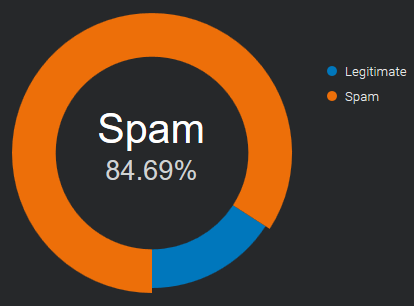
Quelle: E-Mail- und Spam-Daten – Weltweites E-Mail- und Spam-Volumen.
Welche Kosten entstehen durch Spam?
Manchmal dient Spam lediglich Werbezwecken, und der Absender
versucht einfach, mehr Kunden für sein Unternehmen zu gewinnen,
was zu Ablenkung und Zeitverlust führt. Er kann Ihren Posteingang
so überfluten, dass es schwierig wird, wichtige E-Mails zu finden.
Nicht alle Spam-E-Mails sind harmlose Werbe-E-Mails.
Oftmals sind die Absichten böswillig und zielen darauf ab, Benutzersysteme zu beschädigen oder zu übernehmen.
Zu den weltweit häufigsten Varianten von schädlichem Spam gehören Trojaner, Spyware und Ransomware.
Was sind die neuesten Anti-Spam-Techniken?
Stellen Sie sich die Posteingänge Ihres Unternehmens wie Ihre Haustür vor:
Sie müssen entscheiden, wer hereinkommt und wer draußen bleibt.
Keine Methode bietet eine vollständige Lösung für das Spam-Problem.
Jede Methode birgt Risiken: Sie kann legitime E-Mails fälschlicherweise ablehnen (falsch-positive Ergebnisse)
oder Spam nicht abweisen (falsch-negative Ergebnisse)
kommen die damit verbundenen Kosten für Zeitaufwand, Arbeitsaufwand und die fälschliche Blockierung erwünschter E-Mails.
Anti-Spam-Techniken lassen sich in zwei Bereiche unterteilen: Prävention und Bekämpfung.
Spam-Prävention (bevor es passiert)
Beschränken Sie die Verfügbarkeit Ihrer E-Mail-Adressen, um die Wahrscheinlichkeit des Erhalts von Spam zu verringern.
-
Diskretion ist wichtig
: Geben Sie Ihre E-Mail-Adresse nicht an jeden weiter.
Je unbekannter sie ist, desto weniger Spam erhalten Sie.
Verwenden Sie nach Möglichkeit eine separate E-Mail-Adresse für Online-Registrierungen. -
Kontaktformulare
veröffentlichen Ihre E-Mail-Adresse nicht online.
Jeder kann sie sehen, und Spam-Bots fangen sie ständig ab,
um online kontaktiert zu werden. Verwenden Sie sichere* Webformulare/Kontaktformulare.
* = Geschützt durch Bots, die sie automatisch ausfüllen.
Spam-Bekämpfung (während es passiert)
Sobald die Spammer Ihre E-Mail-Adresse haben, verlagert sich der Kampf auf Ihren Mailserver und in Ihren Posteingang.
-
SpamAssassin-ähnliche Bewertungssysteme
nutzen verschiedene Spam-Erkennungstechniken, darunter DNS-basierte E-Mail-Blacklists
(häufig als Echtzeit-Blacklist, DNSBL oder RBL bezeichnet), Textanalyse und Bayes'sche Filterung.
Jeder Test liefert einen Punktwert. Dieser kann positiv oder negativ sein, wobei positive Werte „Spam“ und negative Werte „Nicht-Spam“ bedeuten.
Der Standard-Schwellenwert für den Empfänger liegt bei 5,0. Überschreitet eine E-Mail diesen Schwellenwert, wird sie als Spam markiert.
Im Internet sind zahlreiche „SpamAssassin-Tests“ verfügbar,
mit denen Spammer ihre Nachrichten vor dem Versand überprüfen können. -
Nutzer
dieser Systeme können eingehende E-Mails als legitim oder Spam kennzeichnen. Diese Kennzeichnungen werden in einer zentralen Datenbank gespeichert.
Sobald eine bestimmte Anzahl von Nutzern eine E-Mail als Spam markiert hat, blockiert der Filter diese automatisch und verhindert, dass sie die Postfächer der übrigen Nutzer erreicht.
Manchmal fließen Nutzerfeedbacks in die automatisierten Kontrollen ein, beispielsweise die Anzahl der Interaktionen mit dem Nachrichteninhalt (
z. B. Klicks auf Links und heruntergeladene Bilder) oder die Häufigkeit, mit der dieselbe Nachricht in mehreren Postfächern eingeht.
Bei einer großen und aktiven Nutzerbasis kann ein solches kollaboratives Inhaltsfiltersystem
Spam-Ausbrüche schnell, manchmal innerhalb weniger Minuten, eindämmen.
Spammer können diesen Filter kaum umgehen. -
E-Mail-Authentifizierung:
SPF, DKIM und DMARC sind Authentifizierungstechniken, mit denen Sie überprüfen können, ob die Absenderadresse tatsächlich der angegebenen Adresse entspricht.
Sie sind im Jahr 2020 weit verbreitet und eine gute Möglichkeit, vertrauenswürdige Absender zu identifizieren.
Es ist wichtig, die genaue Domain der E-Mails zu kennen,
da man sonst leicht durch die Änderung eines Buchstabens in die Irre geführt werden kann.
Spammer können die E-Mail-Authentifizierung umgehen,
sodass ihre Nachrichten den Anschein erwecken, von „legitimen Absendern“ zu stammen. -
Autorisierte Absender, Whitelist:
Auf einer Whitelist können Sie eine Reihe vertrauenswürdiger Adressen oder Domains festlegen.
Zu Beginn sind Ihr persönliches Adressbuch und die Liste der empfangenen E-Mails sehr hilfreich.
Befindet sich ein Absender auf dieser Liste, werden alle Kontrollen übersprungen und die Nachricht wird ohne Verzögerung zugestellt.
Diese Methode ist einfach zu implementieren und in Verbindung mit der E-Mail-Authentifizierung sehr effektiv, um E-Mail-Adressen-Spoofing zu verhindern*.
* = Verwendung eines gefälschten Absenders, um den Eindruck zu erwecken, die Nachricht stamme von jemand anderem als dem tatsächlichen Absender.
Sobald Ihre Liste vertrauenswürdiger Kontakte gefüllt ist, erreichen Sie keine E-Mails unbekannter Absender mehr.
Alle unerwünschten Nachrichten können an ein separates Postfach weitergeleitet werden, das Sie einmal täglich oder seltener abrufen.
Spammer finden kaum heraus, welche Absender für welchen Empfänger vertrauenswürdig sind.
Selbst wenn ihnen dies gelingt, warnt Sie die E-Mail-Authentifizierung vor betrügerischem Missbrauch.
So funktioniert DMARC – aktualisiert
Wie funktioniert DMARC mit Google Mail und Office 365? (aktualisiert)
Wir haben erneut getestet, wie sich die E-Mail-Authentifizierung auf die Zustellung
an Google Mail- und Office 365-Postfächer auswirkt, die beliebtesten Anbieter von geschäftlichen E-Mails.
Die Ergebnisse lassen sich in zwei Gruppen unterteilen:
E-Mail-Zustellung
(Wie SPF, DKIM und DMARC die Zustellung gesendeter Nachrichten beeinflussen)
# Google Mail: E-Mails werden immer akzeptiert, die SPF-Authentifizierung scheint keine Rolle zu spielen. Die
DKIM-Signatur wird nur ausgewertet, wenn sie mit der Absenderadresse übereinstimmt und für DMARC die Richtlinie „Quarantäne“ oder „Ablehnen“ festgelegt ist.
# Office 365: Office 365 reagiert vollständig auf SPF. Sobald eine Nachricht die SPF-Prüfung besteht, erreicht sie den Posteingang.
Die DKIM-Signatur wird nur berücksichtigt, wenn sie mit der Absenderadresse übereinstimmt; andernfalls ist sie irrelevant.
Anmerkung: In der letzten Augustwoche zeigte Office 365 ein ungewöhnliches Verhalten:
Nur Nachrichten, die mit DKIM signiert waren (Signaturdomäne stimmt mit der Absenderadresse überein)
und für die ein DMARC-Eintrag (mit beliebiger Richtlinie) gesetzt war, wurden in den Posteingang zugestellt.
Spoofing-Schutz
(Wie SPF, DKIM und DMARC die E-Mail-Adresse des Absenders vor Spoofing schützen*)
* = Die Nachricht wird so angezeigt, als käme sie von einer anderen Person als dem tatsächlichen Absender.
# Google Mail: Bei aktiviertem DMARC werden gefälschte Absender in den Spam-Ordner verschoben (mit p=Quarantäne) oder abgewiesen (mit p=Ablehnen).
Ist die Richtlinie auf „Keine“ (p=none) gesetzt, passiert nichts; in diesem Fall landen alle Nachrichten im Posteingang.
# Office 365: Ein „SPF-Fehler“ oder „SPF-Softfail“ reicht aus, um gefälschte Absender in den Junk-E-Mail-Ordner zu verschieben.
Authentifizierungsanforderungen
Die empfohlenen Anforderungen an die E-Mail-Authentifizierung lassen sich wie folgt zusammenfassen:
| E-Mail-Zustellung | Spoofing-Schutz | |
|---|---|---|
| Google Mail | DKIM-Pass (domänenausgerichtet) | dmarc set with p=quarantine or p=reject |
| Office 365 | SPF- und DKIM-Pass (domänenausgerichtet) | SPF und DMARC aktiviert (für zusätzliche Sicherheit) |
Ergebnisse des E-Mail-Zustellungstests
Nachfolgend ist die vollständige Liste der durchgeführten Tests aufgeführt
| Google Mail | Google Mail (DMARC-Set) |
Office 365 | Office 365 (DMARC-Set) |
||
|---|---|---|---|---|---|
| spf Pass | dkim keine | Posteingang | Posteingang | Posteingang | Posteingang |
| spf-Fehler | dkim keine | Posteingang | Spam | Schrott | Schrott |
| spf SoftFail | dkim keine | Posteingang | Spam | Schrott | Schrott |
| spf keine | dkim keine | Posteingang | Spam | Schrott | Schrott |
| spf Pass | dkim diff | Posteingang | Posteingang | Posteingang | Posteingang |
| spf-Fehler | dkim diff | Posteingang | Spam | Schrott | Schrott |
| spf SoftFail | dkim diff | Posteingang | Spam | Schrott | Schrott |
| spf keine | dkim diff | Posteingang | Spam | Schrott | Schrott |
| spf Pass | DKIM-Pass | Posteingang | Posteingang | Posteingang | Posteingang |
| spf-Fehler | DKIM-Pass | Posteingang | Posteingang | Posteingang | Posteingang |
| spf SoftFail | DKIM-Pass | Posteingang | Posteingang | Posteingang | Posteingang |
| spf keine | DKIM-Pass | Posteingang | Posteingang | Posteingang | Posteingang |
| spf Pass | DKIM ungültig | Posteingang | Posteingang | Posteingang | Posteingang |
| spf-Fehler | DKIM ungültig | Posteingang | Spam | Schrott | Schrott |
| spf SoftFail | DKIM ungültig | Posteingang | Spam | Schrott | Schrott |
| spf keine | DKIM ungültig | Posteingang | Spam | Schrott | Schrott |
Anmerkungen:
- Die Absenderadresse (sichtbarer Absender) und die Mail-From-Adresse (auch „Envelope From“ oder „Return-Path“ genannt) sind identisch; sie beziehen sich auf dieselbe Domain
- „dkim pass“: Die DKIM-Signaturdomäne ist dieselbe wie die der Absenderadresse (die Domänen sind ausgerichtet).
- „dkim diff“: Die DKIM-Signaturdomäne unterscheidet sich von der der Absenderadresse (die Domäne ist NICHT ausgerichtet).
DKIM-Domäne für DMARC
Wie wirkt sich die DKIM-Domänenausrichtung auf die DMARC-Authentifizierung aus?
DMARC (Domain-based Message Authentication, Reporting and Conformance)
ist ein E-Mail-Authentifizierungsstandard, der zur Bekämpfung von gefälschten Domain-E-Mails entwickelt wurde.
Im Kapitel „3.1. Identifikatorausrichtung“ heißt es:
E-Mail-Authentifizierungstechnologien authentifizieren verschiedene (und unterschiedliche) Aspekte einer einzelnen Nachricht. Beispielsweise authentifiziert DKIM die Domain, die die Signatur an die Nachricht angehängt hat, während SPF entweder die Domain im Feld „Mail-From“ (RFC5321.MailFrom) von SMTP oder die Domain „EHLO/HELO“ (RFC5321.EHLO/HELO) oder beide authentifizieren kann. Dies können unterschiedliche Domains sein, die dem Endbenutzer in der Regel nicht sichtbar sind. DMARC authentifiziert die Verwendung der Domain „From“ (RFC5322.From), indem es deren Übereinstimmung mit einem authentifizierten Bezeichner (Authenticated Identifier) vorschreibt. – https://tools.ietf.org/html/rfc7489#section-3.1Es bedeutet einfach:
Wenn ein Absender seine E-Mail mittels SPF und/oder DKIM authentifiziert, muss mindestens eine der Domänen mit der Absenderdomäne übereinstimmenUns war nicht klar, ob eine Nachricht den SPF- oder DKIM-Check
und trotzdem die DMARC-Authentifizierung bestehen könnte.
Wir haben es mit einem für jeden verfügbaren Tool getestet: einem Gmail-Postfach.
Um das Ergebnis zu sehen, öffnen Sie die Nachricht und wählen Sie „Original anzeigen“ aus:
Test 1 - weitergeleitete Nachricht: spf-Fehler, dkim-Erfolg (ausgerichtet)
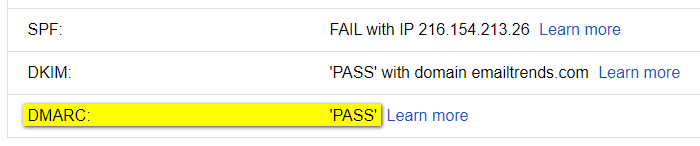
Test 2 - defekter DKIM-Schlüssel: DKIM-Fehler, SPF-Erfolg (ausgerichtet)
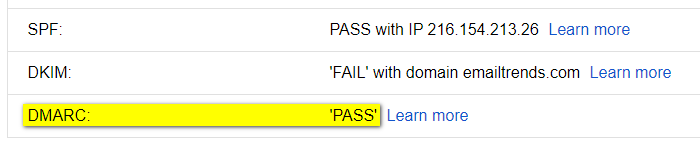
Das Ergebnis ist eindeutig: Die Nachricht besteht die DMARC-Authentifizierung, sofern diese stattfindet:
SPF und Domänenausrichtung. <OR> DKIM und Domänenausrichtung
Um die DMARC-Prüfung zu bestehen, ist es in einigen Fällen daher wichtig, die DKIM-Signatur zu validieren:
Die Signaturdomäne (d=example.com) muss mit der Absenderdomäne übereinstimmen.
Beispiele für „DMARC-PASS“-Ergebnisse, die andernfalls nicht funktioniert hätten:
Fall 1 – Weiterleitung unterbricht die SPF-Authentifizierung
-
SPF-FEHLER: Die SPF-Authentifizierungsprüfung schlägt in den meisten Fällen fehl,
da eine neue Entität, die nicht im SPF-Eintrag des ursprünglichen Absenders enthalten ist, die weitergeleitete E-Mail sendet. -
DKIM-PASS (ausgerichtet): E-Mail-Weiterleitung hat keinen Einfluss auf die DKIM-Signatur
Ergebnis: Die DKIM-Ausrichtung ermöglicht es der Nachricht, die DMARC-Prüfung zu bestehen.
Fall 2 – Die vom E-Mail-Dienstleister (ESP) bereitgestellte SPF-Domäne
kann nicht mit der Absenderdomäne übereinstimmen.
-
SPF~PASS (NICHT ausgerichtet): Die SPF-Authentifizierung schlägt aufgrund der fehlenden Domänenausrichtung fehl,
da die vom E-Mail-Service-Provider (ESP) in der Absenderadresse verwendete Domäne von der in der Absenderadresse abweicht. -
DKIM-PASS (ausgerichtet): Die DKIM-Signatur verwendet dieselbe Domain wie der Absender
Ergebnis: Die DKIM-Ausrichtung ermöglicht es der Nachricht, die DMARC-Prüfung zu bestehen.
die beliebtesten E-Mail-Anbieter
Welche sind die beliebtesten E-Mail-Anbieter im Jahr 2020?
Um die Zustellbarkeit von E-Mails zu überwachen, ist es wichtig zu wissen, welche E-Mail-Anbieter Ihre Empfänger verwenden.
Business to Business
Für den B2B-Bereich liegen uns keine genauen Zahlen vor. Der Großteil der geschäftlichen E-Mail-Konten wandert in die Cloud, wo der Markt zwischen „G Suite“ und „Office 365“ aufgeteilt ist.
Laut Daten von datanyze.com decken diese zusammen über 90 % des weltweiten Marktanteils für geschäftliche E-Mails ab.
Diese Informationen für ein einzelnes Unternehmen zu sammeln, ist recht einfach.
Aus dem MX-Eintrag der Unternehmensdomain lässt sich der verwendete E-Mail-Anbieter ablesen:
aspmx.l.google.com für „G Suite“
und mail.protection.outlook.com für „Office 365“.
Wenn Ihr Unternehmen im B2B-Bereich tätig ist, empfiehlt es sich, regelmäßig ein Postfach für jeden dieser beiden Anbieter zu überwachen.
Ein dritter Anbieter ist Zoho (mx.zoho.com), dessen Marktanteil bei rund 2 % liegt (Quelle: ciodive.com).
Vom Unternehmen zum Verbraucher
Im B2C-Bereich gestaltet sich die Analyse komplexer. Es gibt keine öffentlich zugänglichen „E-Mail-Open-Data“, die auf dem Internetverkehr basieren.
Die einzige Möglichkeit, Informationen über E-Mail-Empfänger zu erhalten, besteht darin, sie aus unserer Kontaktliste zu extrahieren oder sie von großen E-Mail-Dienstleistern zu beziehen. Einige dieser Anbieter erstellen Jahresberichte, um die Daten mit der Internet-Community zu teilen.
Die folgenden Daten zeigen die drei führenden E-Mail-Anbieter in fünfundzwanzig Ländern. Die Informationen stammen aus der von Sendgrid veröffentlichten Studie „2019 Email Benchmark and Engagement Study“.
Länder
Argentinien, Australien, Belgien, Brasilien, Kanada, Chile, China, Kolumbien, Dänemark, Frankreich, Deutschland, Indien, Indonesien, Italien, Japan, Mexiko, Neuseeland, Russland, Saudi-Arabien, Spanien, Südafrika, Schweden, Schweiz, Vereinigtes Königreich, Vereinigte Staaten
Argentinien
| ISO | Anbieter Nr. 1 | % | Anbieter Nr. 2 | % | Anbieter Nr. 3 | % | Gesamt | |
|---|---|---|---|---|---|---|---|---|
| AR | gmail.com | 45.8% | hotmail.com | 33.7% | yahoo.com.ar | 8.2% | 87.7% |
Australien
| ISO | Anbieter Nr. 1 | % | Anbieter Nr. 2 | % | Anbieter Nr. 3 | % | Gesamt | |
|---|---|---|---|---|---|---|---|---|
| AU | gmail.com | 38.0% | hotmail.com | 18.7% | bigpond.com | 5.4% | 62.1% |
Belgien
| ISO | Anbieter Nr. 1 | % | Anbieter Nr. 2 | % | Anbieter Nr. 3 | % | Gesamt | |
|---|---|---|---|---|---|---|---|---|
| SEI | gmail.com | 30.6% | hotmail.com | 23.0% | telenet.be | 9.8% | 63.4% |
Brasilien
| ISO | Anbieter Nr. 1 | % | Anbieter Nr. 2 | % | Anbieter Nr. 3 | % | Gesamt | |
|---|---|---|---|---|---|---|---|---|
| BR | gmail.com | 52.9% | hotmail.com | 22.5% | yahoo.com.br | 6.1% | 81.5% |
Kanada
| ISO | Anbieter Nr. 1 | % | Anbieter Nr. 2 | % | Anbieter Nr. 3 | % | Gesamt | |
|---|---|---|---|---|---|---|---|---|
| CA | gmail.com | 38.6% | hotmail.com | 18.8% | yahoo.com | 4.5% | 61.9% |
Chile
| ISO | Anbieter Nr. 1 | % | Anbieter Nr. 2 | % | Anbieter Nr. 3 | % | Gesamt | |
|---|---|---|---|---|---|---|---|---|
| CL | gmail.com | 67.3% | hotmail.com | 18.2% | yahoo.es | 1.7% | 87.2% |
China
| ISO | Anbieter Nr. 1 | % | Anbieter Nr. 2 | % | Anbieter Nr. 3 | % | Gesamt | |
|---|---|---|---|---|---|---|---|---|
| CN | NetEase (126.com 163.com) | n / A. | Tencent (qq.com) | n / A. | Sina (sina.com) | n / A. | n / A. |
Hinweis: Die Informationen stammen aus „Länderübersicht: China“ von ReturnPath
Kolumbien
| ISO | Anbieter Nr. 1 | % | Anbieter Nr. 2 | % | Anbieter Nr. 3 | % | Gesamt | |
|---|---|---|---|---|---|---|---|---|
| CO | gmail.com | 41.3% | hotmail.com | 38.7% | yahoo.com | 4.3% | 84.3% |
Dänemark
| ISO | Anbieter Nr. 1 | % | Anbieter Nr. 2 | % | Anbieter Nr. 3 | % | Gesamt | |
|---|---|---|---|---|---|---|---|---|
| DK | gmail.com | 35.8% | hotmail.com | 14.0% | live.dk | 3.7% | 53.5% |
Frankreich
| ISO | Anbieter Nr. 1 | % | Anbieter Nr. 2 | % | Anbieter Nr. 3 | % | Gesamt | |
|---|---|---|---|---|---|---|---|---|
| FR | gmail.com | 36.0% | hotmail.fr | 9.8% | orange.fr | 8.2% | 54.0% |
Deutschland
| ISO | Anbieter Nr. 1 | % | Anbieter Nr. 2 | % | Anbieter Nr. 3 | % | Gesamt | |
|---|---|---|---|---|---|---|---|---|
| DE | gmail.com | 20.8% | gmx.de | 10.0% | web.de | 9.5% | 40.3% |
Indien
| ISO | Anbieter Nr. 1 | % | Anbieter Nr. 2 | % | Anbieter Nr. 3 | % | Gesamt | |
|---|---|---|---|---|---|---|---|---|
| IN | gmail.com | 82.4% | yahoo.com | 3.4% | yahoo.co.in | 1.6% | 87.4% |
Indonesien
| ISO | Anbieter Nr. 1 | % | Anbieter Nr. 2 | % | Anbieter Nr. 3 | % | Gesamt | |
|---|---|---|---|---|---|---|---|---|
| AUSWEIS | gmail.com | 82.6% | yahoo.com | 7.1% | yahoo.co.id | 1.0% | 90.7% |
Italien
| ISO | Anbieter Nr. 1 | % | Anbieter Nr. 2 | % | Anbieter Nr. 3 | % | Gesamt | |
|---|---|---|---|---|---|---|---|---|
| ES | gmail.com | 46.8% | libero.it | 9.9% | hotmail.it | 7.2% | 63.9% |
Japan
| ISO | Anbieter Nr. 1 | % | Anbieter Nr. 2 | % | Anbieter Nr. 3 | % | Gesamt | |
|---|---|---|---|---|---|---|---|---|
| JP | gmail.com | 33.8% | yahoo.co.jp | 12.7% | docomo.ne.jp | 8.6% | 55.1% |
Mexiko
| ISO | Anbieter Nr. 1 | % | Anbieter Nr. 2 | % | Anbieter Nr. 3 | % | Gesamt | |
|---|---|---|---|---|---|---|---|---|
| MX | gmail.com | 42.6% | hotmail.com | 31.5% | yahoo.com.mx | 4.0% | 78.1% |
Niederlande
| ISO | Anbieter Nr. 1 | % | Anbieter Nr. 2 | % | Anbieter Nr. 3 | % | Gesamt | |
|---|---|---|---|---|---|---|---|---|
| NL | gmail.com | 35.4% | hotmail.com | 19.5% | live.nl | 2.5% | 57.4% |
Neuseeland
| ISO | Anbieter Nr. 1 | % | Anbieter Nr. 2 | % | Anbieter Nr. 3 | % | Gesamt | |
|---|---|---|---|---|---|---|---|---|
| Neuseeland | gmail.com | 46.3% | hotmail.com | 10.9% | xtra.co.nz | 9.0% | 66.2% |
Russland
| ISO | Anbieter Nr. 1 | % | Anbieter Nr. 2 | % | Anbieter Nr. 3 | % | Gesamt | |
|---|---|---|---|---|---|---|---|---|
| RU | mail.ru | 34.8% | gmail.com | 22.7% | yandex.ru | 19.6% | 77.1% |
Saudi-Arabien
| ISO | Anbieter Nr. 1 | % | Anbieter Nr. 2 | % | Anbieter Nr. 3 | % | Gesamt | |
|---|---|---|---|---|---|---|---|---|
| SA | gmail.com | 47.0% | hotmail.com | 31.0% | yahoo.com | 7.8% | 85.8% |
Spanien
| ISO | Anbieter Nr. 1 | % | Anbieter Nr. 2 | % | Anbieter Nr. 3 | % | Gesamt | |
|---|---|---|---|---|---|---|---|---|
| ES | gmail.com | 50.2% | hotmail.com | 25.8% | yahoo.es | 3.8% | 79.8% |
Südafrika
| ISO | Anbieter Nr. 1 | % | Anbieter Nr. 2 | % | Anbieter Nr. 3 | % | Gesamt | |
|---|---|---|---|---|---|---|---|---|
| ZA | gmail.com | 65.5% | yahoo.com | 4.1% | hotmail.com | 2.9% | 72.5% |
Schweden
| ISO | Anbieter Nr. 1 | % | Anbieter Nr. 2 | % | Anbieter Nr. 3 | % | Gesamt | |
|---|---|---|---|---|---|---|---|---|
| SE | gmail.com | 33.2% | hotmail.com | 21.0% | live.se | 3.0% | 57.2% |
Schweiz
| ISO | Anbieter Nr. 1 | % | Anbieter Nr. 2 | % | Anbieter Nr. 3 | % | Gesamt | |
|---|---|---|---|---|---|---|---|---|
| CH | gmail.com | 25.5% | bluewin.ch | 14.6% | hotmail.com | 10.5% | 50.6% |
Vereinigtes Königreich
| ISO | Anbieter Nr. 1 | % | Anbieter Nr. 2 | % | Anbieter Nr. 3 | % | Gesamt | |
|---|---|---|---|---|---|---|---|---|
| Vereinigtes Königreich | gmail.com | 30.8% | hotmail.com | 10.4% | hotmail.co.uk | 9.2% | 50.4% |
Vereinigte Staaten
| ISO | Anbieter Nr. 1 | % | Anbieter Nr. 2 | % | Anbieter Nr. 3 | % | Gesamt | |
|---|---|---|---|---|---|---|---|---|
| UNS | gmail.com | 41.9% | yahoo.com | 15.1% | hotmail.com | 5.3% | 62.3% |
wie DMARC funktioniert
Wie funktioniert DMARC im Jahr 2020 mit Google Mail und Office 365?
Wir haben getestet, wie sich die E-Mail-Authentifizierung auf die Zustellung
an Google Mail und Office 365 auswirkt, die beliebtesten Anbieter von geschäftlichen E-Mails.
Die Ergebnisse lassen sich in zwei Gruppen unterteilen:
-
E-Mail-Zustellung
(Auswirkungen von SPF, DKIM und DMARC auf die Zustellung gesendeter Nachrichten):
Google Mail: E-Mails werden immer zugestellt, die Authentifizierung scheint keine Rolle zu spielen.
Office 365: Reagiert in der Regel auf SPF und DKIM. Die einzige Möglichkeit, zuverlässige Ergebnisse und die Zustellung im Posteingang zu gewährleisten, besteht darin, die E-Mails mit DMARC zu verknüpfen.
-
Schutz vor Spoofing
(wie SPF, DKIM und DMARC die E-Mail-Adresse des Absenders vor Spoofing schützen*)
* = Die Nachricht wird so angezeigt, als käme sie von einer anderen Person als dem tatsächlichen Absender.
Google Mail: Durch die Kombination von DMARC und SPF (mit Fehler- oder Softfail-Qualifizierern) werden gefälschte Absender in den Spam-Ordner verschoben oder abgewiesen (abhängig von Ihren DMARC-Einstellungen).
Office 365: SPF (mit Fehler- oder Softfail-Qualifizierern) reicht aus, um gefälschte Absender in den Junk-E-Mail-Ordner zu verschieben.
Sie lassen sich wie folgt zusammenfassen:
| E-Mail-Zustellung | Spoofing-Schutz | |
|---|---|---|
| Google Mail | wird immer akzeptiert, eine Authentifizierung wird überhaupt nicht berücksichtigt | DMARC + SPF (Fehler oder Softfail) |
| Office 365 | dmarc + spf pass oder dmarc + dkim pass | spf (Fehler oder Softfail) |
Nachfolgend finden Sie die vollständige Liste der durchgeführten Tests.
| Google Mail | Office 365 | |
|---|---|---|
| spf Pass - dkim none | Posteingang | Posteingang |
| spf Fehler - dkim keine | Posteingang | Schrott |
| spf SoftFail - dkim none | Posteingang | Schrott |
| spf Neutral - dkim none | Posteingang | Posteingang |
| spf none - dkim none | Posteingang | Schrott |
| spf Pass - dkim pass | Posteingang | Schrott* |
| SPF-Fehler – DKIM-Test erfolgreich | Posteingang | Schrott |
| spf SoftFail - dkim pass | Posteingang | Schrott* |
| spf Neutral - dkim pass | Posteingang | Schrott* |
| spf none - dkim pass | Posteingang | Schrott* |
| spf Pass - dkim ungültig | Posteingang | Schrott |
| SPF-Fehler – DKIM ungültig | Posteingang | Schrott |
| spf SoftFail - dkim ungültig | Posteingang | Schrott |
| spf Neutral - dkim ungültig | Posteingang | Schrott |
| spf none - dkim invalid | Posteingang | Schrott |
| spf Pass – dkim ungültig – dmarc abgelehnt | Posteingang | Posteingang |
| SPF-Fehler – DKIM ungültig – DMARC abgelehnt | dsn=5.0.0, stat=Dienst nicht verfügbar | Schrott |
| SPF-SoftFail – DKIM ungültig – DMARC abgelehnt | dsn=5.0.0, stat=Dienst nicht verfügbar | Schrott |
| spf Neutral – dkim ungültig – dmarc abgelehnt | Posteingang | Posteingang |
| SPF nicht vorhanden - DKIM ungültig - DMARC abgelehnt | dsn=5.0.0, stat=Dienst nicht verfügbar | Schrott |
| SPF-Pass – Dkim-Pass – Dmarc-Abweisung | Posteingang | Posteingang |
| SPF-Fehler – DKIM-Erfolg – DMARC-Ablehnung | Posteingang | Posteingang |
| spf SoftFail – dkim bestanden – dmarc abgelehnt | Posteingang | Posteingang |
| spf Neutral – dkim passieren – dmarc ablehnen | Posteingang | Posteingang |
| spf none – dkim passieren – dmarc ablehnen | Posteingang | Posteingang |
| SPF Pass – Dkim Diff – Dmarc Reject | Posteingang | Posteingang |
| SPF-Fehler – DKIM-Unterschied – DMARC-Ablehnung | dsn=5.0.0, stat=Dienst nicht verfügbar | Schrott |
| spf SoftFail - dkim diff - dmarc reject | dsn=5.0.0, stat=Dienst nicht verfügbar | Schrott |
| spf Neutral – Dkim Diff – Dmarc Reject | Posteingang | Posteingang |
| SPF None – Dkim Diff – Dmarc Reject | dsn=5.0.0, stat=Dienst nicht verfügbar | Schrott |
Anmerkungen:
- Die Absenderadresse (sichtbarer Absender) und die Rücksendeadresse des Umschlags stammen aus derselben Domäne
- „dkim pass“: Die DKIM-Signaturdomäne ist dieselbe wie die der Absenderadresse.
- „dkim diff“: Die DKIM-Signaturdomäne unterscheidet von der Absenderadresse.
- Die Sternchen in der zweiten Gruppe bedeuten, dass die Ergebnisse im Laufe der Zeit nicht konsistent waren